
ZKaccess inPulse Manual de usuario

1
inPulse & inPulse+ and ZKBioSecurity 3.0 Quick Start Guide
Quick Start Guide
inPulse & inPulse+
+
ZKBioSecurity 3.0

.......................................................................................... .......................................................................................................................................................................................................................................................................................................................................................................................................................................
..........................................................................................
2
inPulse & inPulse+ and ZKBioSecurity 3.0 Quick Start Guide
CONTENT
Safety Precautions....................................................................3
Device Overview......................................................................4
Product Dimensions & Installation..............................6
Power Connection ..................................................................7
Ethernet Connection.............................................................8
Lock Relay Connection ........................................................9
Wiegand Output Connection......................................11
Standalone Installation .....................................................12
Third Party Controller..........................................................13
How does inPulse/inPulse+ works...........................14
Registration and Verification.........................................15
Device Operation..................................................................16
ZKBioSecurity 3.0
Downloading...........................................................................20
Installation ..................................................................................21
Adding Device.........................................................................23
Creating a Time Zone.........................................................25
Creating an Access Level.................................................26
Enrolling Personnel..............................................................27
Wiegand Format....................................................................29
Add & Delete Personnel to Access Level.............30
Real -Time Monitoring.......................................................31
Exporting Reports.................................................................32
ZKBioSecurity
Software
Installation and
Setup starts at
Page 20

.......................................................................................... .......................................................................................................................................................................................................................................................................................................................................................................................................................................
..........................................................................................
3
inPulse & inPulse+ and ZKBioSecurity 3.0 Quick Start Guide
Safety Precautions
The following precautions are to keep users safe and prevent any damage.
Please read carefully before installation.
Do not install the device in a place subject to direct sunlight,
humidity, dust or soot.
Do not place a magnet near the product. Magnetic objects
such as magnets, CRTs, TVs, monitors or speakers may dam-
age the device.
Do not place the device next to heating equipment.
Be careful not to let liquid like water, drinks or chemicals
leak inside the device.
Do not let children touch the device without supervision.
Do not drop or damage the device.
Do not disassemble, repair or alter the device.
Do not use the device for any other purpose than specied.
Clean the device often to remove dust on it. In cleaning, do
not splash water on the device but clean it with a smooth
cloth or towel.
Contact your supplier in case of a problem.

4
inPulse & inPulse+ and ZKBioSecurity 3.0 Quick Start Guide
Device Overview
Not all products have ngerprint and nger vein functions.
inPulse+
inPulse

5
inPulse & inPulse+ and ZKBioSecurity 3.0 Quick Start Guide
Device Overview
12 Pin Cable Connector
7 Pin Cable Connector
8 Pin Cable Connector
Tamper Alarm Button
2 Pin Cable Connector
4 Pin Cable Connector Ethernet(TCP/IP)
Auxiliary In
Bell
Sensor
Button
Lock
Alarm
Power Out
Wiegand In
LED, Beep
Wiegand Out
RS232
RS485
Power In

6
inPulse & inPulse+ and ZKBioSecurity 3.0 Quick Start Guide
Product Dimensions & Installation
Product Dimensions
Mounting the Device on the Wall
Fix the back plate onto the wall using wall
mounting screws.
Note: We recommend drilling the mounting
plate screws into solid wood (i.e. stud/beam).
If a stud/beam cannot be found, use supplied
drywall plastic anchors.
Use security screws to fasten
the device to back plate.
Insert the device to back plate.

7
inPulse & inPulse+ and ZKBioSecurity 3.0 Quick Start Guide
Power Connection
Without UPS
With UPS (Optional)
Recommended Power Supply
• 12V±10%, at least 500mA
• To share the power with other devices, use a power supply with higher current
ratings.

8
inPulse & inPulse+ and ZKBioSecurity 3.0 Quick Start Guide
Ethernet Connection
Note: The device can be connected to PC directly by Ethernet cable.
LAN Connection
Ethernet cable
Network Cable Apator

9
inPulse & inPulse+ and ZKBioSecurity 3.0 Quick Start Guide
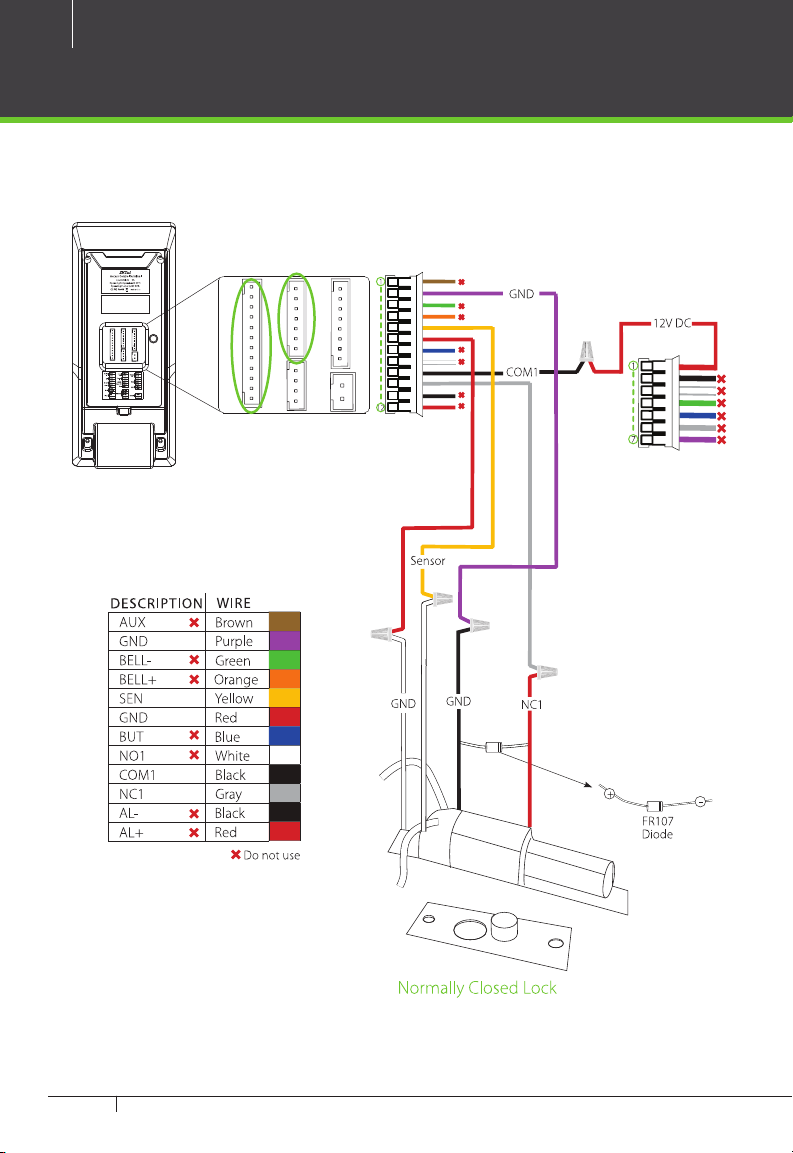
Lock Relay Connection
Device Not Sharing Power with the Lock
Notes:
1. The system supports NO LOCK and NC LOCK. For example the NO LOCK (normally opened
at power on) is connected with ‘NO1’ and ‘COM1’ terminals, and the NC LOCK (normally
closed at power on) is connected with ‘NC1’and ‘COM1’ terminals.
2. When electrical lock is connected to the Access Control System, you must parallel one
FR107 diode (equipped in the package) to prevent the self-inductance EMF from aecting
the system.
Do not reverse the polarities.
10
inPulse & inPulse+ and ZKBioSecurity 3.0 Quick Start Guide
Lock Relay Connection
Device Sharing Power with the Lock
Este manual sirve para los siguientes modelos
1
Tabla de contenidos
Otros manuales de Controladores de ZKaccess


