
Zero88 Betapack 4 Manual de usuario

Gateway 4
Introduction
Compliance
Revisions
Warnings & Safety
Ethernet Connection
Power
DMX Outputs
Merging
Configuration
Web Server
DMX Workshop
Squawk
LED Indication
Mechanical
Support
Gateway 4 provides flexible DMX / RDM data distribution, converting four universes of Ethernet (sACN or Art-Net) into
DMX512/RDM. The unit can be desk mounted or safely secured to a vertical or horizontal bar by adding a standard
clamp onto one of two m10 mounting positions.
Gateway 4 is fully compatible with the latest protocols (sACN, Art-Net 4, LLRP, DMX & RDM), ensuring your
distribution network is ready to meet your future demands. Gateway 4 is appropriate for permanent installations or as
a flexible, adaptable rental & touring tool due to it’s compact, rugged and scratch-resistant metal design.
When combined with any ZerOS console, Gateway 4 provides on-board configuration from the console, for a truly
integrated system. Alternatively, the unit can be configured through an internal web server or via optional control
software. DHCP enables automatic IP addressing; static IP and LLRP negotiation are also supported.
Gateway 4 is ideal for use alongside Splitter 8 and Gateway 8 to build a larger data distribution system.
Please read this manual before use, especially the Warnings & Safety section.
Zero 88 - Gateway 4 - Page 1 of 16 Printed: 24/11/2020 14:34:53 ES

E&OE. Cooper Lighting Solutions reserves the right to make changes to the equipment and specification
described in this manual without prior notice.
Zero 88 - Gateway 4 - Page 2 of 16 Printed: 24/11/2020 14:34:53 ES

Introduction
Thank you
Thank you for choosing Gateway 4 by Zero 88 to fulfil your data distribution needs. We sincerely hope that your new
product will bring you years of trouble-free service. We make great efforts to build in reliability and serviceability at
every stage of our development and production processes and include a three-year limited warranty - giving you
peace of mind for your investment.
Our extensive dealer network can also provide you with technical service and sales support in your local language no
matter where you are in the world. If you have any questions, comments or problems our contact details can be found
at zero88.com/support
Once again, thank you for choosing Zero 88.
This manual
This online manual describes the operation of Gateway 4.
For an overview of the Zero 88 Online Manuals, take a look at this
video.
For detailed information on each function, the manual has been
divided into chapters - one for each major area, which can be
navigated using the menu on the left-hand side. You can also search
the manual using the search bar top right.
Each section or whole chapters can be exported to PDF by tapping
"PDF", found just below the search bar. The whole manual can be
exported as a PDF, by tapping "PDF" at the top page of the manual.
Zero 88 online manuals are updated regularly to ensure you have all the relevant information and useful tips. Check
out the Revisions section to see what has been added. If you see something that doesn't look right, or have
Compliance
Zero 88 - Gateway 4 - Page 3 of 16 Printed: 24/11/2020 14:34:53 ES

Gateway 4 complies with the following standards:
BS EN IEC 62368-1:2020+A11:2020. DMX is defined as Energy Source 1 (SELV)
Revisions
Change log of this manual
November 2020 - DE added - ES
July 2020 - Manual Restructured - ES
June 2020 - Manual Created - ES
Zero 88 - Gateway 4 - Page 4 of 16 Printed: 24/11/2020 14:34:53 ES

Warnings & Safety
No user serviceable parts inside.
This equipment is designed for professional stage lighting control and is unsuitable for any other purpose. It
should be used by, or under the supervision of, an appropriately qualified or trained person.
Please reference wiring instructions if using external PSU. Gateway 4 is not compatible with Zero 88’s
legacy console PSUs.
Zero 88 networking devices are designed for use within a dedicated, stand alone, private, local area network only,
for the sole purpose of transmitting and/or receiving nonsensitive entertainment lighting control data. Although
they utilize Ethernet networking, these devices should not be connected to the internet.
Zero 88 - Gateway 4 - Page 5 of 16 Printed: 24/11/2020 14:34:53 ES

Ethernet Connection
Gateway 4 has an RJ45 (etherCON) connector and supports Art-Net 4 and sACN (ESTA E1.31). Gateway 4 requires
Cat 5 cable or better and supports 10BaseT and 100BaseT.
Zero 88 - Gateway 4 - Page 6 of 16 Printed: 24/11/2020 14:34:53 ES

Power
Gateway 4 can be powered from either an external PSU (9-48 VDC) or with PoE. The latter requires a suitable
Ethernet switch for the power source.
Please reference wiring instructions if using external PSU. Gateway 4 is not compatible with Zero 88’s legacy
console PSUs.
Please note that the product should be powered via EITHER the DC
power input or Ethernet PoE, but not both (there is no option to fail-
over from one power source to the other if both are connected).
Zero 88 - Gateway 4 - Page 7 of 16 Printed: 24/11/2020 14:34:53 ES

DMX Outputs
Gateway 4 can output a maximum of four Universes of DMX512 data. There are four DMX/RDM output ports with
female XLR5 connectors.
If network data or connectivity is lost, the device will hold last state.
Universe Addressing
The universe (Port Address) is used to uniquely identify the DMX data on the network. Art-Net allows universe
numbers in the range 0-32767. sACN allows universe numbering in the range 1 - 63999.
For the avoidance of cross-protocol confusion, users are advised to number universes from 1.
sACN universes 0 & 64000 - 65535 are reserved.
When configuring sACN port numbers using Art-Net, you will not be able to configure between 32768 - 65535.
Zero 88 - Gateway 4 - Page 8 of 16 Printed: 24/11/2020 14:34:53 ES
Merging
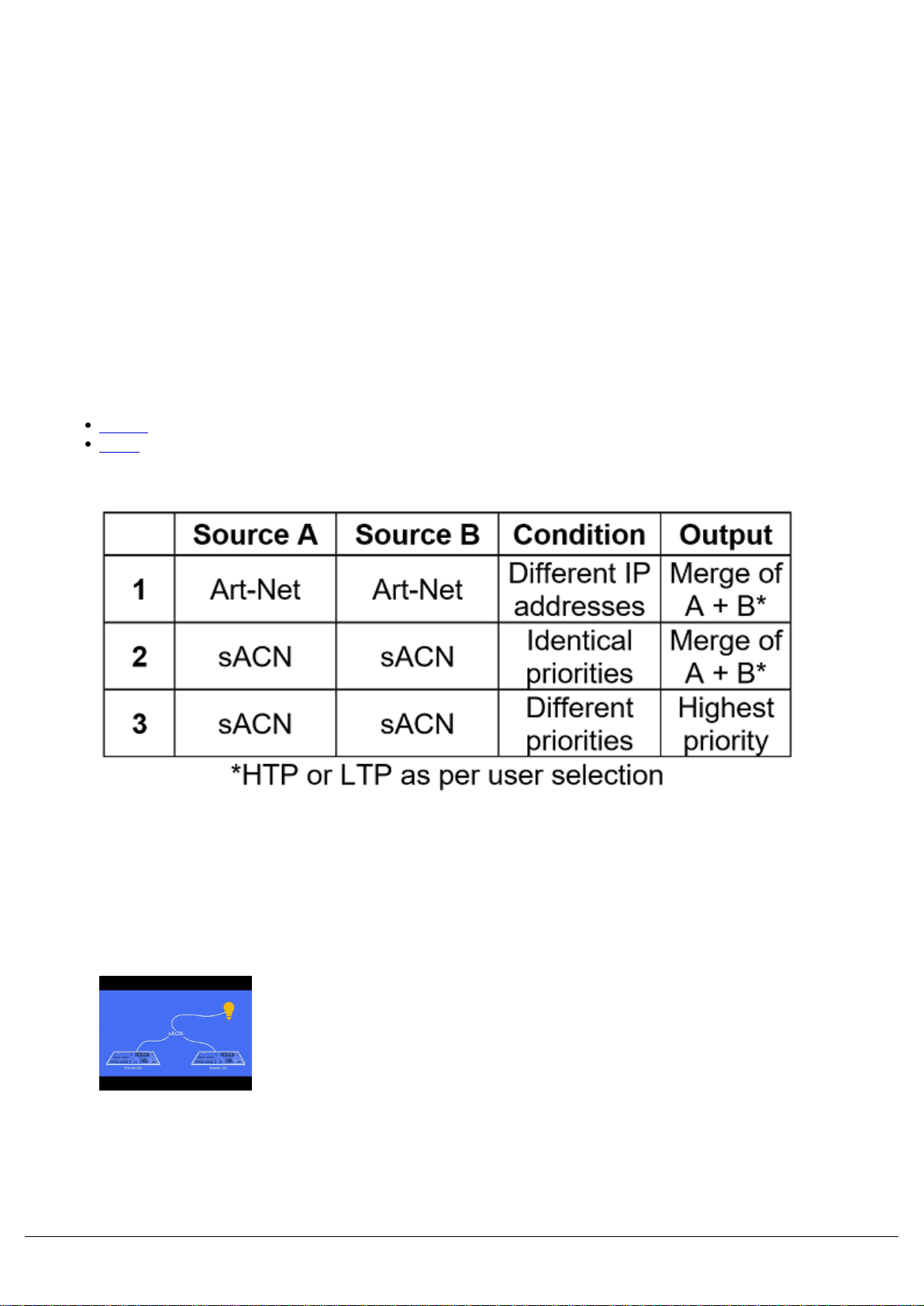
Gateway 4 can merge two streams of data to a DMX output. Depending on the settings, merge can operate as
HTP/LTP or Priority.
In HTP (highest takes precedence), the levels of each channel in the two streams are compared and the highest value
is used.
In LTP (latest takes precedence), the levels of each channel in the two streams is compared to the output; if there is a
change, that level is output.
In Priority, the sACN Priority field defines which universe will be output.
Merging with...
Art-Net
sACN
Art-Net
If two streams from different IP addresses are directed to the same Port-Address, merging will occur. If more streams
are directed to the same Port-Address, they will be ignored.
sACN
Merging can operate with both unicast and multicast data.
If two streams from different IP addresses are directed to the same
universe, the priority field is checked and the stream with the highest
priority is output. If the priority field in both streams is identical,
merging will occur.
If additional stream(s) are directed to the same universe, any
additional stream with higher priority will take precedence. If the
priority is identical to the merging streams, it will be ignored.
Zero 88 - Gateway 4 - Page 9 of 16 Printed: 24/11/2020 14:34:53 ES

Zero 88 - Gateway 4 - Page 10 of 16 Printed: 24/11/2020 14:34:53 ES
Otros manuales para Betapack 4
3
Tabla de contenidos
Otros manuales de Puerta de Zero88

Manuales populares de Puerta de otras marcas

LST
LST M500RFE-AS Manual de usuario

Kinnex
Kinnex Media Gateway Manual de usuario

2N Telekomunikace
2N Telekomunikace 2N StarGate Manual de usuario

Mitsubishi Heavy Industries
Mitsubishi Heavy Industries Superlink SC-WBGW256 Manual de usuario

ZyXEL Communications
ZyXEL Communications ZYWALL2 ET 2WE Manual de usuario

Telsey
Telsey CPVA 500 - SIP Manual de usuario


