
YISEELE YX-700 Manual de usuario

【User Manual】
Model:YX-700
Alarm System

Contents
Preface ...........................................................................................................................................2
1. Parts ...........................................................................................................................................4
1.1 HUB .....................................................................................................................................4
1.2 Remote Control ................................................................................................................4
1.3 oor/Window etector .....................................................................................................5
2. Connect to the Wi-Fi ................................................................................................................6
2.1 The first type: Bluetooth Connection ...........................................................................6
2.2 The second type: Hotspot connection method .........................................................6
3. Installation steps .......................................................................................................................9
4. Add ...........................................................................................................................................12
4.1 Add etectors and Remote control ...........................................................................12
4.2 Add Alexa and Google Home .........................................................................12
5. APP menu explanation ........................................................................................13
6. Maintenance and Troubleshooting .......................................................................14
7. Appendix of Technical Parameters .....................................................................................16
7.1 Hub .....................................................................................................................................16
7.2 Remote ..............................................................................................................................16
7.3 oor/Window etector ...................................................................................................16

Preface:
First of all, thank you for choosing our wireless intelligent security burglar alarm
system!
This wireless intelligent security burglar alarm system will provide round-the-
clock protection for your house and property all year.
The reliable wireless electronic burglar alarm uses the most advanced Israel digital
security technology with a low false alarm rate. Although it is a simple design, it is
powerful: fireproofing, burglary prevention, anti-gas leakage, indoor robbery
prevention, SOS for sudden illness, and other functions. At the same time, wired or
wireless detectors are optional with user-friendly control modes, including anti-
interference, anti-false alarm, or anti-missing alarm. It has been widely used for
families, shops, convenience stores, financial offices, villas, residential quarters, and
urban networking alarms.
To protect your safety and enable the alarm system to achieve the best results,
it is recommended that you read the user manual in detail before installation and
use. If you need further consultation and services in the installation or operation
process, please contact us through our technical service email.
Note: To ensure that you can enjoy the perfect “Three Guarantees” after-sales
service, don’t open the cover of the alarm system, and do not repair or change it
yourself. If you do our company won’t provide free warranty services for any
unauthorized tampering with the products. All losses and adverse consequences
shall be borne by the user.
Please take good care of the manual so you can refer to it later.

1. Parts:
1.1 HUB:

1.2 Remote Control:
1.3 Door/Window Detector:

2. Connect to the Wi-Fi (Choose one of the following methods):
2.1 T e first type: Bluetoot Connection (You can search "YISEELE Smart
Alarm System (Englis ) - How to connect Wi-Fi to APP" on YouTube to view the
connection video).
Step 1: Adjust the Wi-Fi indicator light to blinking state;
(Method: press and hold the reset button until the
HUB has a "prompt tone" and release it).
Step 2: ownload the “Tuya Smart” APP
(Scan the QR code on the right, or search
for "Tuya Smart" in the app store),
register an account, and enter the main interface.
Step 3: Turn on the "Bluetooth" function
of the Mobile Phone, enter the main
interface of the APP, a dialog box will
pop up immediately (as shown
in the right picture), click " Add ".
Step 4: Select 2.4G Wi-Fi,
enter the user password,
click " Next ",

and wait for the connection to succeed.
2.2 T e second type: Hotspot connection met od (When your mobile phone
does not have Bluetooth function, or the connection interface cannot automatically
pop up, please use this method).
Step 1: Adjust the Wi-Fi indicator light to blinking (Method: Press and hold the reset
button until the HUB displays a "prompt tone" and release it).
Step 2: ownload the " Tuya Smart " APP (Scan the QR code above, or search for
" Tuya Smart " in the app store), register an account, and enter the main interface.
Step 3: Click " + " in the upper right corner,click ”Add evice” → Sensors → Alarm
(Wi-Fi) →select 2.4G Wi-Fi, and enter the password, click "Next"→click "Next",
select "Blink Slowly" →click "Go to Connect"→Select SmartLife-XXXX→Click "Tuya
Smart" in the upper right corner.
Please refer to t e diagram below for specific steps:

3. Installation steps:
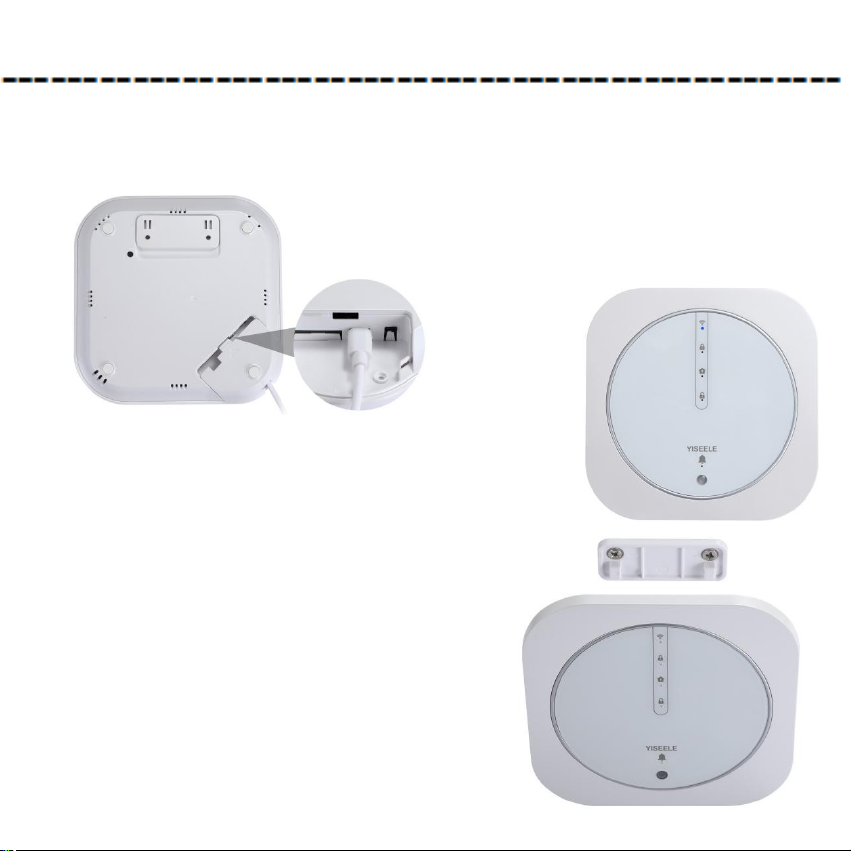
Step 1: Plug in t e power, and insert t e wired siren and turn on t e
switc (YX-700 is not equipped with wired siren, need to purchase separately);
Step 2: Refer to “Connect to t e Wi-Fi”.
Connect the alarm system to Wi-Fi. After the
connection is successful, the Wi-Fi Indicator is always on.
Step 3: Install t e HUB.
1) . Take off the mounting bracket on the
back of the HUB;
2) . Screw the mounting bracket to the
wall with screws;
3) . Hang the HUB on the mounting bracket
and plug the power adapter into the socket.
Step 4: Install t e Door/Window detector .

1) . Open the back of the door/window detector, and then turn on the switch on the
HUB (switch to the "ON");
2) . Paste the double-side adhesive tape to the wireless transmitter and magnetic
block.
3) . According to the mounting diagram, mount the door/window detector on the
position of the door, window, counter, safe box or drawer, etc.
When the door/window detector is
triggered, the indicator light flashes
quickly: the battery of the door/window
detector is low and needs to be replaced.
Steps to replace the battery:
1. Unscrew the screw and take out the
circuit board;
2. Replace with a new battery (the
door/window detector uses a
CR2032 battery)
Mounting diagram:
Tabla de contenidos
Manuales populares de Sistema de seguridad de otras marcas


EDM
EDM Solution 6+6 Wireless-AE Manual de usuario

Highway Safety Group
Highway Safety Group EA401 Manual de usuario

Siren
Siren LED GSM Manual de usuario

Detection Systems
Detection Systems 7090i Instrucciones de montaje

Se-Kure Controls
Se-Kure Controls MicroMini SK-4841 Manual de usuario

Siemens
Siemens FDM273 Manual de usuario