
YachtCam Yacht Cam Manual de usuario

PTZ Cameras
User Manual V2.0

Thank You for Choosing Our Yacht cam Thermal PTZ
Camera! When you open the box:
1. Check that the packing and the contents are not visibly damaged. Contact your supplier
immediately if any parts are either missing or damaged.
2. Make sure if the contents are all included as per the packing list.
3. Do not attempt to use the device with missing or damaged parts. Send the product back in its
original packing if it is damaged.
[Note] The information contained in the document is subject to change without notice.

Table of Contents
ABOUT THE YACHTcam .............................................................................1
FEATURES...........................................................................................................1
PACKING LIST ......................................................................................................1
FUNCTIONS..........................................................................................................2
TECHNICAL DATA.................................................................................................4
PREPARATION..............................................................................................6
INITIAL POWER ON TEST......................................................................................6
CHECK INSTALLATION ENVIRONMENT .................................................................7
KEEP PACKAGE ...................................................................................................7
DIMENSIONS........................................................................................................8
CONNECTIONS.....................................................................................................9
MENU SETTINGS........................................................................................10
MENU CONFIGURATION .....................................................................................10
MENU EXPLANATION..........................................................................................12
VIDEO ................................................................................................................12
PAN TILT............................................................................................................15
SYSTEM.............................................................................................................16
SYMBOLOGY......................................................................................................17
REBOOT.............................................................................................................18
RESTORE FACTORY DEFAULTS .........................................................................18
NETWORK SETTINGS.........................................................................................18
SPECIAL CONTROL COMMANDS.........................................................................18
OPERATION................................................................................................. 20
NETWORK SETTING..................................................................................21
NETWORK CONNECTION....................................................................................21
SOFTWARE QUICK GUIDE ..................................................................................22

OFTWARE OPERATION.......................................................................................23
CONFIGURE.......................................................................................................31
TROUBLE SHOOTING................................................................................33

Safety Notes --- Important
The following important notes must be followed carefully to use the camera and respective
accessories in total safety. Before installing the camera, please read this manual carefully; when
installing please follow instructions of installation indicated in this manual. Please keep this manual
for future use.
The following installation should be performed by qualified service personnel or system installers
in accordance with all local reulations.
Before powering on the camera, please check the power voltage carefully. Make sure that
you are using the right power source or you may damage the equipment.
Always store the power cable, video cable and control cable in secure place.
Do not operate the camera beyond the specified temperature and humidity.
When transporting, avoid violent shaking or force to the camera.
To prevent electric shock, do not remove screws or covers of the camera. There are no
self-serviceable parts inside. Refer to qualified service personnel for servicing.
Video cable and RS485 cable should be a distance away from other cables. Shielded and
independent wiring is necessary for video and control cables to work most effcetivly.
Never aim the lens of the camera at the sun or other extremely bright objects as it may cause
damage.
When cleaning the camera, use a soft cloth so as not to damage the lens. If the camera is very
dirty, wipe it off gently with a soft cloth moistened with a weak solution of water and a neutral
kitchen detergent. Squeeze all liquid from the cloth before wiping the camera, then wipe off all
remaining dirt with a soft, dry cloth. Use lens cleaning paper to clean the lens.
Do not move the camera module manually. In doing so could result in malfunction of the
camera. Do not hold the camera module when carrying the video camera carry it by the base.
Make sure the camera is far away from area where radiation, X-rays, strong electric waves, or
magnetism is generated.
1
About the YACHTcam
About The
The thermal imaging camera system is specially designed for maritime use. It consists of:
thermal imaging sensor, HD zoom module, precise PTZ system, and mounting riser. It ensures
a clear view of details under total dark and/or foggy environment.
Features
Color sensor: 1/2.8”CMOS, 2.13 mega pixel, 30x optical zoom;
Un-Cooled thermal imaging sensor, 640x480 / 384×288, provide clear view in total darkness;
Dual HD-SDI output (up to 1080P30) for color and thermal video at the same time;
Dual H.264 stream output for color and thermal video at the same time;
Single axis vertical image stabilization;
With WDR, True D/N;
Camera address is easily changeable via controller. Baud rate and protocol is self-adaptive;
10.8-28V voltage input;
Auto power-off with low power supply;
IP67 weatherproof.
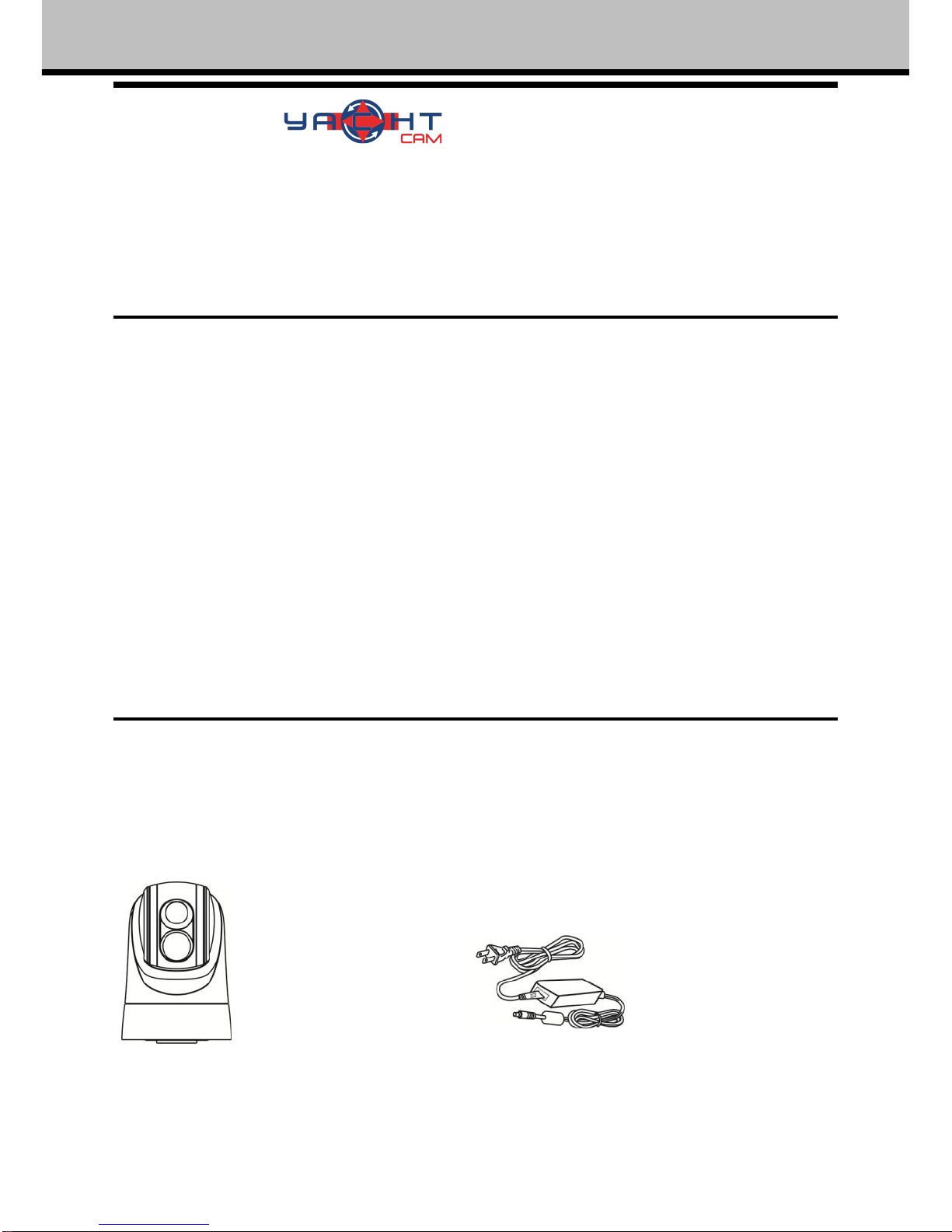
Packing List
When you open the package, please make sure below items are included. If any item is missing,
please contact your supplier.
Thermal PTZ Camera(1) Power Adapter(1)

2
About The YACHTcam
Functions
Soft Address
Camera address can be changed via calling specific presets.
Baud Rate and Protocol Self-adaptive
Camera can detect Pelco D protocols and 4800bps baud rate automatically.
Set Camera Address, Baud Rate and Protocol
Every camera needs to have its own address, baud rate and protocol, the camera only responses
to the commands sent with the same settings, please refer to DIP settings for more information
about setting address, baud rate and protocol.
Proportional Pan
Proportional pan automatically reduces or increases the pan and tilt speeds in proportion to the
zooming times. At telephoto zoom settings, the pan and tilt speeds will be slower for a given
amount of joystick deflection than at wide zoom settings. This keeps the image from moving too
fast on the monitor when there is a large amount of zoom.
Auto Flip
When the camera tilts downward and goes just beyond the vertical angle, the camera rotates 180º.
When the camera rotates (flips), the camera starts moving upward as you continue to hold joystick
in the down position. Once you let go of the joystick after the dome rotates, joystick control returns
to normal operation. The auto-flip feature is useful for following a person who passes directly
beneath the camera if the camera is being used for secutity purposes.
Save/Call Preset
Preset function is that camera saves current horizontal angle and title angle of pan/tilt, zoom and
position parameters into memory. When necessary camera calls these parameters and adjusts
Pan/Tilt and camera to that position. User can save and call presets easily and promptly by using
keyboard controller or other controller. The camera supports up to 256 presets.
Zoom control
User can adjust zoom wide or tele by controller and get desired image.
Focus control
System defaults Auto Focus mode, that is, the lens and camera will automatically adjust the focus
to get the best image.

3
About The YACHTcam
Focus can also be controlled manually from the controller if required. Press Focus Near or Focus
Far key to manually focus. Focus can be manual via keyboard or matrix, please refer to control
keyboard or matrix operation manual for detailed operation. When adjusting position is set with
focus status, it goes back to auto focus.
The camera will NOT auto focus in the following status. Target is not in the center of image.
Targets are in near and far at the same time.
Target is of strong light object. Such as spotlight etc.
Target is behind the glass with water drop or dust.
Target moves too fast.
Large area target such as wall.
Target is too dark or vague.
IRIS Control
System defaults Auto IRIS. Camera can adjust immediately according to the alteration of back
ground illumination so that a lightness steady image can be achieved.
You may adjust IRIS by controller to get required image brightness, and call back Auto IRIS by
controlling the joystick.
Back Light Compensation (BLC)
If a bright backlight presents, the subjects in the picture may appear dark or as a silhouette.
Backlight compensation enhances objects in the center of the picture. The camera uses the center
of the picture to adjust the IRIS. If there is a bright light source outside this area, it will wash out to
white. The camera will adjust the IRIS so that the object in the sensitive area is properly exposed.
Auto White Balance
Camera can automatically adjust white balance (WB) according to the alteration of background
lightness to give a true color image.

4
About the YACHTcam
Technical Data
Thermal Imaging Camera
Sensor Type
Uncooled Amorphns Silicon FPA
Working Band
8μm~14μm
Resolutions
384X288
640X480
Sensor Size
17μm
NETD(300K)
≤60MK
FOV
19mm:
19.5°×14.7°
19mm:
32.0°×24.2°
40mm:
15.5°×11.6°
Digital Zoom
1X, 2X, 4X
Video Display
White Hot/ Black Hot
Detecting Range
1.4nm- 2570m
1804 ft. -550m1.4nm -2570m
1804 ft. -550m:2.9 nm -5400m
3838 ft. -1170m
Recognition Range
2099 ft. - 640m
426 ft. - 130m 2099 ft. - 640m
426 ft. - 130m
4429 ft. -1350m
951 ft. -290m
Daylight Imaging Camera
Video Sensor
1/2.8" CMOS, 2.13MP
Effective Pixel
1920(H) x 1080(V)
HD Video (Network)
1080P25, 720P50, 720P25
HD Video (SDI)
1080P25, 1080I50, 720P50, 720P25
Optical Zoom
30x
Digital Zoom
12X
Lens
f=4.7mm(wide)-94mm(tele),F1.6-3.5
View Angle
59.5°(wide)–3.3°(tele)
Min Illumination
Color:0.0013Lux, Mono: 0.0008lux
WDR
On/Off
WB
Auto
Focus
Auto / Manual
IRIS
Auto / Manual
S/N Ratio
Not less than 50 dB
BLC
On/Off
DNR
1-5 Steps / Off
Day / Night
Auto / Manual
Boat
Person
Boat
Person

5
About the YACHTcam
PTZ
Pan Range
360°Continuous
Pan Speed
Control speed: 0.04°~100°/s; Preset speed: 100°/s
Tilt Range
-15°~90°(Auto Flip)
Tilt Speed
Control speed:0.04°~90°/s, adjustable; Preset speed:90°/s
Preset
256
Preset Precision
±0.2°
Stabilization
Single axis vertical image stabilization
Network
Resolution
Max 1920X1080@30fps
Video Compression
H.264
Network Protocol
HTTP,RTSP, TCP,UDP,ONVIF
Dual Stream
Support
General
OSD Language
English
Comm. Interface
RS-485
Address
0-255
Video Output
HD-SDI
Network Interface
10M/100M
Protocol
PELCO-D (Self-adaptive)
Baud Rate
4800bps
Power Supply
DC10.8-28V
Power Consumption
35W
Work Temperature
-25℃~+55℃
IP Protection
IP67
Dimension
Standard: Φ190(mm)×285(mm)
Weight
Standard: 6.3(±0.1)kg
Tabla de contenidos


