
Xtreme XPRT-SNMP2 Guía

XPRT-SNMP2
UPS Management
User & Installaon Manual
www.xpcc.com | © 2015 Xtreme Power Conversion Corporaon. All rights reserved. (Rev 3/12/15)

Xtreme Power Conversion Corporaon
Web/SNMP Cards
Page 2
UPS Management
Table of Contents
Introducon 4
Features 4
Overview 4
Architecture 5
Safety 5
Console Interface 6
Introducon 6
Command List 8
Web Interface 20
Introducon 20
Navigaon Bar 21
UPS Secon 21
System Secon 24
SNMP Secon 25
SMTP Secon 26
Log Secon 26
Ulity Secon 26
Save Secon 27
User Secon 27
SNMP Agent 27
MIB Structure 27
RFC1628 MIB Objects 28
NetworkConguraon 29
Ethernet Connecon 29
TCP/IP Conguraon 29
DNS Conguraon 30
Hostname 30
Mul-ServerNetworkShutdown(RCCMD) 30

Xtreme Power Conversion Corporaon
Web/SNMP Cards
Page 3
UPS Management
Network Shutdown With RCCMD 30
RemoteMonitoring&Diagnoscs(Rm&D)LicenseRequired 33
Remote Monitoring Service Conguraon 33
Security 35
Services (Access Methods) 36
Encrypon 36
Customer Responsibility 40
OtherFunconalies41
System Time 41
Serial bypass 41
HTTP Based Monitoring 41
Maintenance 43
Soware Upgrade 43
Conguraon File 43
Logs 43
Troubleshoong 44
Troubleshoong UPS Connecon 44
Troubleshoong Local Connecon 44
Troubleshoong Network Connecon 45
Troubleshoong Web Access 46
Troubleshoong Date & Time (NTP) 46
Troubleshoong E-Mail Nocaon (SMTP) 47
Troubleshoong Network Shutdown 48

Xtreme Power Conversion Corporaon
Web/SNMP Cards
Page 4
UPS Management
Introducon
Features
Each SNMP/Web adapter provides the following features:
• 10/100 Mbps connecon speed
• Use of DHCP / BOOTP or manual conguraon for the TCP/IP network sengs
• SNMP Agent
• Web server
• Console interface
• UPS status / alarms / readings, alarm logging over dierent interfaces
• Digital outputs (open-collector outputs for relay drive) – 1-ph plug-in version only
• SNMP Traps and E-mail nocaon upon UPS alarm
• Mul-server network shutdown
• Modbus TCP slave (license required)
• Advanced security features
Overview
XPRT-SNMP2
123
4
Frontpaneluserinterfaceview
1. RJ45 Connector Ethernet connecon, 10Base-T or 100Base-TX
2. LEDs Ref. specic secon
3. RS-232 port Local console connecon (115200-N-8-1)/ MODBUS RTU RS232
4. Reset buon HW reset

Xtreme Power Conversion Corporaon
Web/SNMP Cards
Page 5
UPS Management
LEDs
The various front panel LEDs have the following meaning:
LAN/Netlink
Status Meaning
O No LAN connecon detected
On LAN connecon established, no communicaon
Blink LAN connecon established, receive or transmit acve
UPS/Fail
Status Meaning
O OK / No Fault
On No UPS Connecon
Acve
Status Meaning
O Fault of device
Blink Device OK / No fault
Architecture
Safety
All maintenance and service work should be performed by qualied service personnel only. Please read carefully
the Installaon Manual before installing or operang the adapters.
For more informaon on the UPS system, please refer to the applicable Installaon and User Manual. Parcularly,
refer to Safety Rules, Warnings and Cauons as laid out in the cited document.
Theknowledgeof(andFULLcomplianceto)thesafetyinstruconsandthewarningcontainedinthe
citeddocumentsareTHEONLY CONDITIONtoavoidanydangeroussituaonsduring installaon,operaon,
maintenancework,andtopreservethemaximumreliabilityoftheUPSsystem.

Xtreme Power Conversion Corporaon
Web/SNMP Cards
Page 6
UPS Management
Console Interface
Introducon
The console interface provides a simple way to congure the SNMP/Web adapters through a command- line in-
terface. Actually, the console interface provides a full set of commands, extending far beyond the adapter inial
conguraon and allowing access to all advanced funconalies. Nevertheless, access using the console interface
(by means of a local serial connecon) is normally needed only for inial conguraon, when no DHCP server is
available or the IP-address is not known.
The console interface can be accessed locally (serial connecon) or remotely (Telnet, SSH).
Localconnecon
Local access requires a local computer connected to the adapter serial port using an RJ45-DB9 serial cable:
• Connect the SNMP adapter to a computer using the RJ45-DB9 serial communicaon cable provided with
the snmp/web adapter
• Run a terminal simulator (e.g. HyperTerminal on a PC running Windows)
• Congure the terminal simulator as follows:
115,200bps, 8 data bits, 1 stop bit, parity none, ow control none terminal emulaon VT-100
• Establish the connecon and press <enter>
• The default username (login) and password are ge and ge
• A command-line conguraon interface is entered
Remoteconnecon
The console interface can also be accessed remotely from any computer on the same subnet using either Telnet or
SSH (under the hypothesis that the relevant service is running and enabled for the selected user).

Xtreme Power Conversion Corporaon
Web/SNMP Cards
Page 7
UPS Management
TELNET
Telnet provides basic user authencaon. The SNMP/Web adapter uses the standard telnet port. To start a Telnet
session and connect to the adapter:
• Launch a telnet client (e.g. on a PC running Windows, select Run from the Start menu and type telnet
<IP>)
• The default username (login) and password are ge and ge
• A command-line conguraon interface is entered
SSH
SSH (Secure Shell) combines user authencaon with encrypon, to provide a higher degree of communicaon
security. In any case, the user access rights are the same regardless of the service/interface used.
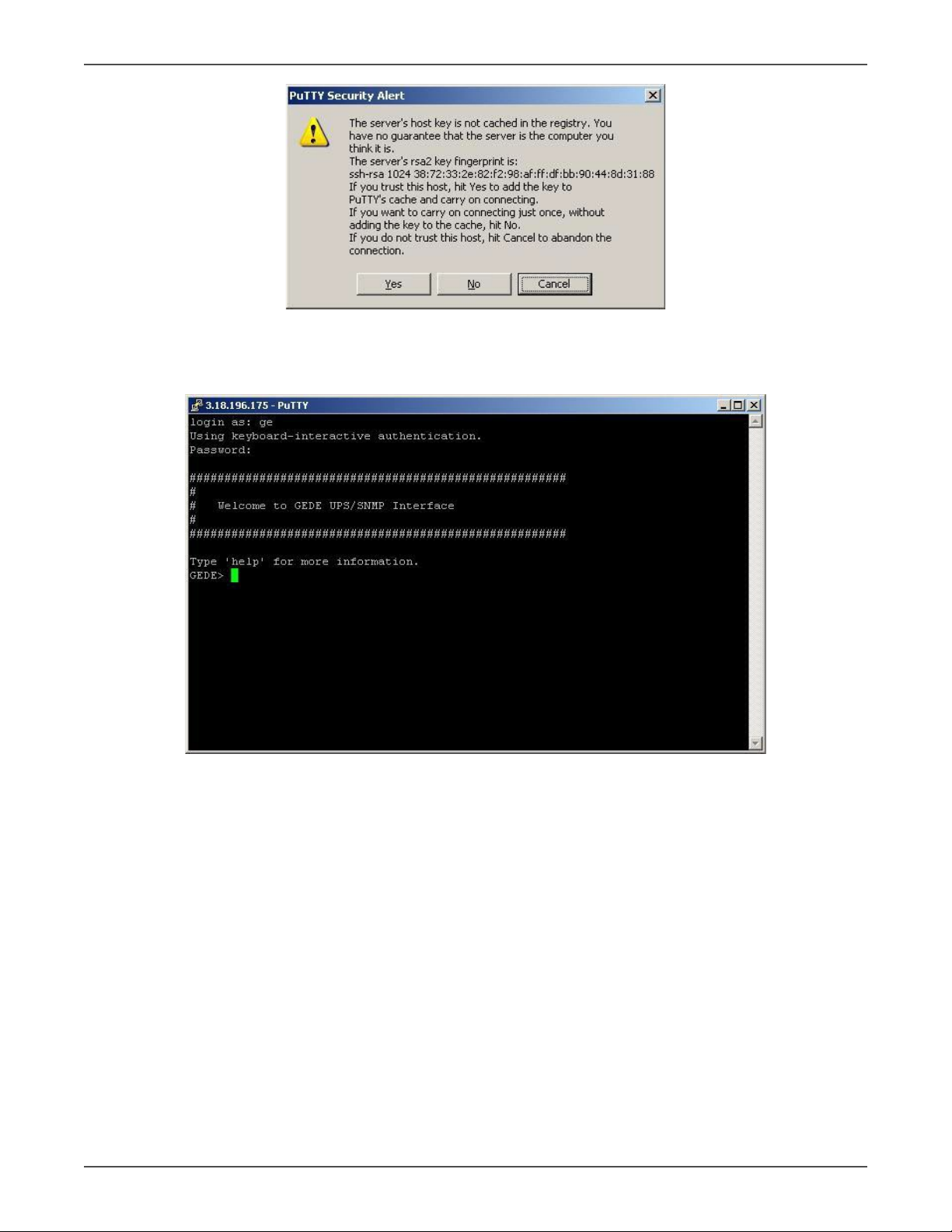
Below is a sample SSH session using a popular SSH client (puy):
• Start the SSH client applicaon (puy.exe)
o In the Host Name secon specify the card hostname or the IP address
o In the Connecon Type secon select SSH
o Select Open to launch the SSH session
NOTES:The SNMP/Web adapters use the standard SSH port. The SNMP/Web adapters support both SSH v1 and
SSH v2. Normally, no further sengs are required. In any case, SSH protocol and version sengs are accessible on
puy on the SSH category on the le-hand side menu.
• Most SSH clients display the host key ngerprint at the start of the session. Make sure the ngerprint
shown matches the SNMP/Web adapter ngerprint (see ENCRYPTION secon for details on guring out
the SSH ngerprint)
Xtreme Power Conversion Corporaon
Web/SNMP Cards
Page 8
UPS Management
• A login window should then be available in a few seconds. The default username (login) and password are
ge and ge
Log-on
User authencaon requires inpung the username and password. Remember that:
• Both username and password are case-sensive, and are always specied in lower case
• By default, only one user is dened, with username and password set to ge and ge
• Depending on the user class, not all commands and sengs may be available
Savingthesengs
Apart from some network parameters, most seng are immediately acve. However, the adapter will revert to the
last save sengs at reboot. Therefore, in order to permanently modify the SNMP/Web adapter seng, remember
to save the conguraon aer every change.
Command List
The various commands are split in dierent groups, depending on the involved funconality, and are listed here
in accordance with their group classicaon. The command-line interface includes a command auto-compleon
feature. Normally, typing a command without any parameter displays usage informaon on the command. A help
command is also available. Note that all commands are case-sensive.

Xtreme Power Conversion Corporaon
Web/SNMP Cards
Page 9
UPS Management
Generalcommandgroup
The general command group consists of the following commands:
Command Parameters Descripon
help
general | network | dns |
user | service |
me | smtp | snmp | trap |
ups | rccmd | events | log
Show help informaon general shows all general commands
network shows all network commands etc …
list List all available commands
version Display the board FW version
logout User logout
NOTE: Auto-logout aer 10 min inacvity
exit User logout
passwd
Change current user password
NOTE:Password length is limited to 8 chars. The command
line interface may accept longer passwords, although only
the rst 8 characters are signicant.
ping [hostname] | [X.X.X.X]
Ping IP address or hostname
hostname fully qualied hostname
X.X.X.X IP-address
nvdefault Reset the conguraon to factory default
nvsave Save changes to non-volale memory
nvdump Dump conguraon le (gedeups.cfg) to FTP area
nvupdate
Update the SNMP/Web conguraon with the gedeups.cfg
le from the FTP area
NOTE: The adapter performs no checks on the received le.
Make sure the le format is correct - unexpected behavior
may occur.
upgrade Start the upgrade with the uploaded rmware
NOTE: FW le to be uploaded via FTP
reboot System restart (so-reset)
NOTE: All unsaved changes will be lost

Xtreme Power Conversion Corporaon
Web/SNMP Cards
Page 10
UPS Management
Networkcommandgroup
The network command group allows to congure the board for communicaon over the network.
Command Parameters Descripon
showip Show the current network sengs
arp Show ARP table
boot-method manual | dhcp | bootp
Dene the network sengs at boot-up (*)
manual stac IP conguraon, the device conguraon
(ref. sep) is used
dhcp network sengs retrieved from DHCP server
bootp network sengs retrieved from BOOTP server
sep
[address]
[netmask]
[gateway]
Set stac IP/mask/default gateway
[address] IP-address
[netmask] Subnet mask
[gateway] Default gateway IP-address
NOTE: network sengs can be specied manually only when
boot-method is set to manual
hostname [hostname] Dene the full qualied domain name
[hostname] Full qualied domain name
dhcphost on | o Get the hostname from DHCP server
NOTE: This funconality is disabled (o) by default
mii-tool recheck
As most network devices, SNMP/Web adapters use an auto-
negoaon protocol to communicate what media technolo-
gies they support, and then select the fastest mutually sup-
ported media technology. Running this command shows the
negoated media.
speedduplex
auto |
100baseTx-FD |
100baseTx-HD |
10baseT-FD |
10baseT-HD
As most network devices, SNMP/Web adapters use an auto-
negoaon protocol to communicate what media tech-
nologies they support, and then select the fastest mutually
supported media technology. Some passive devices, such as
single-speed hubs, are unable to auto-negoate. To handle
such devices, the SNMP/Web adapter can be forced to oper-
ate in one mode, instead of auto-negoang.
menu
Quick network conguraon menu. Running this command
lunches an interacve menu – follow the on-screen instruc-
ons
NOTE: Network sengs become eecve only aer a reboot. Therefore, if these sengs must be modied, the
following acons shall be performed in sequence:
• Update the sengs, using the applicable command
• Save the sengs – nvsave command. Always remember that unsaved seng are lost in case of reset /
reboot
• Reboot the card – reboot command
Seng the boot-method to manual has the side eect that manual-dns is also set to ON. Mind that the reverse is
not true (seng boot-method to DHCP does not forced manual-dns to OFF). However, if the boot method is set
through the quick network conguraon menu, seng the boot-method to DHCP will also force manual-dns to
OFF. Unlike network sengs, the DNS sengs may become immediately acve.
Tabla de contenidos
Otros manuales de Unión Postal Universal de Xtreme

Xtreme
Xtreme 1000VA Guía

Xtreme
Xtreme 1000VA Guía

Xtreme
Xtreme 500VA Guía

Xtreme
Xtreme X90-5S Guía

Xtreme
Xtreme 6kVA Guía

Xtreme
Xtreme M90-80 Series Guía

Xtreme
Xtreme R91-20KVA Manual de funcionamiento

Xtreme
Xtreme 2000VA Manual de funcionamiento

Xtreme
Xtreme TX90 6kVA Manual de usuario

Xtreme
Xtreme X90-2S Guía


Manuales populares de Unión Postal Universal de otras marcas

Pylontech
Pylontech Victron & Pylontech US5000 Manual de usuario

Tecnoware
Tecnoware EVO DSP PLUS MM 6.8 Manual de usuario

Mecer
Mecer ME-1000-WTU Manual de usuario

Mustek
Mustek PowerMust 530(B) Plus Manual de instalación y operación

Emerson
Emerson Liebert NXL series Manual de usuario

MAKELSAN
MAKELSAN BOXER SERIES Manual de usuario


