
XAVI Technologies Corp. X7721r Manual de usuario

X7721r/X7721r+ User’s Manual
Version 1.0
- 1 -

X7721r/X7721r+ User’s Manual
Version 1.0
- 2 -
XAVi Technologies Corporation
Tel: +886-2-2995-7953
9F, No. 129, Hsing Te Road, Sanchung City,
Taipei Hsien 241,
Taiwan
Copyright © 2003, XAVi Technologies Corporation
Information in this manual is subject to change without notice. No part of this manual
may be reproduced or transmitted in any form or by any means, electronic or
mechanical, including photocopying or scanning, for any purpose, without the written
permission of XAVi Technologies Corporation.
XAVi Technologies Corporation provides this documentation without warranty of any
kind, implied or expressed, including, but not limited to, the implied warranties of
merchantability and fitness for a particular purpose.

X7721r/X7721r+ User’s Manual
Version 1.0
- 3 -
T
Ta
ab
bl
le
e
o
of
f
C
Co
on
nt
te
en
nt
ts
s
C
Ch
ha
ap
pt
te
er
r
1
1
–
–
G
Ge
et
tt
ti
in
ng
g
S
St
ta
ar
rt
te
ed
d
I. Overview…………………………………….………….……….……… 6
II. Features…………………………………………………………..…….. 7
III. Packaging……………………………………….…….………………… 8
IV. Safety Guidelines………………………………………………………. 9
V. Appearance…………………………………..………………….…….. 10
Front Panel…………………………………………………….……..…10
Rear Panel………………………………………………………..…… 11
VI. Hardware Installation…………………………………………………. 12
VII. Management…………………..………………..…..…….…………... 13
VIII. Default Values…………….……..……………………………………. 14
IX. Software Upgrade……………………..……………………………… 15
C
Ch
ha
ap
pt
te
er
r
2
2
–
–
C
Co
om
mm
ma
an
nd
d
L
Li
in
ne
e
I
In
nt
te
er
rf
fa
ac
ce
e
I. Console Setup..…………….………….………………..….…..…….. 17
II. CLI Commands……...……………………………..…………………. 18
1. Main Menu Commands…………………………………………. 18
2. LAN Menu Commands…….…………..………………….…… 21
C
Ch
ha
ap
pt
te
er
r
3
3
–
–
W
We
eb
b
M
Ma
an
na
ag
ge
em
me
en
nt
t
I
In
nt
te
er
rf
fa
ac
ce
e
I. Overview…………………………………………………………….22
II. Preparation…………………………………………………………. 22
1. Login………………………………………………………………. 23
2. Connection Settings………………….…………………………..24
2.1 RFC 1483 Bridge……..……………..………….………….. 25
2.1.1 RFC 1483 Bridge with NAT……………….……… 27
2.2 RFC 1483 Route………..………..……………….…………29
2.3 PPP over ATM (PPPoA)…………………………………… 31
2.4 PPP over Ethernet (PPPoE)…..………….……….……… 33
2.5 IP over ATM (IPoA).……….…………..…………..………. 35
3. Advanced Settings………………..………..………….………… 37
3.1 NAPT (Network Address Port Translation)……….……… 37
3.2 Static Routes……………………………………….……….. 38
3.3 DNS Relay…………………………………………………...40
3.4 Security….…………………………………………………... 41
3.4.1 Security state………………………………………….41
3.4.2 Security level……....………………………………….42
3.4.3 Security interfaces...………………………………….43

X7721r/X7721r+ User’s Manual
Version 1.0
- 4 -
T
Ta
ab
bl
le
e
o
of
f
C
Co
on
nt
te
en
nt
ts
s
3.4.4 Policies, Triggers, Intrusion Detection..…………….44
3.4.4.1 Security Policy Configuration……………….45
3.4.4.2 Security Triggers…………….……………….49
3.4.4.3 Intrusion Detection…………..……………….50
3.4.4.4 Default Security Policies…………………….51
4. System Settings………………………………………………….. 52
4.1 Local LAN IP…………………………………………………52
4.2 DHCP Server……………………………………………….. 53
4.3 Management…………………………………………………54
4.3.1 Edit User Details…………….……………………...54
4.3.2 Add Users……………..…………………………….55
4.3.3 Delete Users………….………..…..………..……...56
4.4 Ethernet……………………………………………………… 57
5. Modem Status……………….……………………….…….……..58
6. Maintenance…………………..…………………………..………60
6.1 Error Log…………………………………………………….. 60
6.2 Modem Upgrade………….………………………………… 61
6.3 Backup/Restore………………..…………………………… 61
6.4 Restart……………………………………………………….. 62
6.5 Save…………………………………………………………..62
A
Ap
pp
pe
en
nd
di
ix
x
A
A
–
–
S
Sp
pe
ec
ci
if
fi
ic
ca
at
ti
io
on
ns
s
A1. Hardware Specifications..…………………………………….…………..63
A2. Software Specifications……….…………………………….…………….64
A
Ap
pp
pe
en
nd
di
ix
x
B
B
–
–
W
Wa
ar
rr
ra
an
nt
ti
ie
es
s
B1. Product Warranty……………………………..………………………….. 65
B2. Warranty Repair………………………………………………………….. 66
B3. Out-of-Warranty Repair…………………………………………………..66
A
Ap
pp
pe
en
nd
di
ix
x
C
C
–
–
R
Re
eg
gu
ul
la
at
ti
io
on
ns
s
C1. FCC Part 15 Notice…………………………………….………………..67
C2. IC CS-03 Notice………..………………………………..………………...68
C3. UL Safety Regulations...………………………………..………………...69
C
Co
on
nt
ta
ac
ct
t
I
In
nf
fo
or
rm
ma
at
ti
io
on
n……………………………………………………….…70

X7721r/X7721r+ User’s Manual
Version 1.0
- 5 -
Revision Marks
Revision Date Notes
V 1.0
December 12, 2003
Software Version: 1.02XAT0.7721A

X7721r/X7721r+ User’s Manual
Version 1.0
- 6 -
Chapter 1
Getting Started
I. Overview
The X7721r/X7721r+is a multi-mode ADSL/ADSL2 router, which
complies with ANSI T1.413 Issue 2, ITU G.992.1 (X7721r/X7721r+),
ITU G.992.2, G.992.3, G.992.4, G.992.5 (X7721r+only), Annex A,
and ETSI ITS 101388 ADSL standards. The X7001r+supports
ADSL2+as well. The X7001r/X7721r+provides high-speed Internet
access via one WAN port over ATM over ADSL, and also connects to
the corporate network via a 10/100BaseT Ethernet port. It supports
multiple protocols such as PPP (RFC 2364), IP (RFC 2225/RFC
1577), and RFC 1483 over ATM over ADSL, and PPP (RFC 2516)
over Ethernet. X7001r/X7001r+offers convenient configuration and
management locally by telnet, SNMP, and a web-browser through the
Ethernet interface, and remotely through the ADSL interface.

X7721r/X7721r+ User’s Manual
Version 1.0
- 7 -
II. Features
High Speed Asymmetrical Data Transmission on Twisted
Copper Pair Wire
Service providers can deploy ADSL rapidly over existing wire
infrastructure (POTS or ISDN line)
Interchangeable between Bridge and Router mode
RFC 1483 Bridge and Routing over ATM over ADSL
PPPoE, and IPoA, and PPPoA Routing over ADSL
10/100BaseT Ethernet Port for PC/LAN connection
High quality, simple operation, and low power consumption
Compatible and interoperable with most central office side
ADSL DSLAM or Multi-service Access Systems
Local OAM&P through command line interface via RS-232
craft port
Configuration and management with Telnet through the
Ethernet interface, and remote Telnet through ADSL
interface
Firmware upgradeable through TFTP, HTTP
Interoperability complies with TR-48

X7721r/X7721r+ User’s Manual
Version 1.0
- 8 -
III. Packaging
This package consists of the following items:
X7721r/X7721r+ADSL device
unit
RJ-45 Cable
RJ-11 Cable
AC Adapter
User’s Manual CD

X7721r/X7721r+ User’s Manual
Version 1.0
- 9 -
IV. Safety Guidelines
In order to reduce the risk of fire, electric shock and injury, please
adhere to the following safety guidelines.
Carefully follow the instructions in this manual; also follow
all instruction labels on this device.
Except for the power adapter supplied, this device should not
be connected to any other adapters.
Do not spill liquid of any kind on this device.
Do not place the unit on an unstable stand or table. This unit
may drop and become damaged.
Do not expose this unit to direct sunlight.
Do not place any hot devices close to this unit, as they may
degrade or cause damage to the unit.
Do not place any heavy objects on top of this unit.
Do not use liquid cleaners or aerosol cleaners. Use a soft dry
cloth for cleaning.
X7721r/X7721r+ User’s Manual
Version 1.0
- 10 -
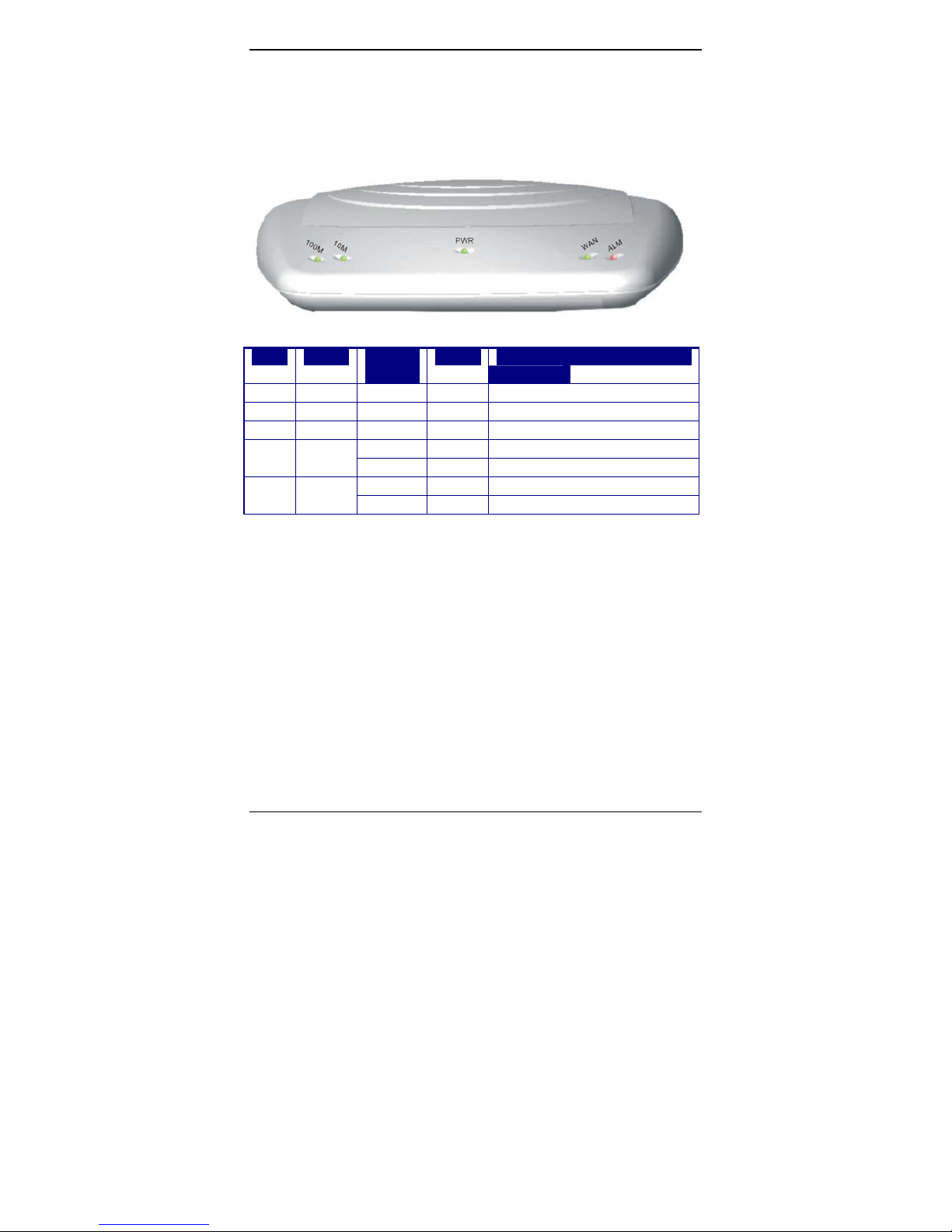
V. Appearance
Front Panel
Label LED
Status
Color Description
1100M ON Green 100M Ethernet transmitting.
210M ON Green 10M Ethernet transmitting.
3PWR ON Green Power supply is connected.
Blinking Green Training with DSLAM.4WAN
ON Green ADSL link is ready.
Blinking RED Booting up.5ALM
ON RED Error.
123 4 5
Este manual sirve para los siguientes modelos
1
Tabla de contenidos
Otros manuales de Enrutador de red de XAVI Technologies Corp.


Manuales populares de Enrutador de red de otras marcas


NETGEAR
NETGEAR FS526T - Switch Manual de usuario

Korenix
Korenix JetNet 5710G Series Manual de usuario

Automated Logic
Automated Logic ZN551 Manual del propietario

Cisco
Cisco ASR 1000 Series Manual del operador

EnGenius
EnGenius ESR-9710 Manual de usuario

Cisco
Cisco 805 Series Instrucciones de funcionamiento y seguridad