
WS Lightspeed Manual de usuario

PRELIMINARY
Software Ver 1.04
June 1, 2007

LIGHTSPEED OVER/UNDER CHECKWEIGHER
TECHNICAL MANUAL
SOFTWARE RELEASE 1.04, 06/2007
Copyright © 2007 Western Scale Co. Limited. All rights reserved.
Published by: Western Scale Co. Limited.
Information in this Installation / Technical Manual is subject to change without
notice due to correction or enhancement. The information described in this
manual is the property of Western Scale Co. Ltd. No part of this manual may be
reproduced or retransmitted in any form, without the expressed written
permission of Western Scale Co. Ltd.
Western Scale Co. Limited
1670 Kingsway Avenue
Port Coquitlam, B.C.
CANADA
V3C 3Y9
Tel: (604) 941-3474
Fax: (604) 941-4020
www.westernscale.ca
FOR TECHNICAL SUPPORT REGARDING THIS PRODUCT, PLEASE CALL
YOUR AUTHORIZED WESTERN DEALER:
THIS IS A PRELIMINARY MANUAL. THERE MAY BE SOME ERRORS DUE TO
FUNCTION AVAILABILITY AND CHANGES REQUIRED DURING THE APPROVAL
PROCESS. PLEASE REPORT ANY DISCREPANCIES TO YOUR WSCL
REPRESENTATIVE. THANK YOU FOR YOUR PATIENCE.

1
Technical Manual
TABLE OF CONTENTS
TABLE OF CONTENTS .................................................................................................... 1
INTRODUCTION............................................................................................................... 2
Disclaimer .....................................................................................................................2
Features ........................................................................................................................3
Specifications ................................................................................................................ 3
KEYPAD & SCALE FUNCTIONS ..................................................................................... 4
DISPLAY & ANNUNCIATORS.......................................................................................... 6
Weight Display .............................................................................................................. 6
Checkweighing Bars ..................................................................................................... 6
Annunciators ................................................................................................................. 7
INSTALLATION................................................................................................................. 8
Pre-Installation .............................................................................................................. 8
Leveling......................................................................................................................... 8
WIRING............................................................................................................................. 9
Opening the Lightspeed Enclosure ............................................................................... 9
Load Cell Wiring............................................................................................................ 9
Communications Wiring (RS 232)............................................................................... 10
Mounting Instructions .................................................................................................. 10
Powering Up................................................................................................................ 11
CALIBRATION MODE .................................................................................................... 12
Calibration Keys .......................................................................................................... 12
Entering Calibration Mode........................................................................................... 12
Navigating Calibration Parameters .............................................................................13
Editing Calibration Parameters ...................................................................................13
Exit & Save Calibration ...............................................................................................13
CALIBRATION PARAMETERS ...................................................................................... 14
Scale Calibration Sub-block 1.x .................................................................................. 14
Zero and Motion Settings Sub-block 2.x ..................................................................... 15
Tare Settings Sub-block 3.x ........................................................................................ 16
Scale Filtering Settings Sub-block 4.x......................................................................... 17
Serial Communications Sub-block 5.x ........................................................................ 18
Checkweigher Functions Sub-block 6.x ...................................................................... 19
Scale Diagnostics Sub-block 9.x................................................................................. 20
SEALING THE INDICATOR (LEGAL FOR TRADE)....................................................... 21
Electronic Seal ............................................................................................................ 21
TROUBLESHOOTING & ERROR MESSAGES ............................................................. 22

2
Checkwei
g
he
r
INTRODUCTION
The Lightspeed Checkweigher meets the most critical customer needs by joining
quick, stable weight readings with the strength to survive the harsh industrial
environments found in food-processing and other industries.
The DYNARREST vibration filtering system uses digital signal processing and
Western's advanced A/D weighing algorithms to capture, stabilize, and display
weights with outstanding speed and accuracy while the sturdy, compact design
and stainless steel construction protect the scale from damage and ease
maintenance costs.
Lightspeed Checkweighers are perfectly suited for virtually all portioning,
checking and light industrial weighing needs. Large buttons and displays
improve human-machine interface in applications from simple weighing, to
instant target weight acquisition, to storing Product IDs and acceptance ranges.
As always, Western’s dedication to durability, functionality, and versatility make
the Lightspeed Checkweigher engineered for the diversity of the weighing
industry.
Disclaimer
The following User information is for the exclusive use of WESTERN Dealers and
Customers.
Installation and configuration procedures (as described in this manual) should
only be carried out by qualified Scale Service Technicians as authorized by
Western.
Scale Service Technicians handling Lightspeed indicator PCBs must
observe proper electrostatic discharge (ESD) handling procedures.
ATTENTION! Unauthorized installation and service of this unit
may void the warranty.
CAUTION! HIGH VOLTAGES are present inside the Lightspeed
indicator enclosure.

3
Technical Manual
Features
Improved Interface
•Large, easy to read LED display (7/8ths inch digits, 22 mm)
•Oversize keys with international symbols
•Brightly colored checkweighing bar graph for quick results
•Intuitive target modes and product storage
Durable & Sanitary
•304 stainless steel base, feet, column and indicator enclosure
•NEMA 4X / IP66 with enclosure breather vent
•Simple, strong and reliable base design (12 Ga. Frame)
•Open design increases drainage and decreases potential for contaminants
•Overload stops for load cell protection
Excellent Serviceability
•Easy to navigate software menu and calibration
•Calibrate to any test weight value
•Terminal wiring
Advanced Capabilities
•DYNArrest digital filtering system for fast and stable weighing in high vibration
areas.
•Store 100 products with weight ranges
•MADE IN CANADA.
Specifications
Excitation: 5 VDC, Up to 4 x 350 Ωor 8 x 700 Ωloadcells
Analog Input Range: 0 - 19 mV
Resolution: 5,000 d (scale) or 10,000 d (indicator only);
1 million internal counts
Measurement Speed: 100 weight samples/sec.
Power: AC Input: 90 - 240 VAC
Consumption: 500 mW
Display: 6 digit, 7 segment, LED weight display
Bright LED bar graph and annunciators
Communications: Full duplex RS-232 serial port
Configurable data format
Selectable output strings
Temperature Range: 14°F to 104°F / -10°C to 40°C
Approvals: NTEP & Measurement Canada pending
Sizes & Capacities: 9 x 9 base: 5 lb, 10 lb, 25 lb
12 x 12 base: 25 lb, 50lb, 100 lb

4
Checkwei
g
he
r
KEYPAD & SCALE FUNCTIONS
The Lightspeed indicator utilizes 7 keys for operator interfacing. To maximize
indicator functionality, some keys perform multiple functions.
ZERO: Sets the weight display to ZERO.
The scale will not zero if:
•Weight on the scale is in MOTION;
•The weight on the scale exceeds the allowed
ZERO RANGE;
•The ZERO function has been disabled.
When one of these situations occurs, the display will
briefly read “Err”.
UNITS: Toggles between Primary and Secondary Weighing
Units.
Units are selected or disabled in Calibration Mode.
RIGHT
ARROW:
Moves the cursor RIGHT when entering values.

5
Technical Manual
TARE: Acquires tare value from weight on the scale (Container,
Box, etc.).
The scale will not tare if:
•Weight on the scale is in MOTION;
•The scale weight is negative;
•The TARE function has been disabled.
When one of these situations occurs, the display will
briefly read “Err”.
LEFT
ARROW:
Moves the cursor LEFT when entering values.
CLEAR: Erases any previously acquired tare values.
PRINT: Transmits data string or scale ticket through COM1.
ENTER
KEY:
Confirms entered values.
TARGET: Acquires target weight from current weight on the scale.
UP
ARROW:
Scrolls UP through Calibration Parameters;
Increments values.
ID:
DOWN
ARROW:
Scrolls DOWN through Calibration Parameters;
Decrements values.
In Canadian Legal for Trade applications, previous tare weights
must be cleared before a new tare weight can be acquired.

6
Checkwei
g
he
r
DISPLAY & ANNUNCIATORS
The Lightspeed uses a high intensity Light Emitting Diode (LED) display with a
quick update rate. The LED bar graph visually signals over, under or accept
conditions and the LED annunciator lamps communicate scale status and mode
information to the user.
Weight Display
•6 digits (7 segments each). Up to 3 decimal points.
•Negative weights are indicated by a minus sign (-) on the far left character.
Checkweighing Bars
UNDER: The scale weight is less than the desired target range.
ACCEPT: The scale weight is within the desired target range.
OVER: The scale in weight is greater than the desired target range.
7
Technical Manual
Annunciators
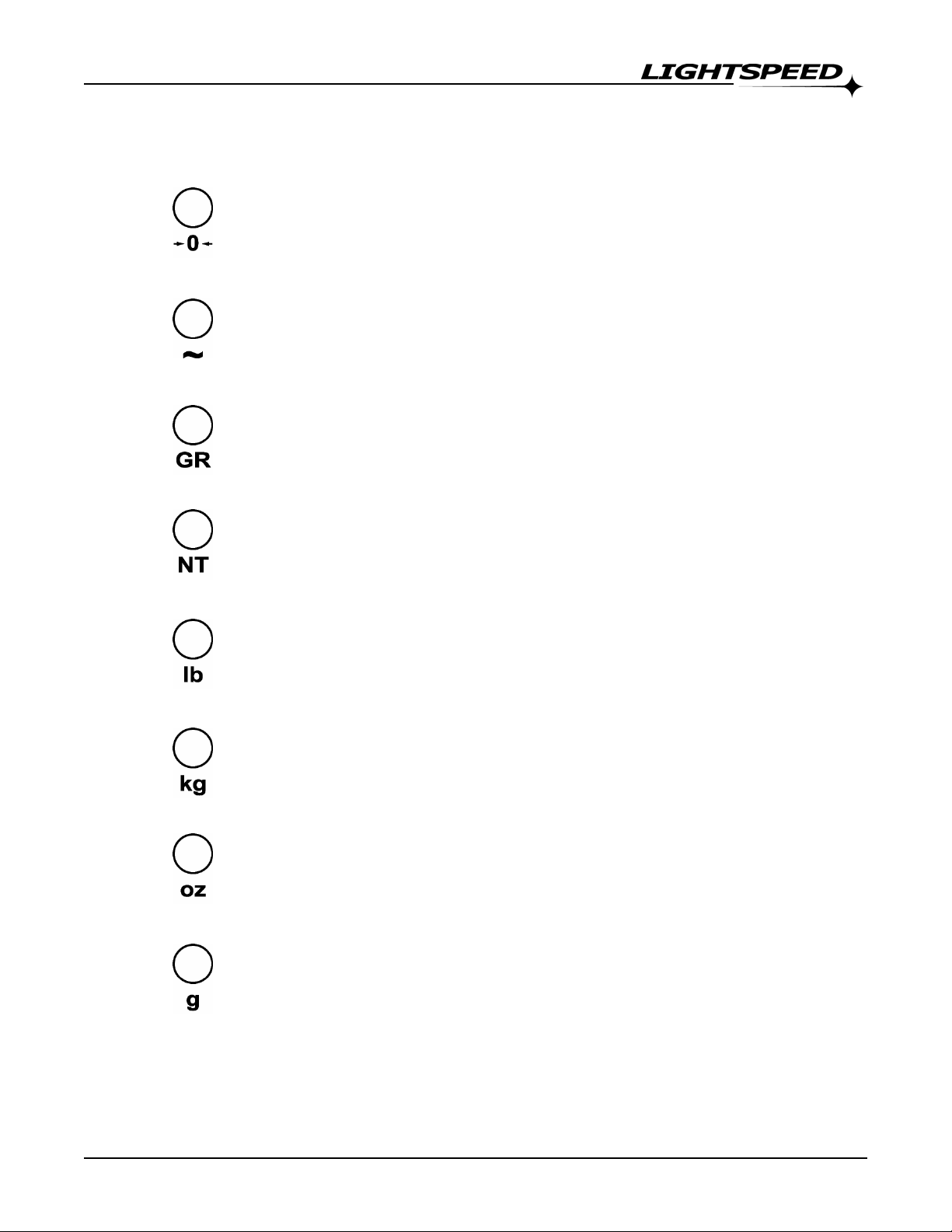
CENTRE ZERO: The scale is within ±0.2 graduations of TRUE
ZERO.
MOTION: The scale is in motion.
GROSS: The scale is in GROSS weighing mode.
NET: The scale in NET weighing mode (a tare weight is stored)
lb: The scale is weighing in POUNDS.
kg: The scale is weighing in KILOGRAMS.
oz: The scale is weighing in OUNCES.
g: The scale is weighing in GRAMS.

8
Checkwei
g
he
r
INSTALLATION
Pre-Installation
It is always good practice to verify that your Lightspeed checkweigher or
Lightspeed indicator is complete and undamaged upon receipt.
•Check over packaging for any signs of damage.
•Remove the Lightspeed from protective packaging and check for damage.
•Verify that the box includes the Lightspeed checkweigher or indicator with:
oUser Manual
Leveling
1. Remove the scale platform cover and observe the bubble level mounted
on the scale frame.
2. Adjust the scale feet until the bubble is within the “bull’s-eye” and all four
scale feet are securely on the surface.
3. Replace the scale platform cover.
Tabla de contenidos
Manuales populares de Instrumento de medición de otras marcas


Endress+Hauser
Endress+Hauser Proline Promag 50 Especificaciones técnicas

Siemens
Siemens SITRANS F Coriolis FCT030 Manual de lista de piezas

KLINGER
KLINGER CMF V Series Manual de usuario

EXFO
EXFO FTB-2 Manual de operación y mantenimiento

Keysight
Keysight M8290A Manual de usuario

ADTEK
ADTEK MW-5 Manual de usuario