
Woxcon MUH44-H2 Manual de usuario

MUH44-H2
4x4 HDMI 2.0 Matrix with Audio Matrix/
Downscaling/ AOC Supported
All Rights Reserved
Version: MUH44-H2 _2019V1.2
User Manual

4x4 HDMI 2.0 Matrix with Audio Matrix/ Downscaling/ AOC Supported
Preface
Read this user manual carefully before using the product. Pictures shown in this
manual are for reference only. Different models and specifications are subject to real
product.
This manual is only for operation instruction, please contact the local distributor for
maintenance assistance. In the constant effort to improve the product, we reserve the
right to make functions or parameters changes without notice or obligation. Please
refer to the dealers for the latest details.
FCC Statement
This equipment generates, uses and can radiate radio frequency energy and, if not
installed and used in accordance with the instructions, may cause harmful interference
to radio communications. It has been tested and found to comply with the limits for a
Class B digital device, pursuant to part 15 of the FCC Rules. These limits are designed
to provide reasonable protection against harmful interference in a commercial
installation.
Operation of this equipment in a residential area is likely to cause interference, in
which case the user at their own expense will be required to take whatever measures
may be necessary to correct the interference.
Any changes or modifications not expressly approved by the manufacture would void
the user’s authority to operate the equipment.

4x4 HDMI 2.0 Matrix with Audio Matrix/ Downscaling/ AOC Supported
SAFETY PRECAUTIONS
To ensure the best from the product, please read all instructions carefully before using
the device. Save this manual for further reference.
l Unpack the equipment carefully and save the original box and packing material for
possible future shipment
l Follow basic safety precautions to reduce the risk of fire, electrical shock and
injury to persons.
l Do not dismantle the housing or modify the module. It may result in electrical
shock or burn.
l Using supplies or parts not meeting the products’ specifications may cause
damage, deterioration or malfunction.
l Refer all servicing to qualified service personnel.
l To pr ev ent fi re or s hock haz a rd, do not expo s e th e unit to r ai n, moi st ure or in st al l
this product near water.
l Do not put any heavy items on the extension cable in case of extrusion.
l Do not remove the housing of the device as opening or removing housing may
expose you to dangerous voltage or other hazards.
l Install the device in a place with fine ventilation to avoid damage caused by
overheat.
l Keep the module away from liquids.
l Spillage into the housing may result in fire, electrical shock, or equipment damage.
If an object or liquid falls or spills on to the housing, unplug the module
immediately.
l Do not twist or pull by force ends of the cable. It can cause malfunction.
l Do not use liquid or aerosol cleaners to clean this unit. Always unplug the power to
the device before cleaning.
l Unplug the power cord when left unused for a long period of time.
l Information on disposal for scrapped devices: do not burn or mix with general
household waste, please treat them as normal electrical wastes.

4x4 HDMI 2.0 Matrix with Audio Matrix/ Downscaling/ AOC Supported
Contents
1. Product Introduction .................................................................................................... 1
1.1 Features ............................................................................................................. 1
1.2 Package List ....................................................................................................... 1
2. Specification ................................................................................................................ 2
3. Panel Description ........................................................................................................ 4
3.1 Front Panel ......................................................................................................... 4
3.2 Rear Panel .......................................................................................................... 5
4. Video Resolution Down-scaling ................................................................................... 6
5. System Connection ..................................................................................................... 7
5.1 Usage Precaution ............................................................................................... 7
5.2 System Diagram ................................................................................................. 7
6. Panel Control ............................................................................................................... 8
6.1 I/O connection switching .................................................................................... 8
6.2 I/O connection Inquiry ........................................................................................ 8
6.3 LOCK Function ................................................................................................... 8
6.4 PRESET RECALL Function ............................................................................... 8
6.5 CLEAR Button .................................................................................................... 9
7. IR Remote Control ..................................................................................................... 10
8. GUI Control ................................................................................................................ 11
8.1 Switching Tab ................................................................................................... 12
8.2 Audio Tab .......................................................................................................... 13
8.3 Configuration Tab ............................................................................................. 14
8.4 CEC Tab ........................................................................................................... 16
8.5 RS232 Tab ........................................................................................................ 18
8.6 Interface Tab ..................................................................................................... 19
8.7 Network Tab ...................................................................................................... 20
8.8 Access Tab ....................................................................................................... 20
8.9 GUI Upgrade .................................................................................................... 21
9. RS232 Control ........................................................................................................... 22

4x4 HDMI 2.0 Matrix with Audio Matrix/ Downscaling/ AOC Supported
9.1 Installation/uninstallation of RS232 Control Software ...................................... 22
9.2 Basic Settings ................................................................................................... 22
9.3 RS232 Communication Commands ................................................................. 23
9.3.1 System Commands ................................................................................ 23
9.3.2 Control Management .............................................................................. 23
9.3.3 Query Commands .................................................................................. 24
9.3.4 Lock/unlock Commands ......................................................................... 27
9.3.5 Audio Commands ................................................................................... 27
9.3.6 HDCP Compliance ................................................................................. 28
9.3.7 EDID Management ................................................................................. 29
9.3.8 CEC Control ........................................................................................... 31
10. Firmware Upgrade ................................................................................................... 34
11. Panel Drawing .......................................................................................................... 34
12. Troubleshooting and Maintenance .......................................................................... 35
13. Customer Service .................................................................................................... 37

4x4 HDMI 2.0 Matrix with Audio Matrix/ Downscaling/ AOC Supported
1
1. Product Introduction
The MUH44-H2 is a professional 4x4 HDMI 2.0 Matrix Switcher with Audio Matrix. It
includes 4 HDMI inputs, 4 HDMI outputs and the last two outputs with down-scaling
function, which is designed for switching two HDMI2.0 and HDCP2.3 compliant signals.
It also features 4 SPDIF and 4 analog audio outputs for audio matrix.
The matrix switcher features comprehensive EDID management and advanced HDCP
handing to ensure maximum functionality with a wide range of video sources.
The matrix switcher not only supports bi-directional IR, RS232 extension but also has
IR, RS232, and TCP/IP control options.
1.1 Features
l 4x4 HDMI 2.0 Matrix Switcher.
l Supports 4K/60 4:4:4, HDR, HDCP2.3 compliant.
l Audio Matrix, audio out can de-embedded from arbitrary input or output.
l Individual volume adjustment on each L+R output.
l Supports 4K to 1080p down-scaling up to 2 outputs.
l HDMI out provides 2.5W to power Active Optical Cable(AoC).
l HDMI Output support up to 5V500mA for AoC cable
l Controllable by front panel, IR, RS232 and TCP/IP.
1.2 Package List
l 1 x MUH44-H2
l 2 x Mounting Ears with 6 Screws
l 4 x Plastic Cushions
l 1 x IR Remote
l 1 x IR Receiver
l 1 x RS232 Cable (3-pin to DB9)
l 1 x Power Adaptor (24V DC 1.25A)
l 1 x User Manual
Note: Please contact your distributor immediately if any damage or defect in the
components is found.

4x4 HDMI 2.0 Matrix with Audio Matrix/ Downscaling/ AOC Supported
2
2. Specification
Video
Video Input
(4) HDMI
Video Input Connector
(4) Type-A female HDMI
Video input Video Resolution
Up to 4K@60Hz 4:4:4
Video Output
(4) HDMI
Video Output Connector
(4) Type-A female HDMI,
Video output Video Resolution
Up to 4K@60Hz 4:4:4
HDMI Output
Supports up to 5V500mA for AoC cable
HDMI Version
Up to 2.0
HDCP Version
Up to 2.3
HDMI Audio Signal
LPCM 7.1 audio, Dolby Atmos®, Dolby® TrueHD, Dolby Digital®
Plus, DTS:X™, and DTS-HD® Master Audio™ pass-through.
Digital Audio Output
Output
(4) Digital SPDIF audio
Output Connector
(4) Toslink connector
Digital SPDIF Audio Format
Supports PCM, Dolby Digital, DTS, DTS-HD
Frequency Response
20 Hz to 20 kHz, ±1dB
Max Output level
±0.05dBFS
THD+N
< 0.05%, 20 Hz – 20 kHz bandwidth, 1 kHz sine at 0 dBFS level (or
max level)
SNR
> 90dB, 20Hz-20 kHz bandwidth
Crosstalk Isolation
< -70 dB, 10 kHz sine at 0 dBFS level (or max level before clipping)
Noise
-90dB
Analog Audio Output
Output
(4) Analog L/R Audio
Output Connector
(4) L&R (RCA)
Digital SPDIF Audio Format
PCM 2CH
Frequency Response
20 Hz to 20 kHz, ±1dB
Max output level
2.0 Vrms ± 0.5 dB. 2 V = 16 dB headroom above -10 dBV (316 mV)
nominal consumer line level signal
THD+N
< 0.05%, 20 Hz – 20 kHz bandwidth, 1 kHz sine at 0 dBFS level (or
max level)
SNR
> 80dB, 20Hz-20 kHz bandwidth
Crosstalk Isolation
< -80 dB, 10 kHz sine at 0 dBFS level (or max level before clipping)
L-R Level deviation
< 0.05 dB, 1 kHz sine at 0 dBFS level (or max level before clipping)

4x4 HDMI 2.0 Matrix with Audio Matrix/ Downscaling/ AOC Supported
3
Frequency Response Deviation
< ± 0.5dB 20Hz - 20KHz
Output Load Capability
1k ohm and higher (supports 10x paralleled 10k ohm loads)
Noise
-80dB
Control
Control Port
(1) IR IN, (1) RS232, (1) FIRMWARE, (1) TCP/IP, (1) IR EYE,
Control Connector
(1) 3.5mm jack, (1) 3-pin terminal block, (1) USB-A, (1) RJ45,
General
Transmission Distance
4K/60Hz/444 5m,4K/60Hz/420 10m,1080P 15m
Bandwidth
18Gbps
Operation Temperature
-5~ +55℃
Storage Temperature
-25 ~ +70℃
Relative Humility
10%-90%
External Power Supply
Input: AC 100~240V, 50/60Hz; Output: 24V DC 1.25A
Maximum Power Consumption
18.3W
Dimension (W*H*D)
436.4mm*44mm*236mm
Net Weight
2.6kg

4x4 HDMI 2.0 Matrix with Audio Matrix/ Downscaling/ AOC Supported
4
3. Panel Description
3.1 Front Panel
No.
Name
Description
①
Power Indicator
l Illuminates green when device powered on;
l Turns red in standby mode.
②
IR sensor
Built-in IR sensor, receives IR signal sent from
IR remote.
③
INPUT selector button
OUTPUT selector
button
l Tot al 4 input selector buttons, press one of
buttons to switch input source.
l Tot al 4 output selector buttons, press the
buttons to select output channel.
④
ENTER button
Confirm operation.
LOCK button
Press this button for 3 seconds to lock/unlock all
front buttons.
ALL button
ALL: Select all outputs to convert an input to all
outputs:→ Press INPUTS 1 + ALL + ENTER
CLEAR button
Withdraw button.
⑤
PRESET RECALL
HOLD TO STORE
l Press and hold the button 1~4 to save the
current switching status to the corresponding
preset 1~4.
l Press the button 1~4 to recall the saved preset
1~4.
4x4 HDMI 2.0 Matrix with Audio Matrix/ Downscaling/ AOC Supported
5
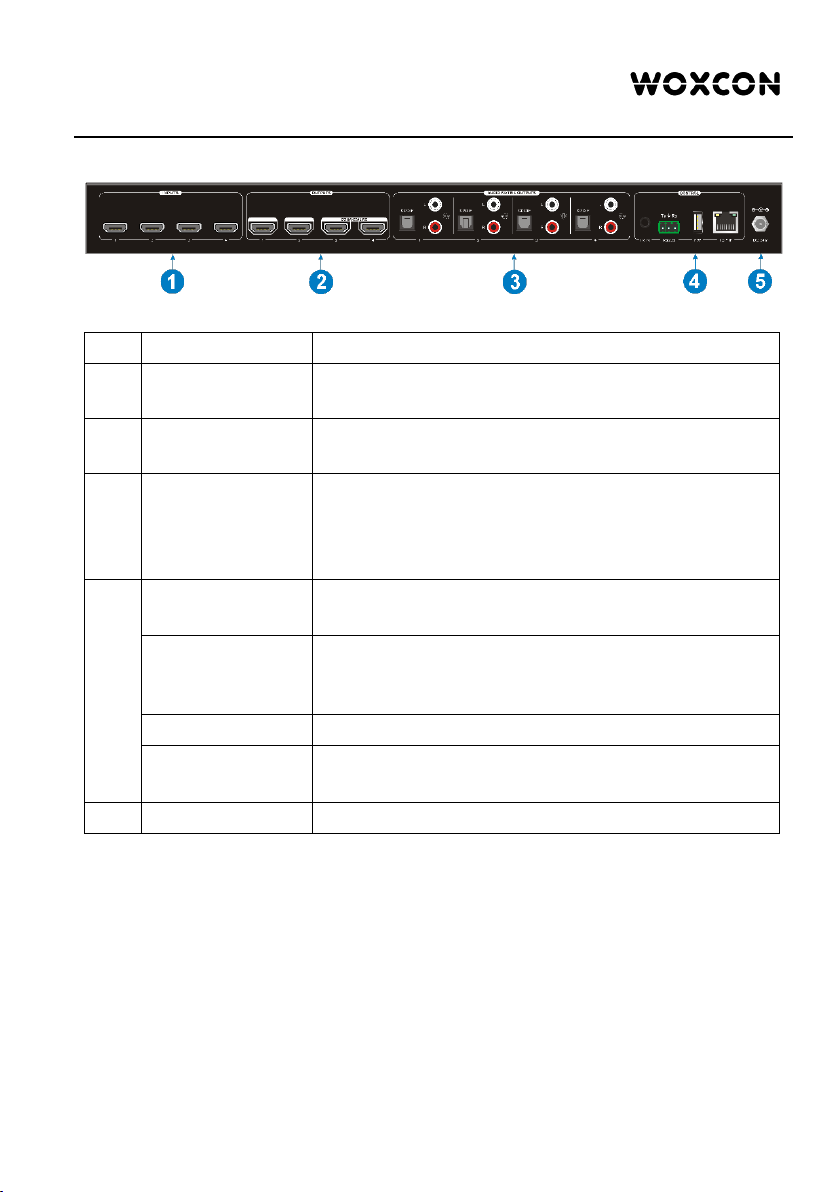
3.2 Rear Panel
No.
Name
Description
①
INPUTS
HDMI input ports, 4 in total, connects with HDMI
sources.
②
OUTPUTS
HDMI: 4 in total, connects with HDMI displays. The
latter four HDMI ports have down-scaling function.
③
AUDIO MATRIX
OUTPUTS
SPDIF: audio output ports for de-embedded HDMI
audio, 4 in total.
L&R (RCA): audio output ports for de-embedded
HDMI audio, 4 pairs in total.
④
IR IN
Connects with external IR receiver for using the IR
remote to control the Matrix Switcher.
RS232
3-pin terminal block to connect the RS232 control
device (e.g. PC) or a device to be controlled by
RS232 commands.
FIREWARE
USB-A port for updating firmware.
TCP/IP
RJ45 port to connect the control device (e.g. PC) to
control the matrix by GUI.
⑤
DC 24V
Connect with 24VDC 1.25A power adaptor.
Tabla de contenidos
Otros manuales de Conmutador de matriz de Woxcon

Woxcon
Woxcon MUH44T-H2 Manual de usuario

Woxcon
Woxcon MUH44T-H2 Manual de usuario

Woxcon
Woxcon MMX1616-N Manual de usuario

Woxcon
Woxcon MUH88-H2 Manual de usuario

Woxcon
Woxcon MMX88-N Manual de usuario

Woxcon
Woxcon MUH44E-H2 KIT Manual de usuario

Woxcon
Woxcon MMX3232-N Manual de usuario

Woxcon
Woxcon NPG-MX88E-H2 KIT Manual de usuario

Woxcon
Woxcon VLHDMIMAT4X4 Manual de usuario

Woxcon
Woxcon NPG-MX44-H2 Manual de usuario


