Worcester DT20RF Manual de usuario

Radio frequency controlled room thermostat with twin channel
digital programmer
FOR GREENSTAR Si MO ELS
INSTRUCTION MANUAL
FITTING & OPERATING INSTRUCTIONS
DT20RF PROGRAMMER
set?
OK
off
timed
on e
on
off
timed
on e
on
heating hot water
sele t sele t
advan e advan e
MON TUE WED THU FRI SAT SUN
CLOCK? PROG? DATE? HDAY?
AM OFF
CHW ON
off
timed
on e
on
off
timed
on e
on
heating hot water
sele t sele t
advan e advan e
MON TUE WED THU FRI SAT SUN
CLOCK? PROG? DATE? HDAY?
AM OFF
CHW ON
set?
OK
off
timed
on e
on
off
timed
on e
on
heating hot water
sele t sele t
advan e advan e
MON TUE WED THU FRI SAT SUN
CLOCK? PROG? DATE? HDAY?
AM OFF
CHW ON
Digistat 7716 192 039
7716 192 041Transmitter 8716 106 6700
Receiver 8716 106 6690
7 Day

CONTACT & MANUAL
INFORMATION
FITTING & OPERATING INSTRUCTIONS FOR WORCESTER BOSCH
T20RF PROGRAMMER
8-716-106-659 issue a (08.04) UK
PLEASE READ THESE INSTRUCTIONS
CAREFULLY BEFORE STARTING
THESE INSTRUCTIONS ARE APPLICABLE TO THE
WORCESTER BOSCH MO EL(S) STATE ON THE
FRONT COVER OF THIS MANUAL ONLY AN MUST NOT
BE USE WITH ANY OTHER MAKE OR MO EL
THE INSTRUCTIONS APPLY IN THE UK ONLY AN
SHOUL BE FOLLOWE EXCEPT FOR ANY STATUTORY
OBLIGATION
IF YOU ARE IN ANY OUBT CONTACT WORCESTER
BOSCH TECHNICAL HELPLINE
THIS ACCESSORY MUST BE FITTE BY A COMPETENT
PERSON. FAILURE TO COMPLY COUL LEA TO
PROSECUTION.
LEAVE THESE INSTRUCTIONS WITH THE USER OR AT
THE APPLIANCE.
CONTACT INFORMATION
WORCESTER BOSCH:
TECHNICAL: 08705 266241
SERVICE: 08547 256206
SPARES: 01905 752571
LITERATURE: 01905 752556
TRAINING: 01905 752526
SALES: 01905 752640
WEBSITE: www.worcester-bosch.co.uk
MANUAL INFORMATION
ABBREVIATIONS:
CH Central Heating
HW omestic Hot
Water
RF Radio Frequency
DLS ay Light Saving
BST British Summer
Time
GMT Greenwich Mean
Time
CCelcius
mMetre
IP Ingress
Protection
VVolts
mA MilliAmps
DEFINITIONS (DLS/BST):
Summer period begin: Last Sunday in March at 1:00
AM GMT (Clock put forward by 60 minutes)
Summer period end: Last Sunday in October at 2:00
AM GMT (Clock put back by 60 minutes)
SYMBOLS:
Central Heating
omestic Hot Water
Radio Frequency (RF) transmitter

SERVICING
& SPARES
USER
INSTRUCTIONS
INSTALLATION &
COMMISSIONING
ACCESSORY
INFORMATION CONTENTS
1
CONTENTS
FITTING & OPERATING INSTRUCTIONS FOR WORCESTER BOSCH
T20RF PROGRAMMER
8-716-106-659 issue a (08.04) UK
ACCESSORY INFORMATION
GENERAL INFORMATION 2
TECHNICAL ATA 3
INSTALLATION & COMMISSIONING
FITTING THE T20 4
SETTING THE RA IO LINK 5
TRANSMITTER LOCATION, CLEARANCES & FIXING 6
USER INSTRUCTIONS
TRANSMITTER OPERATING CONTROLS 7
RECEIVER OPERATING CONTROLS 8
RECEIVER PRE-SET PROGRAMS 9
RECEIVER SETTING PROGRAMS
Setting CH Mon-Fri Setting HW Mon-Fri 10
Setting individual weekdays 11
Setting CH Sat-Sun Setting HW Sat-Sun 12
Setting individual weekend days 13
RECEIVER SETTING HOLI AYS 14
RECEIVER SETTING THE CLOCK 15
RECEIVER SETTING THE ATE 16
BATTERY REPLACEMENT 17
SERVICING & SPARES
MAINTENANCE & SPARES 18
CONTENTS

ACCESSORY
INFORMATION
2GENERAL INFORMATION FITTING & OPERATING INSTRUCTIONS FOR WORCESTER BOSCH
T20RF PROGRAMMER
8-716-106-659 issue a (08.04) UK
STANDARD PACKAGE:
A - Programmer/ RF receiver
B - Remote RF transmitter
C - Screws (x2)
- Wall Plugs (x2)
E - Instructions
F - Batteries (x4)
SPECIFICATIONS:
Receive :
Twin channel programmer for CH &
HW mounted into the boiler fascia
7 day programmer
3 on/off periods per day
Automatic BST settings
Pre-programmed on/off periods
edicated advance buttons
12 or 24 hour back-lit digital display
Holiday function
Pre-wired with PCB connector
T ansmitte :
Remote RF Transmitter to control
CH temperature
4 AA alkaline 1.5V batteries included
Low battery warning
Max. signal range approx. 25 metres
(range may decrease according to
the building construction).
GENERAL INFORMATION
set?
OK
off
timed
on e
on
off
timed
on e
on
heating hot water
sele t sele t
advan e advan e
MON TUE WED THU FRI SAT SUN
CLOCK? PROG? DATE? HDAY?
AM OFF
CHW ON
A
B
E
C
F

ACCESSORY
NFORMATION
3
TECHNICAL ATA
FITTING & OPERATING INSTRUCTIONS FOR WORCESTER BOSCH
T20RF PROGRAMMER
8-716-106-659 issue a (08.04) UK
DESCRIPTION UNITS DT20 Re eiver
TECHNICAL ATA
imensions mm -
Electrical supply - 24v C <65mA
Ambient operating temperature C 0 to +50
Humidity operating range % non-condensing up to 45° 30 - 95
Class of protection - II
egree of protection IP 24
Accuracy @ 25°C sec/day <±1
Battery life years 10
Battery backup time & date years min. 10
Shortest switching period minutes 1
HW & CH On/Off periods number 3
HW & CH Programs days 7
Related Standards:
BS EN60730-1:2001
BS EN60730-2-7:1992
Electro Magnetic Compatibility and Radio Spectrum Matters (ERM); Short Range evices (SR ) ETSI
EN 300 220-1
EC Dire tives:
European Union Law irective 2000/84/EC
Low Voltage irective (73/23/EEC)
Electro Magnetic Compatibility irective (89/336/EEC)
CE Marking irective (93/68/EEC)

INSTALLATION &
COMMISSIONING
4FITTING THE RECEIVER FITTING & OPERATING INSTRUCTIONS FOR WORCESTER BOSCH
T20RF PROGRAMMER
8-716-106-659 issue a (08.04) UK
FITTING THE RECEIVER
DANGER - 24V &
230V: DO NOT TOUCH
THE ELECTRICAL
COMPONENTS OR
CIRCUITS.
CAUTION: ISOLATE THE MAINS
ELECTRICITY SUPPLY BEFORE
STARTING ANY WORK AND
OBSERVE ALL RELEVANT
SAFETY PRECAUTIONS.
Important: Swit h off boiler
Remove boiler outer casing and
control panel fascia to gain access
to the heatronic control panel
1Release securing screw (A)
2Pull cover panel (B) upwards to
remove
3Grip tab (C), pull upwards to
disengage clips ( ) and pull
forwards to remove blanking plate
(E) or existing programmer
4Align connector pins (F) into
receptors (G) in the PCB and push
fully home
5Feed the ribbon cable (G) into
recess (H)
6Align programmer (E) and locate
clips ( ), push into slots then
downwards to secure
7Locate cover panel (B) and secure
with screw (A)
Replace fascia cover and outer
casing before switching on the
electricity supply and boiler
Switch boiler on when completed.
Refer to USERS INSTRUCTIONS
section for details of pre-set and
setting programs.
OBSERVE ELECTRONIC STATIC
ISCHARGE PRECAUTIONS.
O NOT TOUCH THE PCB
CIRCUITS
1
AB
E
C
2
3
F
E
4
AB
7
H
G
6
E
C
5

6
AA
AA
AA
AA
C
B
A
INSTALLATION &
COMMISSIONING
5
SETTING THE RA IO LINK
FITTING & OPERATING INSTRUCTIONS FOR WORCESTER BOSCH
T20RF PROGRAMMER
8-716-106-659 issue a (08.04) UK
SETTING THE RA IO LINK
Receive set up:
The colon, CH and antenna symbols
should flash on the display
1Press the 'set?' button 4 times
2Press the 'OK' button once
3Press the 'set?' button 4 times; 'Lrn'
and 'OFF' should be displayed
4Press the '+' button so the display
shows 'ON' and a flashing antenna
symbol. The learn mode is now ready
to receive a signal from the transmitter
during the next 2 minutes.
T ansmitte set up:
The transmitter must be at least 1 metre
away from the receiver before starting
this procedure:
5Slide open battery compartments (B)
6Remove insulator strips (C)
7Replace the right hand battery
compartment (B) first followed by
the left hand battery compartment
The display (D) then shows the room
temperature and automatically transmits
a signal to the receiver unit in the boiler
to establish a radio link.
8When a radio link has been
established the display reverts back
to normal operation with the antenna
symbol shown
To re-establish the radio link; open both
battery trays until the transmitter display
goes blank, repeat steps 1 to 4 then
step 7 to transmit a set up signal to the
receiver. Repeat this procedure until a
link has been established.
If the radio link is lost the antenna
colon and CH symbols flash on the
receiver display. The program defaults
to manual mode. Press the 'OK' button
to override and switch the heating ON
press again to switch OFF.
57
4
2
x4 x1
1
3
x4
8

INSTALLATION &
COMMISSIONING
6TRANSMITTER LOCATION
CLEARANCES & FIXING
FITTING & OPERATING INSTRUCTIONS FOR WORCESTER BOSCH
T20RF PROGRAMMER
8-716-106-659 issue a (08.04) UK
TRANSMITTER LOCATION
CLEARANCES & FIXING
CAUTION: Ensure there are no
pipes, ele tri ables or other
hazards before drilling.
SAFETY: All relevant safety
precautions must be undertaken.
Protective clothing, footwear, gloves
and safety goggles must be worn
as appropriate.
T ansmitte location:
1Position the transmitter (A) as close
to the main living area as possible
onto a flat inside wall, approx. 1.5m
(5') above the floor within max. signal
range of the appliance receiver.
Keep the transmitter away from:
light and heat sources
enclosures and curtains
direct draughts, including fans, air
vents, windows and doors
damp and condensation
Replacing a mains wi ed unit:
Isolate the main electric supply. Refer
to the manufacturers instructions to
remove the unit. Isolate the existing
wiring and make electrically safe.
T ansmitte clea ances:
See diagram opposite for minimum area
required for operation.
T ansmitte fixing:
2Loosen screw (C) on transmitter to
remove the baseplate (B)
3Hold baseplate (B) level to mark
securing points ( ) and remove
baseplate (B)
4 rill holes to marks
Fit one wall plug into each hole
Reposition baseplate (B), check
level and secure with screws supplied
Refit the transmitter to the baseplate
(B) and tighten screw (C) to secure.
123
1.5m (5)
3
1
50mm
70mm C
2
B
A

7
TRANSMITTER
OPERATING CONTROLS
FITTING & OPERATING INSTRUCTIONS FOR WORCESTER BOSCH
T20RF PROGRAMMER
8-716-106-659 issue a (08.04) UK
USER
INSTRUCTIONS
TRANSMITTER
OPERATING CONTROLS
The flame symbol indicates:
Flame on = heating demand ON
Flame off = heating demand OFF
To change the oom tempe atu e:
Note: the following only occurs during
a timed on period and has no effect
when the receiver is in an off setting.
1To increase the room temperature:
press the '+' button until the required
temperature is displayed
2To decrease the room temperature:
press the '-' button until the flame
symbol is no longer displayed
After 5 seconds the display reverts
back to the actual room temperature.
1
2

USER
INSTRUCTIONS
8RECEIVER
OPERATING CONTROLS
FITTING & OPERATING INSTRUCTIONS FOR WORCESTER BOSCH
T20RF PROGRAMMER
8-716-106-659 issue a (08.04) UK
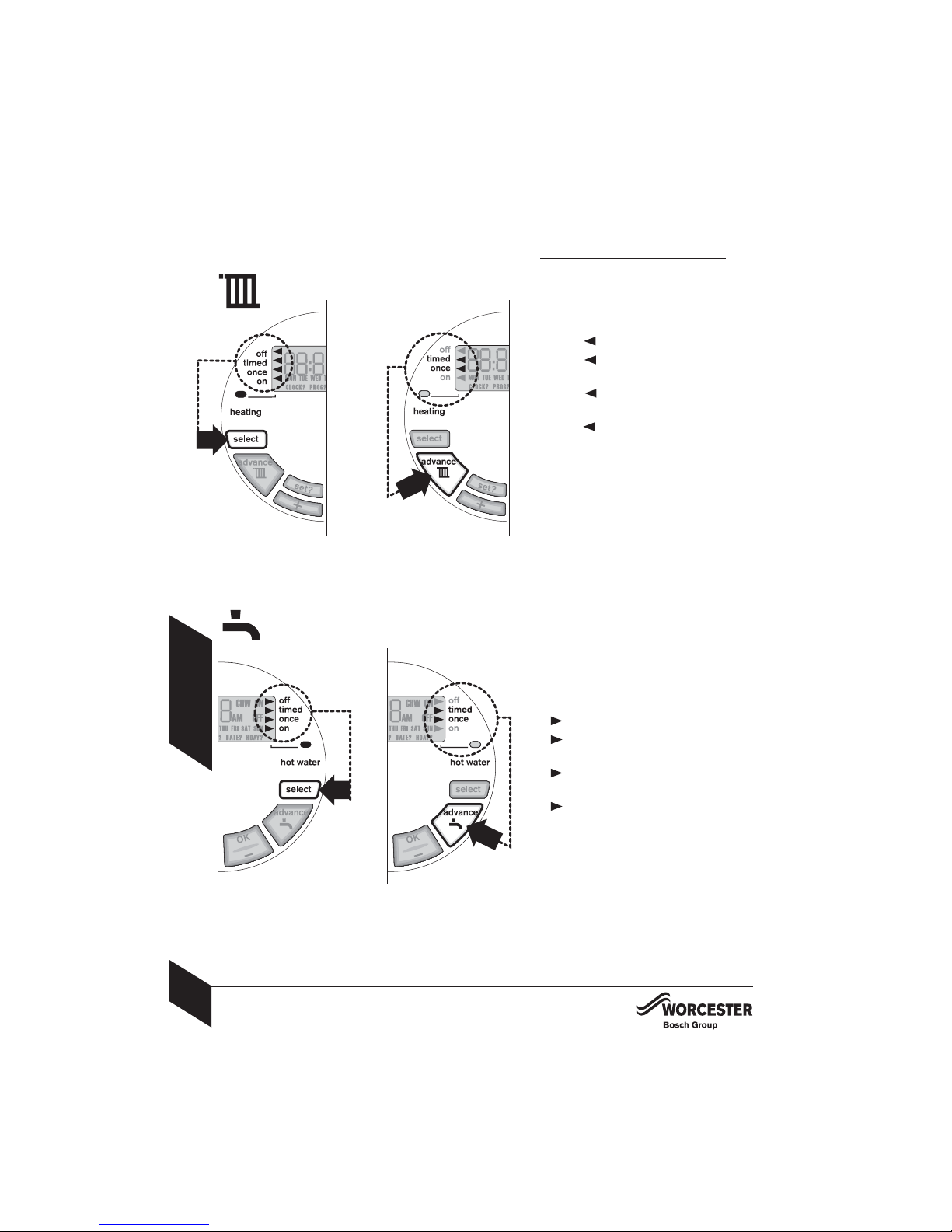
Cent al heating:
1Press 'sele t' button to choose:
off = constantly OFF
timed = up to 3 ON and 3 OFF
time periods as program
on e = ON from 1st ON until 3rd
OFF time period as program
on = constantly ON
2Press 'advan e' button:
ON = heating light on (heating demand
stays on until the next OFF time period)
OFF = heating light off (heating
demand stays off until the next ON
time period)
Note: 'advan e' has no effect with the
constant on or off selected on the
receiver or when there is no demand
from the transmitter.
Hot Wate :
1Press 'sele t' button to choose:
off = constantly OFF
timed = up to 3 ON and 3 OFF
time periods as program
on e = ON from 1st ON until 3rd
OFF time period as program
on = constantly ON
2Press 'advan e' button:
ON = hot water light on (hot water
stays on until the next OFF time period)
OFF = hot water light off (hot water
stays off until the next ON time period)
Note: 'advan e' will not function with
constant on or off selected.
RECEIVER
OPERATING CONTROLS
2
1
1
2
Otros manuales para DT20RF
1
Tabla de contenidos
Otros manuales de Controladores de temperatura de Worcester