
Wohler CDL 210 Manual de usuario

EN
Operating manual
CO2Logger
CDL 210
.
Best.-Nr. 22412 – 2012-10-08
PCE Instruments France EURL
76, Rue de la Plaine des Bouchers
67100 Strasbourg
France
Téléphone: +33 (0) 972 3537 17
Numéro de fax: +33 (0) 972 3537 18
www.pce-instruments.com/french

Contents
30
Contents
1General Information ...........................32
1.1Operation Manual Information..................... 32
1.2Notes........................................................... 32
1.3Intended use ............................................... 32
1.4Components................................................ 32
1.5Information on disposal ............................... 33
1.6Adresse ....................................................... 33
2Specifications.....................................34
3Component explanation ....................36
3.1Keys ............................................................ 36
3.2Display ........................................................ 37
4Operation ............................................38
4.1Power on/off ................................................ 38
4.2Taking Measurement (CO2, temperature and
humidity)...................................................... 39
4.3MAX, MIN.................................................... 39
4.4Data logging ................................................ 40
4.5Data Transmission ...................................... 41
5Alarm...................................................42
5.1Setting the alarm ......................................... 42
5.2Alarm indicator ............................................ 42
6Setup...................................................43
6.1Enter and exit setup mode .......................... 44
6.2Setting the CO2upper limit of good level..... 44
6.3Setting the CO2upper limit of NORMAL level .
.................................................................... 44
6.4Setting the CO2alarm limit .......................... 45
6.5Switching the alarm beep on and off ........... 46
6.6Temperature scale ...................................... 46
6.7Clock and calendar...................................... 47
6.8Reset........................................................... 49
6.9Sampling Rate............................................. 50
7CO2-Calibration ..................................50

Contents
31
EN
7.1Automatic Baseline Calibration....................51
7.2Manual Calibration.......................................51
8Trouble shooting ............................... 52
9Error Code.......................................... 52
9.1CO2-Werte ................................................... 52
9.2Air Temperature Readings...........................53
9.3Air Humidity Reading ...................................53
10Warranty and Service ........................ 54
10.1Warranty ......................................................54
10.2Service.........................................................54
11Declaration of Conformity................. 54

General Information
32
1 General Information
1.1 Operation Manual In-
formation
This operation manual allows you to safely work
with the Wöhler CDL 210 CO2Logger. Please
keep this manual for your information.
The Wöhler CDL 210 should be used by trained
professionals for its intended use only.
Liability is void for any damages caused by not
following this manual.
1.2 Notes
WARINING!
Not following this warning can cause injury or
death.
ATTENTION!
Not following this note can cause permanent
damage to the analyzer.
NOTE!
Useful information
1.3 Intended use
The Wöhler CO2-logger measures the CO2level,
the air temperature and the humidity and logs the
measured data. It is therefore ideal for the moni-
toring and the evaluation of the interior climate in
living spaces and in commercial premises.
1.4 Components
Model Parts
Wöhler CDL 210 CO2-Logger
Power supply
USB cable
Software

General Information
33
EN
1.5 Information on disposal
Electronic equipment does not belong into domes-
tic waste, but must be disposed in accordance
with the applicable statutory provisions.
You may hand in any defective batteries taken out
of the unit to our company as well as to recycling
places of public disposal systems or to selling
points of new batteries or storage batteries.
1.6 Adresse PCE Deutschland GmbH
Im Langel 4
59872 Meschede
Tel.: +49 2903 976 990
Fax: +49 2903 976 9929
E-Mail: [email protected]
Service-Hotline:
+49 2903 976 990

Specifications
34
2 Specifications
CO2-Measurement Description Data
Range 0 – 2.000 ppm
(2001 - 9.999 ppm out
of scale range)
Resolution 1 ppm
Accuracy ± 50 ppm ± 5 % of
reading (0-2000 ppm)
Pressure dependence ± 1,6 % of reading per
kPa deviation from
normal pressure, 100
kPa
Sensor Stable NDIR sensor
Temperature Description Data
Range -10 °C to +60 °C
Resolution 0,1 °C (0,1 °F)
Accuracy ± 0,6 °C (± 0,9 °F)
Relative Humidity Description Data
Range 5 – 95 %
Resolution 0,1 %
Accuracy ± 3 %
(10 – 90 %, 25 °C),
5 %
(other values, 25 °C)

35
EN
Data Logging Description Data
Number of measure-
ment series
5.333 per reading
(°C, %rF, CO2)
Data logging 15.999
Sampling rate from 1 second to
4:59:59 hours
General technical data Description Data
Display Simultaneous indica-
tion of CO2level, tem-
perature and relative
humidity
Indoor air quality indi-
cation
Good
Normal
Poor
Power Supply AC Adapter 5 V,
0,5 A output
Connection to PC USB-interface
Dimensions
(L x B X D)
120 mm x 100 mm x
110 mm
Visible and audible CO2warning alarm.

Component explanation
36
3 Component explanation
3.1 Keys
Fig. 1: Component explanation
Number Key Function
1 SET Enter setup mode
Save and finish settings
2 ESC Exit setup mode
Exit data logging mode
Terminate datalogging
Terminate calibration
3 RESET Clear MAX/MIN records
4 LOG/▲Start data logging
Select mode
Increase value in setup mode
5 MIN/MAX▼Activate MIN/MAX function
Select mode
Decrease value in setup mode
1 + 4 + 5 Set + ▲+ ▼
(Press simultane-
ously)
CO2- calibration

Component explanation
37
EN
3.2 Display
Fig. 2: Display details
Icon Signification
MIN/MAX Minimum/Maximum readings
GOOD Good CO2 level
NORMAL Normal CO2 level
POOR Poor CO2 level
Air Temp. Air temperature
Humidity % Unit of relative humidity (air)
Relay activated
CO2alarm
CO2-concentration in ppm
Relative humidity in %
Air temperature in °C oder
°F
Calendar
Clock
Operation
38
4 Operation
4.1 Power on/off
ACHTUNG!
Calibrate the Wöhler CDL 210 at fresh air, before
using it fort he first time (see chapter 7).
Plug in the power supply and the meter turns on
automatically with a short beep. The readings will
immediately appear in the display.
ATTENTION!
If the voltage is too high or low, “bAT“ will flash in
the display. (Please see chapter 8 “Trouble shoot-
ing”).
WARNING!
Risk of electrical shock!
Never touch the jack with wet hands!
Protect the power supply against water and mois-
ture!
Do not unplug the power supply by pulling the ca-
ble!
Do not use the power supply when the voltage
requirements of the recharger and the supply do
not match!
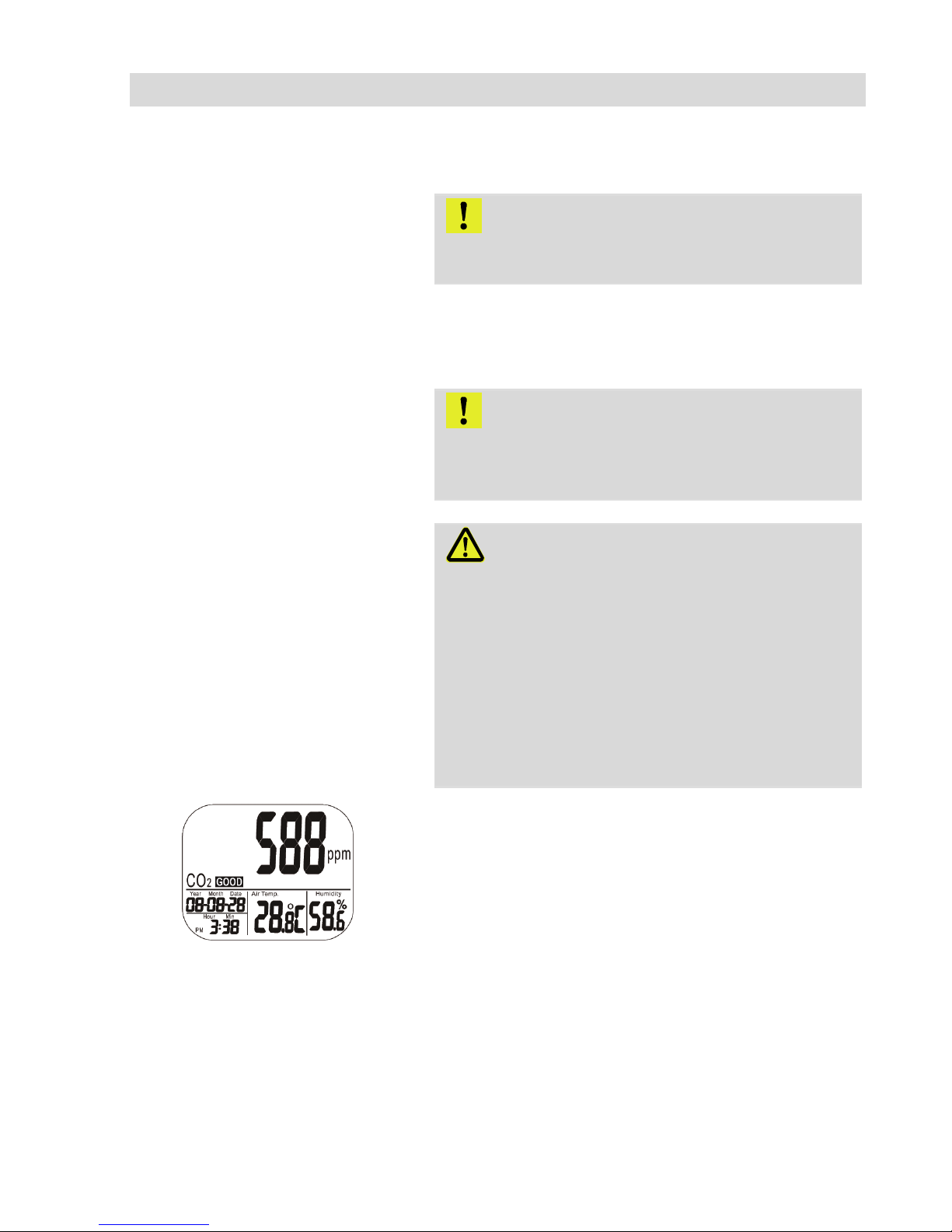
Fig. 3: Initial display
The display will show the current CO2-value, the
temperature, humidity, date and time.
The air quality level is indicated as good, normal
or poor, see Fig. 3.
Otros manuales para CDL 210
2
Tabla de contenidos
Otros manuales de Registrador de datos de Wohler


