
WiT HWT9053 Manual de usuario

HWT9053-RS485 | manual v0707 | http://wiki.wit-motion.com/english
- 1 -
USER MANUAL
HWT9053(RS485)
IP67 Inclinometer

HWT9053-RS485 | manual v0707 | http://wiki.wit-motion.com/english
- 2 -
Tutorial Link
Google Drive
Link to instructions DEMO:
WITMOTION Youtube Channel
HWT9053 RS485 Playlist
If you have technical problems or cannot find the information that you need in the
provided documents, please contact our support team. Our engineering team is
committed to providing the required support necessary to ensure that you are
successful with the operation of our AHRS sensors.
Contact
Technical Support Contact Info
Application
● AGV Truck
● Platform Stability
● Auto Safety System
● 3D Virtual Reality
● Industrial Control
● Robot
● Car Navigation
● UAV
● Truck-mounted Satellite Antenna Equipment

HWT9053-RS485 | manual v0707 | http://wiki.wit-motion.com/english
- 3 -
Contents
Tutorial Link...............................................................................- 2 -
Contact........................................................................................ - 2 -
Application................................................................................. - 2 -
Contents......................................................................................- 3 -
1.1 Warning Statement..................................................- 5 -
2 Use Instructions with PC.................................................- 6 -
2.1 Connection Method.................................................. - 6 -
2.1.1 Serial Connection...................................................................... - 6 -
2.2 Software Introduction.............................................- 9 -
2.2.1 Main Menu................................................................................ - 9 -
2.2.2 Menu of Configuration............................................................- 11 -
2.3 Calibration.................................................................- 14 -
2.3.1 Accelerometer Calibration...................................................... - 14 -
2.3.2 Magnetic Field Calibration......................................................- 16 -
2.3.3 Gyroscope Automatic Calibration...........................................- 18 -
2.3.4 Reset Z-axis Angle.................................................................. - 18 -
2.4 Configuration........................................................... - 19 -
2.4.1 Baud Rate................................................................................ - 19 -
2.4.2 Data Recording........................................................................- 19 -
2.4.3 Data Playback..........................................................................- 21 -
2.4.4 Placement Direction................................................................ - 24 -
2.4.5 Bandwidth............................................................................... - 25 -
2.4.6 Restore Factory Setting........................................................... - 26 -

HWT9053-RS485 | manual v0707 | http://wiki.wit-motion.com/english
- 4 -
1 Introduction
The HWT9053 integrates high-precision gyroscopes, accelerometers, and
MMC3630 magnetic field sensors. It uses high-performance microprocessors
and advanced dynamics calculation and Kalman dynamic filtering algorithms to
quickly solve the current real-time motion posture of the module.
HWT9053 offers several advantages over competing sensor:
•The use of advanced digital filtering technology can effectively reduce
measurement noise and improve measurement accuracy.
•The module integrates an attitude solver, with the dynamic Kalman filter
algorithm, can accurately output the current attitude of the module in a
dynamic environment, the attitude measurement accuracy is 0.001°
(HWT9052 is 0.01°), the stability is extremely high, and the performance is
even better than a certain Some professional inclinometers
•The module has its own voltage stabilization circuit, and the working voltage is
5V~36V.
•Support 485 interface. It is convenient for users to choose the best connection
method. The serial port rate is adjustable from 4800bps to 921600bps.
•4-layer PCB board technology, thinner, smaller and more reliable.

HWT9053-RS485 | manual v0707 | http://wiki.wit-motion.com/english
- 5 -
1.1 Warning Statement
Putting more than 36 Volt across the sensor wiring of
the main power supply can lead to permanent damage
to the sensor.
VCC cannot connect with GND directly, otherwise it
will lead to the burning of the circuit board.
For proper instrument grounding: use WITMOTION
with its original factory-made cable or accessories.
Do not access the I2C interface.
For secondary developing project or integration: use
WITMOTION with its compiled sample code.

HWT9053-RS485 | manual v0707 | http://wiki.wit-motion.com/english
- 6 -
2 Use Instructions with PC
2.1 Connection Method
PC software is only compatible with Windows system.
Link to HWT9053’s demo video
2.1.1 Serial Connection
Step 1. Connect the sensor with a serial converter
PIN Connection:
VCC - 5~36V
B - B
A - A
GND - GND
(VCC 5~36V is recommended for connection)

HWT9053-RS485 | manual v0707 | http://wiki.wit-motion.com/english
- 7 -
Recommended tools:
3-in-1 serial converter 6-in-1 serial converter
Link to tutorial of 3-in-1 serial converter(CH340 driver)
Link to tutorial of 6-in-1 serial converter (CP2102 driver)
Step 1. Unzip the software and install the driver CH340 or CP2102
(Depending on which accessory for usage.)
Step 2. Insert the converter to computer and confirm the “com port” in device
manager
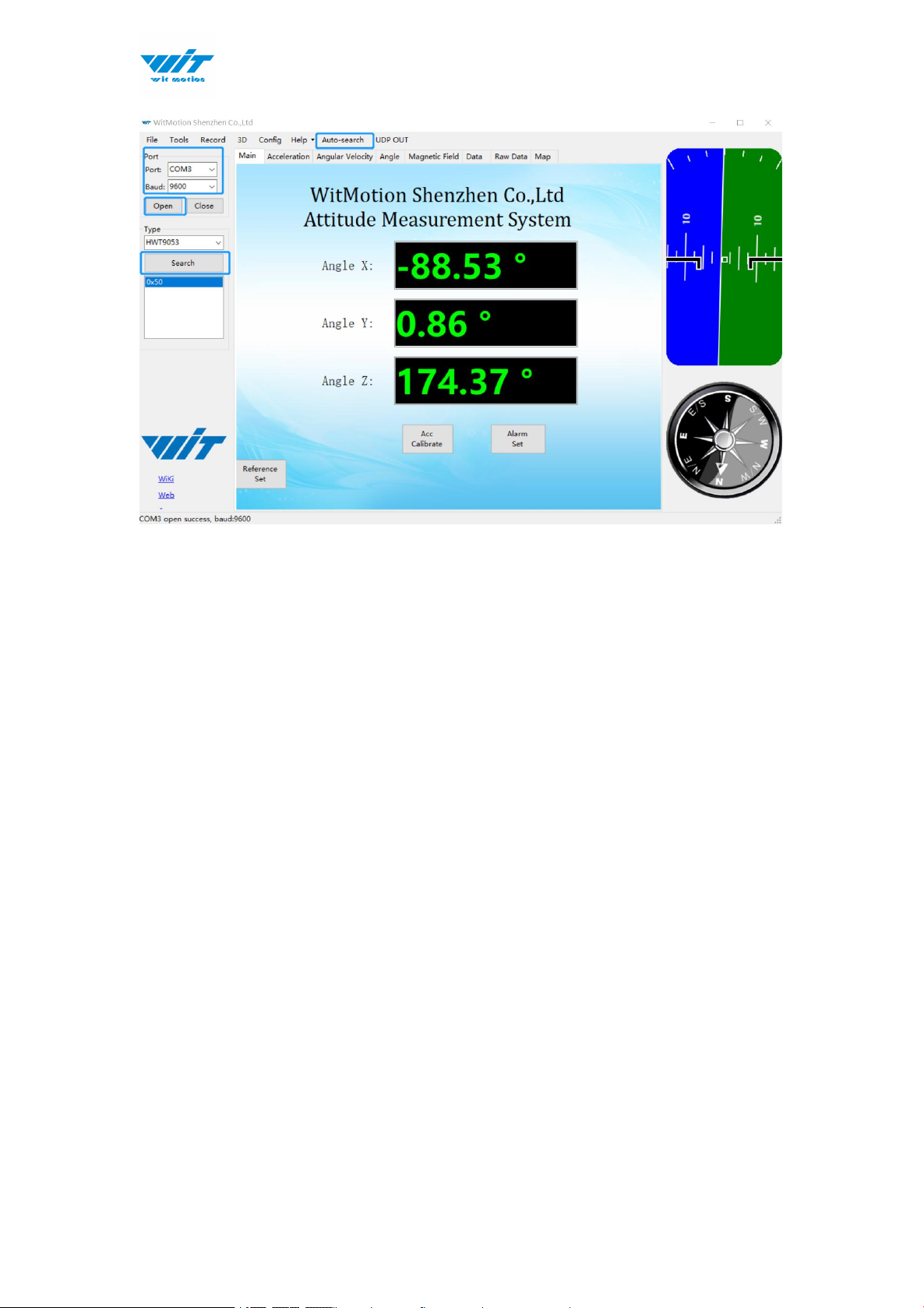
Step 3. Open the software (Minimu.exe).
HWT9053-RS485 | manual v0707 | http://wiki.wit-motion.com/english
- 8 -
Step 1.Choose the com port and baud rate 9600.
Step 2.Open the com port.
Step 3.Choose HWT9053, then click Auto-search.
Step 4.Click 0×50.

HWT9053-RS485 | manual v0707 | http://wiki.wit-motion.com/english
- 9 -
2.2 Software Introduction
Link to download software
2.2.1 Main Menu
Main Menu of software
Button
Function
File
Launch recorded HEX file (Bin format)
Tools
Hide or display tools box on left side
Record
Record function
3D
3D DEMO
Config
Configuration setting
Help
Language
English or Chinese
Bluetooth Set
Bind or unbind
Buletooth 2.0
transparent set
One click configuration or advanced
configuration
Firmware update
Option for firmware update
About Minimu
Info about Minimu.exe
Factory test
For manufacturer internal test only
Auto-search
Auto searching the sensor
UDP out
Start forwarding or forwarding settings

HWT9053-RS485 | manual v0707 | http://wiki.wit-motion.com/english
- 10 -
Port
Choose port
Baud
Baud rate selection
Type
Fixed setting as Modbus for HWT9053
Open
Open com port
Close
Close com port
Tabla de contenidos
Otros manuales de Instrumento de medición de WiT


Manuales populares de Instrumento de medición de otras marcas


Endress+Hauser
Endress+Hauser Proline Promag 50 Especificaciones técnicas

Siemens
Siemens SITRANS F Coriolis FCT030 Manual de lista de piezas

KLINGER
KLINGER CMF V Series Manual de usuario

EXFO
EXFO FTB-2 Manual de operación y mantenimiento

Keysight
Keysight M8290A Manual de usuario

ADTEK
ADTEK MW-5 Manual de usuario