
WILSON PRO PRO 1000C Manual de usuario

PRO 1000C
A Wilson Electronics Brand
wilsonpro.com 866.294.1660
User Manual
In-Building Cell Signal Amplifier
With Extended Dynamic Range & LTE Connected
Remote Monitoring

Package Content
1
About The Pro 1000C
2
Key Features
4
Competitive Advantages
5
Post Install Setup
7
Status Screen
8
Band Status Screens
9
WilsonPro Cloud
13
Local Ethernet Configuration Utility
31
Safety Guidelines
38
Warranty
41
Index

PRO 1000C IN-BUILDING CELL SIGNAL AMPLIFIER WITH REMOTE MONITORING 1
Pro 1000C
2’ Wilson
400
Lightning Surge
Protector
Wide Band Directional
Antenna + 75’
Wilson 400 Cable
Dome Antenna +
100’ Wilson 400 Cable
Kit 460242
Package
Content

IN-BUILDING CELL SIGNAL AMPLIFIER WITH REMOTE MONITORING PRO 1000C
2
Monitor Your Amplifier Installs
Online
Customizable Email/Text Alert
Notifications
Ultra-High System Reliability &
Guaranteed Uptime
Avoid Costly Troubleshooting
Location Visits
The Industry’s First Platform For Cloud-Based Management
Pro 1000C

PRO 1000C IN-BUILDING CELL SIGNAL AMPLIFIER WITH REMOTE MONITORING 3
The Pro 1000C is the industry’s first
platform for cloud-based management
and monitoring of cellular signal
amplifiers.
The WilsonPro Cloud allows an
integrator to manage and monitor
installed cellular amplifiers
from a phone, tablet, laptop, or any device that runs a Web browser. You can get
customizable email and text notifications to alert you to any status change of your
installed amplifiers, including notification if a system ever goes oine.
With the WilsonPro Cloud you can remotely reset an amp or selectively turn specific
frequency bands on and o, so the integrator avoids costly troubleshooting site visits.
The platform also provides report generation, performance and signal level histories,
and organization of monitored amps by account and location. There’s even a remote
donor antenna tuning tool.
For installers and integrators, subscribing to the WilsonPro Cloud means you can
sell your clients extended service plans, generating recurring revenue streams for
your business. And for your clients, the WilsonPro Cloud provides ultra-high system
reliability and guaranteed uptime.
The 1000C amplifier connects to the WilsonPro Cloud right out of the box via an LTE
modem on the donor antenna, or through a traditional hardwired Ethernet port. The
wireless LTE connection is included in the annual WilsonPro Cloud subscription, so no
additional Internet connection is required.
t
m
ent
IN-BUILDING CELL SIGNAL AMPLIFIER WITH REMOTE MONITORING PRO 1000C
4
Simple Wall-Mount Installation: An indoor and outdoor
port are located on top of the Pro 1000C for easy antenna
connections, while an exposed mounting flange at each
corner of the amplifier provides for simple and clean wall-
mount installation.
Onboard Software for Better Control: The amplifier is
automatically controlled with automatic onboard software,
ensuring great connectivity throughout large spaces and
multi-story buildings. The amplifier will adjust its gain level up
or down as required by the conditions of the immediate signal
environment.
Extended Dynamic Range (XDR) for continuous connectivity:
Gives the 1000C much greater tolerance for a strong incoming
signal from the tower. XDR lets the 1000 system work with an
incoming signal stronger than any competing amplifier and
never shuts down due to a strong outside signal.
Color LCD for Easier Access: Unlike other amplifiers, the
Pro 1000C has a color LCD screen with four-way navigation,
allowing integrators to optimize antenna position and
maximize the performance of the amplifier.
Remote LTE Connected Monitoring: Get immediate
notification if the 1000C stops working or if band
conditions change.
IN-BUILDING CELL SIGNAL AMPLIFIER WITH REMOTE MONITORING PRO 1000C
4
Key
Features

PRO 1000C IN-BUILDING CELL SIGNAL AMPLIFIER WITH REMOTE MONITORING 5
Highest Downlink Power: Up to +15dBm downlink output
power allows for stronger signal in environments where the
incoming signal is weak. The benefit is a stronger signal sent
to the inside antennas, providing larger coverage area from a
single amplifier.
Highest Uplink Power: This allows for a stronger signal
transmitted to the tower, up to +3dB more than the
competition, providing greater user capacity and increased
range from the cell site.
Lower Overload and Shutdown Threshold: No matter how
strong the outside signal, the Pro 1000C never shuts down.
This is a huge benefit in strong signal environments like cities
and locations close to a carrier tower.
Intelligent Control: Pro cellular amplifiers automatically
adjust signal gain while still providing even signal coverage
throughout the building.
More Secure: Connectivity and remote monitoring via LTE, so
no “sharing” of existing premises network resources which
creates a more secure system.
PRO 1000C IN-BUILDING CELL SIGNAL AMPLIFIER WITH REMOTE MONITORING 5
Competitive
Advantages

IN-BUILDING CELL SIGNAL AMPLIFIER WITH REMOTE MONITORING PRO 1000C
6
Outside
Directional
Antenna
to power
Lightning
Surge Protector
Inside Dome
Antenna
power
o p
1000C
Simple wall-mount
installation.
The direction of the
outside antenna should
be adjusted until the “DL”
bar is maximized.
A Wilson Lightning Surge Protector is recommended for all building installations. Make
sure the protector is installed outside the building at point of entry connected to a
suitable ground and in line between the Outside Antenna and the Signal Amplifier.
Installation
Diagram
PRO 1000C IN-BUILDING CELL SIGNAL AMPLIFIER WITH REMOTE MONITORING 7
5 Band Cellular Booster
5 Band Cellular
Booster
Pro 1000C
SN:
460042CO158651865
MAC:
70:B3:D5:95:C0:02
Visit cloud wilsonpro.com to register this product
MFG Data:
2018-07-06
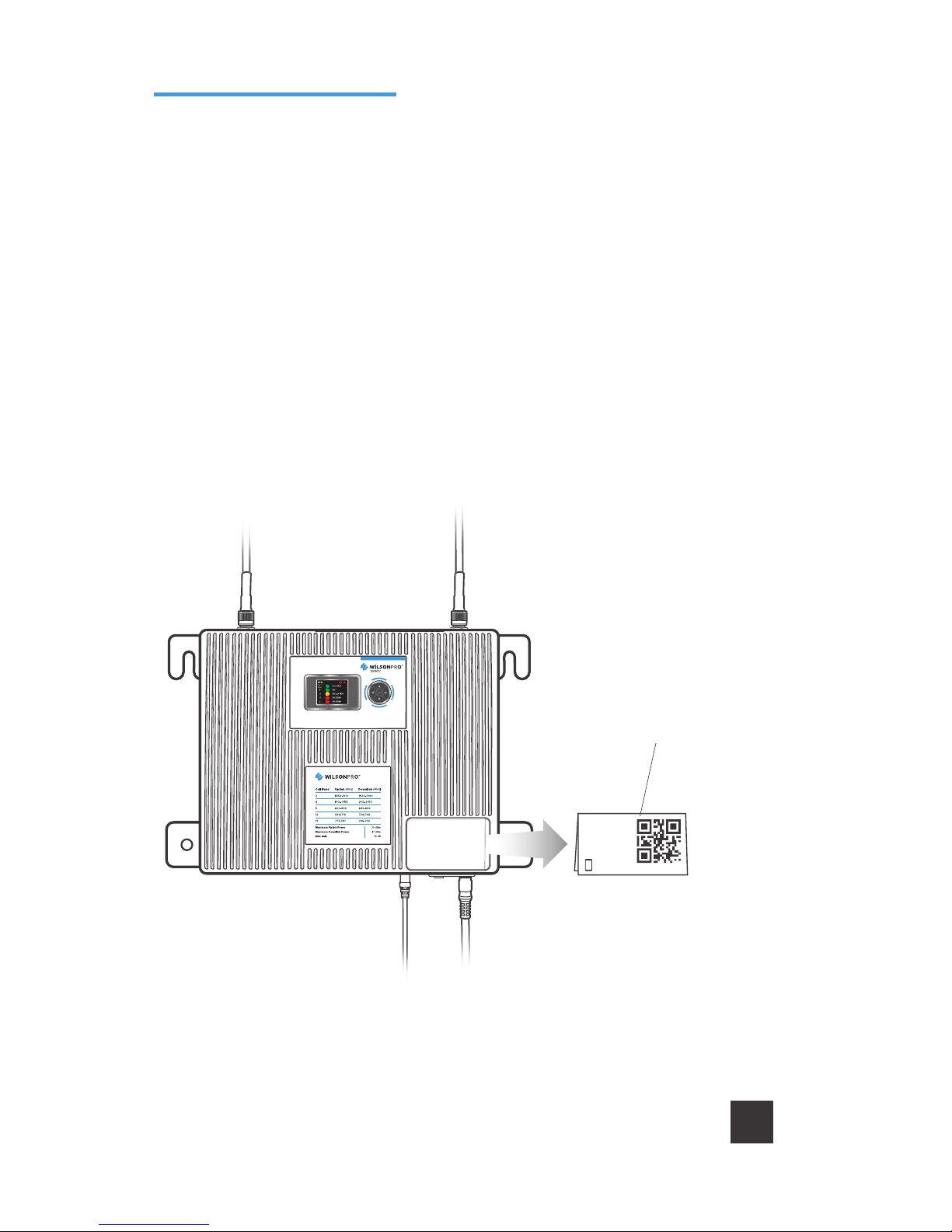
The WilsonPro Pro 1000C oers the same cost-eective, FCC and carrier approved pas-
sive DAS amplifier solution that installers and integrators have come to trust, including
the added functionality, alerts, and troubleshooting of an enhanced cloud management
and monitoring solution.
Once the AC power cable and antenna cables are connected, scan the QR code on
the Quick Registration Card to add the amplifier to your WilsonPro Cloud account. For
detailed instructions see the WilsonPro Cloud section.
To add the amplifier to your
WilsonPro Cloud account,
scan the QR code or enter
the info in manually.
WilsonPro Cloud Quick
Registration Card
Post Install
Setup

IN-BUILDING CELL SIGNAL AMPLIFIER WITH REMOTE MONITORING PRO 1000C
8
The Pro 1000C takes about 20 seconds to boot up. Once boot up is complete, the status
screen will appear, showing the amplification and status of each port and band.
A solid green light indicates that a band
is operating correctly with maximum
allowable gain.
A solid yellow light indicates band gain
reduction because of an oscillation
condition. Reposition antennas (more
separation between indoor and outdoor
antennas, and pointed in opposite
directions) and reboot (power cycle)
the 1000C for maximum performance.
When adequate separation is achieved,
the yellow lights will return to green
upon reboot. Note that when the light
is yellow, the band is operational;
however, performance is reduced.
System Status Screen
Splash Screen
Lights Description
Status Screen
Tabla de contenidos
Otros manuales de Amplificador de WILSON PRO


