
Wave Central AXRX-QDM Manual del propietario

AXRX-QDM Receiver User and
Programming Guide
Wave Central LLC
99 Garden Parkway, Suite C., Carlisle, PA 17013
+1 888 736 9283 www.wave-central.com

Contents
1. System Description .……………………………………………………………………. 4
1.1 What is the AXRX-QDM Receiver.......……………………………………… 4
1.2 Features & Benefits ....………………………………………………………….. 5
1.3 Overview ..…..………………………………………………………………………. 7
2. Getting Started ………………………………………………………………………….. 9
2.1 Identifying your Device …….………………………………………………….. 9
2.2 Labels …………………………………………………………………………………. 9
2.3 Installation .…………………………………………………………………………. 10
2.4 Software ……………………………………………………………………………… 11
3. Controls, Connections & Indicators ………………………………………………. 12
3.1 About Controls, connections & Indicators ……………………………….. 12
3.2 Front Panel .…………………………………………………………………………. 12
3.3 Control Panel …………………………………………………………………… ….. 13
4. Setting up your AXRX-QDM Receiver……………………………………………… 14
4.1 Connecting Antennas ……..…….………………………………………………. 14
4.2 Connecting DC Power……………………………………………………………. 15
4.3 Connecting AC Power …………………………………………………………… 15
4.4 Connecting Video Signals ……………………………………………………… 15
4.5 Connecting Audio Signals ……………………………………………………… 16
4.6 Connecting Data Signals ……………………………………………………….. 16
4.7 Connecting Control Signals ……………………………………………………. 17
4.8 About IP Control ………………………………………………………………….. 17
4.9 About Mission Commander.……………………………………………………. 17
5. Basic Operations …………………………………………………………………………. 18
5.1 Starting and Stopping …….…………………………………………………….. 18
5.2 Control Panel ………………………………………………………………………. 18
5.3 Menu Structure …………………………………………………………………… 20
5.4 Display System …………………………………………………………………….. 23
6. Advanced Setup …………………………………………………………………………. 26
6.1 Web Browser …….………………………………………………………………… 26
6.2 Connecting PC …………………………………………………………………….. 26
AXRX-QDM Receiver Users Guide

6.3 Primary Window ………………………………………………………………….. 29
6.4 Status Tab …………………………………………………………………………… 30
6.5 Global Settings …………………………………………………………………….. 35
6.6 Setting the Clock ………………………………………………………………….. 42
6.7 Configuration Tabs ………………………………………………………………. 42
6.8 Frequency Scanner ………………………………………………………………. 47
6.9 Log Tab ………………………………………………………………………………. 51
6.10 Upload Tab ……………………………………………………………………….. 51
6.11 Information Tab …………………………………………………………………. 51
7. Appendix A ………………………………………………………………………………… 52
7.1 Cautions and Warnings …………………………………………………………. 52
7.2 EMC/ Safety and Approvals …………………………………………………… 54
8. Appendix B ………………………………………………………………………………… 54
8.1 Equipment Care ….……………………………………………………………….. 54
8.2 Charging ……………………………………………………………………………… 55
8.3 Lithium Batteries ………………………………………………………………….. 55
8.4 Cleaning ……………………………………………………………………………… 56
8.5 Storage ……………………………………………………………………………….. 56
8.6 Repairs ……………………………………………………………………………….. 56
8.7 Technical Support ………………………………………………………………… 56
8.8 RMA Service ………………………………………………………………………… 56
9. Glossary …………………………………………………………………………………….. 58
9.1 Glossary ……………………………………………………………………………… 58
Document Disclaimer ...................................................................... 66
AXRX-QDM Receiver Users Guide

AXRX-QDM Receiver Users Guide
1.
Systems Description
This User Guide is about:
Equipment Title Operational Frequencies
AXRX-QDM Diversity Receiver 2GHz to 7.1GHz
Compact Sector Antennas 2GHz to 7.1GHz
Figure 1-1 – AXRX-QDM Receiver
1.1
What is the AXRX-QDM Receiver?
The AXRX-QDM Receiver from Wave Central is a feature-rich COFDM digital video receiver,
which can operate in a variety of transmission bandwidths enabling the user to trade off
image quality against range, to suit all types of missions.
The AXRX-QDM Receiver has Wave Central at its core and is ideal for establishing long
duration rugged wireless video links, in harsh external environments, like mobile and urban
environments. The AXRX-QDM receiver is available in a variety of frequency bands.
Control is achieved through a front panel interface or by connecting the unit to an IP
network using the Ethernet interface given. You can quickly configure the device in the field
with laptop PC and configuration software.
The product can be used with an optional external chargeable battery pack; IDX or Anton
Bauer, providing between four and five hours battery life. The unit can also run from an
external DC supply which is included.
The front panel allows the user to switch channels and do basic configuration without the
need for connection to a PC, making it ideal for portable or mobile situations.
4

AXRX-QDM Receiver Users Guide
1.2
What are the Features and Benefits of AXRX-
QDM
Receivers?
It can be very useful to understand how the features of the unit yield tangible benefits to
you. This table summarizes these features and, more importantly, the benefits.
What are the Key Features of the AXRX-QDM Receiver?
Small dimensions: 5.7 x 3.5 x 1.6 inches (without cables or battery)
Low power
Fully featured 8/7/6/MHz demodulation
Maximum ratio combining antenna diversity
IP video streaming (RTSP and UDP) *
Ethernet control
Front Panel control
Specifications:
RF input (2) 2GHz to &.1GHz
DVB-T Bandwidth 6, 7 & 8 MHz
DVB-T Guard Intervals 1/32, 1/16, 1/8 and ¼
DVB-T FEC ½, 2/3, 3/4, 5/6 & 7/8
DVB T Constellations QPSK, 16QAM & 64QAM
Sensitivity <95dB
Video Line Standard PAL/NTSC
Resolutions (HD) 1920X1080i/59.94/50Hz
1920X1080p 30/29.97/25/24/23.97
1920X1080psf 30/29.97/25/24/23.97
1280x720p 60/59.94/50Hz
(SD) 720X480i 59.94Hz
720X576i 50Hz
Video Out (2) SD/HD SDI Video (1) Composite – BNC
Audio Out Analog (2) Stereo Line level via LEMO 5-pin OB, Headset Monitor
Embedded
Power – DC Input 9 to 16VDC
Power Consumption 20 Watts
Available Battery Plates IDX or Anton Bauer
5

AXRX-QDM Receiver Users Guide
1.2.1 Features and Benefits Table
KeyFeatures KeyBenefits
Compliant DVB-T Demodulator and
proprietary narrowband.
Full Demodulation 8, 7, and 6 MHz
Correct multi-mode operation - Perfect
integration with your current equipment.
Line Level Audio / Video Out, Headphone
output.
Easy to use - Operations staff can use known
standard equipment.
Digital COFDM Modulation Excellent performance - Resistant to multipath
interference, delivers high quality video and
audio, also when mobile or in built up areas like
urban environments.
Low Delay, high quality video encoding
in MPEG-2 and MPEG-4
High reliability - Use a radio system like it was
a line. You can select between MPEG 2 and 4
to suit your operation.
Low latency Enables real-time operations like remote
vehicle control or UAV operations.
Sixteen Presets Available Better use of assets and resources - You can
preset frequencies into sixteen presets.
Configure the full operation in the calm of the
headquarters then the operations staff only
have to quickly select the preset with one
button.
High reliability and availability Reduced maintenance requirement, reduced
spares holding, resulting in important cost
benefits across the life of the system.
Low Mass Applicable for discrete operation in the field.
Note: AXRX-QDM Receivers are frequency specified because they have internal down
converters.
6

AXRX-QDM Receiver Users Guide
1.3
Getting an Overview of the AXRX-QDM Receiver
Diagram: AXRX-QDM Receiver Primary System
Figure 1-2 Primary System Layout
Primary Unit bottom panel shown
1
23
13
9
4
5
8
7
6
12
11
10
13
7

AXRX-QDM Receiver Users Guide
No Item Function
1 AXRX-QDM Receiver. Primary Unit bottom panel shown.
2 N Connector 2-way female for antennaAntennas connect here. Do not
tighten too much – tighten with
your hand.
3 N Connector 2-way female for antenna Two antennas used for diversity
reception.
4 USB Mini-B 5-way receptacle Connects to your PC for
programming the AXRX-QDM
receiver.
5 RJ45 8-way receptacle (sockets). Connects from your PC.
6 LEMO OB 4-way receptacle (sockets) Power Input.
7 LEMO OB 6-way receptacle (sockets), For control/data in and out.
8 LEMO OB 5-way receptacle (sockets). Audio output.
9 1/8” Stereo Phone Jack Headset audio monitoring
10 BNC 2-way plug, (pins). SD/HD SDI
11 BNC 2-way plug, (pins). SD/HD SDI
12 BNC 2-way plug, (pins). For analog video output.
13 Battery Adapter Plate IDX or Anton Bauer
Table 1-3 – Primary System Diagram Key
8

AXRX-QDM Receiver Users Guide
2.
Getting Started
2.1
Identifying your Device
The AXRX-QDM Receiver is described in this User Guide.
Figure 2-1 – AXRX-QDM Receiver showing Control Panel
This is a AXRX-QDM Receiver [Quick Deploy Mini]
Its type designation is: AXRX-QDM
Dimensions: 5.7” (L) x 3.5” (W) x 1.6” (D)
Less cables and battery adapter plate
Weight: 1.4 pounds
Operating Temperature: -10 degrees C to +45 degrees C
Power Consumption: 8W DC Input 6 to 16VDC
2.2
About the Labels on your AXRX-QDM Receiver
Which model do I have? What is its Serial Number?
This topic contains information covering placards, labels, markings, etc., showing the part
number, legend and location of each placard, label, or marking required for safety or
maintenance important information.
9
AXRX-QDM Receiver Users Guide
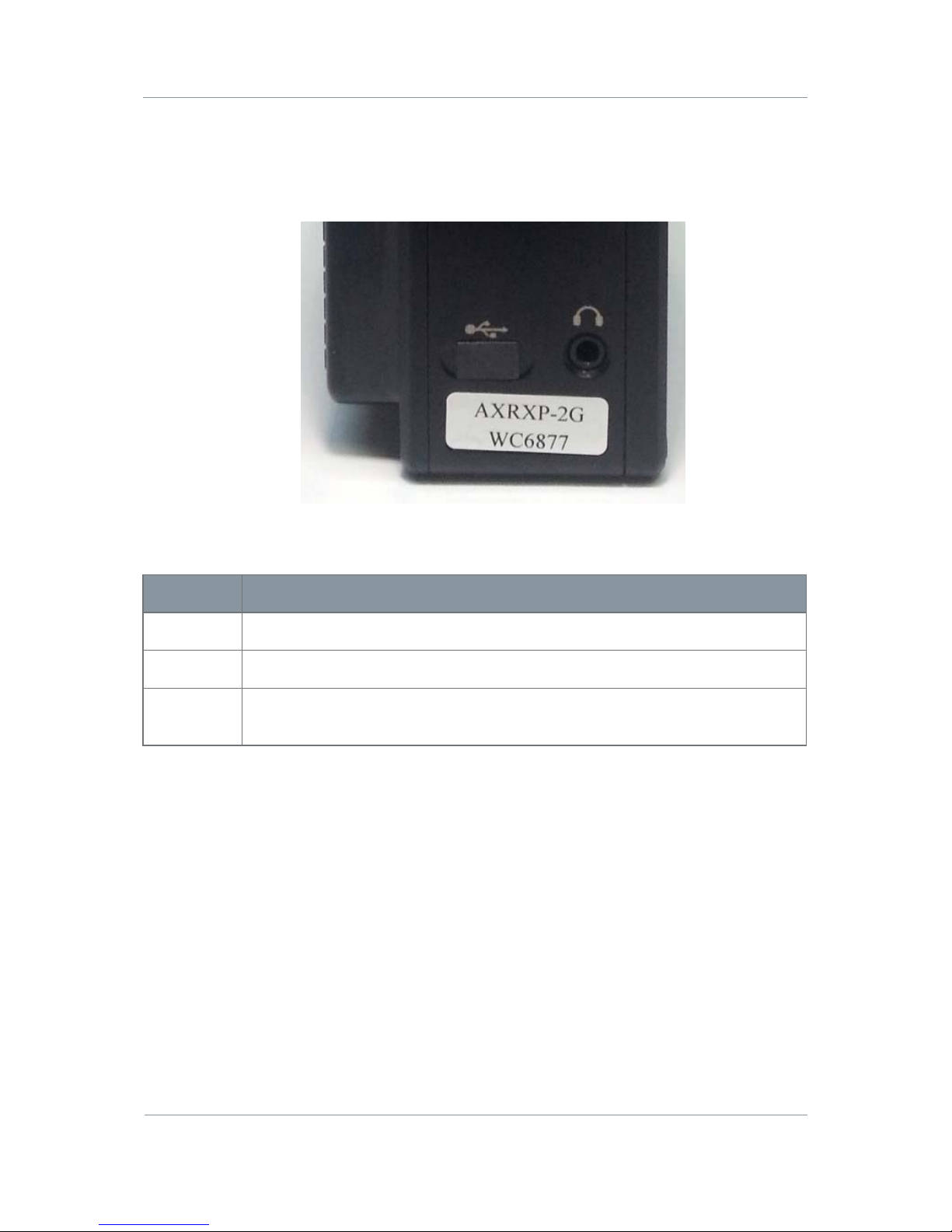
Step 1: Identify the Device Label
Figure 2-2 – AXRX-QDM Receiver Label
No Item
1 AXRXP-2G family of products.
2 Frequency range, 2GHz in this example.
3 WC with four digit serial number. This number will be necessary during a
support call.
Table 2-3 – AXRX-QDM Receiver Label Key
2.3
Planning the Hardware Installation
During the layout of the system, you must give careful consideration of the location of this
and all other related modules. Some of the items to think about include:
Space - Keep 100mm clearance left and right for cable bending.
How near to other devices (for example, source equipment).
Length of cables.
Environmental conditions (temperature, humidity, etc.)
Access for repair.
10
Otros manuales para AXRX-QDM
1
Tabla de contenidos
Otros manuales de Receptor de Wave Central


