
VNS S901 Manual de instrucciones

S901 Quick User Guide Document: S901-3
---------------------------------------------------------------------------------------------------------------------------------------------
0
S901 Quick User Guide
5x1 Seamless UHD switcher with Quad Split Views
Technical support:
Tel: +886-2-2792-2819 Cell: +886-935-678-033
Skype: vns-inc
Version: 1.02
Website: www.vnstw.com
The absolute opposite of ordinary

S901 Quick User Guide Document: S901-3
---------------------------------------------------------------------------------------------------------------------------------------------
1
1. System Connection
If the output resolution is not supported by the monitor, user will not see the image.
Please select output resolution in remote controller to 1080P to see the image.
After Power on S901, user will see LED indicator lighted up.
➢Input LED will turn to green when S901 has detected input signal.
➢When user selects the input for display, LED will turn to orange.
➢Output LED will turn to orange when S901 has detected display device in the output.
Input LED
Output LED, output resolution can be selected by remote controller
Main window
Sub-window2
Sub-window3
Sub-window1
Main
Sub-1
Sub-2
Sub-3

S901 Quick User Guide Document: S901-3
---------------------------------------------------------------------------------------------------------------------------------------------
2
2. Seamless switching for main input
➢Seamless switching function is only functional for main input with single image display.
➢Select from green LED port and click input selection button to switch input port. The LED will turn
to orange light when the input port has been selected.
User can also select main input port from remote controller.
Input selection buttons
Output resolution selection, more
output resolution can be selected
from OSD
HDMI-2
Toggle between
HDMI-3 & DP-2
HDMI-1
Input selection
DP1

S901 Quick User Guide Document: S901-3
---------------------------------------------------------------------------------------------------------------------------------------------
3
3. Front panel
OSD menu operation
➢Activate OSD menu through MENU key
➢Manipulate OSD function through INPUT keypads (same as input selection keys). The symbol are
under each input selection button.
Profile Save and Load (Custom setting Save and Recall)
➢Press [Save] keypad, then select Profile Index # keypad (same as Input selection keys)
➢Press [Recall] keypad, then select Profile Index # keypad (same as Input selection keys)
➢The Index # is under each input selection key.
LED Indicator
➢Input LED will turn to green when S901 has detected input signal.
➢When user selects the input for display, LED will turn to orange.
➢Output LED will turn to orange when S901 has detected display device in the output.
➢Power LED:
➢RED Power LED lighted: Power connected and has been turned off by remote controller. Need
to turn on by remote controller again.
➢GREEN Power LED flashing at 1.0s interval: OSD lock through Lock through remote controller
85x command. Press 850 on remote controller number keys to unlock OSD.
➢GREEN Power LED flashing at 0.5s interval: OSD Lock through press MENU for 5 seconds.
Hold Menu key for 5 seconds to unlock if the system.
Input LED
Three functions
1. Seamless input selection
2. OSD function key after
activate OSD
3. Index for Profile Save and
Load
Quad split view
ON/OFF hotkey
Activate OSD
MENU
Custom setting
Profile RECALL
Output
LED
IR Receiver
Custom setting
Profile SAVE
S901 Quick User Guide Document: S901-3
---------------------------------------------------------------------------------------------------------------------------------------------
4
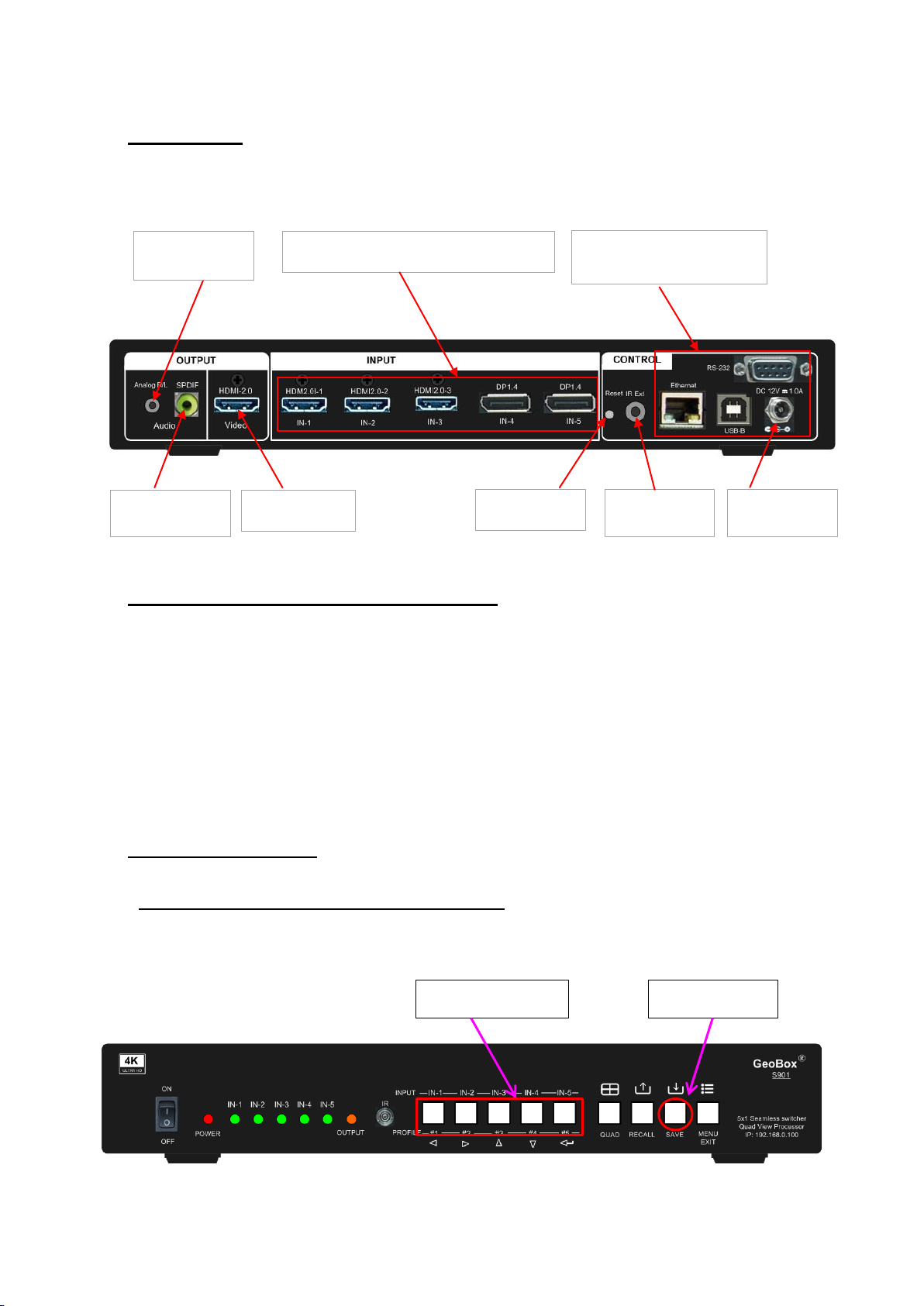
4. Back panel
User can connect signal source to any of the input ports for main display and PIP/POP operation.
5. Custom settings saved and recalled
➢Custom settings will be saved under Profile Index. It will be erased only when user resets the
system through inserting pin into Reset Hole on back panel for 5 seconds.
➢Custom setting [Save] and [Load] can be implemented through front panel keypads, remote
controller, RS232 and GCT PC tool by USB WebGui or Ethernet.
➢5 Profile Indexes can be saved through front panel buttons. 10 indexes can be saved in remote
controller and through OSD menu.
5.1. Save system settings
5.1.1. Save system settings through front panel buttons
Click [Save] key, then select Index# to save custom settings.
[Save] hotkey
Profile Index keys
Input Ports, HDMI 2.0 & DP 1.4
Video Output
IR Extender
connector
DC 12V/2A
connector
System control
RS232, USB, Ethernet
Reset Hole
SPDIF Audio
Output
Analog RL/LH
Audio Output

S901 Quick User Guide Document: S901-3
---------------------------------------------------------------------------------------------------------------------------------------------
5
5.1.2. Save system settings through IR remote controller
➢Click [Save] hotkey on remote controller, then select # key to save custom settings.
➢10 profile Indexes can be saved from remote controller. “0” represents Index #10.
5.2. Recall system settings
5.2.1. Recall system settings through front panel keypads
Click [Recall] key, then select Index # to load custom settings.
5.2.2. Recall system settings through remote controller
➢Click [Recall] hotkey on remote controller, then select # key to load custom settings.
➢“0” represents Index #10.
Click [Save] key, then
select number key
Click [Profile] key, then
select number key
[Recall] hotkey
Profile Index keys
S901 Quick User Guide Document: S901-3
---------------------------------------------------------------------------------------------------------------------------------------------
6
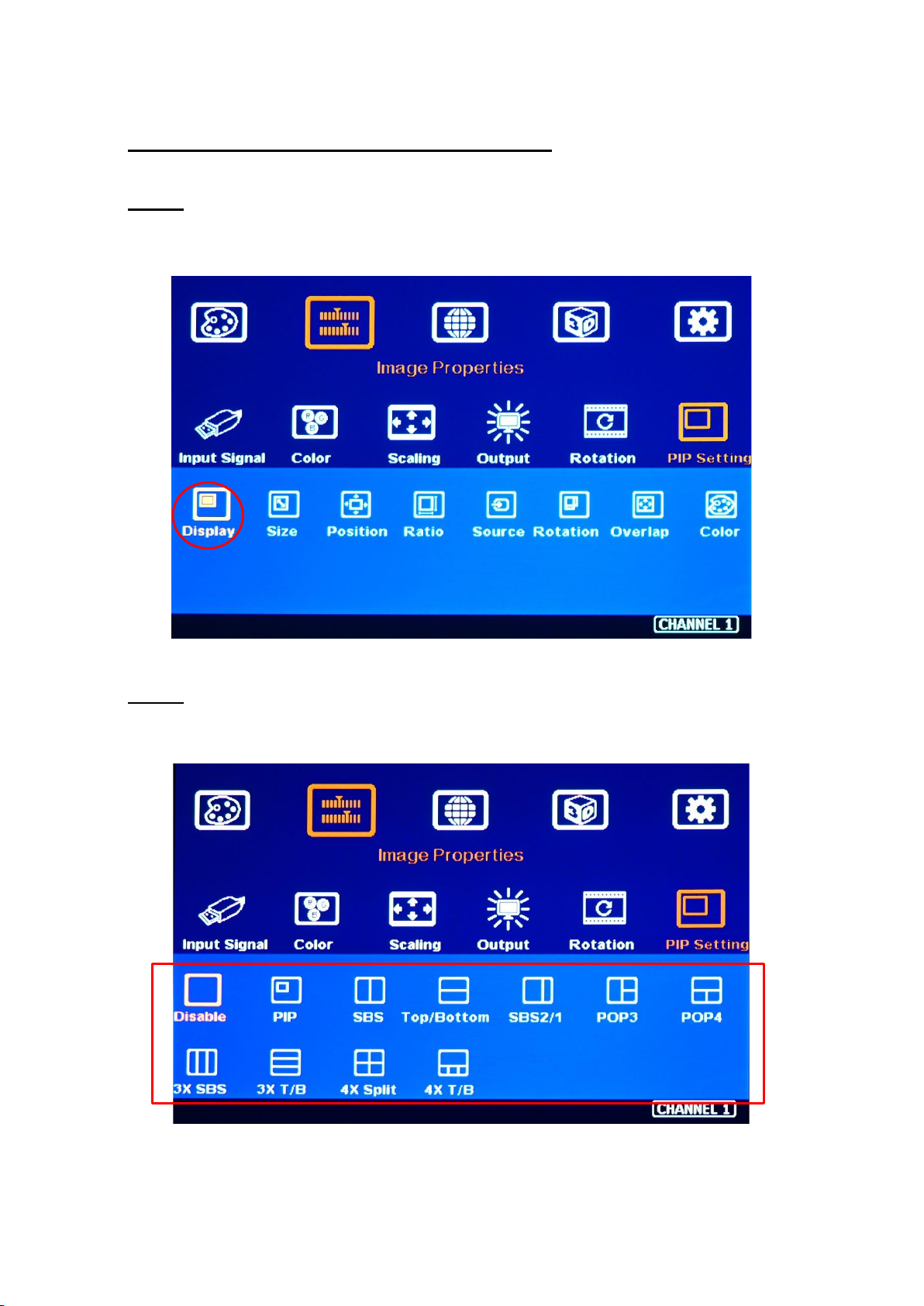
6. More display patterns selected from OSD
6.1. Step 1
Click MENU key to open OSD→[Image Properties]→[PIP setting]→[Display]
6.2. Step 2
Select required display pattern→Select input source→Save to Profile Index #.

S901 Quick User Guide Document: S901-3
---------------------------------------------------------------------------------------------------------------------------------------------
7
7. Main and Sub-window input source selection
➢One of the display windows is Main-window and the rest are sub-window. Main-window input source
can be selected directly from front panel keypads.
➢Sub-window input signal can only be selected from OSD by remote controller or front panel keypads.
➢Any input port can be selected as main or sub-window input source or duplicated.
➢User can set the cropping area of the input source through [Overlap] function under [Video Wall]
menu (for main-window) or under [PIP setting] menu (for sub-windows).
Main input source selection
➢Click front panel input selection keys or
➢Activate [MENU] key→[Image Properties]→[Input Signal]→select input port.
Sub-window input source selection
Activate [MENU] key→[Image Properties]→[PIP Setting]→[Source]→select [Sub-Win#]→Select
input port.
Main image source selection Sub-window source selection
Under this example, Sub-win1 selects HDMI-2
Tabla de contenidos
Otros manuales de Cambiar de VNS


