
Vizualogic RoadTrip RT-043A Manual de usuario


1.Welcome 1
2.ImportantSafetyInformation 1
2.InstallationInstructions 1
3.GPSPackingList 2
4.ProductDescription 3
5.ProductSpecifications 4
6.RearviewMirrorGPSAppearanceandFunctionDescription 6
7.QuickGuide 8
8.UsingSD/MMCard 9
9.StarttoNavigate 9
10.DetailedInstructions 10
11.Calculator 15
12.MusicInterface 17
13.AddingMusic 18
14.VideoInterface 19
15.PhotoInterface 21
22
23
24
24
25
26
27
21.SystemInformation
22 FAQ
16.FlashInterface
17.Devicesettings
18.Timesetup
19.LanguageSetup
20.VolumeAdjustment
TableofContents
27
22
.
FAQ
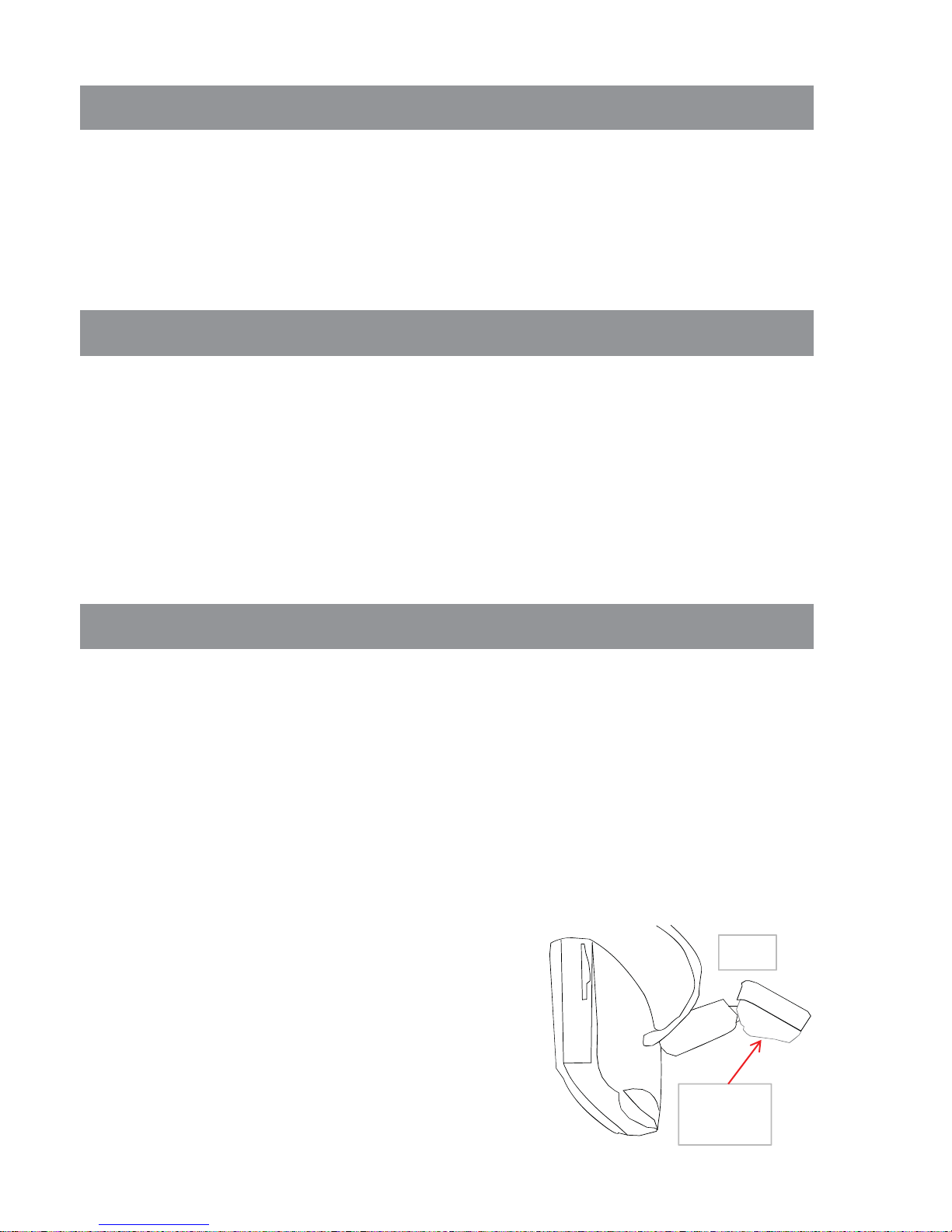
1) Remove factory mirror (most factory mirrors will have a hex screw to remove it) Fig 1 Refer to your
InstallationInstructions
Thisvideoproductisdesignedforfrontdrivernavigationonly.Thevideoportionofthisunitshouldonly
beusedwhenthevehicleisparkedwiththeemergencybrakeset.Driverdistractionisamajorcauseof
accidentsandforthisreasonmanystatesspecificallyprohibittheviewingofmotionvideowithinview
ofthedriverwhilethevehicleisinmotion.
Welcome
Reviewingthisowner'smanualthoroughlypriortooperationwillprovideyouwiththebest
performanceandhelpexplainthesimplerequirementsforpropercare.
ImportantSafetyInformation
Forsafetyreasons,whenchangingtheSDcarditisrecommendedthatthevehiclebestationary,and
thatyoudonotallowchildrentounfastenseatbeltstochangeSDcardsormakeanyadjustmentstothe
system.Systemadjustmentscanbesafelyaccomplishedwhenthevehicleisinpark.Enjoyyour
VizualogicRearviewmirrorwithGpsbutrememberthesafetyofallpassengersisthenumberone
priority.
CongratulationsonyourpurchaseofaVizualogicRearviewmirrorwithGPSthatwillprovideyou
withmanyyearsofenjoyment.Thissophisticatedproductprovidesyouwithvehiclenavigationwith
Bluetoothandabackupcamerainputwithoutalteringtheappearanceofyourvehicle'soriginalinterior.
1a)Afteryouhaveloosenedthehexscrewremovethemirrorbyslidingitforward.
3)RemovefactoryAPillar(thisshouldbedonebyaqualifiedtechnician)
4)RunthewireprovidedwiththemirrorandtuckitaroundtheAPillarandtheheadliner.
5)Theyellowwirewillneedtobehookeduptoaconstant12vsource.
6)Theredwirewillneedtobehookeduptoaaccessorywire12vsource.
7)Theblackwirewillneedtobehookeduptoavehiclechassisground.
8)Thegreenwireisforreversesensorfortherearviewcamera.
9)Video1inputwireisforaftermarketvideoinput.
10)Video2inputwireisforaftermarketvideoinput.
11)Camerawireisforreversecamerainput.
2)MountyournewGPSMirrorbyslidingitoverthefactorywindshieldbracketandtighteningthehex
screw.
1)
R
emove
f
ac
t
orym
i
rror.
(
mos
t
f
ac
t
orym
i
rrorsw
ill
h
avea
h
exscrew
t
oremove
it)
Fi
g
1
.
R
e
f
er
t
oyour
vehiclesownersmanualformoredetailedinstructions.
Note:IfyoufindthatthemirrorhasadifferentmountingtypebracketcontactyourVizualogicdealer
andaskaboutdifferentbracketavailability.
Fig1
Hex
Screw

1
1
1User'sManual
CarCharger(optional)
Bracket(optional)
1
Components Quantity
1
MirrorwithGPS
Navigation
Cablewithafilter
PowerCable
GPSPackingList

4.3InchcolorTFTHighBrightnessDisplayScreenat320x240resolution
1.5WBuiltinHiFiSpeaker
Button+TouchPanelOperation
BuiltinHighSensitiveGPSReceptionModule
BuiltinGPSReceivingAntenna
SupportsBackupCameraInput
SupportsDataStorageSD/MMCCardorBuiltinFlash
MusicPlaybackinMp3,WavandMIDIFormats
VideoPlaybackinASF,AVI,MP4,WMVFormats
ImageBrowsinginBMP,JPG,PNGandGIFFormats
BluetoothHandsFreeFunction
Video Signal Input to Support the Function of A Rear View Camera
ProductDescription
Vid
eo
Si
gna
l
I
npu
t
t
o
S
uppor
t
th
e
F
unc
ti
ono
f
A
R
ear
Vi
ew
C
amera
SupportsFMtransmitfunction,FrequencyRangefrom88MHZto92MHZ
Powersupplyfrom9Vto16V

NavigationSoftware HorizonNavigation
SDcardorFlash(optional)
OperatingSystem WINCE5.0NET
SoftwareCompilation
Method ARMV41
128MB~8GB
NavigationSoftware
StorageMedium
WorkingHumidity 45%~80%RH
ProductSpecifications
EnvironmentParameters
Size 30*8.5*3cm
10°C~+55°C
StorageTemperature 20°C~+85°C
MainChipType
WorkingTemperature
SystemParameters
MainFrequency 400MHZ/533MHZ(optional)
SAMSUNGS3C2443
Memory 64MB4G(option)
ExpansionCard
StorageHumidity 30%~90%RH

CVBS
VideoInputPower
18,000m
MaximumSpeedRate 515m/s
BuildinAntennaVoltage 3.3V+5%
BuildinAntennaCurrent
WarmStartupTime 40sonAverage
No
ScreenDimensions 4.3
Rlti
320*240
SpeedRate 0.1m/s
DataUpdateRate
ColdStartupTime Lessthan100s
MaximumPositioning
Height
RecaptureTime 0.1sonAverage
HotStartupTime Lessthan3s
TrackingSensitivity 150dBm
GPSHardwareParameters
PositioningSensitivity 10m,2DRMS5m,3DRMS,WAASenabled
1HZ
C/ACode 1.023MHZChipRate
ChannelNumber 20Channels
15ma
BasicParameters
Acceleration <4g
BuildinAntennaType BuiltinActiveCeramicAntenna
BuildinAntennaGain 24dB
Frequency 1.575GHZ
VideoInputType
BluetoothHandsFreeParameters
MaximumDistance 10m
3~5M
StandbyPower <20mW
PowerSupply DC9Vto16V
HandsFreeType FullDuplexTransmission
ChipSet CSRBLUECORE3
MP4Parameters
asf,avi,mp4,wmz
Resolution 320*240
TransmitFrequency 88MHZ~92MHZ
TransmitDistance
CommunicationType V1.2
FMTransmitter
Resolution 320*240
AudioOutput(option) DoubleChannelCDSoundQuality
AudioPower 4/1.5w
Formats

RearviewMirrorGPSAppearanceandFunctionDescription
1
2 3 44 5 6 7
8
9
12
1
2 3 44 5 6 7
8
9
1
11
13
12
15
14 16
17
18

1Mirror StandardMirrororAutoDimmingMirror
2V2 VideoInput#2
3M SwitchfromVideomodetoGPSmode
4Pressandholdtoturnon/offthedevice
5S MuteorTurnsOn/OffAutodimmingFunctions
6V1 VideoInput#1
7 MIC BluetoothMicrophone
8 TouchScreen 4.3inchtouchscreen
9 SDCardSlot Supportsupto8GBSDcard
10 VideoInput(1) VideoInput(v1buttonselected)
11 VideoInput(2) VideoInput(v2buttonselected)
12 BracketChassis AttachVehicleSpecificBracketHere
13 CarCameraInput RearCameraInputPort
14 Battery(yellow) 12V+Constantpowersupply
15 ACC(Red) 12V+ACCpowersupply
16 Gnd(black) Chassisground
17 CameraTriggerLine(Green) Triggerforbackupcamerasignalswitching
18 Fuse Serviceablefuse
NO. Name Description

4.1PowerOn/Off
Therearetwowaystoturnon/offthedevice
! Caution Whenthereisnopower,thedevicewillturnoffautomatically.
4.2InstructionoftheMainMenu
1)Thedevicewillturnonautomaticallyassoonasyoustartyourengine.Itwillalsoturnoff
automaticallyassoonasyouturnoffthevehicle.
2)PressandholdthePowerButtonformorethan1second,toturnthedeviceon.Whenyouwantto
turnoffthedevice,pressandholdthesamebuttonformorethan1second.
QuickGuide
Navigation:ToNavigatedirectly.
Bluetooth:TobeusedasaHandsFreedevice.
Assistant:Calculator.
Amusement:Music,Movie,Photo,Flash,etc.
Settings:Tosetupnavigation,FM,volume,backgroundlight,time,languageetc.
QuickGuide:Briefdeviceguide.
Tabla de contenidos


