
Vivitek NovoConnect NC-X500 Manual de usuario

1
2023
NC-X500

EN-1
Main Unit
Antenna
HDMI Cable
USB Power Adapter
Battery
USB-to-DC Power Cable
Remote Control
1
6
2
4
7
3
5
PACKAGE CONTENTS
EN-2
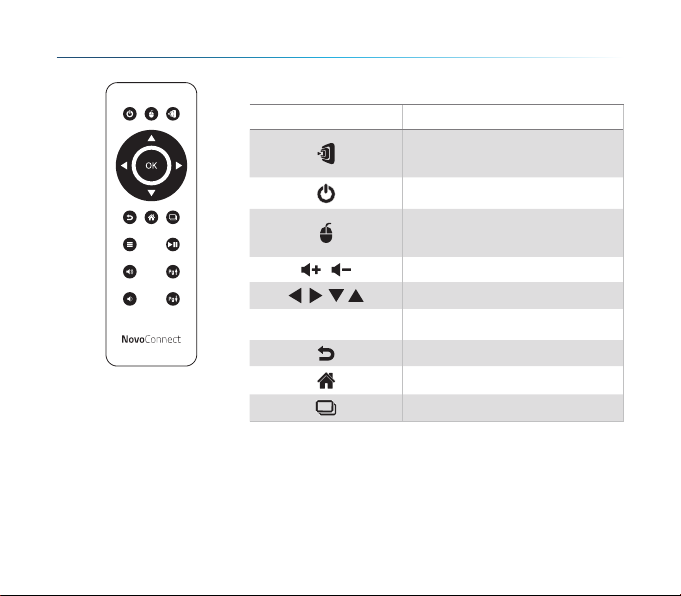
The Remote Control Unit
Function Descriptions
Icon Description
Mode Switching
(Presentation- Signage)
Power
Mouse Click
(Left Click)
/ Volume +/-
Navigation
OK
Confirm
Go-Back
Home
Recent Apps

EN-3
OVERVIEW
SETTING UP Main Unit
1Port USB-A
2Micro SD Card Slot
3RJ45 (Ethernet)
4HDMI OUT
5Port Type-C
6AUDIO OUT
7RESET
8DC Jack
Hardware Installation
Antenna: Attach Antenna to Antenna Connector.
HDMI: Connect HDMI cable to a LCD monitor or projector HDMI connector.
Power Input
5VDC Jack: Connect to the USB power adapter with the supplied USB
cable.
3 75
4 61 82

EN-4
Configuring network connection
There are two network connections, Ethernet and WiFi.
• Ethernet
Use a RJ45 cable to connect the main unit to your network, typically your
Intranet.
• WiFi
Two options are available.
• WiFi Hotspot
• Regular WiFi
* To configure, bring up the Settings
menu on the device and then follow
the on-screen instructions.

EN-5
Screen mirroring
NovoConnect Software
To mirror content to the screen, NovoConnect offers three options:
1Mirror with software / App
2Mirror with native mirroring capability of your mobile devices (Miracast,
AirPlay, & Google Cast)
Visit www.vivitekcorp.com and install the NovoConnect Software on your PC/
Mac

EN-6
Free software is available for Windows, MacOS, iOS and
Android devices.
1Download and install the NovoConnect
software.
• Tablets/phones/Chromebooks: Download
NovoConnect App from Apple’s App Store
or Google’s Play Store
• Windows/Mac computers: Download
NovoConnect software from NovoConnect
website www.vivitekcorp.com
2Connect your computer or mobile device to
the same network as the main unit.
3Run the NovoConnect software, then you
can connect to the main unit via one of the
following methods.
• Meeting ID
• IP address
• QR-code scan
• Nearby Devices
Mirroring with NovoConnect software

EN-7
• AirPlay - iPhones, iPads, & Mac computers
• Miracast – Windows 10 computers and some Android devices
• Google Cast – Most Android devices
1Connect your mobile device to the
same WiFi network as the main
unit.
2Depending on your device, the
steps to start mirroring slightly vary.
• For iPhones, iPad, and Mac
computers, bring up the AirPlay
menu
• For Windows 10 computers, bring
up its “Connect” or “Connect to a
wireless display” menu
• For Android devices, this feature is generally referred to as “Screen Cast”,
“Screen Mirroring”, or “Google Cast”, etc.
Once you see the main unit in the device list, tap or click to connect.
NC-X500 supports the following native mirroring:
Mirroring with native mirroring

FR-1
Unité principale
Antenne
Câble HDMI
Adaptateur secteur USB
Batterie
Câble d'alimentation USB
vers CC
Télécommande
1
6
2
4
7
3
5
CONTENU DE L'EMBALLAGE

FR-2
La télécommande
Description des fonctions
Icône Description
Changement de mode
(Présentation - Affichage
Dynamique)
Alimentation
Clic de souris
(Clic gauche)
/ Volume +/-
Navigation
OK
Confirmer
Retourner
Accueil
Applications récentes
Tabla de contenidos
Idiomas:


