Velleman Modules velleman Manual de usuario

1
VM107
Counter module 3
Universele teller 11
Compteur avance 19
Universalzähler 26
Módulo contador 33
Eq.
Out
Counter module

2
10
9
8
7
6
5
4
3
1
2
Fuse
100mA
Count Up
Count Down
+ 5V
EQUAL OUT
RELAY
TRANSFORMER
VM108
LN
Connection - Aansluiting - Raccordement - Anschlüsse - Conexion
UK Make sure the input voltage matches. Mind the polarity!
NL Sluit de geschikte ingangsspanning aan. Let op de polariteit!
FR Branchez le réseau à la connexion prévue. Respectez la polarité.
D Bitte achten Sie darauf, dass die Eingangsspannung stimmt. Beachten Sie die Polarität!
ES Conecte la red a la conexión prevista. ¡Respete la polaridad!
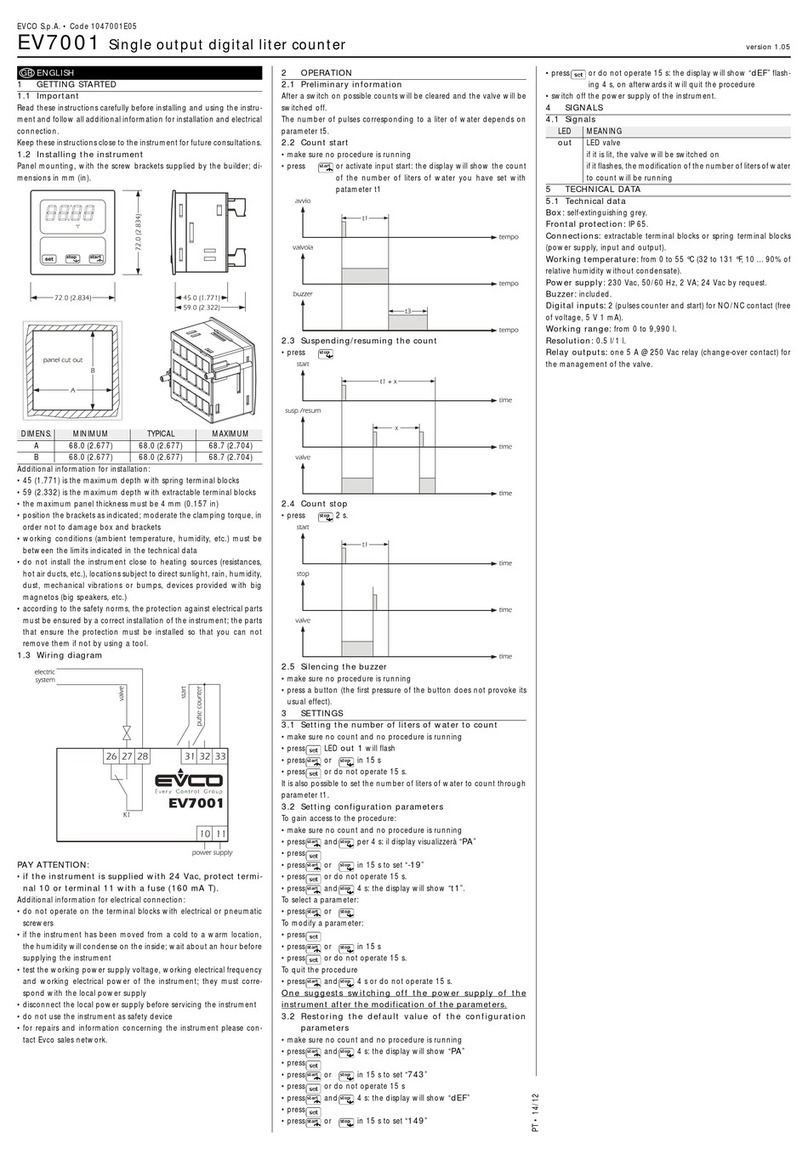
IMPORTANT !
VM107 2 x 9VAC
K8035
5
2
1
3
4
6
7
9
8
10
+
-
ADAPTOR
E. OUT
RELAY
Count Up
Count Down
+ 5V
VM107 9 - 12VDC

3
Warnings
Thank you for purchasing this counter module.
WARNING
DISCONNECT POWER DURING INSTALLATION !
READ THE OPERATING AND MAINTENANCE INSTRUCTIONS IN THIS
USER’S GUIDE CAREFULLY. SEE PAGE 9
!
WARRANTY
This product is guaranteed against defects in components and construction from the moment it is purchased and for a period of ONE YEAR starting from the date of sale. This
guarantee is only valid if the unit is submitted together with the original purchase invoice. VELLEMAN Ltd limits its responsibility to the reparation of defects or, as VELLEMAN Ltd
deems necessary, to the replacement or reparation of defective components. Costs and risks connected to the transport, removal or placement of the product, or any other costs
directly or indirectly connected to the repair, will not be reimbursed by VELLEMAN Ltd. VELLEMAN Ltd will not be held responsible for any damages caused by the malfunctioning of a
unit.
CONTENT :
FEATURES & SPECIFICATIONS ........................................................................................................................................................ 4
ASSEMBLING ....................................................................................................................................................................................... 5
OPERATION.......................................................................................................................................................................................... 6
SAFETY AND WARNING INSTRUCTIONS......................................................................................................................................... 9

4
Specifications & features
Specifications and features
SPECIFICATIONS*
Comes in handy for people counting, part counting, score keeping, ...
Counts up or down.
Count input through on-board pushbuttons or by external pulses.
Display modes : normal or time (hh:mm and mm:ss).
An internal oscillator allows time measurement.
Programmable pre-set value with equal output.
Self diagnostic at power up.
FEATURES
Counter input voltage :..........................................................................................3 - 12Vdc (normal dry contact possible)
EQUAL output :......................................................................................................................................5Vdc / max. 50mA
Max. counting speed : .....................................................................................200/sec. (2/sec. with long debounce delay)
Max. count :..................................................................................................................4 digits (9999 / 23h59m / 59m59s)
Power supply : ................................................................................................................... 9 - 12Vdc or 2 x 9Vac / 300mA
Power consumption : ......................................................................................................................................150mA max.
Dimensions :..............................................................................................................165 x 90 x 35mm (6,5" x 3.5" x 1,4")
*Modifications and typographical errors reserved.

5
Assembling
Assembly
HOUSING
FRONT PANEL
TOP COVER
BUTTONS
PCB

6
Operation
Operation
Push button for preset value
‘UP’ button
‘DOWN’ button
‘Reset’ button
Counter display
Equal output indication
Eq. Out
When all connections are made, the four LED displays will light up and the module type will appear “107” after which
following messages appear :
If an irregularity is found during the self-test, an error code will appear, when GOOD appears then the unit is ready for use.
r x. x x Version number
T E S T Self-test is working
G O O D Internal parts are working correctly

7
The errors 5 & 6 can appears
when during the self-test
counter pulses are received,
this can be reset by pressing
SW4 briefly.
Counting pulses can be applied to the unit in two different ways :
1. + 3V to 12V pulses with respect to ground.
2. Use the + 5V connection for push buttons or relay contacts when there is no power supply from an external source.
Press “Reset” button briefly to reset the readout. “0000”.
Press the “UP” button to increase the actual value with one.
Press the “DOWN” button to decreases the actual value with one.
Setting the Pre-set value:
It is possible to set a number which will continuously be compared with the content of the counter. If both are equal, then the
output (Equal OUT) is activated.
Press Set/Run (set briefly appears).
Press Up or Down to set the value.
Press Set/Run to store the value (Run appears).
Error code Description
Err. 2 Error in the keyboard section.
Err. 3 The switches are in the wrong position. ’DIP SWITCH’
Err. 4 Input A and B are at the same time active
Err. 5 Input A is active during self-test or input A is possibly malfunctioning.
Err. 6 Input B is active during self-test or input B is possibly malfunctioning.
Operation

8
Operation
Counter settings :
The counter can be used for decade or modulo 60 (clock) counting, an internal oscillator can be provided for use in modulo
60-mode
1. COUNTER SETTINGS
FUNCTION DIP SWITCH
OFF ON
Decade counter 1
Modulo 60 : hh:mm (23.59) 2 1
Modulo 60 : mm:ss. (59.59) 1 & 2
2. DEBOUNCE SETTING
Normal debounce 3
Long debounce 3
External pulses 4
Internal oscillator 4
3. INPUT SETTING
When changing the position of one of the switches, the current counter value and the pre-set value will be erased.

9
Safety and warning instructions
All repairs should be executed by qualified technicians.
Avoid the installation of the module in locations with standing or running water or excessive humidity. Indoor use
only ! SAFETY INSTRUCTIONS
Do not attempt to disassemble the unit as it does notcontain any parts that are to be serviced by the user. (Tampering voids warranty)
Handle the module gently and carefully. Dropping it can damage the circuit board andcase.
Never exceed the protection limit values indicated in the specifications.
As safety requirement vary, please check with your local authorities.
No objects or liquids should be allowed to penetrate the housing.
Make sure that the ventilation slots are not blocked.
Disconnect the module from the ACpower before connecting new devices.
Wipe the device witha dry and clean cloth. Do not use detergents orother liquids that may damage the housing.
Keep the device away fromchildren.
Facilitate the operation of the device by familiarising yourself with its adjustments and indications.
Velleman modules are not suitable for use or as part of life support systems, or systems that might create hazardous situations of kind.
Repair under warranty is only possible with date and proof of purchase.
WARNINGS

10
Tabla de contenidos
Idiomas:
Otros manuales de Contador de efectivo de Velleman Modules