VANPOWERS DP C240.CAN Manual de usuario

Vanpowers Bike
Display
User Manual
For Seine

USER GUIDE
DP C240.CAN

Contents
1. Important Notice ............................................................................................................................ 4
2. Display Introduction .......................................................................................................................4
3. Product Description ....................................................................................................................... 5
3.1 Specifications ............................................................................................................................ 5
3.2 Overview of Functions .............................................................................................................. 5
4. Display Example Image .................................................................................................................. 6
5. Buttons ........................................................................................................................................... 7
6. Normal Operation .......................................................................................................................... 7
6.1 Power On/Off ............................................................................................................................7
6.2 Assist Level Selection ................................................................................................................ 8
6.3 Ride Information ....................................................................................................................... 9
6.4 Backlight and Headlight ..........................................................................................................10
6.5 Walk Assist .............................................................................................................................. 11
6.6 BOOST Function ...................................................................................................................... 11
6.7 Battery Capacity ......................................................................................................................12
6.8 USB Charging ...........................................................................................................................12
7. Settings .........................................................................................................................................13
7.1 Display Settings .......................................................................................................................13
7.2 Information ............................................................................................................................. 17

1. Important Notice
If an error code on the display does not go away after following the
recommended instructions, please contact your retailer.
This product is designed to be waterproof. However, it is highly
recommended that you avoid submerging the display completely.
Do not clean the display with a steam jet, high-pressure cleaner, or
water hose.
Please exercise caution when using this product.
Do not use paint thinners or other solvents to clean the display, as
these substances can cause damage.
Wear and tear due to normal use/aging is not covered by the
warranty.
2. Display Introduction
Model: DP C240.CAN BUS
The housing material is polycarbonate (PC); the display window is
made of acrylic materials.
The label marking is as follows:

Note: Please keep the QR code label attached to the display cable. It can
be used to access possible software updates.
3. Product Description
3.1 Specifications
Operating temperature: –20 ℃–45 ℃
Storage temperature: –20 ℃–50 ℃
Waterproof rating: IP65
Storage room humidity: 30–70% RH
3.2 Overview of Functions
Speed indicator (including real-time speed, maximum trip speed, and
average trip speed)
Imperial and metric unit options
Battery capacity indicator
Automatic lighting system
Backlight brightness settings
Support instructions

Odometer (including single-trip distance, total distance, and
remaining distance before recharge)
BOOST function (with compatible controller)
Assist level indicator
Ride time indicator
Motor power usage indicator
Walk assist function
Error message indicator
Calories burned indicator (with compatible controller)
Distance to recharge indicator (with compatible controller)
Button vibration settings
USB charging (5V and 500mA)
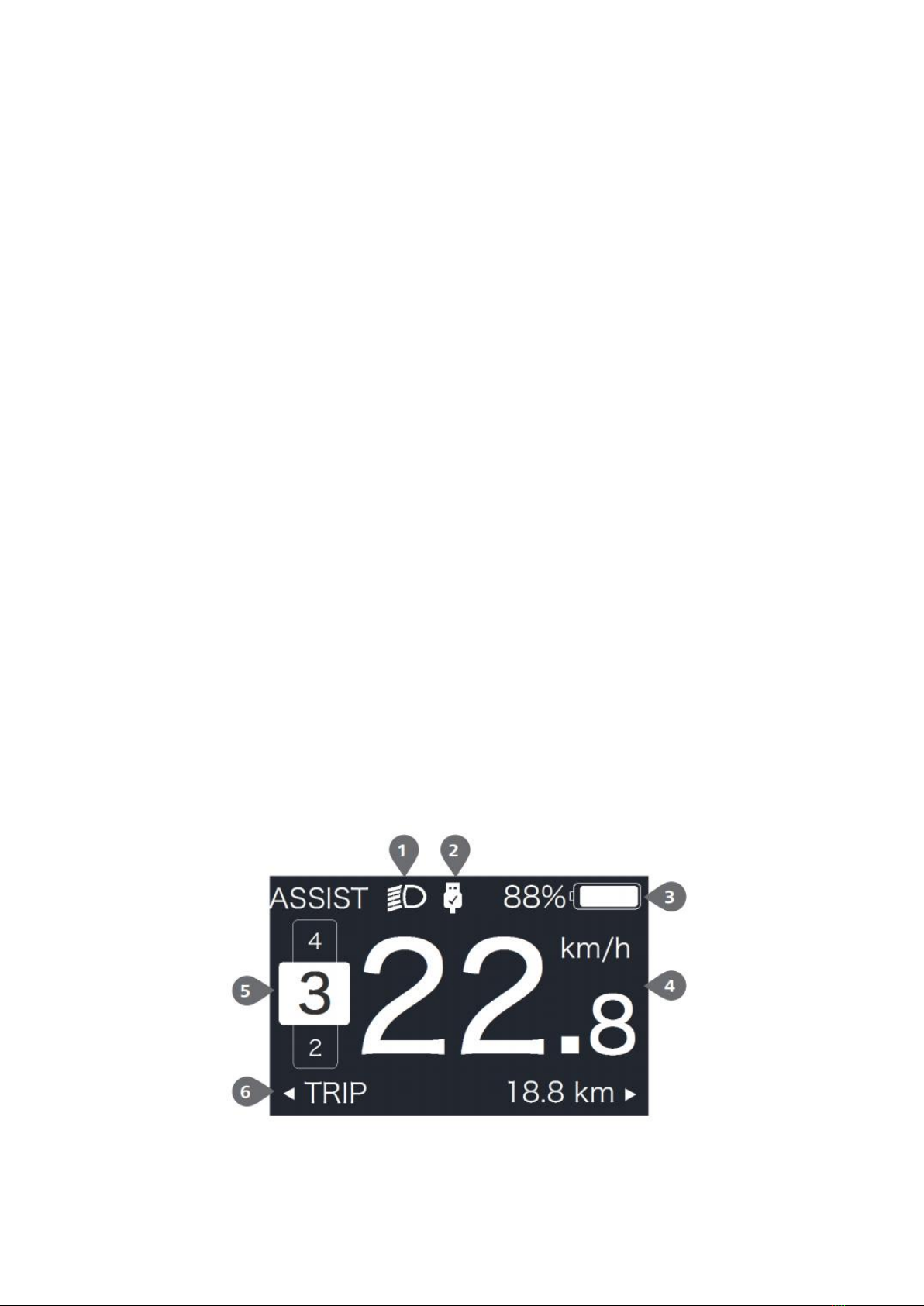
4. Display Example Image
1: Headlight indicator

2: USB connection indicator
3: Battery capacity
4: Real-time speed
5: Assist level
6: Data mode indicator
5. Buttons
6. Normal Operation
6.1 Power On/Off
Press and hold (>2 seconds) to turn on the display (the screen
should show the boot up logo). Press and hold again (>2 seconds)
to turn off the display.

The display will automatically power down if not used for the amount of
time designated by the Auto Off setting.
6.2 Assist Level Selection
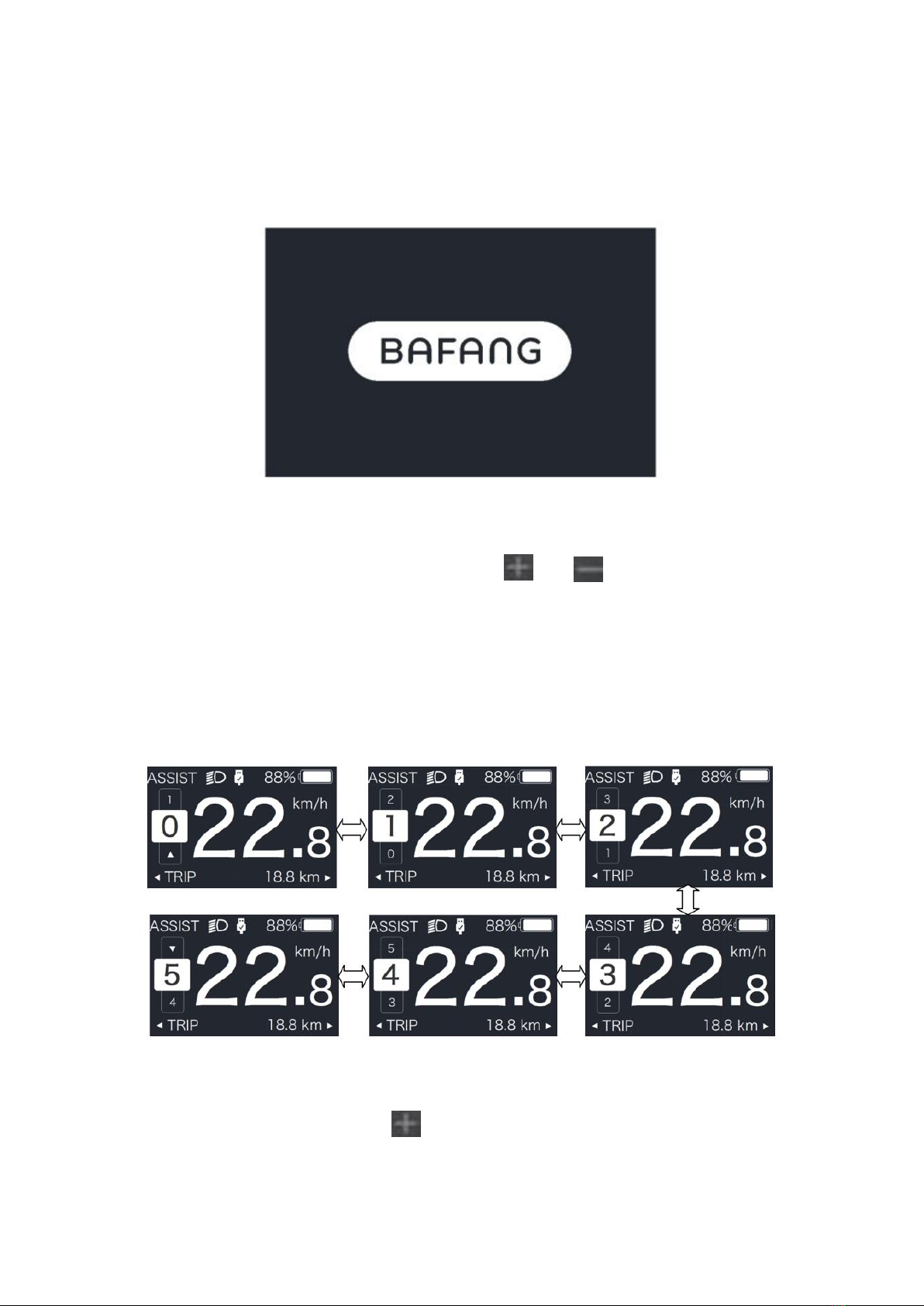
When the display turned on, short press or to change the
assist level (the level of motor power provided by the controller), The
lowest level is 0 (no assistance), and the highest level is 5. The interface
looks like this:
Note: If the controller on your e-bike has the BOOST function, you can
activate it by short pressing .

6.3 Ride Information
Short press the button to cycle through settings information.
For systems with a torque sensor, the settings list is as follows:
current trip distance (TRIP, mi or km) → total distance (ODO, mi or
km) → maximum trip speed (MAX, mph or km/h) → average trip
speed (AVG, mph or km/h) → distance until recharge (RANGE, mi or
km) → energy consumption (CALORIES/CAL, kCal) → real-time power
usage (POWER, W) → current trip time (TIME, min).
For systems with a speed sensor, the settings list is as follows: current
trip distance (TRIP, mi or km) → total distance (ODO, mi or km) →
maximum trip speed (MAX, mph or km/h) → average trip speed (AVG,
mph or km/h) → distance until recharge (RANGE, mi or km) →
current trip time (TIME, min).

6.4 Backlight and Headlight
Press and hold (>2 seconds) to turn on the backlight and headlight.
Press and hold again (>2 seconds) to turn off the backlight and
headlight. The brightness of the backlight can be changed using the
Brightness setting. If the display is turned on in a dark environment, the
backlight and headlight will be turned on automatically. However, if the
backlight and headlight are turned off manually, they will need to be
turned on again manually.
Tabla de contenidos
Otros manuales de Accesorios para bicicletas de VANPOWERS
Manuales populares de Accesorios para bicicletas de otras marcas

Sigma
Sigma BC 16.16 Manual de usuario

Playcore
Playcore Dero Setbacks Manual de usuario

VDO Cyclecomputing
VDO Cyclecomputing x3dw Manual de usuario

Cateye
Cateye RAPID X2 Manual de usuario

buratti meccanica
buratti meccanica Clorofilla Trail Manual de usuario

Shimano
Shimano SG-8R20 Instrucciones de funcionamiento