
Tunstall Ambient Temperature Sensor Manual de usuario

t: 01977 661234
f: 01977 660562
e: enquiries@tunstall.com
w: uk.tunstall.com
Version: V1 V1R1.1
Ambient Temperature Sensor
Installation Guide

2
Contents
1.
Features and Introduction................................................................................... 3
Your Ambient Temperature Sensor ...............................................................................3
2.
Getting Started ................................................................................................... 5
What’s in the box? .........................................................................................................5
How to install .................................................................................................................5
Unlocking the Ambient Temperature Sensor ................................................................6
Language Selection ........................................................................................................7
Configuration Menu .......................................................................................................
Advanced Mode .............................................................................................................9
LCD Always On .............................................................................................................10
Repeat Alarm ...............................................................................................................11
Limit .............................................................................................................................12
Scale .............................................................................................................................13
Battery .........................................................................................................................14
ALB – Auto Low Battery ...............................................................................................15
AP – Auto Presence ......................................................................................................15
Status – Battery ............................................................................................................16
Send Message ..............................................................................................................17
Setup Summary ............................................................................................................19
About ...........................................................................................................................20
How to reset the Ambient Temperature Sensor .........................................................21
3.
How to program to the Tunstall Home Unit ...................................................... 22
4.
otes and Warnings .......................................................................................... 23
Service Information......................................................................................................23
Changing the battery ...................................................................................................23
5.
Compliance and Standards ................................................................................ 25
Declaration of conformity ............................................................................................25

3
1. Features and Introduction
The Ambient Temperature Sensor is a solution to monitor and maintain a healthy
temperature within the home. It supports independent living by maintaining a pre-
determined temperature to provide a comfortable living environment and monitor
for unexpected changes.
It provides a unique, flexible solution for individuals at home and for grouped
housing developments. It is compatible with Lifeline home units and other Tunstall
systems.
The wireless, wall mounted radio sensor is designed to monitor a high and low
temperature threshold that can be pre-set using the LCD screen and simple
configuration menu.
The Ambient Temperature Sensor sends alarm signals to the Lifeline home unit or
other Tunstall systems to provide early warnings of potentially hazardous
temperatures. The 24-hour monitoring centre or carer can then take appropriate
action.
Your Ambient Temperature Sensor
The sensor is configured using the built-in buttons and LCD screen. When the high
and low temperatures have been selected, the sensor will send a message to the
home unit identifying when these temperature thresholds are crossed.
It has been designed to detect two ambient temperature situations; high and low.
• The high temperature alarm is generated if temperatures passes above the high
temperature level for more than 5 minutes.
The low temperature alarm is generated if temperatures passes below the low
temperature level for more than 5 minutes.

4
Illustration Legend
Ambient Temperature Sensor
1 LCD Screen
2 Back Button
3 Up Button
4 Air Vent
5 Down Button
6 Select Button
7 Red LED

5
2. Getting Started
What’s in the box?
1 Ambient Temperature Sensor
2 Velcro Pads
1 Technical Insert
How to install
The Ambient Temperature Sensor should be installed in a clean, dry environment and
for optimum radio performance should be mounted away from metallic surfaces.
The Ambient Temperature Sensor can be fastened to the wall by a variety of
methods – integral keyhole slots or Velcro Pads. The installer should determine the
most appropriate method.

6
Unlocking the Ambient Temperature Sensor
To unlock the Ambient Temperature Sensor:
Press the “Select Button” once.
Press and hold the “Up Button” and the “Select Button”; keep holding
both buttons.
The Ambient Temperature Sensor will then display “Change Settings”
which can be confirmed by pressing the “Select Button”.
The Ambient Temperature Sensor is now unlocked and can now be
configured.

7
Language Selection
The Default language for a new Ambient Temperature Sensor is English (UK). You can
change the language setting on the Ambient Temperature Sensor if it is incorrect or if
you have accidentally changed the language.
After unlocking the Ambient Temperature Sensor, the “Configuration
Menu will be displayed.
Press the “Down Button” to navigate to the “Language/Country”
Menu and press the “Select Button”.
The “Language/Country” Menu displays a list of available languages.
Navigate this list using the “Up Button” and the “Down Button” and
use the “Select Button” to choose the new language.
The Ambient Temperature Sensor will confirm on screen that the
newly selected language has been set. Once completed the Ambient
Temperature Sensor will return to “Configuration” Menu.

8
Configuration Menu
The “Configuration” Menu is accessed after unlocking the Ambient Temperature
Sensor and contains a list of the options used to Ambient Temperature Sensor set it
up.
Advanced Mode: Changes can be made here to the LCD Always On,
Repeat Alarm, temperature limits and measurement
scale.
Battery: Used to configure AP and ALB and displays the status
of the user changeable battery.
Language: Displays a list of selectable display languages which
the Ambient Temperature Sensor can operate in.
Send Message: Sends a test radio message from the Ambient
Temperature Sensor to the Tunstall system. This will
generate an alarm on the Tunstall System.
Setup Summary: Displays the current sensor configuration.
About: Displays the current version firmware.
Exit: Exits the Configuration Menu. The sensor is now
active.

9
Advanced Mode
To access the “Advanced Mode” menu:
After Unlocking the Ambient Temperature Sensor, the
“Configuration” Menu will be displayed.
The “Advanced Mode” Menu will be selected when first opening the
“Configuration” Menu press the “Select Button”.
The “Advanced Mode” Menu allows the Ambient Temperature
Sensor to be configured for use. Settings that can be changed here
are: LCD always On, Repeat Alarm, Temperature Limits and Scale.
10
LCD Always On
To change the LCD Always on option:
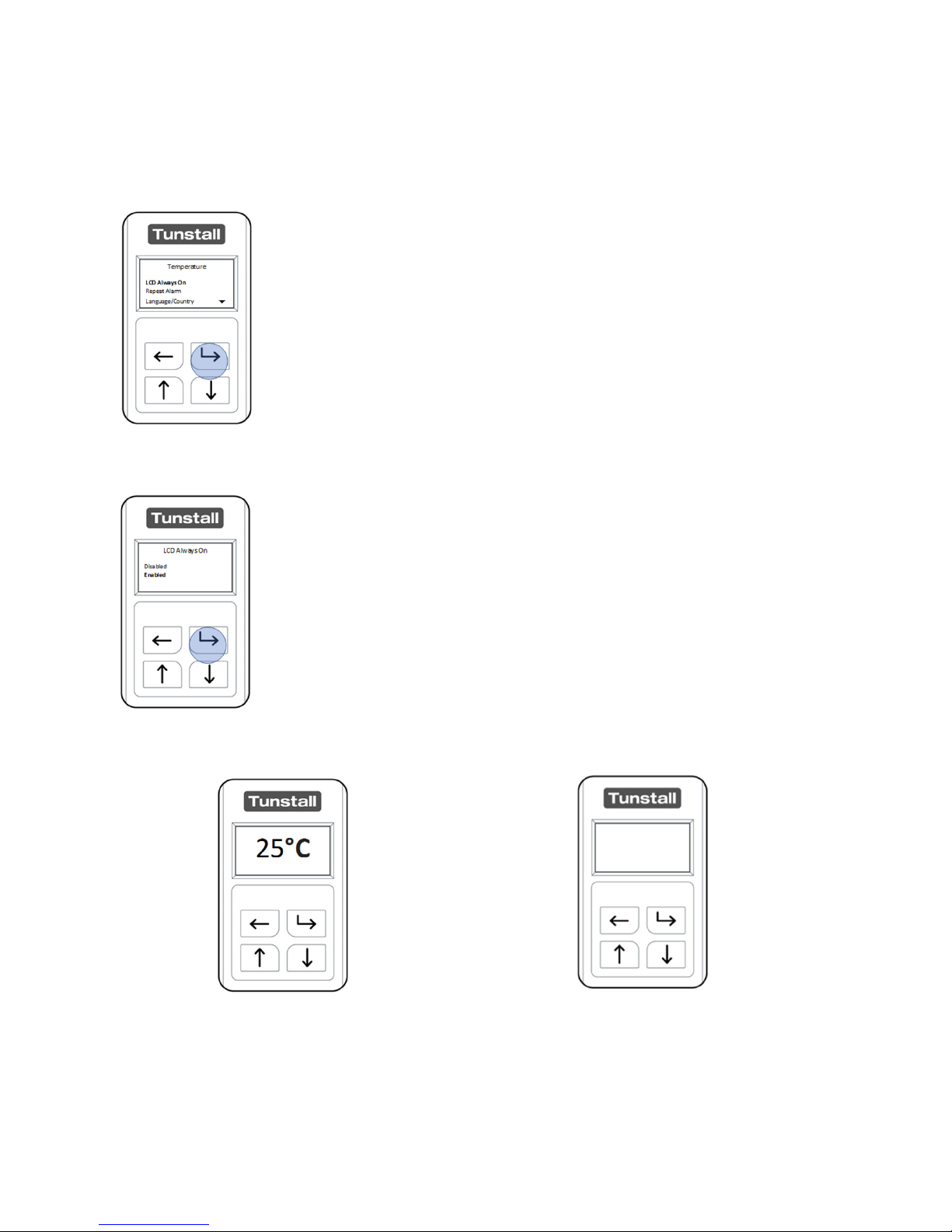
After Unlocking the Ambient Temperature Sensor and entering
“Advanced Mode”, the “LCD Always On” menu is highlighted,
press the “Select Button” to enter.
The two options displayed are “Enabled” and Disabled”. By
selecting “Enabled” the sensor will always display the current
temperature. By selecting “Disabled”, in normal operation the
display will turn off after 30 seconds of no user interaction. The
current temperature can then be displayed by pressing the
“Select Button”.
LCD Always On Enabled LCD Always On Disabled
Tabla de contenidos


