
Travel Vision DDS Manual de instrucciones

www.travel-vision.com
Dish Diversity Switch
INSTALLATION & USER’S MANUAL
Version 3.3 as from software 1.0.13 October 2018

Page 2
PREFACE
Congratulations on your purchase of the Travel Vision DDS
This manual was drawn up to provide you with all necessary information about the
installation, the use and maintenance of this system.
The Travel Vision Dish Diversity Switch was developed to fit the needs of ship owners to
have an antenna switch that also does not depend on the brand and type of satellite
antennas.
WARNINGS and NOTES
All details are up-to-date to the manual printing date. Travelvision BV cannot be held liable
whatsoever for any errors that were made whilst compiling this manual.
Travelvision BV reserves the right to introduce any modification deemed necessary due to
development of the products and also reserves the right, without prior notice, to make
amendments in this installation and user manual, as well as in the products, as described
therein.
Travel Vision ® is a registered trademark by Travelvision B.V.
Please read this installation and user manual before putting your Travel Vision DDS into
service. Any service and installation should exclusively be performed by qualified
personnel.
To reduce the risk of electric shock, do not remove the cover of the Dish Diversity Switch.
There are no parts in the DDS that require service and maintenance from the user.
Make sure that all wiring is adequately connected before putting the DDS into service.
Turn the supply voltage off and disconnect it before carrying out any service to the
system.

Page 3
Content
1. System description page 4.
2. Hardware installation page 5.
2.1 General Installation page 5.
2.2 Coax cable routing page 5.
2.3 Wiring schematic page 6.
3. Installation and configuration page 7.
3.1 Equalise power levels Dish 1 and 2. page 7.
3.2 Level detection page 7.
3.3 Calibration page 7.
3.4 Default settings page 8.
3.5 Menu page 9.
4. Specifications page 10.
5. Warranty conditions page 11.

Page 4
1. System Description
Travel Vision’s Dish Diversity Switch was developed to fit the needs of ship owners to
have an antenna switch that does not depend on the brand and type of satellite antennas.
The Travel Vision Dish Diversity Switch doesn’t need to communicate with the antenna
controller units. The Dish Diversity Switch takes RF-signal samples from both antennas
and determines entirely autonomous which satellite antenna has the strongest signal. The
signal from that antenna is then routed to a connected head-end or receivers.

Page 5
2. Hardware Installation
2.1 General Installation
The Dish Diversity Switch is provided with an Euro style Power cord and plug.
Before start doing any installation, please make sure main power is disconnected.
The system is designed to be installed in a 19inch cabinet rack. The Dish Diversity Switch
has a standard height of 1U.
The Dish Diversity Switch operates under embedded software control.
If power is applied to the unit, the software will start automatically and no user intervention
is needed. The embedded software can be updated using an USB memory stick.
2.2 Coax cable routing
Interfacing the Dish Diversity Switch
The red loops in the drawing above are coaxial loops that connect the output of the signal
level detector to an input of the switch.
By default the loops are placed onto the Horizontal low band input. This means that the
coax cable from Dish1 LNB low Horizontal band shall be connected to input Detector
Dish1 In. The Coax cable from Dish2 LNB Low Horizontal band should be connected
to input Detector Dish 2 in.
Any band can be used for signal strength measurement as long both detector inputs are
connected to the same signal band. It’s preferred to use a signal band that has multiple
steady carriers. Although the switch section was designed to give minimum attenuation
and maximum flatness over the entire L-band, it does introduce a signal loss of
approximately 3dB.
The signal band that is routed through the Detector experiences an additional attenuation
of approximately 1dB. This additional attenuation is mainly introduced by the F-connectors
and the coaxial wiring internally and the loops externally.
If the systems signal level overhead is smaller than 4 dB, low gain amplifiers must be used
to compensate the additional losses introduced by the Dish Diversity Switch.

Page 6
2.3 Wiring Schematic

Page 7
3. Installation and configuration
3.1 Equalise power levels Dish 1 and 2.
Before RF cables from both dishes are connected to the DDS, make sure the dBµV
power levels from both dishes should be equalised in power. For example with amplifier or
attenuator set both levels on 70 dBµV.
3.2 Level detection
When main power and RF cables are connected, the software starts and will display the
measured signal levels from Dish 1 and Dish 2.
If the detector has no signal or a level that is too low, display will show <43 dB µV.
If the level is too high display will show >84 dBµV
The level displayed is in dB µV units, this level displayed cannot be compared to the levels
that one would read from a spectrum analyzer. The used level detection measures the RF
power across the entire L-band instead of a single transponder.
3.3 Calibration
Calibration is done in factory, and DDS can be immediately used after installation.
Although after reset in menu or firmware update the DDS should be calibrated again to
measure the difference between the 2 input detectors inside the DDS.
Calibration must be done with 1 antenna with a minimum 2 outputs, connected to both
detector dish 1 and detector dish 2.
How to calibrate?:
1. Align dish with twin or quad output LNB to satellite.
2. Set the dBµV power from the 2 outputs from dish equal. (for example with amplifier
or attenuator set both outputs 70 dbµV)
3. Connect LNB output 1 to DDS detector dish 1
4. Connect LNB output 2 to DDS detector dish 2
5. Enter the installation menu by pressing the <Enter> ( ) and <Esc> ( ) keys for
4 seconds.
6. Then scroll down the menu pressing the ↓ key until Calibrate is displayed.
7. Then press <Enter> to start the calibration routine.
At this point the control unit reads the RF-signals and compared against each other
and stored into non volatile memory.
If calibration is done leave the menu by pressing <Esc>.

Page 8
3.4 Default Settings
The following settings are default. They can be changed by the user. Changing these
setting will affect the systems performance. We advise not to change any settings unless
you are a certified mechanic.
Setting Default
Auto/Manual Auto
Switch Delay 0 second
RF Power Threshold 00,2 dB
Backlight On
Backlight Intensity maximum
Page 9
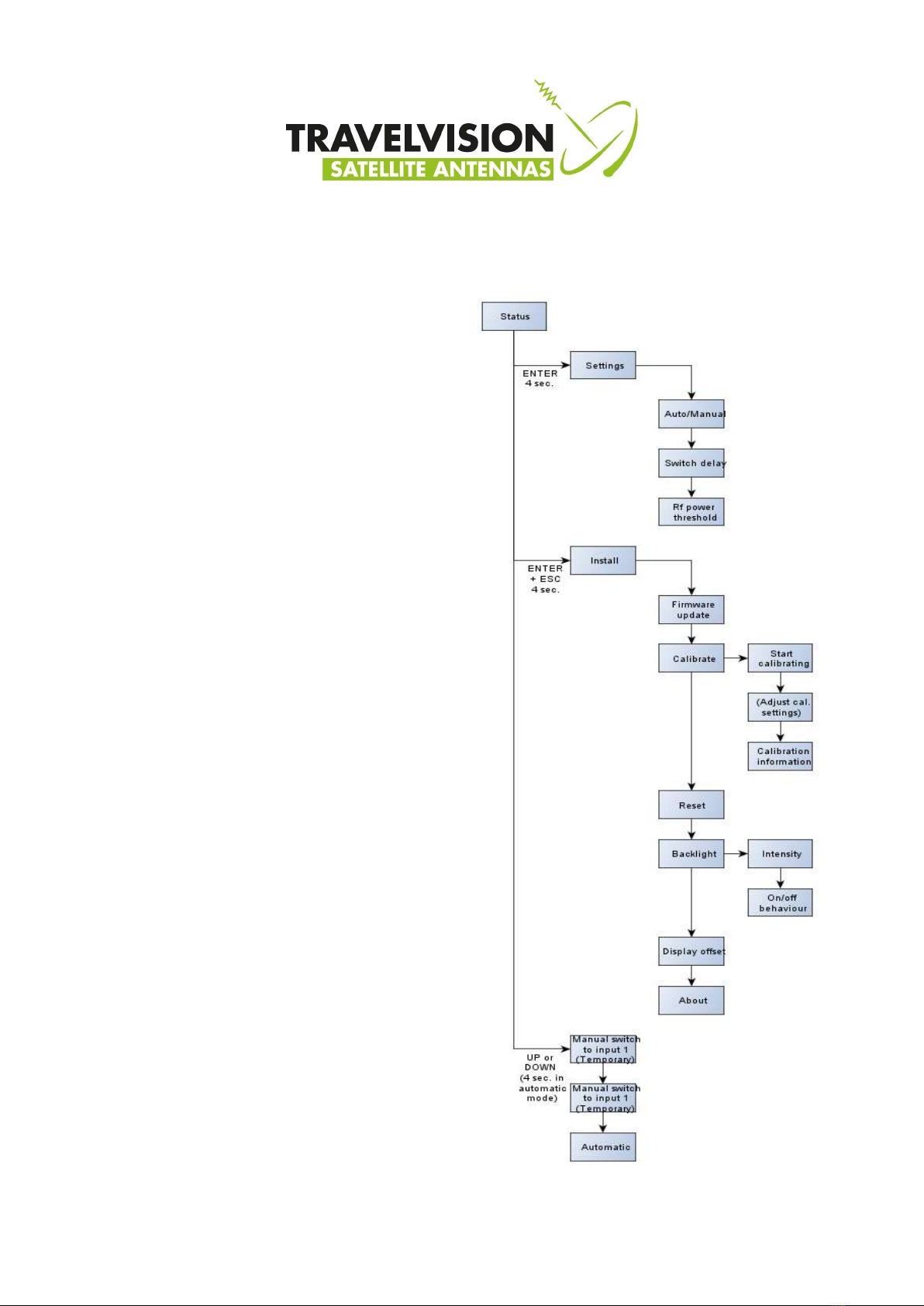
3.5 Menu
When a key, or combination of keys is
pressed an user can enter different menu
functions.
To enter the settings menu, press Enter
for 4 seconds.
To enter installation menu, press Enter
and Escape together for 4 seconds.
When the switch is in automatic mode you
can manually select an input by pressing
the UP or Down key for 4 seconds.
Please note that this menu is not available
when the switch is in manual mode.

Page 10
4. Specifications
Power Supply Universal 100..240 Volt AC, 50..60 Hz 25 Watt maximum
Power cord plug type Euro
Dimensions 19 inch rack mount, 1U height.
RF detector
Frequency range L-band (950..2150 MHz)
Impedance 75 Ohm
Connectors F-connector female (high performance type)
Pass through loss <1dB typical
RF level handling 42dBµV to 84dBµV
Switch Section
Frequency range L-band (950..2150 MHz)
Impedance 75 Ohm
Connectors F-connector female (high performance type)
Pass through loss <3dB typical
RF level handling 42dBµV to 84dBµV (1Watt absolute maximum)
Isolation between Ports > 30 dB typical
Isolation Port to Port > 35 dB typical
DC current path All port have a DC pass (jumper selection pass no-pass)
Maximum DC current 800 mA
Tabla de contenidos
Otros manuales de Cambiar de Travel Vision


