TIS TIS-4PL-E66D Manual de usuario

6 06795 20838 8
BARCODE (UPC-A)
NETWORK 4 ZONE AMPLIFIER
INSTALLATION MANUAL
Model: TIS-4PL-E66D
TIS-4PL-E66D is a 4-zone multi-room audio
system that allows you to play music from various
sources, including online music services, your
phone storage, and NAS, in different rooms or the
same room. It is easy to set up and use.
PRODUCT INFORMATION
PRODUCT SPECIFICATIONS
Input
Line in Max 2V RMS input
Optical in Max 192kHz/24bit sample rate decode
PCM encoding
USB USB disk drive playback
Output
Pre out Max 2V RMS output
Coaxial out 44.1kHz/16bit output
Speaker out SOW per channel / 8ohms
Bridged Amplifier mode 100W / 4ohms per channel
General
Power 115-230V AC 50/60Hz
Control Interface Dual-way RS232
Size 2U rack size
Protection Bus connection Reverse polarity protection
Amplifier Reverse polarity protection
Network Ethernet In RJ45, Connect to internet
Ethernet Out RJ45, Output to other device to share the network
Dimensions Width × length × height 300mm × 100mm × 430mm
Music Sources
Streaming Protocol Spotify Connect, Airplay, DLNA, UPnP, Qplay
Online Music Spotify, Tidal, Deezer, Qobuz, Napster, Pandora, Amazon Music,
Internet Radio, iHeartRadio, vTuner, QQ music, QQ FM
Local Music Mobile device music, NAS storage music files, USB disk drive
music files
Multizone function
1.By Master input source
2.By APP to setup one zone as master to sync music to other
zone

INSTALLATION MANUAL
MODEL : TIS-4PL-E66D
NETWORK 4 ZONE AMPLIFIER
2
www.tiscontrol.com
TIS CONTROL LIMITED
Wanchai, Hong Kong
TIS CONTROL PTY LIMITED
SA, AUSTRALIA
Copyright © 2023 TIS, All Rights Reserved
TIS Logo is registered trademark of TIS CONTROL.
All of the specification are subject to change without notice.
SIMPLE INSTALLATION
You can install this module on a wall or
place it on a stable surface.
MOUNTING LOCATION
Position the device on a stable location with
easy access to wiring and terminals.
WARRANTY
There is a Two-Year warranty provided
by law. The hologram warranty seal and
product serial number are available on
each device.
READ INSTRUCTIONS
We recommend that you read this
Instruction Manual before installation.
SAFETY INSTRUCTIONS
Electrical equipment should only be
installed and tted by electrically skilled
persons.
Failure to observe the instructions may
cause damage to the device and other
hazards. These instructions are an
integral part of the product and must
remain with the end customer.
Any issues stemming from an
installation by an unauthorised person
is the responsibility of the user and will
not be covered by warranty.
PROGRAMMING
This device can be tested and
programmed manually. Advanced
programming requires knowledge of
the TIS Device Search software and
instruction in the TIS advanced training
courses.

INSTALLATION MANUAL
MODEL : TIS-4PL-E66D
NETWORK 4 ZONE AMPLIFIER
3
www.tiscontrol.com
TIS CONTROL LIMITED
Wanchai, Hong Kong
TIS CONTROL PTY LIMITED
SA, AUSTRALIA
Copyright © 2023 TIS, All Rights Reserved
TIS Logo is registered trademark of TIS CONTROL.
All of the specification are subject to change without notice.
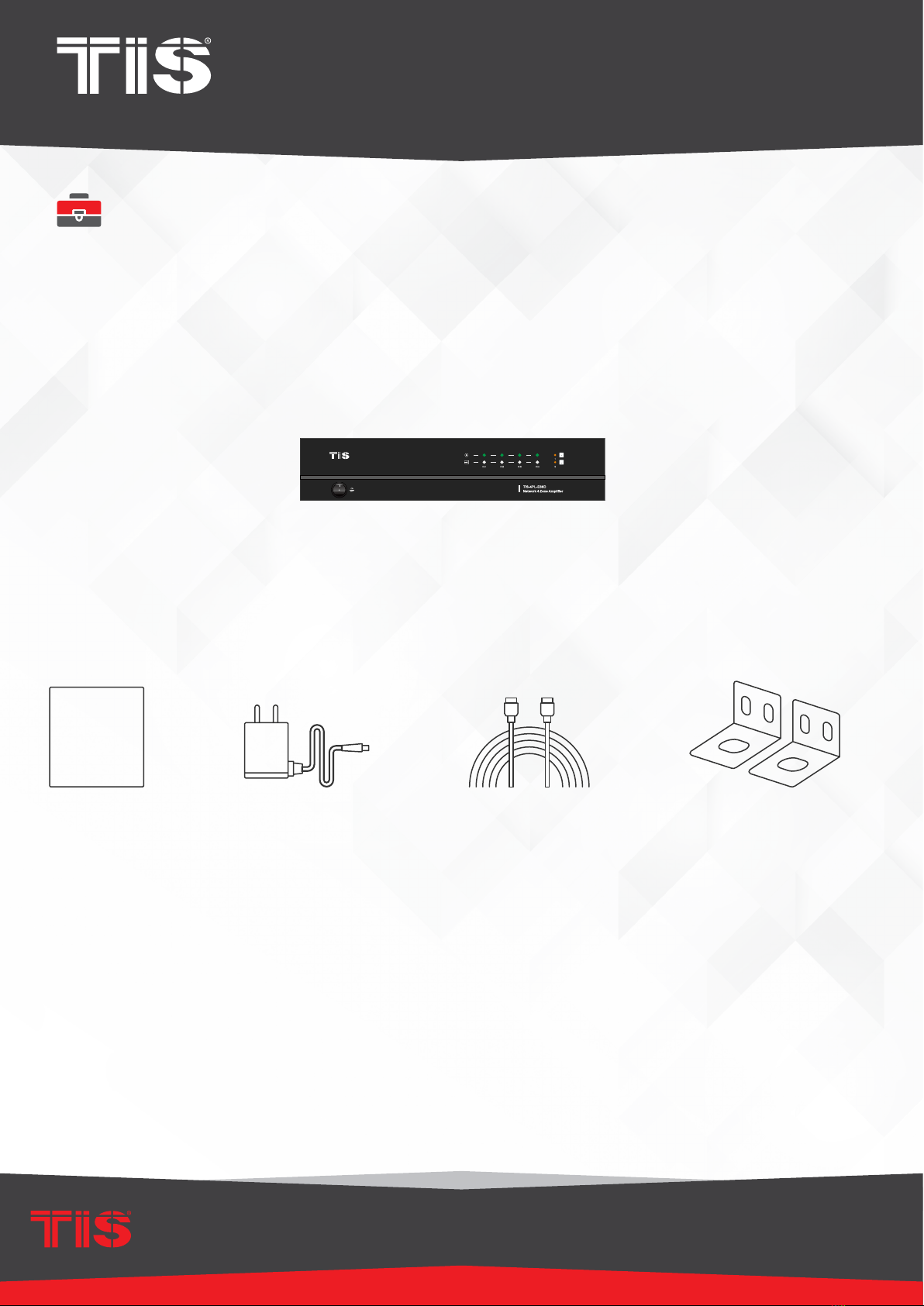
WHAT’S INCLUDED IN THE BOX
Amplier
User manual Rack Mount Brackets x2Ethernet cable12V/2A Power Cable

INSTALLATION MANUAL
MODEL : TIS-4PL-E66D
NETWORK 4 ZONE AMPLIFIER
4
www.tiscontrol.com
TIS CONTROL LIMITED
Wanchai, Hong Kong
TIS CONTROL PTY LIMITED
SA, AUSTRALIA
Copyright © 2023 TIS, All Rights Reserved
TIS Logo is registered trademark of TIS CONTROL.
All of the specification are subject to change without notice.
▸
TIS-4PL-E66D contains 4 audio ampliers for you to connect to 4 set of stereo speakers. Each zone also
contains analog and digital audio outputs for you to use as audio source. You can easily play music from
online music services, your phone storage, NAS and other sources by using the WIIM app on your iOS
or Android device.
▸
- Amplication: Each zone can provide 50Wx2@8ohms (stereo mode) or 100W@4ohms (bridge mode)
▸
- Multi-room audio function: Play different songs in different rooms or same song in every room.
▸
- Easy network setup: Connect to your home network and it is ready to use.
▸
- Rich I/O interface: Each zone has separate digital input/output and analog input/output. There is also a
master source input that all zones can used at the same time.
High Speed Internet Connection:
TIS-4PL-E66D requires an internet connection in order to stream music from online music services and
receive rmware updates. Slower internet connections may cause performance issues.
Wireless Router:
To use the TIS-4PL-E66D, you must have a functional Wi-Fi network in your home, as the control APP on
your mobile device must be in the same network as the streamer.
Control APP-WIIM:
TIS-4PL-E66D can be controlled using our free WIIM app on any iOS or Android device that meets the
following minimum requirements:
Or Android from the following link: https://dln.bz/a/muzoplayer/3.1.11.210810
SYSTEM REQUIREMENTS

INSTALLATION MANUAL
MODEL : TIS-4PL-E66D
NETWORK 4 ZONE AMPLIFIER
5
www.tiscontrol.com
TIS CONTROL LIMITED
Wanchai, Hong Kong
TIS CONTROL PTY LIMITED
SA, AUSTRALIA
Copyright © 2023 TIS, All Rights Reserved
TIS Logo is registered trademark of TIS CONTROL.
All of the specification are subject to change without notice.
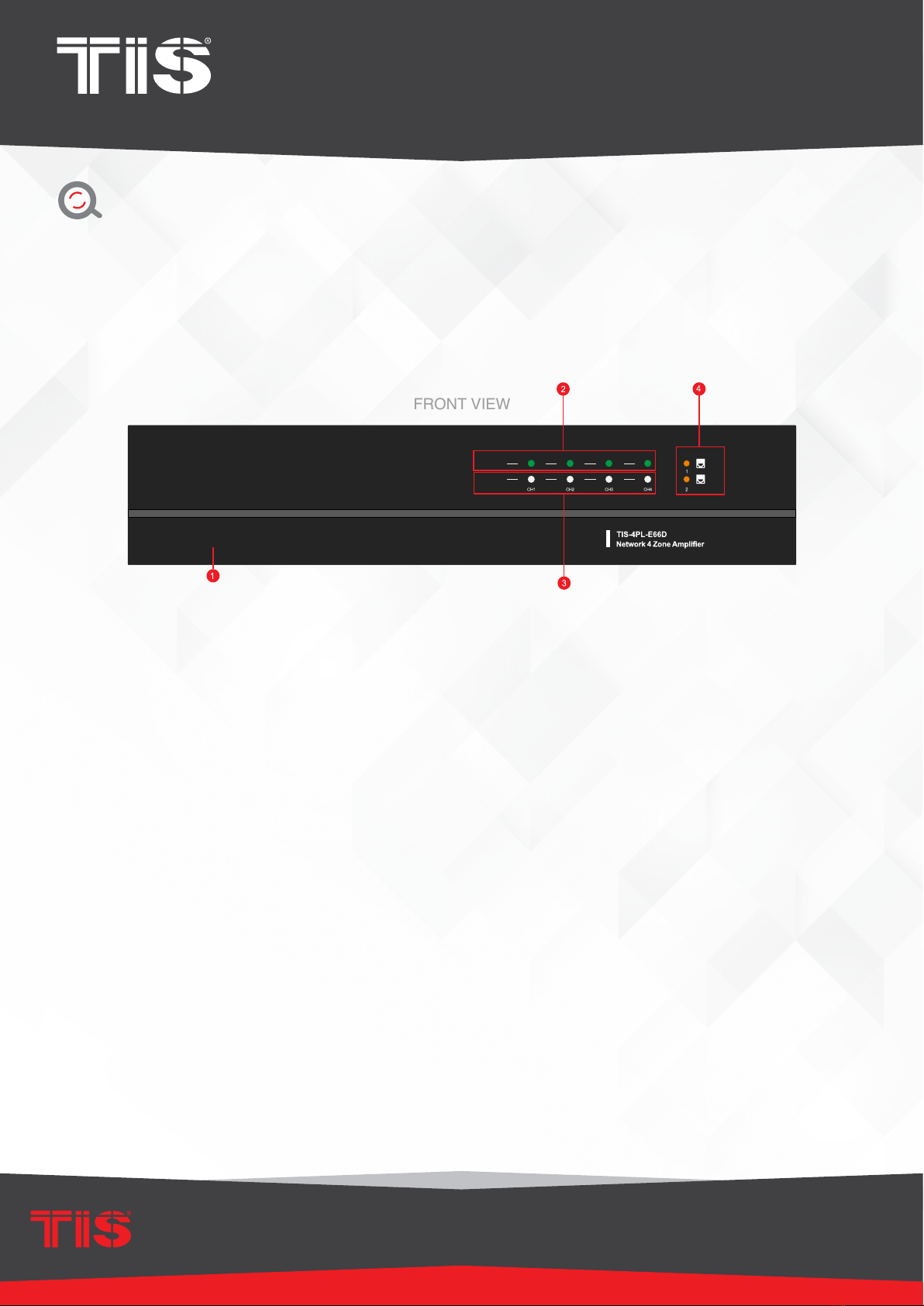
1) Power button
2) Streaming Indicator — When streaming, the LED turns on.
3) Input Source Indicator — LED Color: White represents Network Audio, Green
represents Line in 1 (Zone Line in), Yellow represents Line in 2 (Master Line in),
Magenta represents Master Optical in, Cyan represents Master Coaxial in, and Red
represents USB.
4) Network Indicators — LED turns on when the network is accessible.
OVERVIEW
FRONT VIEW

INSTALLATION MANUAL
MODEL : TIS-4PL-E66D
NETWORK 4 ZONE AMPLIFIER
6
www.tiscontrol.com
TIS CONTROL LIMITED
Wanchai, Hong Kong
TIS CONTROL PTY LIMITED
SA, AUSTRALIA
Copyright © 2023 TIS, All Rights Reserved
TIS Logo is registered trademark of TIS CONTROL.
All of the specification are subject to change without notice.
BACK VIEW
SIDE VIEW
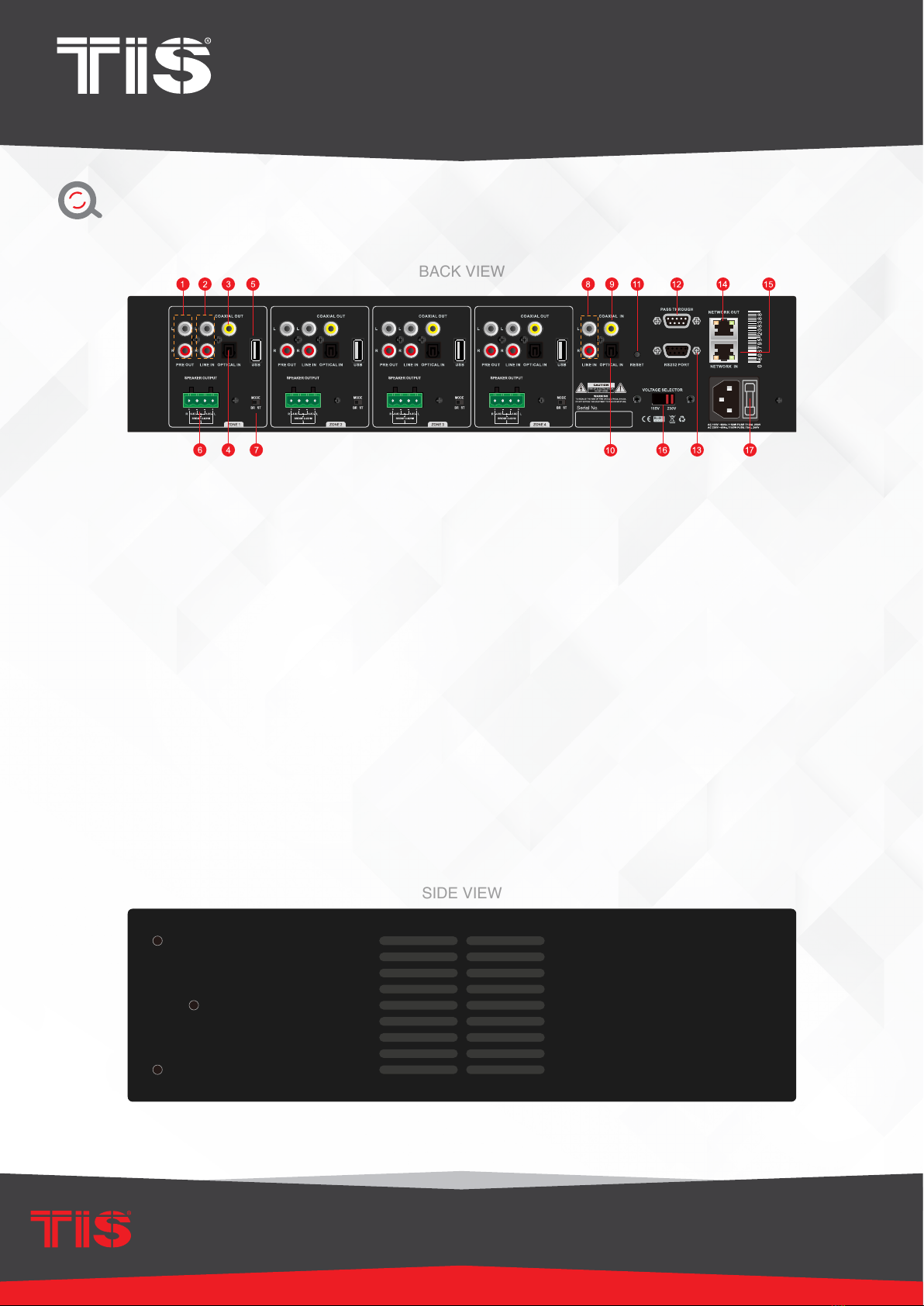
1) Pre-Out
2) Line in (Line 1 in APP)
3) Digital Coaxial Out
4) Digital Optical In
5) USB port
Screw holes for mounting brackets
6) Speaker out
7) Stereo/Bridge mode switch
8) Master Line In
9) Master Coaxial In
10) Master Optical In
11) Reset Button
12) RS232 Pass Through Port
13) RS232 Port
14) Network Output
15) Network Input
16) Voltage Selection
17) Switch (115V/230V)
18) Power Plug
OVERVIEW

INSTALLATION MANUAL
MODEL : TIS-4PL-E66D
NETWORK 4 ZONE AMPLIFIER
7
www.tiscontrol.com
TIS CONTROL LIMITED
Wanchai, Hong Kong
TIS CONTROL PTY LIMITED
SA, AUSTRALIA
Copyright © 2023 TIS, All Rights Reserved
TIS Logo is registered trademark of TIS CONTROL.
All of the specification are subject to change without notice.
MOUNTING
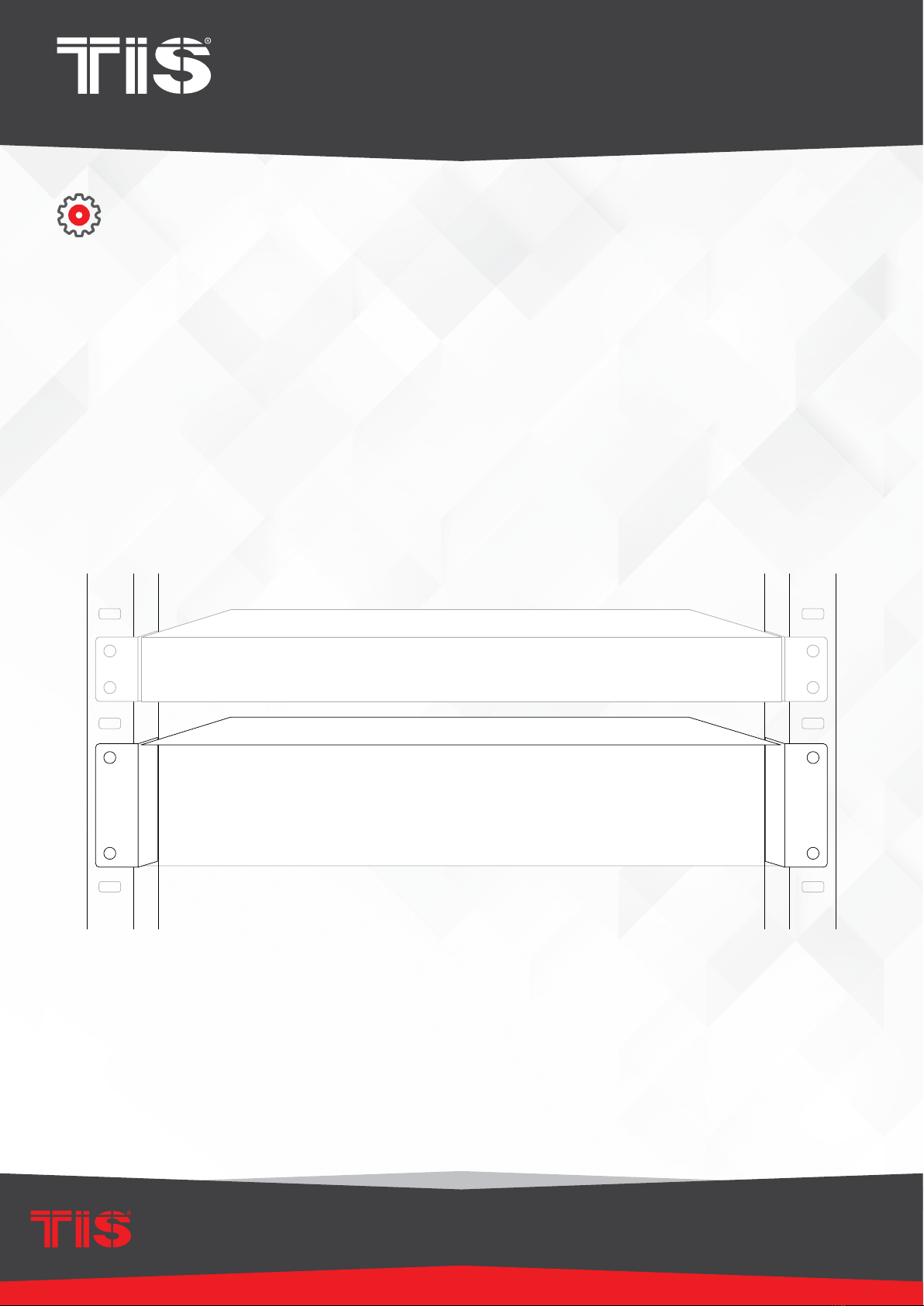
The size is standard 2U, so it ts easily into an equipment rack. If you want to mount the TIS-4PL-
E66D on a standard EIA equipment rack, use the included rack mounting brackets on each side.
Align the rack mounting brackets with the screw holes on the side, then tighten the screws.

INSTALLATION MANUAL
MODEL : TIS-4PL-E66D
NETWORK 4 ZONE AMPLIFIER
8
www.tiscontrol.com
TIS CONTROL LIMITED
Wanchai, Hong Kong
TIS CONTROL PTY LIMITED
SA, AUSTRALIA
Copyright © 2023 TIS, All Rights Reserved
TIS Logo is registered trademark of TIS CONTROL.
All of the specification are subject to change without notice.
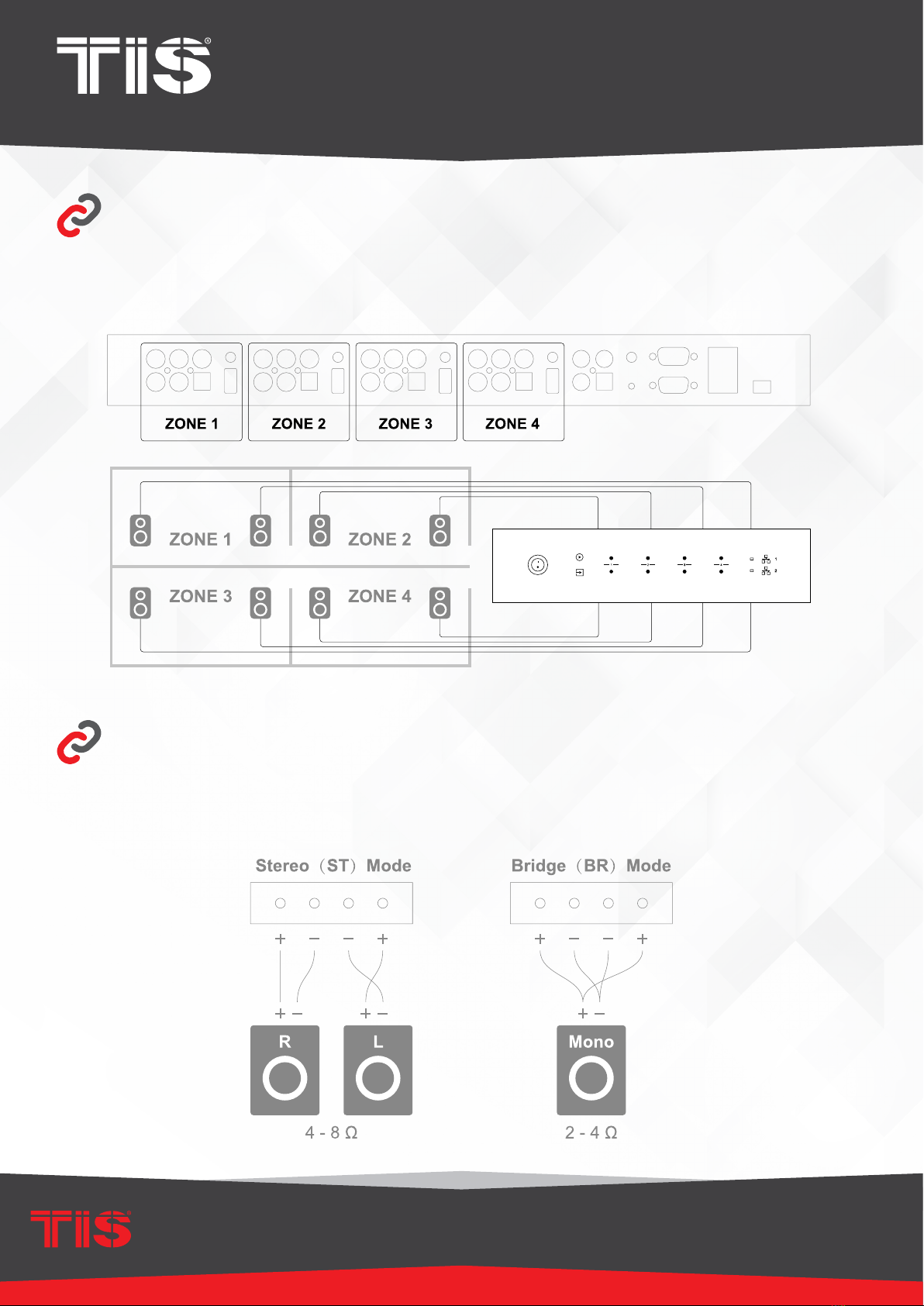
ZONE CONNECTION
CONNECT YOUR SPEAKERS
You can listen to the same audio source in all four zones at the same time, or you can listen to
different audio sources in each zone.
Using the phoenix connector, connect your stereo speaker to the speaker output. You can also
connect to a Mono speaker by switching to Bridge mode (BR).

INSTALLATION MANUAL
MODEL : TIS-4PL-E66D
NETWORK 4 ZONE AMPLIFIER
9
www.tiscontrol.com
TIS CONTROL LIMITED
Wanchai, Hong Kong
TIS CONTROL PTY LIMITED
SA, AUSTRALIA
Copyright © 2023 TIS, All Rights Reserved
TIS Logo is registered trademark of TIS CONTROL.
All of the specification are subject to change without notice.
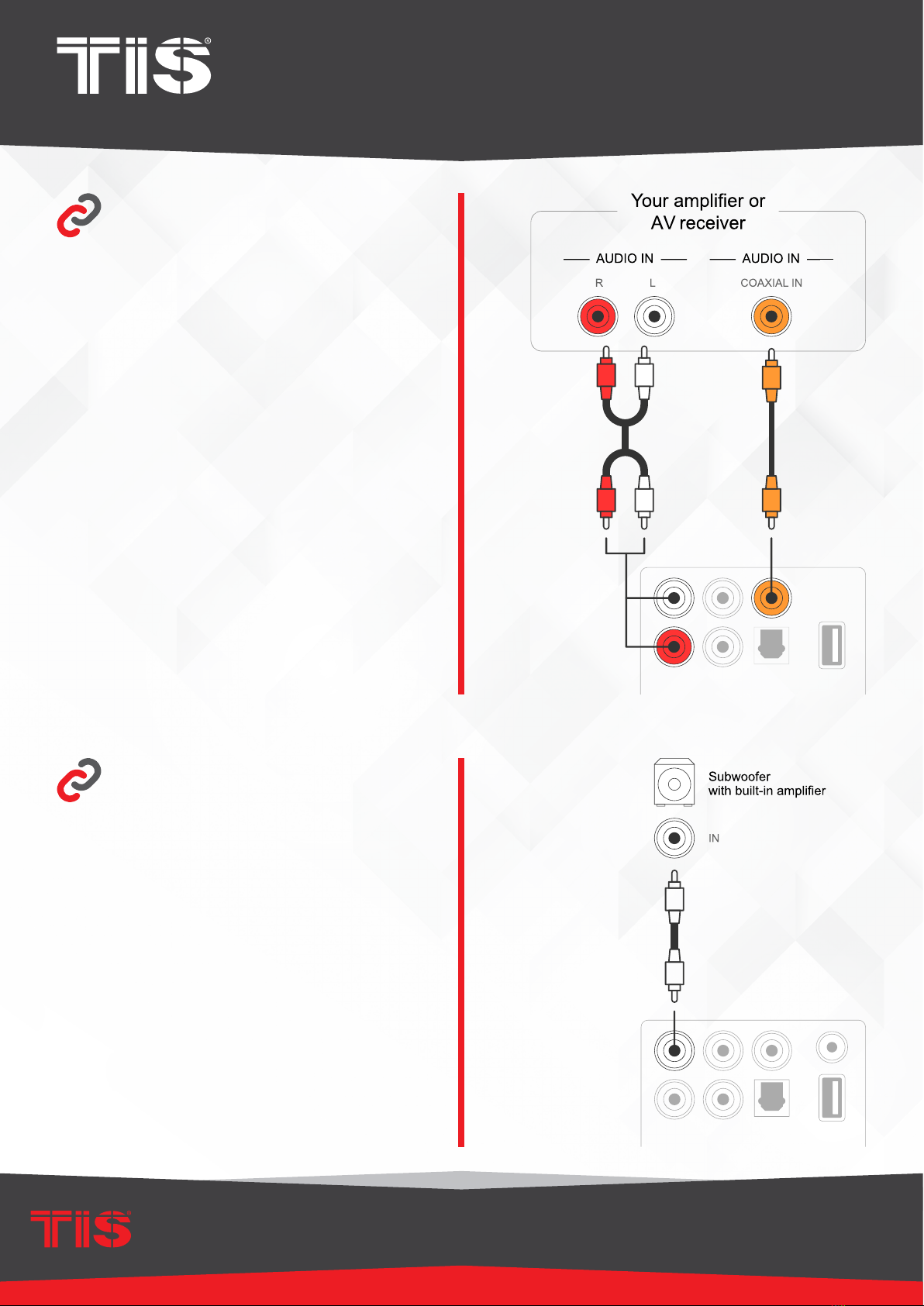
Connect to an External
Amplier or AV
Receiver
Connect to an
External Subwoofer
Using the appropriate cable, connect the LINE
OUT output to the input on your amplier or AV
receiver.
TIS-4PL-E66D supports both analog (RCA) and
digital (Coaxial) output.
Connect the LINE OUT “L” output to the subwoofer
or subwoofer amplier’s input.

INSTALLATION MANUAL
MODEL : TIS-4PL-E66D
NETWORK 4 ZONE AMPLIFIER
10
www.tiscontrol.com
TIS CONTROL LIMITED
Wanchai, Hong Kong
TIS CONTROL PTY LIMITED
SA, AUSTRALIA
Copyright © 2023 TIS, All Rights Reserved
TIS Logo is registered trademark of TIS CONTROL.
All of the specification are subject to change without notice.
Connect to a USB Storage
Device
Connect to Audio Playback Device
To play music from a USB storage device,
simply connect a USB storage device
containing music les to the Zone’s USB port.
Connect the LINE IN, OPTICAL IN connectors in each zone or the LINE IN, COAXIAL IN, OPTICAL IN
connectors in the master input area to an audio playback device; this can be a CD player, portable music
player, or any device with an audio output that uses the same connector.
LINE IN in each zone is represented as Line in in the APP, while LINE IN in the master input area is represented
as AUX. Optical IN is represented as OPT1 in each zone, while Optical IN and Coaxial IN are represented as
OPT2 and COX in the master input area.
Tabla de contenidos