
Teleorigin RBMTX-Lite Manual de usuario


Index
1 Document history..............................................................................................................................5
2 Package..............................................................................................................................................6
2.1 Box...............................................................................................................................................6
2.2 Package contents........................................................................................................................6
2.3 Router versions...........................................................................................................................7
3 General resentation.........................................................................................................................8
3.1 Front anel..................................................................................................................................8
3.2 Back anel...................................................................................................................................8
3.3 External connections...................................................................................................................9
3.3.1 GSM/UMTS/LTE antenna connector....................................................................................9
3.3.2 Modem serial ort, either full RS232/RS485.......................................................................9
3.3.3 LAN connector......................................................................................................................9
3.3.4 Power su ly connector.....................................................................................................10
3.3.5 SIM card holders.................................................................................................................10
3.4 Product sticker..........................................................................................................................10
4 Basic features and services..............................................................................................................11
5 Using the modem............................................................................................................................12
5.1 Setting u the modem..............................................................................................................12
5.1.1 Inserting SIM card(s)..........................................................................................................12
5.1.2 Connecting antenna...........................................................................................................13
5.1.3 Connecting ower su ly cable.........................................................................................14
5.1.4 Connecting LAN cable with RJ-45.......................................................................................14
5.2 Router configuration.................................................................................................................15
5.2.1 Setting u the connection..................................................................................................15
5.2.2 Modem status age............................................................................................................15
5.2.3 Local network.....................................................................................................................17
5.2.4 GSM network.....................................................................................................................18
5.2.5 WiFi network......................................................................................................................19
5.2.6 Connection control.............................................................................................................20
5.2.7 Ports configuration.............................................................................................................21
5.2.8 TCP/IP forwarding...............................................................................................................22

5.2.9 VLAN...................................................................................................................................23
5.2.10 Static routes.....................................................................................................................24
5.2.11 Dynamic DNS....................................................................................................................25
5.2.12 Access control..................................................................................................................26
5.2.13 O en VPN.........................................................................................................................27
5.2.14 I sec static/I sec mobile..................................................................................................29
5.2.15 Generating SSL certificates...............................................................................................32
5.2.16 NTRIP configuration age.................................................................................................34
5.2.17 SMS Actions......................................................................................................................35
5.2.18 Time..................................................................................................................................36
5.2.19 Syslog................................................................................................................................37
5.2.20 User files...........................................................................................................................38
5.2.21 Backu and restore..........................................................................................................39
5.2.22 Discard changes................................................................................................................39
5.2.23 Save settings ...................................................................................................................39
5.3 System logs descri tion............................................................................................................40
5.4 El roma Device Manager..........................................................................................................41
6 Troubleshooting...............................................................................................................................43
6.1 No communication with the modem........................................................................................43
6.2 Modem answers but there is no internet connection..............................................................43
7 Technical characteristics..................................................................................................................44
7.1 Mechanical characteristic.........................................................................................................44
7.2 Housing (dimension diagram)...................................................................................................44
7.3 Electrical characteristic.............................................................................................................44
7.3.1 Power su ly......................................................................................................................44
7.3.2 RF characteristics................................................................................................................44
7.3.2.1 Frequency ranges – UMTS/HSPA variant.....................................................................44
7.3.2.2 Frequency ranges - LTE variant....................................................................................44
7.3.2.3 WiFi characteristics......................................................................................................45
7.3.2.4 External antenna.........................................................................................................45
7.4 Environmental characteristic....................................................................................................45
8 Router architecture..........................................................................................................................46
9 Safety recommendations.................................................................................................................47

9.1 General Safety...........................................................................................................................47
9.2 Care and Maintenance .............................................................................................................47
9.3 Res onsibility ...........................................................................................................................47
10 Accessories....................................................................................................................................48
Power cable – o en end.................................................................................................................48
RS232/485 cable............................................................................................................................48
DIN rail holder:...............................................................................................................................49
Velctro:...........................................................................................................................................49
11 Safety Recommendations..............................................................................................................50
12 Certifications..................................................................................................................................52
12.1 Conformity Assessment Issues...............................................................................................52
12.2 Declatarions of conformity.....................................................................................................52
12.3 National restrictions................................................................................................................52
13 List of Acronyms............................................................................................................................53
14 On-line su ort.............................................................................................................................55

1 Document history
Revision Date Changes
#0.6 8.03.2018 - Preliminary version
#0.8 21.05.2018 - New screenshots
#0.9 13.09.2018 - LE description

2 Package
2.1 Box
User can find product sticker on the box which matches sticker placed on the device - it
proves that your modem is an original product. More information about stickers are in chapter
Product sticker
2.2 Package contents
Complete package contains:
. RBMTX-Lite router
2. Antenna GSM (SMA connector)
3. Power adapter
4. Wall holder

2.3 Router versions
There are many ways to upgrade your RBMTX-Lite router. List below shows typical
configuration and different combinations (variants) of this terminal.
Option Typical Option
Power supply 9-30V -
Memory
256MB RAM, 5 2MB MicroSD card
(part used for Linux system, the size of
SD card can be changed in the future)
-
Processor Cortex A7, max. 528MHz, I.MX6UL(L) -
RS232 System console -
RS485 -
Connection UMTS/HSPA LTE
Dual SIM - available
LAN Ethernet 0/ 00Mbps -
WiFi - available
Bluetooth - available
3 General presentation
3.1 ront panel
3.2 Back panel

3.3 External connections
3.3.1 GSM/UMTS/LTE antenna connector
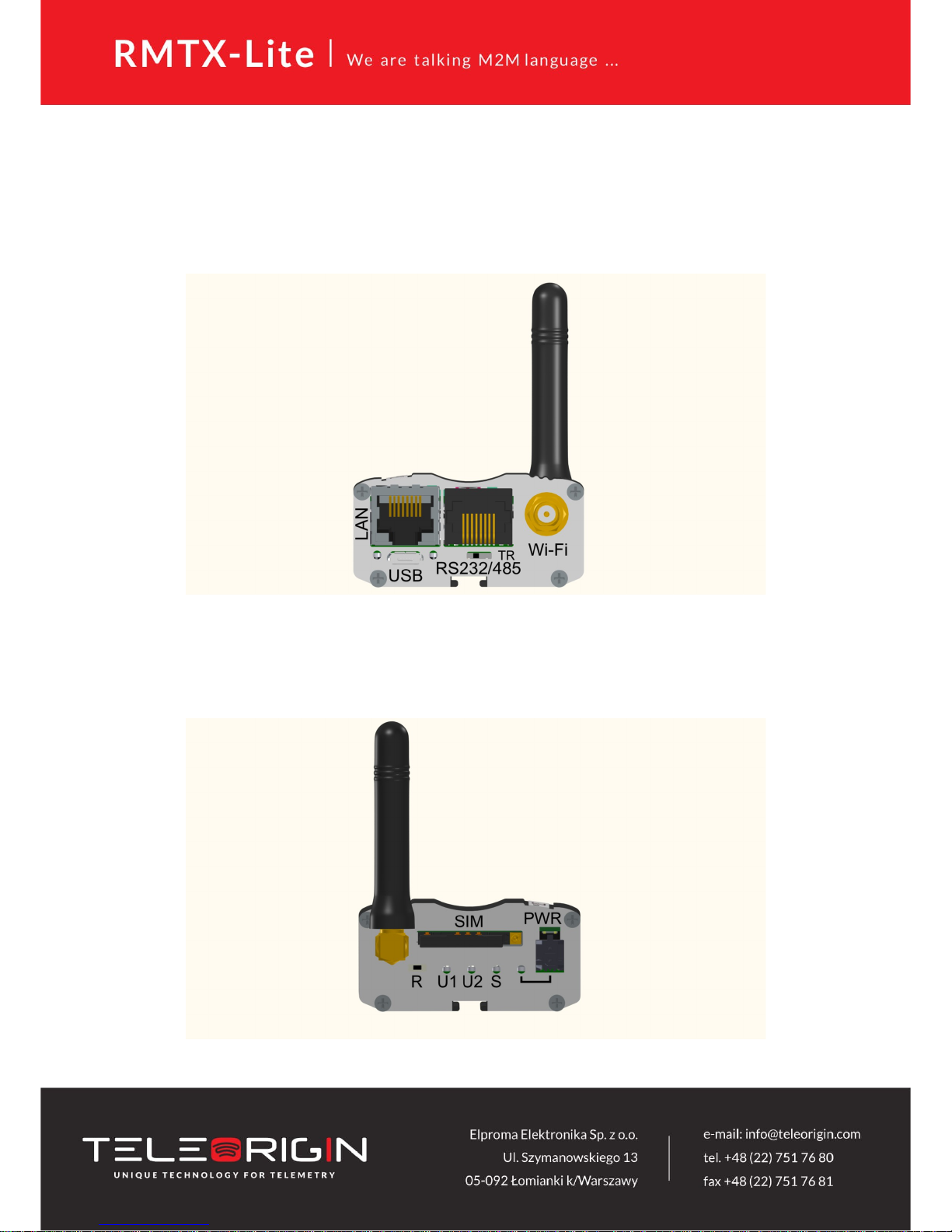
SMA antenna connector placed on front panel is used to connect external
GSM/UMTS/LTE. It must be connected to establish a connection with GSM/UMTS/LTE
network. In good circumstances (good coverage, level of received signal is high) use antenna
which is included in package. When signal strength is poor please use outdoor
directional/omnidirectional or indoor antenna.
Note: If antenna is not connected, connection with GSM/UMTS/LTE network will be
impossible.
3.3.2 Modem serial port, either full RS232/RS485
Serial RS232/RS485 (RJ-45 connector marked as “RS232/485”) is placed on front
panel of router. Serial connector pinout is described in a tables below.
3.3.3 LAN connector
Second RJ-45 connector (marked as “LAN”) is placed next to serial connector and is
used for communication with PC or laptop through Ethernet interface. WWW configuration is
available in the web browser (default IP address is 92. 68. .234). You can change the default
address in “Local network” tab.

3.3.4 Power supply connector
Please use power adapter which is included in package. It ensures “clean” power
supply input and avoids short transients on power supply lines originating from inductive
load switching. Power supply range of RBMTX-Lite router is 9-30V.
Tabla de contenidos
Manuales populares de Enrutador de red de otras marcas


NETGEAR
NETGEAR FS526T - Switch Manual de usuario

Korenix
Korenix JetNet 5710G Series Manual de usuario

Automated Logic
Automated Logic ZN551 Manual del propietario

Cisco
Cisco ASR 1000 Series Manual del operador

EnGenius
EnGenius ESR-9710 Manual de usuario

Cisco
Cisco 805 Series Instrucciones de funcionamiento y seguridad