Teledyne Lecroy SAM40 Manual de usuario

SAM40
Sensor Acquisition Module
Operator’s Manual

928571-00 Rev A
II
SAM40
Sensor Acquisition Module
Operator’s Manual
© 2017 Teledyne LeCroy, Inc. All rights reserved.
Unauthorized duplication of Teledyne LeCroy documentation materials is strictly prohibited. Customers are permitted to
duplicate and distribute Teledyne LeCroy documentation for internal educational purposes.
Teledyne LeCroy is a trademark of Teledyne LeCroy, Inc. Other product or brand names are trademarks or requested
trademarks of their respective holders. Information in this publication supersedes all earlier versions. Specifications are
subject to change without notice.
928571-00 Rev A,
October, 2017
700 Chestnut Ridge Road
Chestnut Ridge, NY 10977
1.800.5.LECROY •teledynelecroy.com

SAM40 Operator’s Manual 1
Key Specifications
Detailed specifications are maintained on the product page at
teledynelecroy.com.
Welcome
Thank you for buying a Teledyne LeCroy product. We’re certain you’ll
be pleased with the detailed features unique to our instruments. This
Operator’s Manual covers important safety and installation information
for your SAM40 Sensor Acquisition Module, along with basic operation.
Introducing SAM40 Sensor Acquisition Module
The SAM40 sensor acquisition module simply and quickly interfaces to
a supported Teledyne LeCroy 12-bit high definition oscilloscope (HDO).
The SAM40 acquires very low speed (kHz bandwidth) sensor and other
signals, while the HDO acquires higher speed analog, digital and serial
data signals. The HDO cross-triggers the SAM40, and the SAM40 sends
acquisition data to the HDO for time-synchronized display with the high
bandwidth HDO analog and digital channels.
An HDO with a SAM40 permits fast debug and validation of complex
deeply embedded control systems, mechatronics, and electro-mechanical
systems. An HDO with a sensor acquisition module cost-effectively
replaces multiple instruments with one consolidated view of system
performance. All math, measurements, pass/fail and other analysis
capabilities that can normally be performed on acquired oscilloscope
data can also be performed on the SAM40 acquisition data.
SAM40 data can be easily unitized and rescaled into appropriate sensor
units. More than 65 different SI and English system physical units are
supported for length, mass, temperature, angle, velocity, acceleration,
volume, force/weight, pressure, electrical, magnetic, energy and rotating
machine quantities. Math and measurements applied to rescaled
waveforms correctly read and convert to new units as required.
OVERVIEW
Bandwidth 40 kHz
Voltage/IEPE Input Channels 8, 16, or 24
Memory 2.5 Mpts per channel
Sample Rate 1 S/s to 100 kS/s
Vertical Resolution 24 bits
Materials List
Check that you have all the parts listed here. Contact Teledyne LeCroy
immediately if any part is missing.
•One (1) Sensor Acquisition Module
•One (1) AC Line (Power) Cord rated for the region
•One (1) USB 2.0 Cable Type A-to-B
•Three (3) BNC-to-BNC Cables
•One (1) Operator’s Manual
•One (1) SAM40 Registration Card
•One (1) Performance Certificate
•One (1) Declaration of Conformity

928571-00 Rev A
2
Front Panel
OVERVIEW
Back Panel
Power Switch BNC Connectors
RefClk In Trig In
USBTMC
Ethernet AC Power
Power Switch turns on SAM40, or
puts it into Standby Power mode.
BNC Connectors input signal from
IEPE/ICP-compatible sensors
(IEPE coupling) or a voltage input
(DC1MΩ, AC1MΩ, or Ground coupling).
RefClk In accepts synchronizing
10 MHz reference clock signal from
the oscilloscope.
Trig In accepts acquisition trigger
output from the oscilloscope.
USBTMC Port transmits data from
SAM40 to the oscilloscope.

SAM40 Operator’s Manual 3
1. Update the oscilloscope firmware to the
version matched to the latest version of
SAM40 firmware.
Note: The oscilloscope firmware must
remain in synch with the SAM40 firmware,
or you will not be able to install the latter.
The required version of each is listed on our
software download page.
2. Connect one of the included BNC cables
from SAM40 RefClk In to oscilloscope
RefClk In/Out.
3. Connect the other BNC cable from SAM40
Trig In to oscilloscope Aux Out.
4. Connect the USB 2.0 A-B cable from the
SAM40 USBTMC port (B connector) to any
oscilloscope host USB port (A connector).
5. Connect the approrpriately rated power
cord to the AC Power inlet.
6. Power on the SAM40.
7. Download the latest SAM40 firmware and
run the update (see p.11).
8. Connect sensor/voltage outputs to the BNC
input channels on the SAM40 front panel.
Connecting to the Oscilloscope
BASICS
Note: HDO8000A shown. Position of USBTMC, Aux Out and Ref In/Out varies on different oscilloscopes.

928571-00 Rev A
4
BASICS
When the oscilloscope is started with a SAM40
Sensor Acquisition Module connected, the
oscilloscope Vertical menu will offer an option for
Sensor Setup. Choose this to open the Sensor
Setup dialog.
Conguring Sensor Input Channels
Similar to the Channel Setup dialog, Sensor Setup is a collection of all the available sensor input channels, allowing you to quickly enable/disable a
channel. Behind it are the individual Sensor (SEn) conguration dialogs. Select "More..." near the closebox to display additional tabs.

SAM40 Operator’s Manual 5
BASICS
The Sensor dialogs contain many of the same settings as the Channel (Cn) conguration dialogs.
4 mA Bias
When the 4 mA Bias checkbox is selected, the SAM40 applies an excitation
current to IEPE/ICP sensor inputs. It is disabled when Coupling is set to
something other than IEPE.
Note: It is recommended to leave the 4 mA Bias checkbox deselected (the
default state) until sensors are connected, then select it prior to taking
measurements.
Bandwidth
The selectable bandwidth settings are Full (40 kHz), 2 kHz, 500 Hz, and
100 Hz. SAM40 inputs utilize a digital IIR lter to limit bandwidth.
Vertical Scale
As with channel traces, the Vertical Scale sets the amount of voltage (or
different vertical unit) represented by one Vertical division of the grid.
Coupling
When the input is an IEPE/ICP-compatible sensor, check <24 Vpk Input
(max. input for IEPE sensors) and select IEPE from the Coupling eld.
Otherwise, for a voltage input, you may leave <24 Vpk Input unchecked
and select DC1MΩ, AC1MΩ, or Ground coupling.
Note: Maximum input voltage is 50 Vpk for DC1MΩ, AC1MΩand Ground
coupling, but only 24 Vpk for IEPE coupling.

928571-00 Rev A
6
To rescale a sensor trace to a unit other than Volts or Amperes, on the
SEndialog choose Vertical Unit Others, then select the Sensor Setup
button to display the rescale settings:
Unit Category is the unit type, for example, Length or Velocity.
Units reflect the category selection, for example, a Length unit of meters
(m) versus a Velocity unit of meters per second (m/s).
Units/V (slope) is the multiplication factor (a) used to scale the acquired
sensor Voltage. Enter the number of the new unit that will equal 1 Volt.
Add is the amount of additive constant (b) to add to the rescaled value.
This value is always given in the new unit.
Rescaling
Most sensors output voltage values. The SAM40 rescale settings allow
you to change the units in which sensor output values are displayed to
a much wider selection than Volts or Amperes. They can also be used
for intelligent rescaling of output values, equivalent to using the Rescale
math function (y=ax+b), where:
• a is the multiplication factor (Units/V)
• b is the additive constant (Add)
Tip: Analog channels, parameters, and math functions can be rescaled
to many of the same units as sensors by using the Units subdialog next
to the main setup dialogs For instructions, see your oscilloscope online
Support or Operator's Manual.
As with channel rescaling, measurements performed on this sensor are
converted and displayed in the selected unit. However, math functions
are displayed in the unit that is logically appropriate for the result,
including complex results that must be derived from a table of core
SI units.
Units are automatically rescaled up or down within the list of SI unit
prefixes based on the relative size of the input signal.
BASICS
Example: Multiplying one sensor trace in Volts per meter by another
sensor trace in meters yields a result in Volts.
Example: 1000 V is displayed as 1 kV, while .1 V is displayed
as 100 mV. When the rescale value is 1 V = 1 Pascal (Pa), a 1
milliVolt (mV) reading is displayed as 1 mPa rather than .001 Pa
or 100e-3 Pa.

SAM40 Operator’s Manual 7
Sensor signals with unit conversion. The math function applied to these signals (F7) is automatically shown in the
logically appropriate unit for the product of Amperes and Volts—Watts.
The Units subdialog offers a selection
of alternative units in the equivalent
dimension to Watts for the F7 trace.
BASICS
For math functions and measurements parameters, a further unit override is possible on the Units subdialog, which shows a selection of units in the
equivalent dimension to the unit of the Fnor Pnsource trace. For example, while the default unit for the product of Volts and Amperes would be Watts, a
user could choose to instead display this function as Volt-Amperes Reactive (VAR) or horsepower (hp).

928571-00 Rev A
8
BASICS
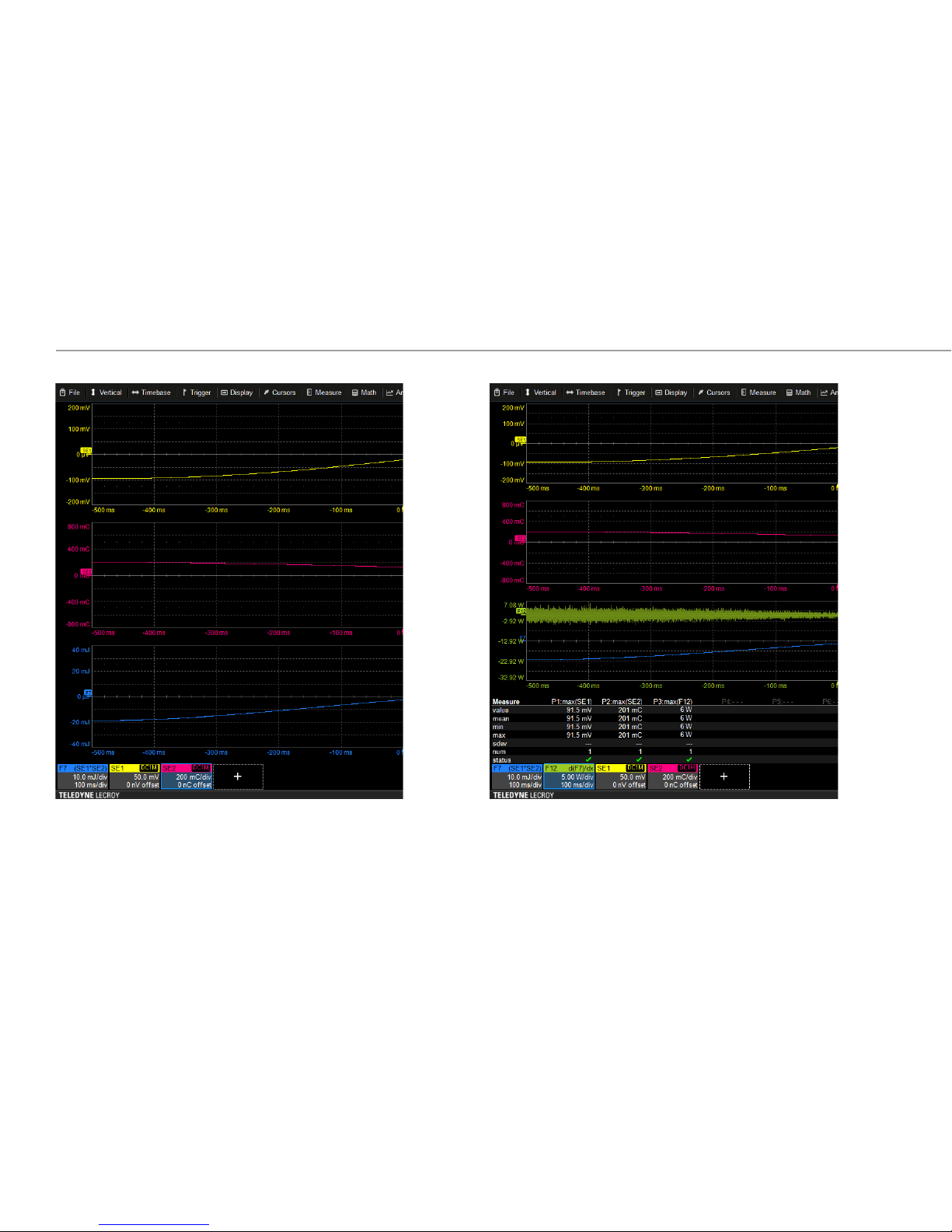
Further rescaling and changing units of one of the sensor traces
to Coulombs produces another automatic rescaling and unit
conversion for the math trace F7—this time to Joules.
Another math function (F12) applied to math trace F7 once again
yields the appropriate unit for the derivative of Joules, Watts.
Tabla de contenidos
Manuales populares de Unidad de control de otras marcas

Festo
Festo Compact Performance CP-FB6-E Manual de lista de piezas

Elo TouchSystems
Elo TouchSystems DMS-SA19P-EXTME Manual de usuario

JS Automation
JS Automation MPC3034A Manual de usuario

JAUDT
JAUDT SW GII 6406 Series Guía rápida

Spektrum
Spektrum Air Module System Manual de usuario

BOC Edwards
BOC Edwards Q Series Manual de usuario