Telecrane F24-60N Manual de usuario

F24-60N Industrial Remote
Controller
Operating Manual
TELECRANE Lee’s Hi-Tech Ent. Co., Ltd.
®

2
Table of Contents
Warranty & Precautions of Operation..………….……...2
F24-60N Operation………………...…………….….…….4
F24-60N Software Quick Start ……………………..…….8
Definition of Function Terminology……………....……13

3
Warranty
Warranty
Lee’s Hi-Tech Enterprises Co., Ltd. guarantees that this product meets its published
specifications at the time of shipment from the factory. Under proper installation it should work
as expected.
Warranty Period
This equipment is warranted against defects in material and manufacturing for a period of one
year from the date of shipment. During the warranty period, TELECRANE is responsible for
necessary repairs as long as the product can be proved to be defective.
For warranty service or repair this product must be returned to a service facility designated by
TELECRANE. Buyer will pay shipping charges to TELECRANE while TELECRANE will pay
return shipping charges.
Excluded Items
This warranty does not include consumptive parts such as batteries, fuses, buttons, relays. Also
this warranty does not cover damages caused by improper installation, improper or insufficient
maintenance, unauthorized modification, improper operation, ignorance of environmental
specifications, or improper software setting.
Remarks
No other warranty is expressed or implied, except for the above mentioned.◎
The remedies provided herein are the buyer’s sole and exclusive remedies. TELECRANE ◎
shall not be liable for any direct, indirect, special, incidental or consequential damages.
Attention
◎ Never dismantle the equipment by any unauthorized personnel, or equipment may be
damaged.
◎ After finishing operation of TELECRANE radio controller shut off main power to the crane,
power to receiver, and remove transmitter key. If transmitter’s power is controlled by “rotary
key switch”, then need turn the key to “OFF” position and remove it.
◎ The crane should be equipped with main power relay, limit switch and other safety devices.
Precautions ( I )
To avoid any interference, the receiver must be placed as far as possible from frequency inverter
and power cable as possible.
Precaution ( II )
The receiver should be installed on top of the electrical control box. Do not mount the receiver
inside the electrical control box.

4
Emergency Procedure
In case of Emergency, please follow the procedure below and contact the distributor for service
immediately.
1. Press EMS button of transmitter.
2. Remove the key from transmitter.
3. Switch off crane main power.
4. Contact distributor nearest you immediately.
F24-60N Operation
How to start
1. Insert 4 AA-size batteries into battery compartment.
2. Insert rotary key and switch to ON position.
3. Follow the Power-On procedure to energize receiver main relay.
4. Operate normally according to the function settings have been done.
5. Follow the instructions below to switch off the system: (1) Press EMS button /mushroom, (2)
remove the key and keep it in safe place, (3) Switch off the equipment’s main power (e.g.
Crane)
Transmitter Batteries
Transmitter requires 4 AA size alkaline or rechargeable batteries. 3 stages power indicator
available on transmitter. During operation, green LED indicator flashes when battery power is
full and flashes yellow when battery power is low. Replace new battery immediately when
yellow indicator appears, unloading and stop all activity until new battery is replaced. An EMS
stop signal will be sent automatically to receiver accompany with red LED indicator if the
transmitter power is below the limit.
Receiver Power Supply
Each transformer provide 2 option voltages for receiver power supply as below:
(1) 48/110 VAC
(2) 110/220 VAC
(3) 48/220 VAC
(4) 220/380 VAC
Changing Frequency by Setting DIP Switch
The dip switch of F24-60N allows users to set in 70 different frequency channels. And each
channel is represented by a combination of 8 dip switch numbers. For example, CH #01 (Freq.
433.0625) is #00000001.

5
12345678
01 433.0625 0 0 0 0 0 0 0 1
CH Freq.
Dip Switch No.
When the dip switch at position (1) is
shifting to “ON” side (Shown as
attached photo), that means the dip
switch number becomes “1”. For another
opposite side, it stands for dip switch
number “0”.
Note: Whenever changing the frequency,
both the transmitter and receiver must be
turned off the power and turned on again
to activate new frequency.
Changing receiver power supply voltage
1. Disconnect receiver power.
2. Remove transformer connector plug from original position (Fig A)
3 Then insert connector plug into new position (Fig B)
Connector Plug
110V
48V
48V
220V
220V
110V
220V
3
80V

6
(Fig. A) (Fig. B)
NC/NO output connection
Relay module are designed for both type of relay such NO and NC/NO. Both outputs connection
of NC/NO relay are available on the relay module. To replace NC/NO relay, remove existing NO
relay and insert a new NC/NO relay. Follow the relay module indication for new output wire
connections for NC/NO relay.
COM Configuration
P1~P44 are terminal for COM, changing COM configuration by using wire included inside the
packages. Different size of wire is available.
Symptom Causes or solution
Transmitter r
ed LED
indicator flashing quickly
(every 0.2 sec) when
operating
One of t
he pushbuttons is jammed.
Joystick is not in neutral position.
The EMS mushroom is not released completely.
The transmitter is not properly Power-On.
Note: Please contact the distributor nearest you for
further assistant
if need.
Transmitter green/Yellow
LED indicator flashing
crossly when start key switch
on
The joystick #1 memory is damaged. Contact the distributor for
service.
Transmitter red/yellow LED
indicator flashing crossly
when start key switch on
The joystick #2 memory is damaged. Contact the distributor for
service.
Red LED indicator flashing
quickly when start key
switch on
Transmitter main memory is damaged
. Contact the distributor
for service.
Transmitter red
LED
indicator remains on
permanent
Remove the batteries and re-insert again.
Receiver LED1 indicator
flashing quickly
Receiver main memory is damaged. Contact the distributor for
service.
Receiver does not respond at
all Switch off main power and switch on again after 20 seconds.
Troubleshooting

7
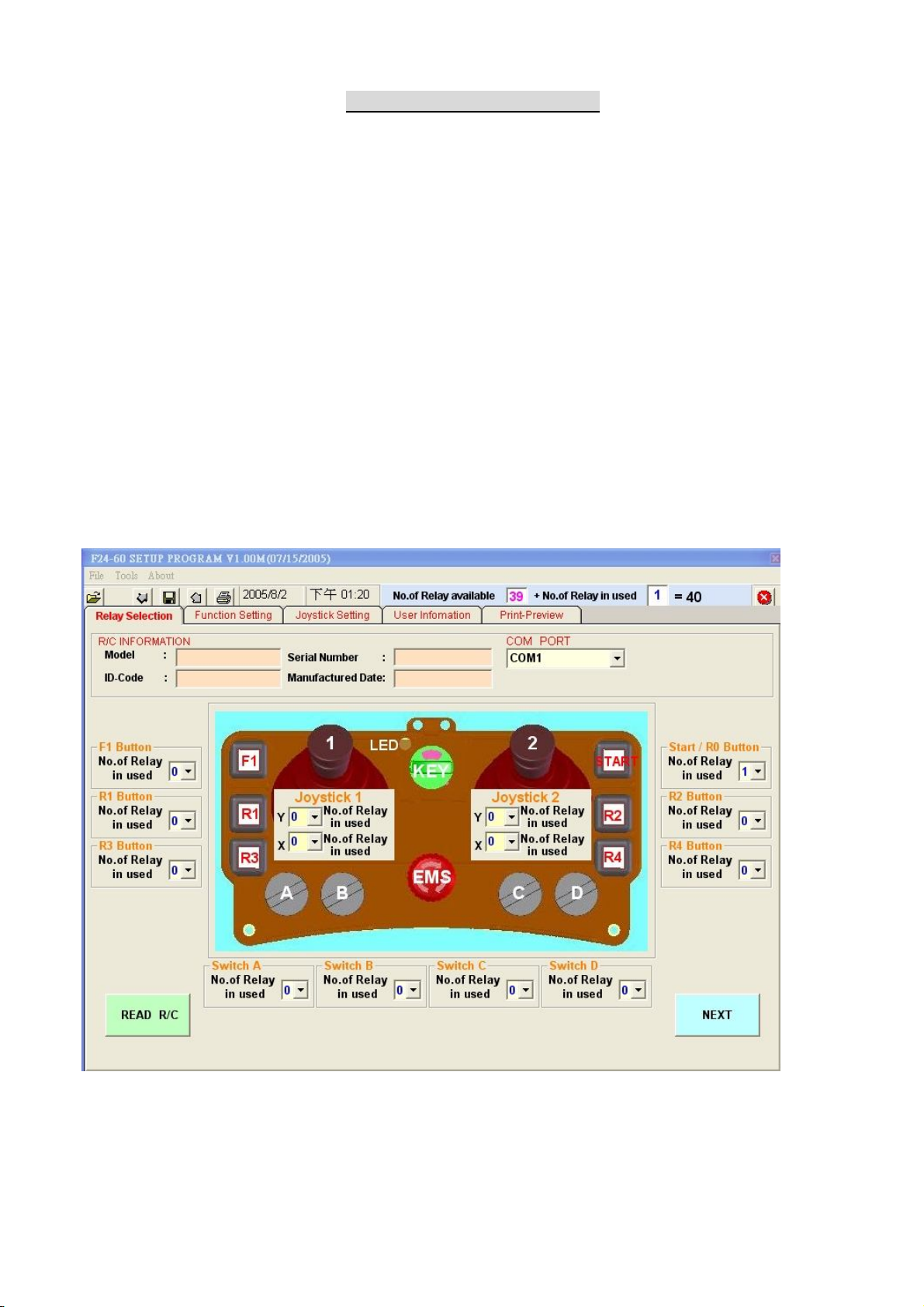
F24-60(N) Software Quick Start
I. RELAY SELECTION
Select quantity of relay to be used for each buttons, selector switch and
joystick.
(1) Choose COM PORT for your interface is assign
(2) Press READ R/C (It may take a while to download the data from transmitter or
receiver)
(3) Pull down the menu and changing the number of relay to be used of each command.
Select 0 for command disable.
(3) Press NEXT when ready
Note: Total quantity of relay available on receiver is 40.
Maximum quantity of relay to be used of each joystick axis is 16.

8
II. FUNCTION SETTING
Choose the function for selected buttons, selector switch, joystick and
transmitter/receiver parameters.
(1) Changing the setting as need and press NEXT when ready
Note: You may return to previous step by press RETURN at any time.
Refer to annex I for further explanation of all parameters.

9
III. JOYSTICK SETTING
Joystick relay editing
Joystick Setting is divided into 4 parts
(1) Joystick No. 1 Y axis
(2) Joystick No. 1 X axis
(3) Joystick No. 2 Y axis
(4) Joystick No. 2 X axis
(1) Click relay table to edit relay output according to the command. Leave blank for
disable.
(2) Press NEXT when ready.
(3) Repeat the above process for all joystick setting.
Note: You may return to previous step by press RETURN at any time.
Refer to annex I for further explanation of acc. Delay time, interlock delay time and
inching.
Relay availability for each axis is shown on the left side of table with correspondent
relay as indicated.

10
IV. USER INFORMATION
Save user information as record for future use.
(1) Fill the necessary information as need.
(2) Press WRITE R/C when ready to overwrite the existing data on transmitter or
receiver.
Note: You may return to previous step by press RETURN at any time.
The user information is not saving in either transmitter or receiver memory, and
it will be only saving into PC with D24 file format.
Tabla de contenidos
Otros manuales de Mando a distancia de Telecrane

Telecrane
Telecrane F24+ Series Manual de usuario

Telecrane
Telecrane F25 Manual de usuario

Telecrane
Telecrane F21-E1 Manual de usuario

Telecrane
Telecrane F24-12S Manual de usuario

Telecrane
Telecrane F21-E2 Manual de usuario

Telecrane
Telecrane F21-12S Manual de usuario

Telecrane
Telecrane F24 Series Manual de usuario

Telecrane
Telecrane F21-2S Manual de usuario