Tech Controllers EU-M-9t Manual de usuario

1
EU-M-9t

2
TABLE OF CONTENTS
I. Safety ...............................................................................................................................................................................3
II. Device description ...........................................................................................................................................................4
III. How to install the controller ...........................................................................................................................................5
IV. Main screen description..................................................................................................................................................8
V. Controller functions.......................................................................................................................................................10
1. Operation modes..........................................................................................................................................................11
2. Language ......................................................................................................................................................................11
3. Time settings ................................................................................................................................................................11
4. Screen settings .............................................................................................................................................................11
5. Screensaver ..................................................................................................................................................................11
6. Theme...........................................................................................................................................................................11
7. Sound............................................................................................................................................................................11
8. Registration ..................................................................................................................................................................11
9. Module Wi-Fi................................................................................................................................................................11
10. Protections...............................................................................................................................................................12
11. Factory settings........................................................................................................................................................12
12. Software version ......................................................................................................................................................12
VI. How to control the heatingsystem via www.emodul.eu .............................................................................................12
1. Registration ..................................................................................................................................................................12
2. Home tab......................................................................................................................................................................13
3. Zones tab......................................................................................................................................................................15
4. Menu tab......................................................................................................................................................................16
5. Statistigs tab.................................................................................................................................................................16
6. Settings tab...................................................................................................................................................................16
VII. Protections and alarms..................................................................................................................................................17
VIII. Technical data................................................................................................................................................................19
JG.2021.01.07

3
I. SAFETY
Before using the device for the first time the user should read the following regulations carefully. Not obeying the rules
included in this manual may lead to personal injuries or controller damage. The user’s manual should be stored in a safe place
for further reference. In order to avoid accidents and errors it should be ensured that every person using the device has
familiarized themselves with the principle of operation as well as security functions of the controller. If the device is to be
sold or put in a different place, make sure that the user’s manual is there with the device so that any potential user has access
to essential information about the device.
The manufacturer does not accept responsibility for any injuries or damage resulting from negligence; therefore, users are
obliged to take the necessary safety measures listed in this manual to protect their lives and property.
WARNING
High voltage! Make sure the controller is disconnected from the mains before performing any activities involving
the power supply (plugging cables, installing the device etc.).
The device should be installed by a qualified electrician.
Before starting the controller, the user shoud measure earthing resistance of the electric motors as well as the
insulation resistance of the cables.
The controller should not be operated by children.
NOTE
The device may be damaged if struck by a lightning. Make sure the plug is disconnected from the power supply
during storm.
Any use other than specified by the manufacturer is forbidden.
Before and during the heating season, the controller should be checked for condition of its cables. The user should
also check if the controller is properly mounted and clean it if dusty or dirty.
Changes in the merchandise described in the manual may have been introduced subsequent to its completion on 07.01.2021.
The manufacturer retains the right to introduce changes to the structure. The illustrations may include additional equipment.
Print technology may result in differences in colours shown.
We are committed to protecting the environment. Manufacturing electronic devices imposes
an obligation of providing for environmentally safe disposal of used electronic components and
devices. Hence, we have been entered into a register kept by the Inspection For Environmental
Protection. The crossed-out bin symbol on a product means that the product may not be
disposed of to household waste containers. Recycling of wastes helps to protect the
environment. The user is obliged to transfer their used equipment to a collection point where
all electric and electronic components will be recycled.

4
II. DEVICE DESCRIPTION
EU-M-9t control panel is intended for cooperation with EU-L-9r external controller and controlling subordinate room
regulators, sensors and thermostatic actuators.
EU-M-9t control panel may be used to adjust the settings in other zones - pre-set temperature, floor heating.
NOTE
Only one EU-M-9t control panel may be installed in a heating system. The panel may control up to 32 heating zones.
Controller functions and equipment:
possibility of controlling the operation of main controllers and thermostatic actuators, room regulators, wired
temperature sensors (EU-R-9b, EU-R-9z, EU-R-9s, EU-C-7p) and wireless temperature sensors (EU-C-8r, EU-R-8b, EU-
R-8z, EU-C-mini ) registered in the controllers.
Built-in Wi-Fi module
Possibility of controlling the heating system online via https://emodul.eu
Large, colour display made of glass
The set includes the EU-MZ-RS power supply
NOTE
The control panel itself does not measure the temperature. It forwards temperature readings from room regulators
and sensors to the external controller in which they have been registered.
There are 2 color versions:
WHITE
BLACK

5
III. HOW TO INSTALL THE CONTROLLER
WARNING
The device should be installed by a qualified electrician.
WARNING
Risk of fatal electric shock from touching live connections. Before working on the controller switch off the
power supply and prevent it from being accidentally switched on.
WARNING
Incorrect connection of cables may lead to controller damage.
In order to mount the panel on the wall, screw the rear part of the housing onto the wall (1) and slide the device into to (2).
The EU-M-9t panel works with an additional MZ-RS power supply (3) included in the set, mounted near the heating device.

6
In order to mount another control panel, connect a four-core cable to appropriate ports using the diagram below.
NOTE
Make sure the wires are connected properly.

7

8
IV. MAIN SCREEN DESCRIPTION
The touch screen enables convenient and intuitive operation of the controller.
1. Enter controller menu
2. WiFi signal strength
3. Question mark icon – tap here to open up a screen with current external temperature, contact status and pump
status.
4. Tab change
5. Current time
6. Zone status:
1
2
4
5
6
7
8
9
10
3
External temperature
Contact status
Pump status
Number of registered
external sensors

9
7. Zone icon
8. Zone name
9. Current zone temperature
10. Pre-set zone temperature
EU-M-9t control panel is a master controller, which enables the user to change the pre-set zone parameters regardless of the
regulator or room sensor used in the zone.
In order to enter the settings of a given zone, tap on the zone status. The screen will show basic zone editing screen:
1. Return to the main screen
2. WiFi signal strength
3. The number of the zone which the displayed information refers to.
4. Current time
5. Mode change icon: schedules (local, global) or constant temperature.
6. Floor temperature
7. Information about the registered window sensor and actuators
8. Pre-set zone temperature
9. Current schedule type
10. Current zone temperature
1
2
3
5
7
9
10
4
6
8

10
V. CONTROLLER FUNCTIONS
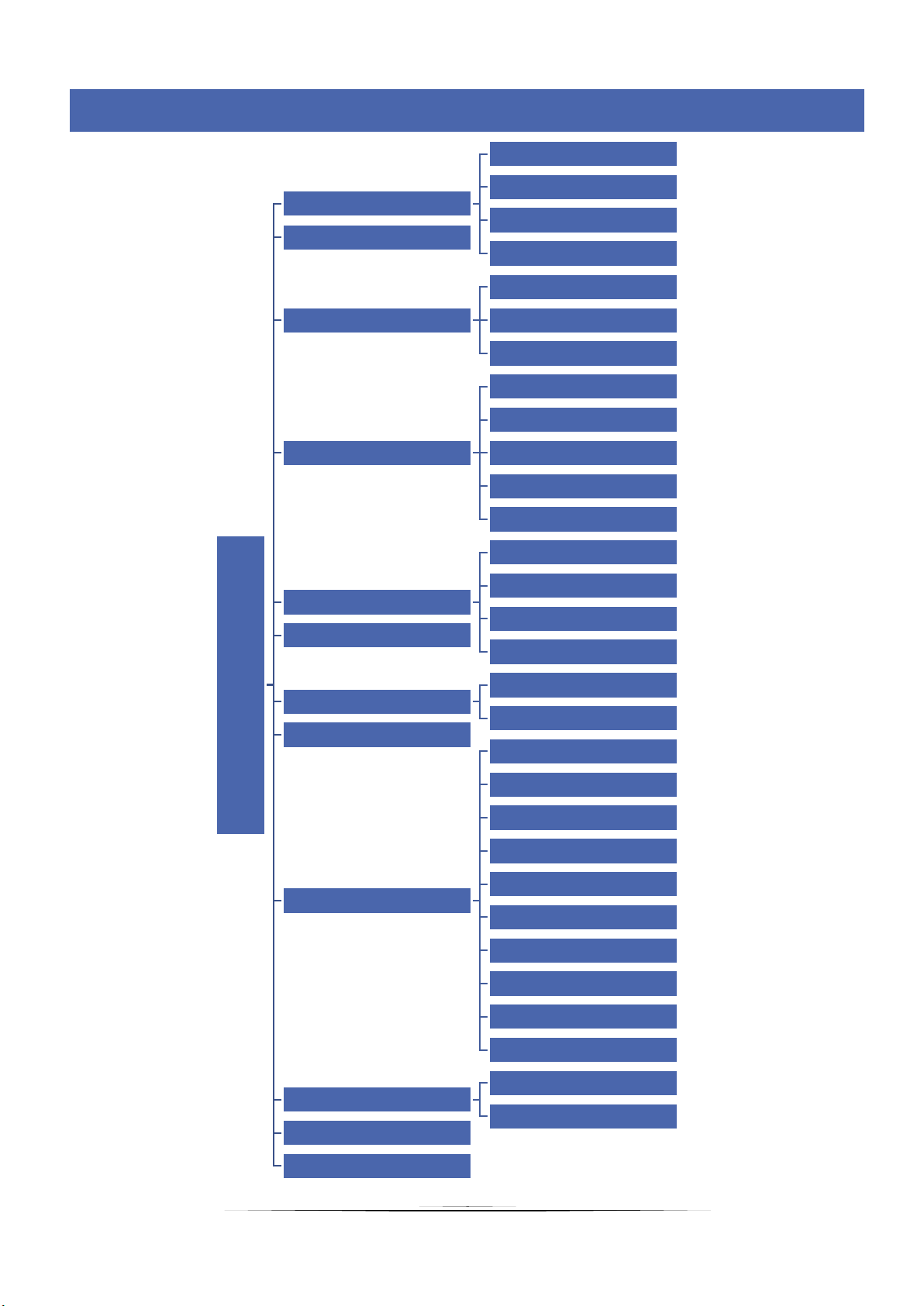
Menu
Operations mode
Normal mode
Eco mode
Holiday mode
Comfort mode
Language
Time settings
Download
Clock
Date
Screen settings
Screen brightness
Blank screen time
Screen blanking time
Select animation
Animation duration
Screensaver
No screensaver
Clock
Date
External temperature
Theme 1-3
Sound ON
Frequency
Registration 1-4 module
Wi-Fi
Disconnect
Select Wi-Fi network
Registration
DHCP
Address IP
Gate adress
Address DNS
Adsress MAC
Subnetwork mask
Module version
Protections Auto-lock ON
Auto-lock PIN code
Factory settings
Software version
Blok diagram –controller menu
Tabla de contenidos
Otros manuales de Controladores de temperatura de Tech Controllers

Tech Controllers
Tech Controllers EU-292n v3 Manual de usuario

Tech Controllers
Tech Controllers EU-F-2z v1 Manual de usuario

Tech Controllers
Tech Controllers EU-297 v2 Manual de usuario

Tech Controllers
Tech Controllers EU-293v3 Manual de usuario

Tech Controllers
Tech Controllers EU-297 v3 Manual de usuario

Tech Controllers
Tech Controllers ST-280 Manual de usuario

Tech Controllers
Tech Controllers EU-402N PWM Manual de usuario

Tech Controllers
Tech Controllers EU-292n v2 Manual de usuario

Tech Controllers
Tech Controllers EU-281C Manual de usuario

Tech Controllers
Tech Controllers EU-281 Manual de usuario