Teac MP-400 Manual de usuario

MP3 Player MP-400
User Manual
To ensure the smooth handling of your warranty please write the serial number
of your device into the box. In the case of warranty you are expected to send it
together with a copy of your invoice to your nearest TEAC sales representative.
®

GB – 2 | MP-400
•Copyright © 2005, TEAC Corporation. All rights re-
served. Edition: August 2005
•Company and product names provided herein are
trademarks of their respective companies.
•Changes in specifications and features may be made
without notice or obligation.
Disposing of the Product
Your device should not be placed
in municipal waste. Please check
local regulations for disposal of
electronic products.

GB – 3 | MP-400
Contents
NAME OF EACH PART ........................................................................... 6
Top .................................................................................................. 6
Bottom ........................................................................................... 6
Left / Right ..................................................................................... 7
Front ............................................................................................... 7
CONTENT OF PACKAGE ....................................................................... 8
BASIC OPERATION ................................................................................ 8
Connect to PC .............................................................................. 8
Download File in Windows Me, 2000, XP, Macintosh ................. 9
Download File in Window98SE .................................................... 9
Install Win98SE Driver .................................................................. 10
Firmware Upgrade ...................................................................... 16
Reset ............................................................................................ 17
Charging ..................................................................................... 17
Power On/Off .............................................................................. 18
Volume Up/Down ....................................................................... 18
HOLD On/Off ............................................................................... 18
MODE ........................................................................................... 19
Mode Selection .......................................................................... 20
MUSIC .................................................................................................. 22
Select Music mode ..................................................................... 22
Listening to Music ....................................................................... 23
Track Forward/Track Back .......................................................... 23
Fast Forward/Rewind .................................................................. 23
Using Music Menu ....................................................................... 24
Play Menu .................................................................................... 25
Equalizer ................................................................................. 25
3D Sound ............................................................................... 26
User EQ ................................................................................... 27
Repeat Mode ........................................................................ 28
Display Menu .............................................................................. 29
ID3 Tag ................................................................................... 29
Language .............................................................................. 30
Speed Menu ............................................................................... 31
Speed ..................................................................................... 31
Set Speed .................................................................................... 32
Contents

GB – 4 | MP-400
File Menu ..................................................................................... 33
File Info ................................................................................... 33
Delete Bookmark .................................................................. 34
Creating a Bookmark ........................................................... 35
Navigation Mode ....................................................................... 36
Navigation ................................................................................... 36
Delete File .............................................................................. 37
Copy File ................................................................................ 38
Repeat Section (A <-> B) ........................................................... 39
VOICE RECORD .................................................................................. 40
Select Voice Record Mode ....................................................... 40
Voice Record .............................................................................. 41
Voice Record Quality ................................................................. 42
FM RADIO ............................................................................................ 43
Select FM Radio Mode ............................................................... 43
Manual Mode ............................................................................. 44
Selecting Station Manually in Manual Mode ..................... 44
FM Radio CH Auto Scan in Manual Mode. ........................ 44
FM Radio CH Auto Save in Manual Mode. ........................ 44
Preset Mode ................................................................................ 45
Saving CH .................................................................................... 45
FM Radio Menu ........................................................................... 46
Using FM Radio Menu ........................................................... 46
FM Band ................................................................................. 47
Set Sensitivity ......................................................................... 48
Mode Select .......................................................................... 49
Shift Between Manual Mode and Preset Mode ............ 49
CH List ..................................................................................... 50
CH Delete .............................................................................. 51
CH Delete by the Easy Way ............................................ 51
FM Radio Record ........................................................................ 52
LINE IN RECORD .................................................................................. 53
Select Line in Record Mode ...................................................... 53
Connect Devices ....................................................................... 54
Line In Record ............................................................................. 55
Using Line in Record Menu ........................................................ 56
Quality .................................................................................... 57
CD Sync ................................................................................. 58
Contents

GB – 5 | MP-400
VIEW .................................................................................................... 59
Select View Mode ...................................................................... 59
Seeing Image .............................................................................. 60
Seeing Motion Picture ................................................................ 61
MP4 Converter ............................................................................ 62
Install MP4 Converter ............................................................ 62
Converter to MP4 file ............................................................ 64
MP4 Player ................................................................................... 66
SYSTEM MANAGER ............................................................................. 68
Select System Manager Mode ................................................. 68
Control Menu .............................................................................. 69
Memory info .......................................................................... 69
Version .................................................................................... 69
Format .................................................................................... 70
Screen Saver ......................................................................... 70
Reset ....................................................................................... 71
LCD Color Menu ......................................................................... 72
LCD Color .............................................................................. 72
Timer menu .................................................................................. 73
Power Save ............................................................................ 73
Sleep ...................................................................................... 73
TROUBLE SHOOTING ........................................................................... 74
SPECIFICATIONS .................................................................................. 75
Specifications (continued) ........................................................ 76
Contents

GB – 6 | MP-400
Name of Each Part
NAME OF EACH PART
Top
1. VOL- Volume down
2. VOL+ Volume up
3. REC/MODE Recording/Mode selection
4. HOLD (lock/unlock key)
5. Reset
6. MENU/NAVI (Menu key/Navigation key)
7. A-B/SPEED Repeat/Set playback speed
8. previous song, REW, back
9. Power ON/OFF/Play/Pause/Confirm selection
10. next song, FF, next
Bottom

GB – 7 | MP-400
Name of Each Part
Left / Right
LC-Display
11. USB connector
12. Connect earphone jack /Connect Line in jack
13. Microphone
Front

GB – 8 | MP-400
CONTENT OF PACKAGE
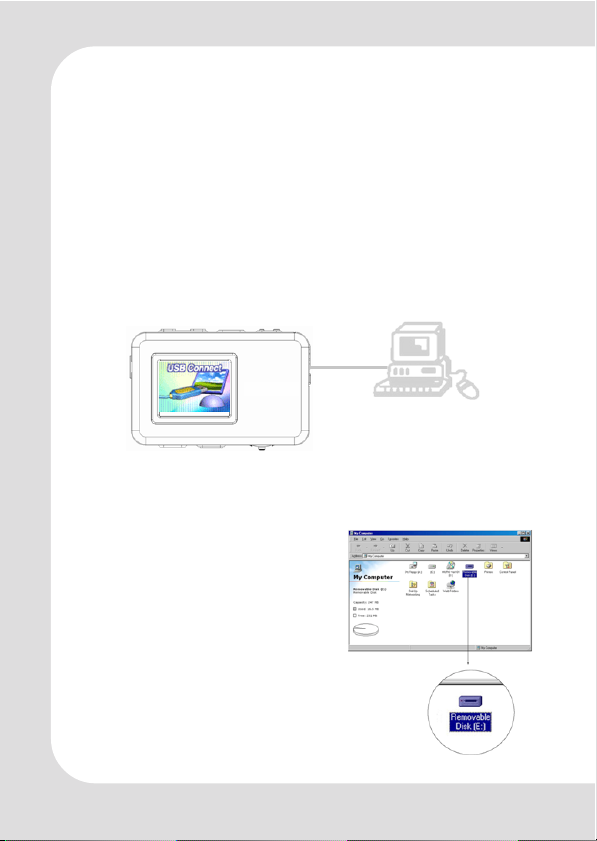
– The below image can be displayed if player is connected
when it is powered on.
– If you connect the product without power on, the USB con-
nect image won’t display.
– The player can be recognized
as a removable disk.
– Its name can be verified as PC
system.
Content of Package/ Basic Operation: Connect to PC
MP3 player MP-400
Earphone
USB cable
Line-In cable
USB charging adapter
Neck strap
Installation CD
Operation overview
User’s manual (on CD)
BASIC OPERATION
Connect to PC
– Connect player to PC with USB Cable.

GB – 9 | MP-400
Download File in
Windows Me, 2000, XP, Macintosh
- Copy the files you want to download in your PC and paste
them in the removable disk.
Download File in Window98SE
– If your PC window system is Window98SE, please install MP-
400 Installer in your PC. Installer program is contained in the
bundled CD.
Basic Operation: Download File in
Windows

GB – 10 | MP-400
Install Win98SE Driver
– Put the bundled CD in your PC. The CD is executed automati-
cally.
– Choose Win98SE driver by double click.
– The below image appears and starts install.
– Click “Next”.
Basic Operation: Install Win98SE Driver
– Click “Next”.
Tabla de contenidos
Otros manuales de Reproductor de MP3 de Teac

Teac
Teac MP-211 Instrucciones de montaje

Teac
Teac Mini CD/MP3 Player Manual de usuario

Teac
Teac MP-233 Manual de usuario

Teac
Teac MP-350 Manual de usuario

Teac
Teac MP-150 Manual de usuario

Teac
Teac MP-275 Manual de usuario

Teac
Teac MP-111 Manual de usuario

Teac
Teac MP-200 Manual de usuario

Teac
Teac MP-300 Instrucciones de montaje

Teac
Teac MP-280 Instrucciones de montaje