
TDS Metrocom ACTIONTEC Hoja de información del producto


2
CONTENTS
ACTIONTEC DSL MODEM: 3
DSL Kit Contents 3
CONFIGURING YOUR COMPUTER: 5
Static IP Address Setup 5
Dynamic IP Address Setup 7
ACTIONTEC DSL MODEM INSTALLATION: 9
Actiontec DSL Modem Installation 9
DSL Filter Installation 11
CONFIGURING YOUR E-MAIL: 13
Configuring Your E-mail 13
Accessing Your WebMail 15
SYSTEM REQUIREMENTS: 16
TROUBLESHOOTING: 17
SUPPORT SERVICES: 20

3
DSL KIT CONTENTS
1. Actiontec DSL Modem
2. Power cord
3. Ethernet (yellow) cable

4
DSL KIT CONTENTS
1. 1 Actiontec 701 DSL Modem
2. 1 Power cord (Color:Black)
3. 1 Ethernet cable (Color:Yellow)
4. 1 DSL cable (Color:Gray)
5. 1 DSL filter (Color:White)
6. 1 Splitter (Color:White)
If you did not receive these items, please call
TDS Metrocom Repair at 1.888.790.6415.
Verify your computer meets the system
requirements listed on page 16of this
User Guide.
If you have:
Windows XP proceed to page 5for
instructions for configuring your static IP
address or page 7for configuring a
dynamically assigned IP address.
If you have:
Windows 98, Me, NT, 2000 or Mac OS
contact TDS Dedicated Technical Support
at 1.888.850.5915. 6. Splitter
4. DSL (gray) cable
5. DSL filter
your DSL kit should include:

5
CONFIGURING YOUR COMPUTER
static IP address setup
1. Select
Start
then
Control Panel.
(figure 7)
If you do not see
Control Panel,
select
Settings
then
Control Panel
.
(figure 8)
2. Click
Network and Internet Connections
.
(figure 9)
If you do not see
Network and Internet
Connections
, select
Network Connections
.
(figure 10)
3. Right-click
Local Area Connection
and
select
Properties
. (figure 11)
figure 7
figure 8
figure 9
figure 11
please note:
figure 10
please note:
6
CONFIGURING YOUR COMPUTER
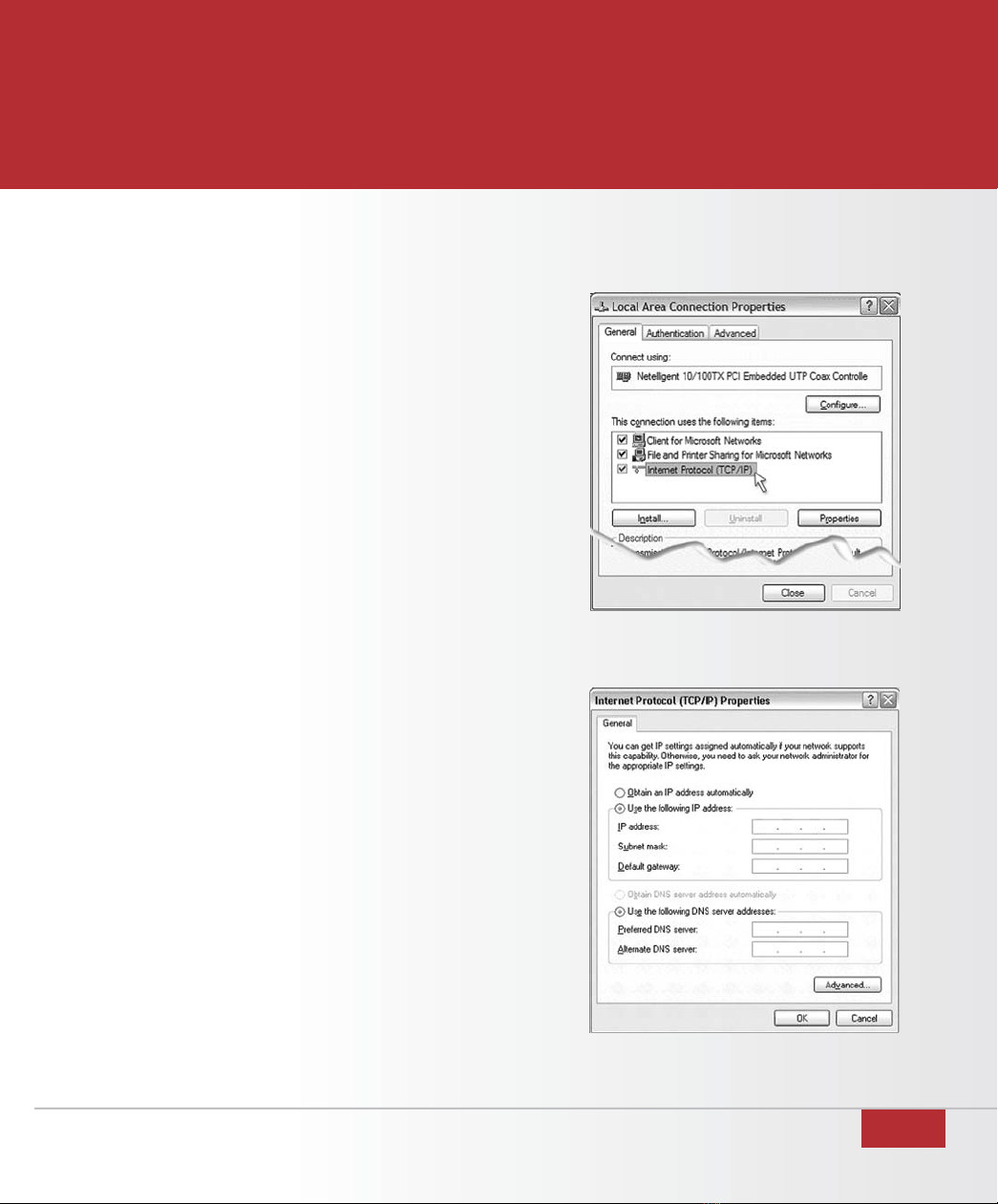
4. Double-click
Internet Protocol
(TCP/IP).
(figure 12)
5. Select
Use the following IP address
and
Use
the following DNS server address
.
(figure 13)
6. Enter the IP & DNS address information given
to you by your TDS Metrocom Account
Executive. If you do not have your IP address,
please contact TDS Metrocom Business
Customer Care at 1.866.206.0596.
7. Click
OK
and
Close.
8. Open your Web Browser (example: Internet
Explorer). Your homepage should appear.
Proceed to page 9.
figure 12
figure 13

7
CONFIGURING YOUR COMPUTER
dynamic IP address setup
1. Select
Start
then
Control Panel.
(figure 14)
If you do not see
Control Panel,
select
Settings
then
Control Panel
.
(figure 15)
2. Click
Network and Internet Connections
.
(figure 16)
If you do not see
Network and Internet
Connections,
select
Network Connections
.
(figure 17)
3. Right-click
Local Area Connection
and select
Properties
. (figure 18)
figure14
figure 15
figure 16
figure 18
please note:
figure17
please note:

8
CONFIGURING YOUR COMPUTER
4. Double-click
Internet Protocol
(TCP/IP).
(figure 19)
5. Select
Obtain an IP address automatically
.
(figure 20)
6. Click
OK
and
Close.
7. Open your Web Browser (example: Internet
Explorer). Your homepage should appear.
Proceed to page 9.
figure 19
figure 20

9
ACTIONTEC DSL MODEM INSTALLATION
The Actiontec DSL modem needs proper
ventilation to function. Place your Actiontec DSL
modem in an adequately ventilated area and
away from heat sources.
Steps for wiring a single computer:
1. Plug the end of the Power cord into the Power
port on the back of the Actiontec DSL modem.
(figure 21)
2. Plug the other end of the Power cord into
a power outlet. (A power strip with surge
protection is recommended.)
3. Turn the power switch on.
4. Plug one end of the Ethernet (yellow) cable into
the Ethernet Network Interface Card (NIC) in
your computer. (figure 22)
Your computer may look slightly different.
5. Plug the remaining end of the Ethernet cable
into the yellow Ethernet port on the back of the
Actiontec DSL modem. (figure 23)
figure 21
figure 22
figure 23
please note:
please note:
Wiring for use with a hub/router and multiple
computers is not supported by TDS Metrocom
Dedicated Technical Support. You will need to
consult your hub or router installation instructions
to configure individual computers.

10
ACTIONTEC DSL MODEM INSTALLATION
figure 25
figure 24
6. Connect one end of the DSL (gray) cable
to the Phone port on the back of the
Actiontec DSL modem. (figure 24)
7. Connect the remaining end of the DSL (gray)
cable into your phone jack. (figure 25)
The following lights should be lit on the
Actiontec DSL modem:
• Power light on solid green
• DSL light flashing or solid green
• Ethernet light on solid green .
• Internet light flashing green, then
solid green
Otros manuales para ACTIONTEC
1
Tabla de contenidos
Manuales populares de Módem de otras marcas


US Robotics
US Robotics 3453C Manual de usuario

MaxTech
MaxTech Plug & Play Internal Voice/FAX/Data/SVD... Manual de usuario

Zte
Zte MF823 Manual de usuario

Four-Faith
Four-Faith F1403 Manual de usuario

Sierra Wireless
Sierra Wireless AIRLINK MP595W Manual de usuario

Gemtek
Gemtek WiMAX WIXFBR-103 Manual de usuario