
Tapo RV30 Plus Manual de usuario

User Manual
LiDAR Navigation Robot Vacuum & Mop
+ Smart Auto-Empty Dock
©2023 TP-Link 7106510021 REV1.2.0
*Images may dier from actual products.

IMPORTANT SAFETY INSTRUCTIONS
READ ALL INSTRUCTIONS
BEFORE USING THIS APPLIANCE
WARNING – To reduce the risk of re, electric shock, or injury:
• Do not leave appliance when plugged in. Unplug from outlet when not in use and before servicing.
• Do not use outdoors or on wet surfaces.
• Do not allow to be used as a toy. Close attention is necessary when used by or near children.
• Use only as described in this manual. Use only manufacturer’s recommended attachments.
• Do not use with damaged cord or plug. If appliance is not working as it should, has been dropped, damaged, left outdoors, or dropped
into water, return it to a service center.
• Do not pull or carry by cord, use cord as a handle, close a door on cord, or pull cord around sharp edges or corners. Do not run
appliance over cord. Keep cord away from heated surfaces.
• Do not unplug by pulling on cord. To unplug, grasp the plug, not the cord.
• Do not handle plug or appliance with wet hands.
• Do not put any object into openings. Do not use with any opening blocked; keep free of dust.
• Do not use to pick up ammable or combustible liquids, such as gasoline, or use in areas where they may be present.
• Keep hair, loose clothing, ngers, and all parts of body away from openings and moving parts.
• Turn o all controls before unplugging.
• Do not put any object into openings. Do not use with any opening blocked; keep free of dust, lint, hair, and anything that may reduce air
ow.
• Do not pick up anything that is burning or smoking, such as cigarettes, matches, or hot ashes.
• Do not use without dust bag and/or lters in place.
• Use extra care when cleaning on stairs.
WARNING: Do not charge non-rechargeable batteries.
WARNING: Read all safety warnings and instructions. Failure to follow the warnings and instructions may result in electric shock, re
and/or serious injury.
Risk of explosion. Floor sanding can result in an explosive mixture of ne dust and air. Use oor-sanding machine only in a well-ventilated
area free from any ame or match.
• Prevent unintentional starting. Ensure the switch is in the o-position before connecting to battery pack, picking up or carrying the
appliance. Carrying the appliance with your nger on the switch or energizing appliance that have the switch on invites accidents.
• Recharge only with the charger specied by the manufacturer. A charger that is suitable for one type of battery pack may create a risk
of re when used with another battery pack.
• Use appliances only with specically designated battery packs. Use of any other battery packs may create a risk of injury and re.

• Under abusive conditions, liquid may be ejected from the battery; avoid contact. If contact accidentally occurs, ush with water. If liquid
contacts eyes, additionally seek medical help. Liquid ejected from the battery may cause irritation or burns.
• When battery pack is not in use, keep it away from other metal objects, like paper clips, coins, keys, nails, screws or other small metal
objects, that can make a connection from one terminal to another. Shorting the battery terminals together may cause burns or a re.
• Do not use a battery pack or appliance that is damaged or modied. Damaged or modied batteries may exhibit unpredictable
behavior resulting in re, explosion or risk of injury.
• Do not expose a battery pack or appliance to re or excessive temperature. Exposure to re or temperature above 130°C may cause
explosion.
• Follow all charging instructions and do not charge the battery pack or appliance outside of the temperature range specied in the
instructions. Charging improperly or at temperatures outside of the specied range may damage the battery and increase the risk of
re.
• Do not charge the battery at ambient temperature below 39°F (4°C) or above 104 °F (40°C). Also keeping the temperature range of
between 39-104°F when storing unit or during use.
• Have servicing performed by a qualied repair person using only identical replacement parts. This will ensure that the safety of the
product is maintained.
• Do not modify or attempt to repair the appliance except as indicated in the instructions for use and care.
• Place the cords from other appliances out of the area to be cleaned.
• Do not operate the vacuum in a room where an infant or child is sleeping.
• Do not operate the vacuum in an area where there are lit candles or fragile objects on the floor to be cleaned.
• Do not operate the vacuum in a room that has lit candles on furniture that the vacuum may accidentally hit or bump into.
• Do not allow children to sit on the vacuum.
• Do not use the vacuum on a wet surface.
• To reduce the risk of electric shock, this appliance has a polarized plug (one blade is wider than the other). This plug will t in a polarized
outlet only one way. If the plug does not t fully in the outlet, reverse the plug. If it still does not t, contact a qualied electrician to
install the proper outlet. Do not change the plug in any way.
• Household use only
• The charging dock must only be supplied at safety extra-low voltage dened in the standard of EN 60335-1 corresponding to the
marking on the charging dock.
• This charging dock can only charge lithium batteries and can only charge one battery at a time. The capacity of the battery does not
exceed 5000mAh.
WARNING: Do not charge non-rechargeable batteries.
SAVE THESE INSTRUCTIONS

For Robot Vacuum:
TP-Link hereby declares that the device is in compliance with the essential requirements and other relevant provisions of directives 2014/53/EU, 2009/125/EC, 2011 /65/EU and (EU)
2015/863. The original EU declaration of conformity may be found at https://www.tapo.com/en/support/ce/
TP-Link hereby declares that the device is in compliance with the essential requirements and other relevant provisions of the Radio Equipment Regulations 2017.
The original UK declaration of conformity may be found at https://www.tapo.com/support/ukca/
Safety Information
Keep the device away from water, re, humidity or hot environments.
This appliance contains batteries that are only replaceable by skilled persons.
Do not attempt to disassemble, repair, or modify the device. If you need service, please contact us.
If the supply cord is damaged, it must be replaced by the manufacturer, its service agent or similarly qualied persons in order to avoid a hazard.
The instructions shall state the substance of the following:
This appliance is not intended for use by persons (including children) with reduced physical, sensory or mental capabilities, or lack of experience and knowledge, unless they have
been given supervision or instruction concerning use of the appliance by a person responsible for their safety.
Children should be supervised to ensure that they do not play with the appliance.
The appliance is only to be used with the power supply unit provided with the appliance.
WARNING: For the purposes of recharging the battery, only use the detachable supply unit provided with this appliance.
The appliance contains a 5000mAh lithium-ion battery.
This appliance can be used by children aged from 8 years and above and persons with reduced physical, sensory or mental capabilities or lack of experience and knowledge if they
have been given supervision or instruction concerning use of the appliance in a safe way and understand the hazards involved. Children shall not play with the appliance. Cleaning
and user maintenance shall not be made by children without supervision.
For Auto-Empty Dock / Battery:
TP-Link hereby declares that the device is in compliance with the essential requirements and other relevant provisions of directives 2014/30/EU, 2014/35/EU, 2009/125/EC,
2011/65/EU and (EU)2015/863. The original EU declaration of conformity may be found at https://www.tapo.com/en/support/ce/
TP-Link hereby declares that the device is in compliance with the essential requirements and other relevant provisions of the Electromagnetic Compatibility Regulations 2016 and
Electrical Equipment (Safety) Regulations 2016.
The original UK declaration of conformity may be found at https://www.tapo.com/support/ukca/
For EU/UK Region
Operating Frequency:
2400MHz~2483.5MHz / 20dBm (Wi-Fi)
2402MHz~2480MHz / 10dBm (Bluetooth)
Avoid replacement of a battery with an incorrect type that can defeat a safeguard.
Avoid disposal of a battery into re or a hot oven, or mechanically crushing or cutting of a battery, that can result in an explosion.
Do not leave a battery in an extremely high temperature surrounding environment that can result in an explosion or the leakage of ammable liquid or gas;
Do not leave a battery subjected to extremely low air pressure that may result in an explosion or the leakage of ammable liquid or gas.
Warning
For indoor use only

Package Contents
User Manual ×1Mop Cloth Mount* +
Washable Mop Cloth ×1
HEPA Filter ×1
Auto-Empty Dock* + Dust Bag ×1
*One dust bag installed
*One mop cloth installed
User Manual
*One side brush and HEPA Filter installed
Robot Vacuum*
Side Brush ×1 Cleaning Brush ×1
1

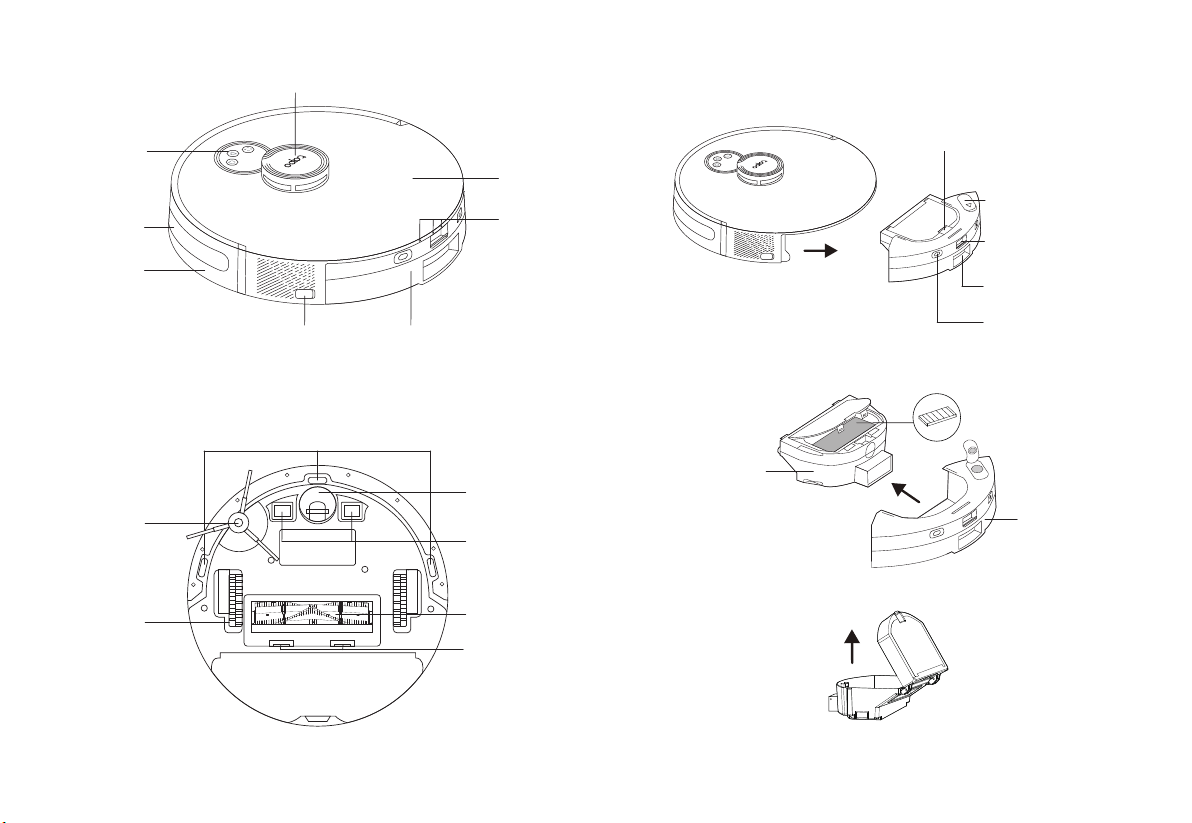
Overview
Robot Vacuum
Power/Clean
Combination Button
• Press once: Start/pause cleaning.
• Press and hold for 5 seconds: Turn on/o the robot vacuum.
• Press and hold simultaneously for 5 seconds:
Enter setup mode to congure network.
• Press and hold simultaneously for 10 seconds:
Restore to factory default settings.
• Return to the dock to charge.
• Empty the bin when docked.
Dock
• Press once: Start spot cleaning.
• Press and hold for 5 seconds: Turn on/o the child lock.
Spot Cleaning/Child Lock
*For the rst use, slide the power switch from OFF to ON to turn on.
LED
• Red: Battery level < 20%; Error
• Orange: Battery level between 20% and 80%
• Green: Battery level > 80%
2
OFF ON
Cli Sensors
Power Switch
LiDAR
Side Brush
Charging Contacts
Caster Wheel
Main Brush
Main Brush Cover Latch
Wheel
Bumper
Recharge
Sensor
Buttons
& LEDs
Dustbin & Water Tank
Water Tank Latch
Dust Collection Port
Filter Latch
Rubber Plug
Charging Contacts
Open Dustbin
Dustbin
Filter
Water Tank
OFF ON
3
Recharge
Sensor
Cover

Overview
Auto-Empty Dock
LED Indicator
Top cover
Open to install/take out the dust bag.
Put the cover back on each time you open it.
Dust Bag Compartment
Charging Contacts
Dust Collection Port
The dust in the robot vacuum will be
collected into the dust bag through the
port.
• White: Working properly
• O: Robot vacuum is connected to the dock; sleeping.
• Solid Red: Dust bag not installed; top cover not closed.
• Flashing Red: Error
Dust Bag Handle
Dust Bag
Fan Filter
4

Remove Protective Film
3
Remove Protective Strip
2
0.5m (1.6ft)
0.5m (1.6ft)
• To ensure a better user experience, make sure the area is with good Wi-Fi signals.
• Do not place it in direct sunlight. Ensure the area around the dock is free of clutter to
improve docking performance.
• To prevent the risk of your robot vacuum falling downstairs, ensure that the dock is
placed at least 1.2m (4 ft) away from stairs.
• Always keep the dock powered on, otherwise the robot vacuum will not automatically
return. And do not move the dock frequently.
• Place a waterproof pad to prevent the mop from wetting the oor when the robot
vacuum is being charged.
1. Place the dock on a level surface, at against a wall,
without obstacles within 1.5m (4.9ft) in front and
0.5m (1.6ft) on left and right.
2. Connect the power cord to the power source.
Ensure the cable is kept tidy.
Before use, remove the protective strips on
both sides of the front bumper.
Remove the protective lm on the front bumper.
Notes
1.5m (4.9ft)
Position the Dock
1
5

Power On and Charge
4
Place the robot vacuum on the charging dock
or tap to send it back to the dock to charge.
It will return to the dock at the end of a cleaning
job and whenever it needs to recharge.
Slide the power switch from OFF to ON to turn on
your robot vacuum.
• If the power switch is in the ON position, you can also press and hold the button
for 5 seconds to turn on/o your robot vacuum.
• If the power switch is in the OFF position, the robot vacuum will automatically turn
on when it is charged on the dock, and turn o when it leaves the charging dock.
Notes
• When the LED of the charging dock ashes 3 times and then goes out, the
charging will begin.
• We recommend that you charge the robot vacuum fully for about 4 hours prior
to starting the rst cleaning job.
Notes
OFF ON
OFF ON
6
Tabla de contenidos
Otros manuales de Aspiradora de Tapo


