
Tangent VITA 7100K Manual de usuario
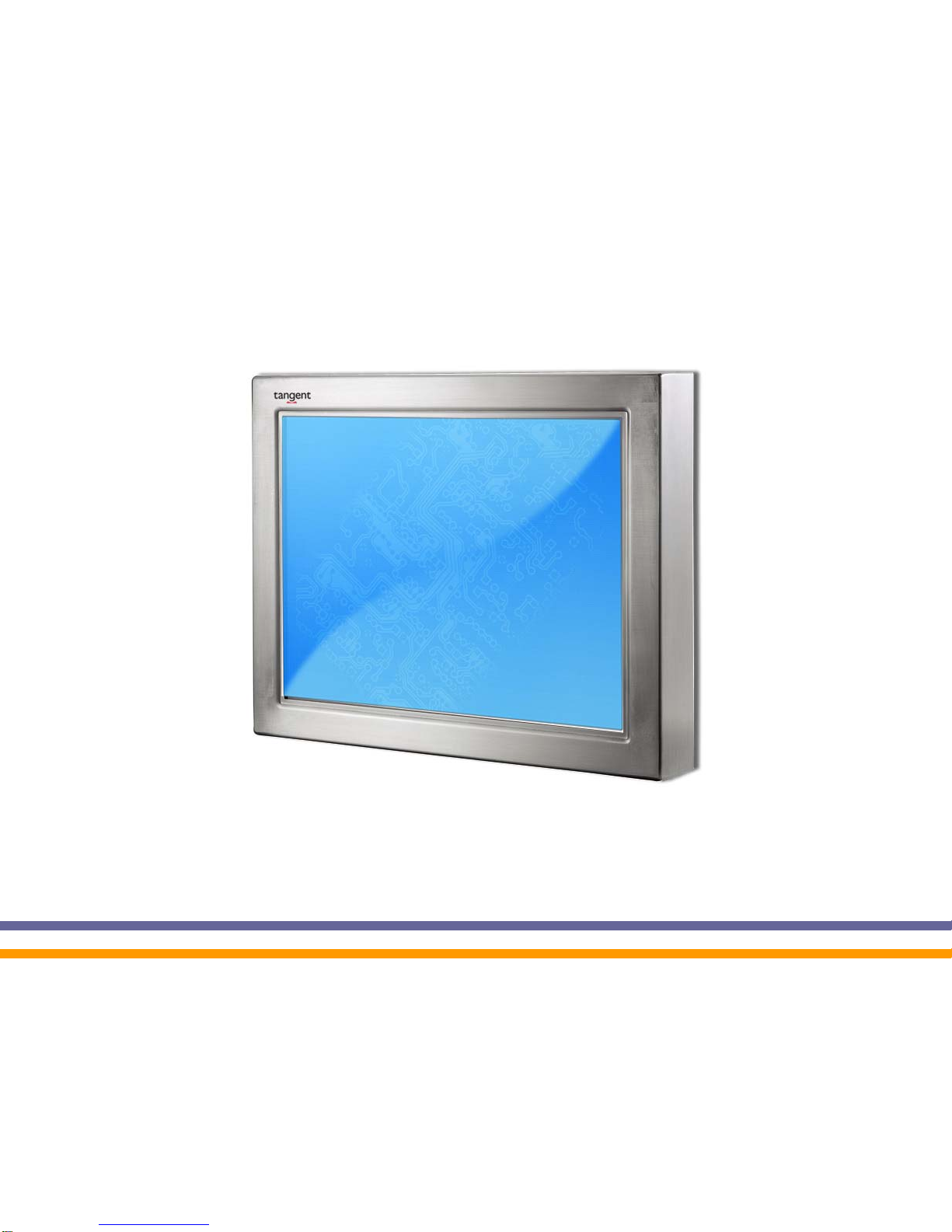
VITA K Series
User’s Manual
2007 July V1.1
Copyright 2007 July
All Rights Reserved
Manual Version 1.1

The information contained in this document is subject to change without notice.
We make no warranty of any kind with regard to this material, including, but not
limited to, the implied warranties of merchantability and fitness for a particular
purpose. We shall not be liable for errors contained herein or for incidental or
consequential damages in connection with the furnishing, performance, or use of
this material.
This document contains proprietary information that is protected by copyright. All
rights are reserved. No part of this document may be photocopied, reproduced or
translated to another language without the prior written consent of the
manufacturer.
TRADEMARK
Intel®, Pentium® and MMX are registered trademarks of Intel® Corporation.
Microsoft® and Windows® are registered trademarks of Microsoft Corporation.
1
Safety
IMPORTANT SAFETY INSTRUCTIONS
1. To disconnect the machine from the electrial power supply, turn off the power
switch and remove the power cord plug from the wall socket. The wall socket
must be easily accessible and in close proximity to the machine.
2. Read these instructions carefully. Save these instructions for future reference.
3. Follow all warnings and instructions marked on the product.
4. Do not use this product near water.
5. Do not place this product on an unstable cart,stand,or table.The product may
fall, causing serious damage to the product.
6. Slots and openings in the cabinet and the back or bottom are provided for
ventilation to ensure reliable operation of the product and to protect it from
overheating. These openings must not be blocked or covered.The openings
should never be blocked by placing the product on a bed, sofa, rug, or other
similar surface.This product should never be placed near or over a radiator or
heat register,or in a built-in installation unless proper ventilation is provided.
7. This product should be operated from the type of power indicated on the
label.If you are not sure of the type of power available, consult your dealer or
local power company.
8. Do not allow anything to rest on the power cord. Do not locate this product
where people could walk on the cord.
9. Never push objects of any kind into this product through cabinet slots as they
may touch dangerous voltage points or short out parts that could result in a
fire or electric shock. Never spill liquid of any kind on the product.
CE MARK
This device complies with the requirements of the EEC directive
2004/08/EC with regard to “Electromagnetic compatibility” and
2006/95/EC “Low Voltage Directive”.
FCC
This device complies with part 15 of the FCC rules. Operation is subject to the
following two conditions:
(1) This device may not cause harmful interference.
(2) This device must accept any interference received, including interference that
may cause undesired operation.
2
CAUTION ON LITHIUM BATTERIES
There is a danger of explosion if the battery is replaced incorrectly. Replace only
with the same or equivalent type recommended by the manufacturer. Discard
used batteries according to the manufacturer’s instructions.
LEGISLATION AND WEEE SYMBOL
2002/96/EC Waste Electrical and Electronic Equipment Directive on the
treatment, collection, recycling and disposal of electric and electronic
devices and their components.
The crossed dustbin symbol on the device means that it should not be disposed of
with other household wastes at the end of its working life. Instead, the device
should be taken to the appropriate waste collection centers for treatment,
collection, recycling and disposal procedure.
To prevent possible harm to the environment or human health from uncontrolled
waste disposal, please separate this from other types of wastes and recycle it
responsibly to promote the sustainable reuse of material resources.
Household users should contact either the retailer where they purchased this
product, or their local government office, for details of where and how they can
take this item for environmentally safe recycling.
Business users should contact their supplier and check the terms and conditions
of the purchase contract.
This product should not be mixed with other commercial wastes for disposal.
3

Table of Contents
1. Item Checklist ..............................................................................................5
2. System View.................................................................................................6
2.1. Front View...............................................................................................6
2.1. Rear View...............................................................................................6
2.2. I/O View .................................................................................................7
3. Specification ................................................................................................8
4. Jumper Settings.........................................................................................10
5. BIOS Settings.............................................................................................17
6. Airflow Requirements ................................................................................20
4
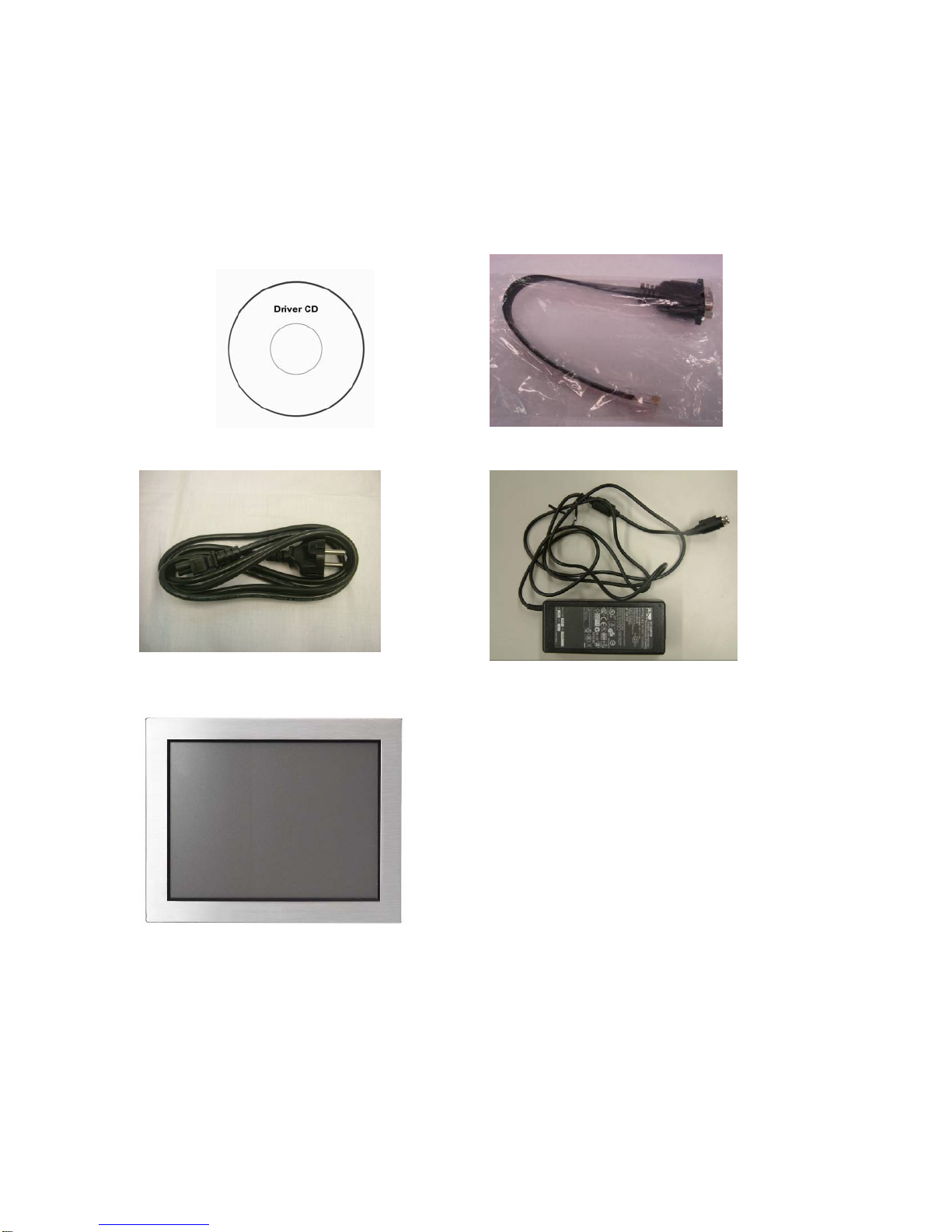
1. Item Checklist
Remove the unit from the carton by holding it with the foam inserts:
a. Driver CD b. Com port Cable
c. Power Cable d. Power Adapter
e. System
5
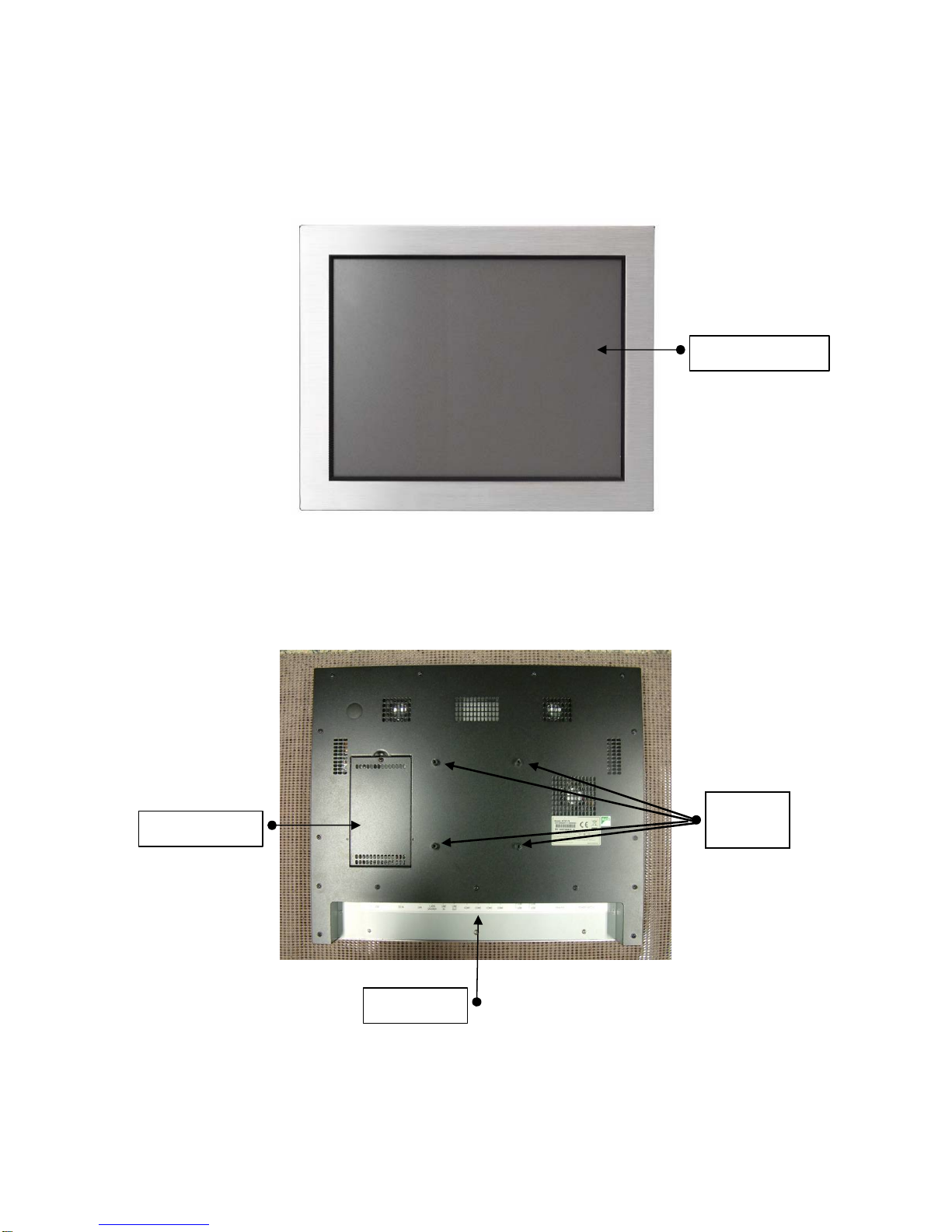
2. System View
2.1. Front View
Touch Screen
2.1. Rear View
VESA
Mount
HDD Cover
I/O Ports
6
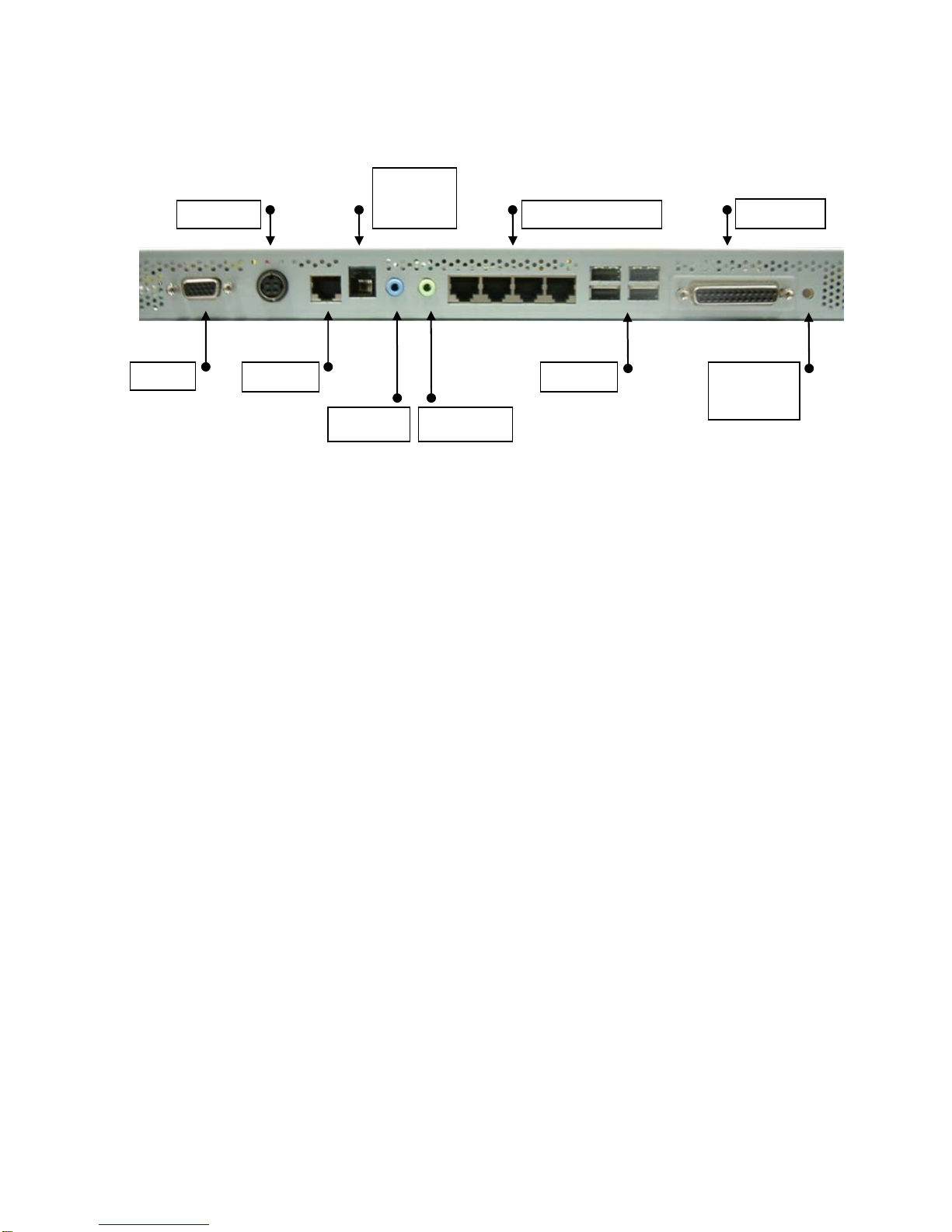
2.2. I/O View
Cash
Drawer
Parallel
DC IN
COM1,2,3,4
VGA
USB
Power
Switch
LAN
Line in Line out
7
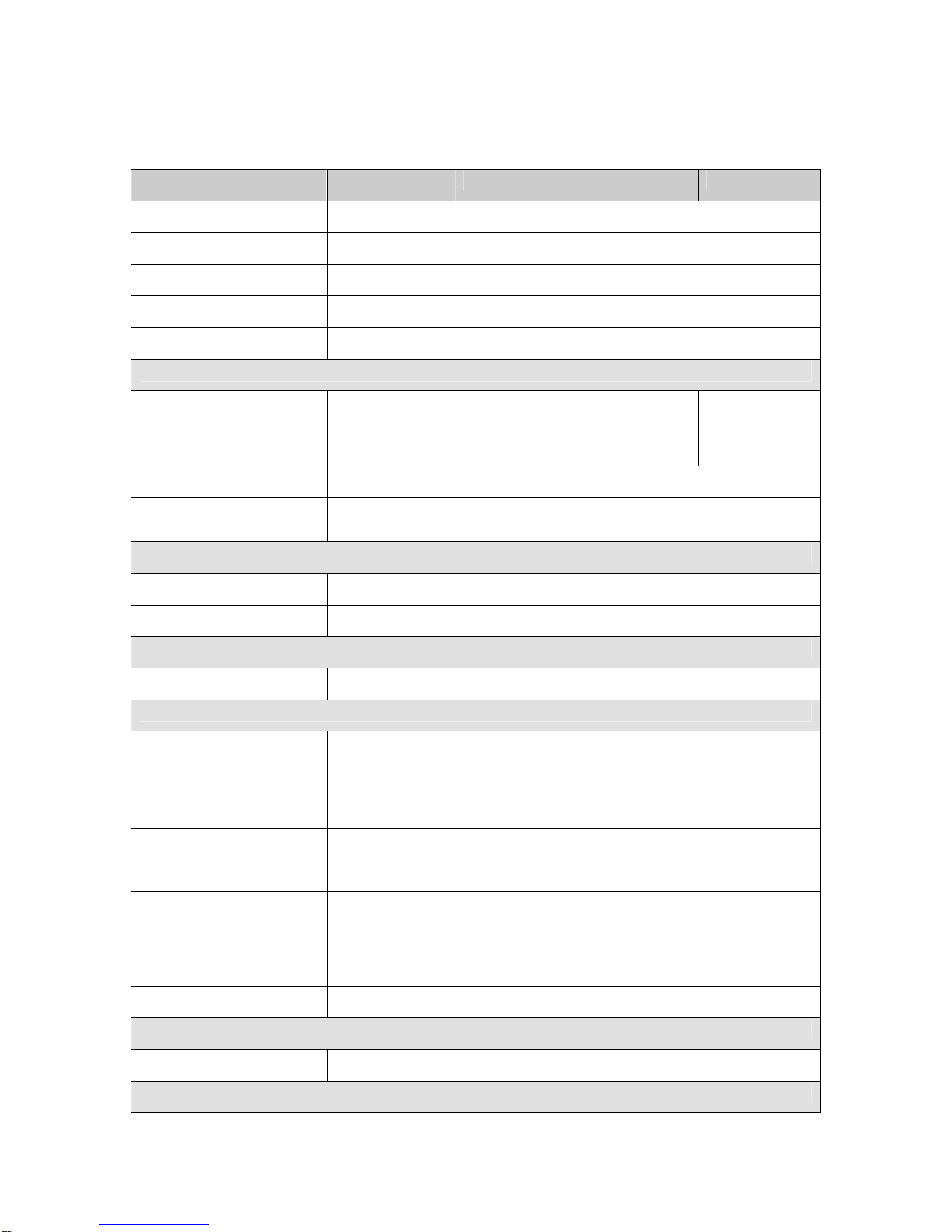
3. Specification
Main Name VITA 7100K VITA 7300K VITA 7500K VITA 7900K
CPU Support Intel Pentium M 1.8GHz
Chipset Intel 855GM FSB 400 MHz
System Memory 2 x DDR SO-DIMM slot, up to 2GB
Graphic Memory Shared system memory 8 ~ 64MB
BIOS AWARD BIOS
LCD Touch Panel
LCD Size 12” TFT LCD 15” TFT
LCD 17” TFT
LCD 19” TFT
LCD
Brightness 400nits 350nits 300nits 300nits
Maximal Resolution 800 x 600 1024 x 768 1280 x 1024
Touch Screen Type Resistive
touch Resistive type/, Intelligent SAW touch
Storage
HDD 2.5” Slim HDD bay
Flash Memory Optional Compact Flash memory (without HDD)
Expansion
miniPCI One miniPCI slot
External I/O Ports
USB 2.0 Four USB ports
Serial / COM 4 x RJ-45 (COM1 standard RS-232; COM2 RS232 / 422 /
485 selectable by Jumper; COM3 & COM4 pin 9 with 5V
or 12V powered by Jumper
Parallel One DB/ 25F
LAN (10 / 100) One RJ45
Cash Drawer One RJ-11 (12V or 24 V)
DC Jack One latch type
Audio Jack One Line-out, One Line-in
2nd VGA One DB 15F
Internal Interface
USB 2.0 Two USB ports
Power
8
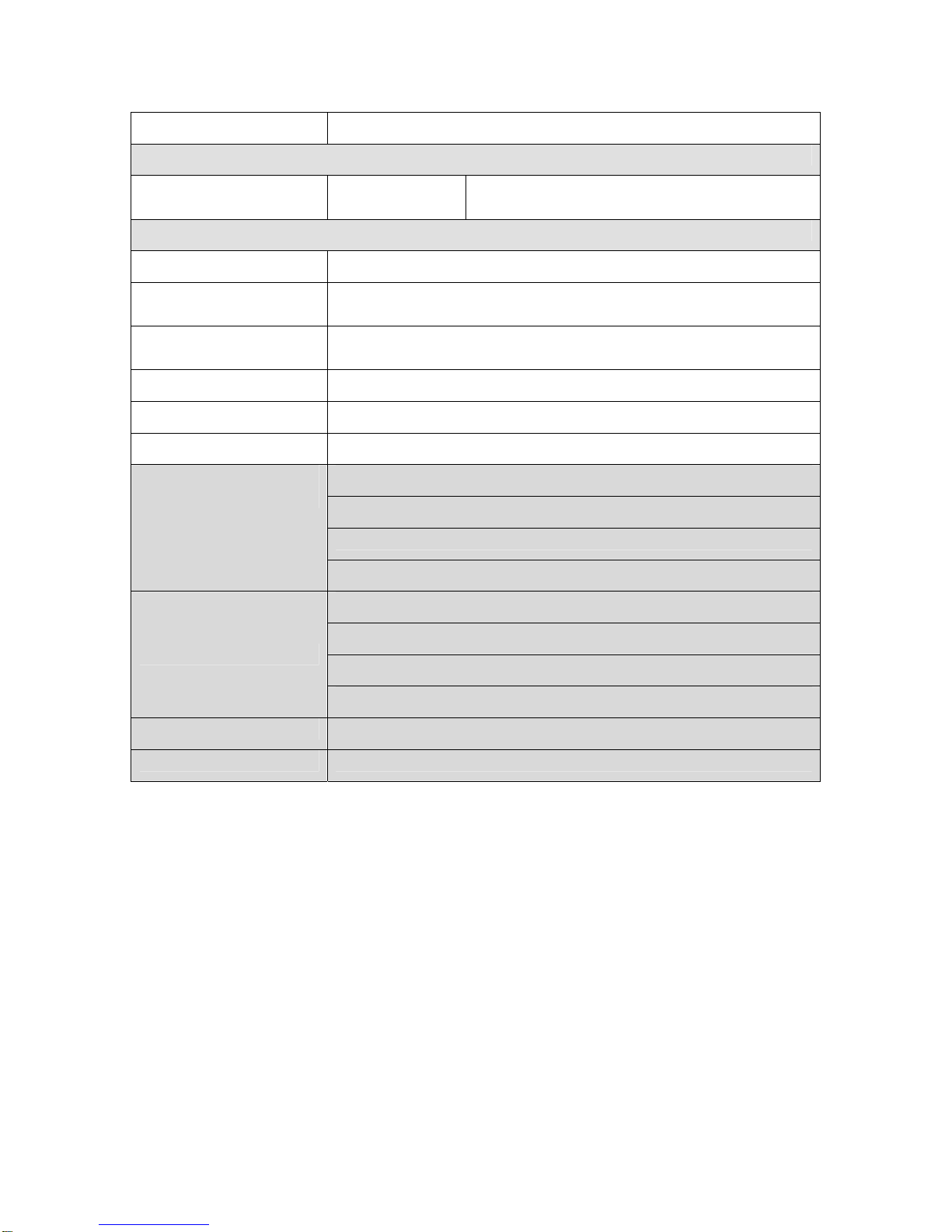
Power Adapter DC 19V, 90W
Audio
Speaker One 3 W
Speaker Two 3W speakers
Environment
EMC & Safety FCC, Class A, CE, LVD
Operating
Temperature O ~ 40℃(32℉~ 104℉)
Storage
Temperature -20 ~ 60℃(-4℉~ 140℉)
Operating Humidity 5% ~ 95% RH non condensing
Storage Humidity 5% ~ 95% RH non condensing
Dust & Water Proof NEMA 3 / IP 55
VITA 7100K 13.0” W x 10.4” H x 2.2” D
VITA 7300K 14.5” W x 11.5” H x 2.4” D
VITA 7500K 16.0” W x 13.3” H x 2.4” D
Dimension
(W x D x H mm/inch)
VITA 7900K 17.5” W x 14.6” H x 2.4” D
VITA 7100K 10.4 lb
VITA 7300K 12.8 lb
VITA 7500K 16.8 lb
Weight
VITA 7900K 19.8 lb
Mounting VESA Standard
OS Support Win XP Pro, XPe, WEPOS, Windows NT 4.0 / 2000
- Specifications subject to change without prior notice.
9
Este manual sirve para los siguientes modelos
3
Tabla de contenidos
Otros manuales de Pantalla táctil de Tangent

Manuales populares de Pantalla táctil de otras marcas

Elecro Engineering
Elecro Engineering Poolsmart Plus Instrucciones de instalación

Johnson Controls
Johnson Controls IQ4 HUB Manual de usuario

Elo TouchSystems
Elo TouchSystems ET2270L Manual de usuario

Elo TouchSystems
Elo TouchSystems ET1002L Manual de usuario

Elo TouchSystems
Elo TouchSystems 3201L Manual de usuario

Duratec
Duratec S15 Manual de usuario


