
Synology M2D18 Manual

Synology Adapter Card M2D18
Hardware Installation Guide

Thank you for purchasing this Synology product! Before setting up your new Adapter Card, please check the
package contents to verify that you have received the items below. Also, make sure to read the safety instructions
carefully to avoid harming yourself or damaging your Adapter Card.
Note: All images below are for illustrative purposes only, and may dier from the actual product.
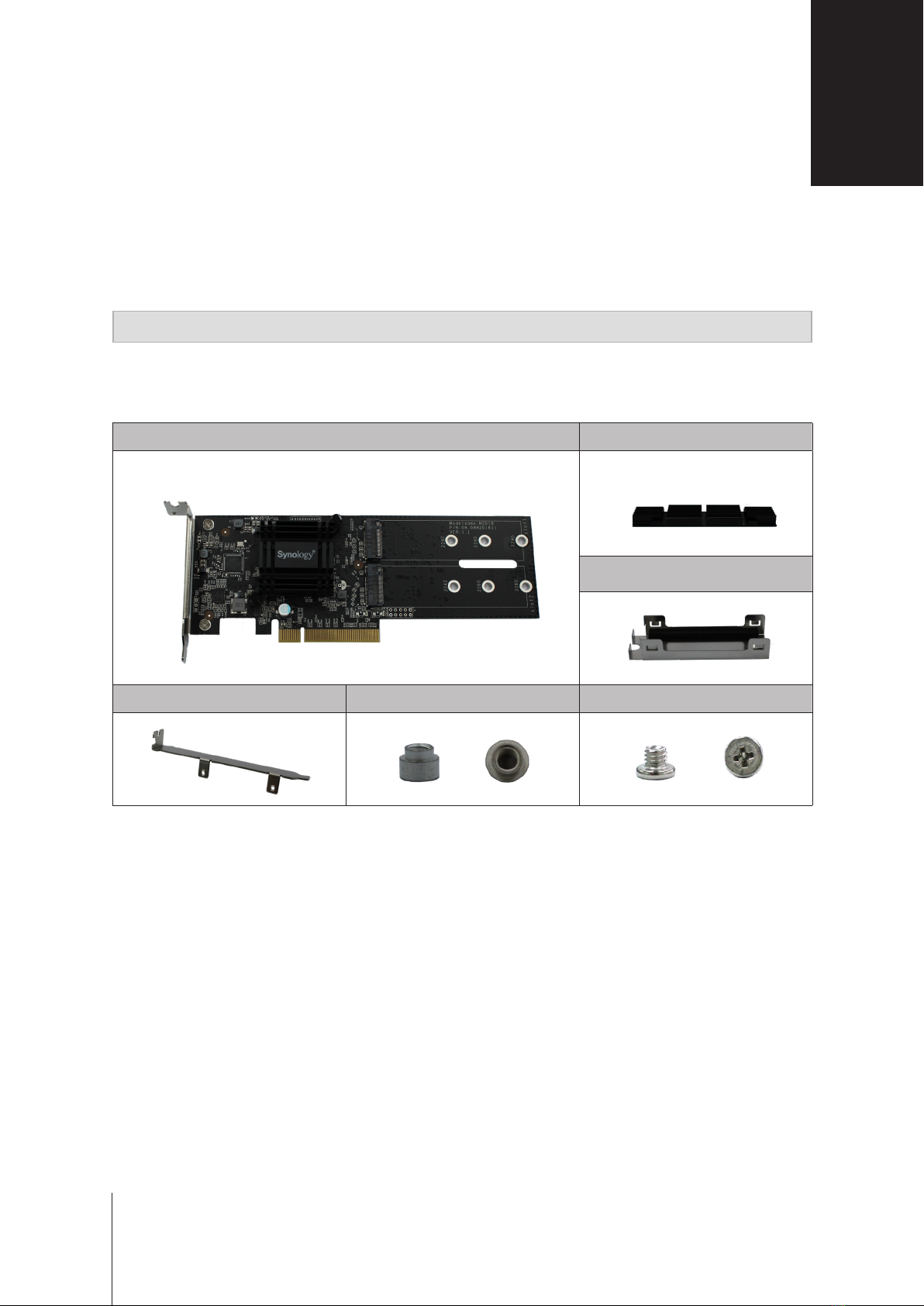
Package Contents
Adapter card x 1 Heatsink x 2
Shielding bracket x 2
Standard full height bracket x 1 Nut x 3 Screws x 6
1
Chapter
3
3
Before You Start

4Chapter 1: Before You Start
Safety Instructions
Keep away from direct sunlight and away from chemicals. Make sure the environment does not
experience abrupt changes in temperature or humidity.
Place the product right side up at all times.
Do not place near any liquids.
Before cleaning, unplug the power cord. Wipe with damp paper towels. Do not use chemical or
aerosol cleaners.
To prevent the unit from falling over, do not place on carts or any unstable surfaces.
The power cord must plug in to the correct supply voltage. Make sure that the supplied AC voltage is
correct and stable.
To remove all electrical current from the device, ensure that all power cords are disconnected from
the power source.
Risk of explosion if battery is replaced with an incorrect type. Dispose of used batteries appropriately.
Tools and Parts for Drive Installation
• A screwdriver (for removing the casing of your target installed DiskStation)
Attach M2D18 Adapter Card to Synology NAS
Please refer to Synology Hardware Compatibility List to make sure your Synology NAS supports M2D18 adapter
card before attaching it.
To install the M2D18 adapter card:
1 Press and hold the power button until you hear a beep sound to shut down your Synology NAS. Disconnect all
cables from your Synology NAS to prevent any possible damage.
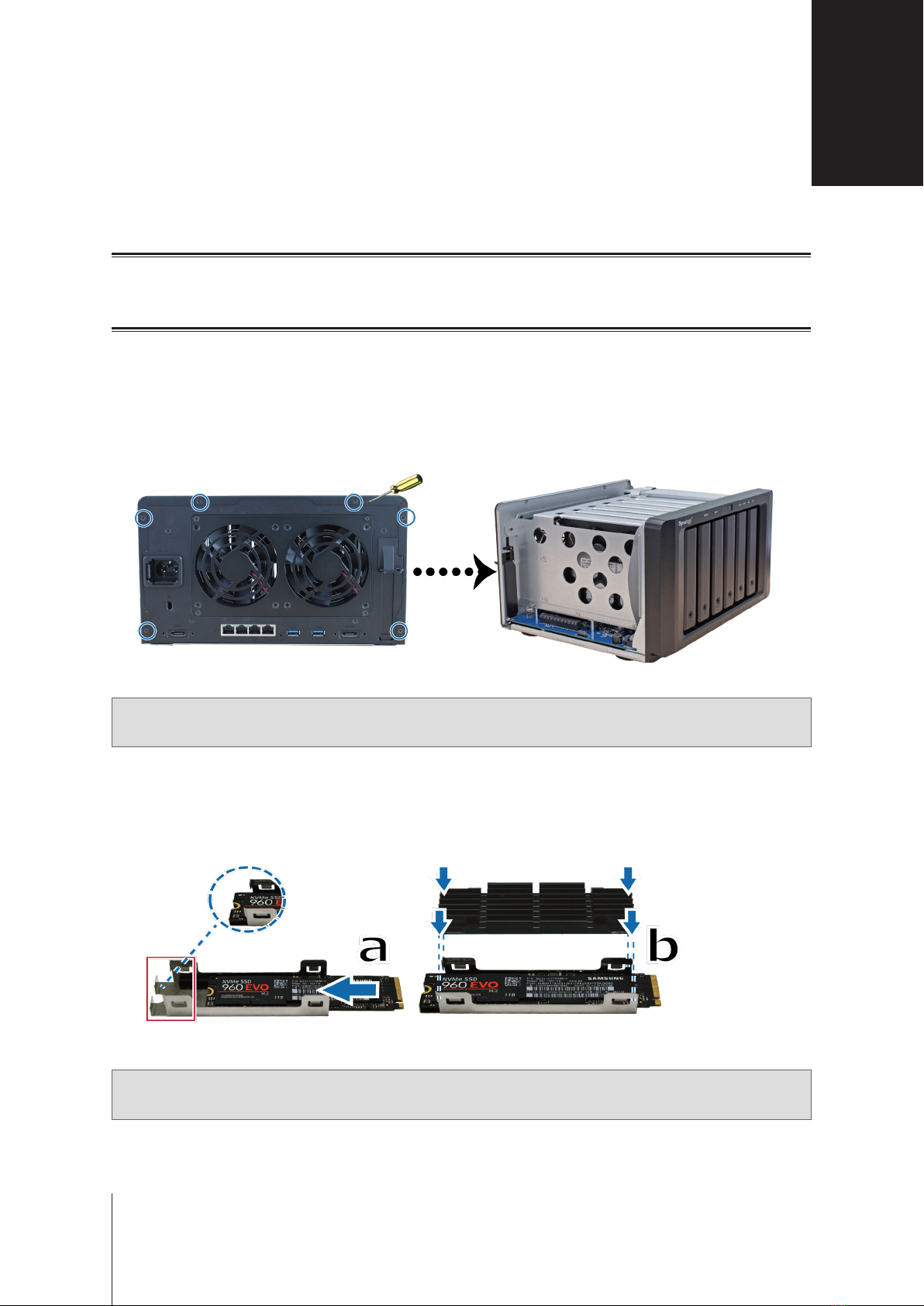
2 Open the top cover of Synology NAS by removing the 6 screws that secure the main unit.
Note: Here we use DS1618+ as an example. Please refer your Synology NAS Hardware Installation Guide for the
proper casing removal process.
3 Assemble M.2 SSD:
a Push the SSD all the way into the xed bracket until it is rmly seated.
b Align the heatsink with the clips of the bracket and press the four corners down. Please make sure the
heatsink is rmly attached to the clips to ensure the smooth running of the SSD.
Note: Please remove the stretch wrap at the bottom of the heatsink before step 3-b.
Hardware Setup
5
2
Chapter

6Chapter 2: Hardware Setup
4 Add M.2 SSD to M2D18 adapter card:
a Place a nut (1) and fasten a screw (2) to secure it.
b Insert M.2 SSD into the slot. Make sure the card is fully inserted.
c Tighten the SSD with a screw.
d Repeat previous two steps if installing another optional SSD is needed. Slot numbers are shown as below.
5 Install the M2D18 adapter card:
a Remove the screw that secures the adapter slot’s cover.
b Remove the adapter slot’s cover.

7Chapter 2: Hardware Setup
c Align the card’s connector with the adapter slot and insert the card.
d Fasten the removed screw in step 5-a so as to secure the newly inserted card.
6 Place back the removed top cover in step 2 and tighten the screws.
Note: Make sure the connector is fully inserted or the adapter card may not function properly.
7 To disassemble the heatsink module:
a Pull the metal clips of a shielding bracket outwards while pushing the heatsink upwards.
b Rotate the bracket and repeat the step above to free the heatsink.
c Slide out the detached heatsink and SSD.
d Gently lift the heatsink to detach it from the SSD.

Item M2D18
PCIe Interface PCIe 2.0 x 8
Driver Interface PCIe NVMe/SATA
Connector Type and Quantity M.2 M-Key x 2
Supported Form Factor 2280/ 2260/ 2242
Bracket Height 80 mm (half height), 120 mm (full height)
Size (H x W x D) 70 mm x 180 mm x 18 mm
Operating Temperature 0°C to 40°C (32°F to 104°F)
Storage Temperature -20°C to 60°C (-5°F to 140°F)
Relative humidity 5% to 95% RH
Note:
• The supported NVMe/ SATA SSD will vary from dierent Synology NAS devices, please visit www.synology.
com to get more information.
• The heatsink is only suited for M.2 2280 SSD.
Specications A
8
Appendix

SYNOLOGY, INC.
END USER LICENSE AGREEMENT
IMPORTANT–READ CAREFULLY: THIS END USER LICENSE AGREEMENT ("EULA") IS A LEGAL AGREEMENT
BETWEEN YOU (EITHER AN INDIVIDUAL OR A LEGAL ENTITY) AND SYNOLOGY, INC. ("SYNOLOGY") FOR THE
SYNOLOGY SOFTWARE INSTALLED ONTO THE SYNOLOGY PRODUCT PUCHASED BY YOU (THE "PRODUCT"),
OR LEGALLY DOWNLOADED FROM WWW.SYNOLOGY.COM, OR ANY OTHER CHANNEL PROVIDED BY
SYNOLOGY ( "SOFTWARE").
YOU AGREE TO BE BOUND BY THE TERMS OF THIS EULA BY USING THE PRODUCTS CONTAINING THE
SOFTWARE, INSTALLING THE SOFTWARE ONTO THE PRODUCTS OR DEVICE CONNECTED TO THE PRODUCTS.
IF YOU DO NOT AGREE TO THE TERMS OF THIS EULA, DO NOT USETHE PRODUCTS CONTAINING THE
SOFTWAREOR DOWNLOAD THE SOFTWARE FROM WWW.SYNOLOGY.COM, OR ANY OTHER CHANNEL
PROVIDED BY SYNOLOGY.INSTEAD, YOU MAY RETURN THE PRODUCT TO THE RESELLER WHERE YOU
PURCHASED IT FOR A REFUND IN ACCORDANCE WITH THE RESELLER'S APPLICABLE RETURN POLICY.
Section 1. Limited Software License. Subject to the terms and conditions of this EULA, Synology grants you a limited, non-
exclusive, non-transferable, personal license to install, run and use one copy of the Software loaded on the Product or on
your device connected to the Product solely relating to your authorized use of the Product.
Section 2. Documentation. You may make and use a reasonable number of copies of any documentation provided with the
Software; provided that such copies will only be used for internal business purposes and are not to be republished or
redistributed (either in hard copy or electronic form) to any third party.
Section 3. Backup. You may make a reasonable number of copies of the Software for backup and archival purposes only.
Section 4. Updates. Any software provided to you by Synology or made available on the Synology website at
www.synology.com ("Website") or any other channel provided by Synology that updates or supplements the original
Software is governed by this EULA unless separate license terms are provided with such updates or supplements, in which
case, such separate terms will govern.
Section 5. License Limitations. The license set forth in Sections 1, 2 and 3 applies only to the extent that you have ordered
and paid for the Product and states the entirety of your rights with respect to the Software. Synology reserves all rights not
expressly granted to you in this EULA. Without limiting the foregoing, you shall not authorize or permit any third party to: (a)
use the Software for any purpose other than that in connection with the Product; (b) license, distribute, lease, rent, lend,
transfer, assign or otherwise dispose of the Software; (c) reverse engineer, decompile, disassemble or attempt to discover
the source code of or any trade secrets related to the Software, except and only to the extent that such conduct is
expressly permitted by applicable law notwithstanding this limitation; (d) adapt, modify, alter, translate or create any
derivative works of the Software; (e) remove, alter or obscure any copyright notice or other proprietary rights notice on the
Software or Product; or (f) circumvent or attempt to circumvent any methods employed by Synology to control access to the
components, features or functions of the Product or Software. Subject to the limitations specified in this Section 5, you are
not prohibited from providing any services hosted by Synology NAS server to any third party for commercial purpose.
Section 6. Open Source. The Software may contain components licensed to Synology under the GNU General Public
License ("GPL Components"), currently available at http://www.gnu.org/licenses/gpl.html. The terms of the GPL will control
solely with respect to the GPL Components to the extent that this EULA conflicts with the requirements of the GPL with
respect to your use of the GPL Components, and, in such event, you agree to be bound by the GPL with respect to your
use of such components.
Section 7. Audit. Synology will have the right to audit your compliance with the terms of this EULA. You agree to grant
Synology a right to access to your facilities, equipment, books, records and documents and to otherwise reasonably
cooperate with Synology in order to facilitate any such audit by Synology or its agent authorized by Synology.
Section 8. Ownership. The Software is a valuable property of Synology and its licensors, protected by copyright and other
intellectual property laws and treaties. Synology or its licensors own all rights, titles and interests in and to the Software,
including but not limited to copyright and any other intellectual property rights.
Section 9. Limited Warranty. Synology provides a limited warrant that the Software will substantially conform to Synology's
published specifications for the Software, if any, or otherwise set forth on the Website, for a period required by your local
law. Synology will use commercially reasonable efforts to, in Synology's sole discretion, either correct any such
nonconformity in the Software or replace any Software that fails to comply with the foregoing warranty, provided that you
give Synology written notice of such noncompliance within the warranty period. The foregoing warranty does not apply to
any noncompliance resulting from any: (w) use, reproduction, distribution or disclosure not in accordance with this EULA;
(x) any customization, modification or other alteration of the Software by anyone other than Synology; (y) combination of
the Software with any product, services or other items provided by anyone other than Synology; or (z) your failure to
comply with this EULA.
Section 10. Support. During the period specified in the Section 9, Synology will make available to you the support services.
Following the expiration of the applicable period, support for Software may be available from Synology upon written

request.
Section 11. Disclaimer of Warranties. EXCEPT AS EXPRESSLY SET FORTH ABOVE, THE SOFTWARE IS PROVIDED
"AS IS" AND WITH ALL FAULTS. SYNOLOGY AND ITS SUPPLIERS HEREBY DISCLAIM ALL OTHER WARRANTIES,
EXPRESS, IMPLIED OR STATUTORY, ARISING BY LAW OR OTHERWISE, INCLUDING BUT NOT LIMITED TO ANY
IMPLIED WARRANTIES OF MERCHANTABILITY, FITNESS FOR A PARTICULAR PURPOSE OR USE, TITLE AND
NONINFRINGEMENT, WITH REGARD TO THE SOFTWARE. WITHOUT LIMITING THE FOREGOING, SYNOLOGY
DOES NOT WARRANT THAT THE SOFTWARE WILL BE FREE OF BUGS, ERRORS, VIRUSES OR OTHER DEFECTS.
Section 12. Disclaimer of Certain Damages. IN NO EVENT WILL SYNOLOGY OR ITS LICENSORS BE LIABLE FOR ANY
INCIDENTAL, INDIRECT, SPECIAL, PUNITIVE, CONSEQUENTIAL OR SIMILAR DAMAGES OR LIABILITIES
WHATSOEVER (INCLUDING, BUT NOT LIMITED TO LOSS OF DATA, INFORMATION, REVENUE, PROFIT OR
BUSINESS) ARISING OUT OF OR RELATING TO THE USE OF OR INABILITY TO USE THE SOFTWARE OR
OTHERWISE UNDER OR IN CONNECTION WITH THIS EULA OR THE SOFTWARE, WHETHER BASED ON
CONTRACT, TORT (INCLUDING NEGLIGENCE), STRICT LIABILITY OR OTHER THEORY EVEN IF SYNOLOGY HAS
BEEN ADVISED OF THE POSSIBILITY OF SUCH DAMAGES.
Section 13. Limitation of Liability. SYNOLOGY'S AND ITS SUPPLIERS' LIABILITY ARISING OUT OF OR RELATING TO
THE USE OF OR INABILITY TO USE THE SOFTWARE OR OTHERWISE UNDER OR IN CONNECTION WITH THIS
EULA OR THE SOFTWARE IS LIMITED TO THE AMOUNT ACTUALLY PAID BY YOU FOR THE PRODUCT
REGARDLESS OF THE AMOUNT OF DAMAGES YOU MAY INCUR AND WHETHER BASED ON CONTRACT, TORT
(INCLUDING NEGLIGENCE), STRICT LIABILITY OR OTHER THEORY. The foregoing disclaimer of warranties,
disclaimer of certain damages and limitation of liability will apply to the maximum extent permitted by applicable law. The
laws of some states/jurisdictions do not allow the exclusion of implied warranties or the exclusion or limitation of certain
damages. To the extent that those laws apply to this EULA, the exclusions and limitations set forth above may not apply to
you.
Section 14. Export Restrictions. You acknowledge that the Software is subject to U.S. export restrictions. You agree to
comply with all applicable laws and regulations that apply to the Software, including without limitation the U.S. Export
Administration Regulations.
Section 15. Termination. Without prejudice to any other rights, Synology may terminate this EULA if you do not abide by
the terms and conditions contained herein. In such event, you must cease use of the Software and destroy all copies of the
Software and all of its component parts.
Section 16. Assignment. You may not transfer or assign your rights under this EULA to any third party, except for that pre-
installed in the Products. Any such transfer or assignment in violation of the foregoing restriction will be void.
Section 17. Applicable Law. Unless expressly prohibited by local law, this EULA is governed by and construed in
accordance with the laws of the country, in accordance with which Synology Inc. was organized without regard to any
conflict of law principles to the contrary.
Section 18. Dispute Resolution. Any dispute, controversy or claim arising out of or relating to this EULA will be resolved
exclusively and finally by arbitration conducted by three neutral arbitrators in accordance with the procedures of the
Arbitration Law and related enforcement rules of the country in which Synology Inc. was organized. In such cases, the
arbitration will be limited solely to the dispute between you and Synology. The arbitration, or any portion of it, will not be
consolidated with any other arbitration and will not be conducted on a class-wide or class action basis. The arbitration shall
take place in Taipei and the arbitration proceedings shall be conducted in English or, if both parties so agree, in Mandarin
Chinese. The arbitration award shall be final and binding on the parties and may be enforced in any court having
jurisdiction. You understand that, in the absence of this provision, you would have had a right to litigate any such dispute,
controversy or claim in a court, including the right to litigate claims on a class-wide or class-action basis, and you expressly
and knowingly waives those rights and agrees to resolve any disputes through binding arbitration in accordance with the
provisions of this Section 18. Nothing in this Section shall be deemed to prohibit or restrict Synology from seeking injunctive
relief or seeking such other rights and remedies as it may have at law or equity for any actual or threatened breach of any
provision of this EULA relating to Synology's intellectual property rights.
Section 19. Attorneys' Fees. In any arbitration, mediation, or other legal action or proceeding to enforce rights or remedies
under this EULA, the prevailing party will be entitled to recover, in addition to any other relief to which it may be entitled,
costs and reasonable attorneys' fees.
Section 20. Severability. If any provision of this EULA is held by a court of competent jurisdiction to be invalid, illegal, or
unenforceable, the remainder of this EULA will remain in full force and effect.
Section 21. Entire Agreement. This EULA sets forth the entire agreement of Synology and you with respect to the Software
and the subject matter hereof and supersedes all prior and contemporaneous understandings and agreements whether
written or oral. No amendment, modification or waiver of any of the provisions of this EULA will be valid unless set forth in a
written instrument signed by the party to be bound thereby.
Powered by TCPDF (www.tcpdf.org)
Tabla de contenidos
Otros manuales de Hardware de computadora de Synology

Synology
Synology DiskStation DS215+ Manual de usuario

Synology
Synology DS1813+ Manual

Synology
Synology NAS RS822+ Manual

Synology
Synology DiskStation DS2415+ Manual de usuario

Synology
Synology RXD1219sas Manual

Synology
Synology DX1222 Manual

Synology
Synology NAS DS3622xs+ Manual

Synology
Synology RX1213sas Manual de usuario
Manuales populares de Hardware de computadora de otras marcas

EMC2
EMC2 VNX Series Manual del propietario

Panasonic
Panasonic DV0PM20105 Manual de usuario

Mitsubishi Electric
Mitsubishi Electric Q81BD-J61BT11 Manual de usuario

Gigabyte
Gigabyte B660M DS3H AX DDR4 Manual de usuario

Raidon
Raidon iT2300 Manual de usuario

National Instruments
National Instruments PXI-8186 Manual de usuario


