
Sunstech RP-D20 Manual de usuario

OPERATION MANUAL
RP-D20RP-D20
PLL FM STEREO / FM RECEIVERPLL FM STEREO / FM RECEIVER
ACCESSORIES
Stereo Earphones
Operation Manual
Carrying Strap
STYLISH DESIGN WITH COMPOUND METAL FRONT PLATE
MANUAL TUNING / SCAN / PRESET
30 MEMORY PRESETS (AM: 10; FM: 20)
MONO/STEREO/BASS SELECTABLE
SLEEP FUNCTION
LOCK SWITCH, BATTERY INDICATOR
ONLY ONE AAA BATTERY REQUIRED
STEREO EARPHONES SUPPLIED
DIMENSIONS: 78X36X14.8mm

Battery
Compartment
(Back Side)
4
LCD IDENTIFICATION
LOCATION OF CONTROLS
LCD
3
RP-D20
AM/FM STEREO
RESET
Earphone
Jack
Carrying Strap
Reset
6
5
14
Volume
Power
1
7
POWER
LOCK
Stereo / Mono
Carrying Strap
Lock
10
16
6
11
8
Scan+ / Hour
2
13
Band
M+
Bass
BAND
M+ MEMORY
TIME SET
BASS
9
12
15
M-
Scan- / Minute
Memory/
Time Set
FM Band
Frequency/Time
Preset Number
Memory Indicator
Sleep
Lock
KHz
MHz
Battery Indicator
Bass
AM Band

BATTERY INSTALLATION
1. Slide thebattery lid in
the direction ofthe arrow.
2. Insert oneAAAbattery
with correct polarityshown
in the compartment.
3. Close thelid of compartment.
POWER INDICATION
The battery poweris divided into 3 levels,
when appears inthe display, the unitwill
turn off automatically. Normally, replace
battery when appearsin the display.
Battery replacement hasto be operatedwhen the
unit is off.
place the batterywithin 10
seconds to preventstored memories losing.
When the unitis not being used for a long period
of time, removethe battery to avoid damage from
battery leakage.
If you replacebattery with the unit on,
all preset memorieswill lost immediately.
After turnoff the unit,re
Full Lower Exhausted
GB-01
105.70 105.70 105.70

105.70 105.70
SET SLEEP TIME
When the unitis off, hold down the POWER
button, sleep indicator flashes, and sleep
time changes circularlyamong100, 90, 20,
10, OFF. When itchanges to your desired
sleep time, releasethe POWER button, the
unit will shutoff automatically when the set
time reaches.
BAND SELECTION
After turn onthe radio, press band button
repeatedly to selectband between AM and
FM, the correspondingband appears in the
display.
2
AM FM
POWER
BEFORE OPERATING
1. Before turnon the unit, check if thebattery
installed in correctpolarity.
2. Check LOCKswitch if appears in
the display, the unit is locked. Unlockthe
unit by pushthe switch to right side.
TURN ON / OFF THE RADIO
1. Power on/ off
Press POWER button to turn onthe radio
manually, the radio willreceive the last
channel you everheard. After listening,
press POWER buttonagain to turn it off.
2. Sleep
Sleep time canbe set with
indicator constantly
displays. When thesetting
time reaches, theunit will
turn off automatically.
(Sleep time settingrefer to Page 3.)
LOCKED
LOCK
UNLOCKED
1
BAND
105.70
100 10 Off
GB-02 GB-03

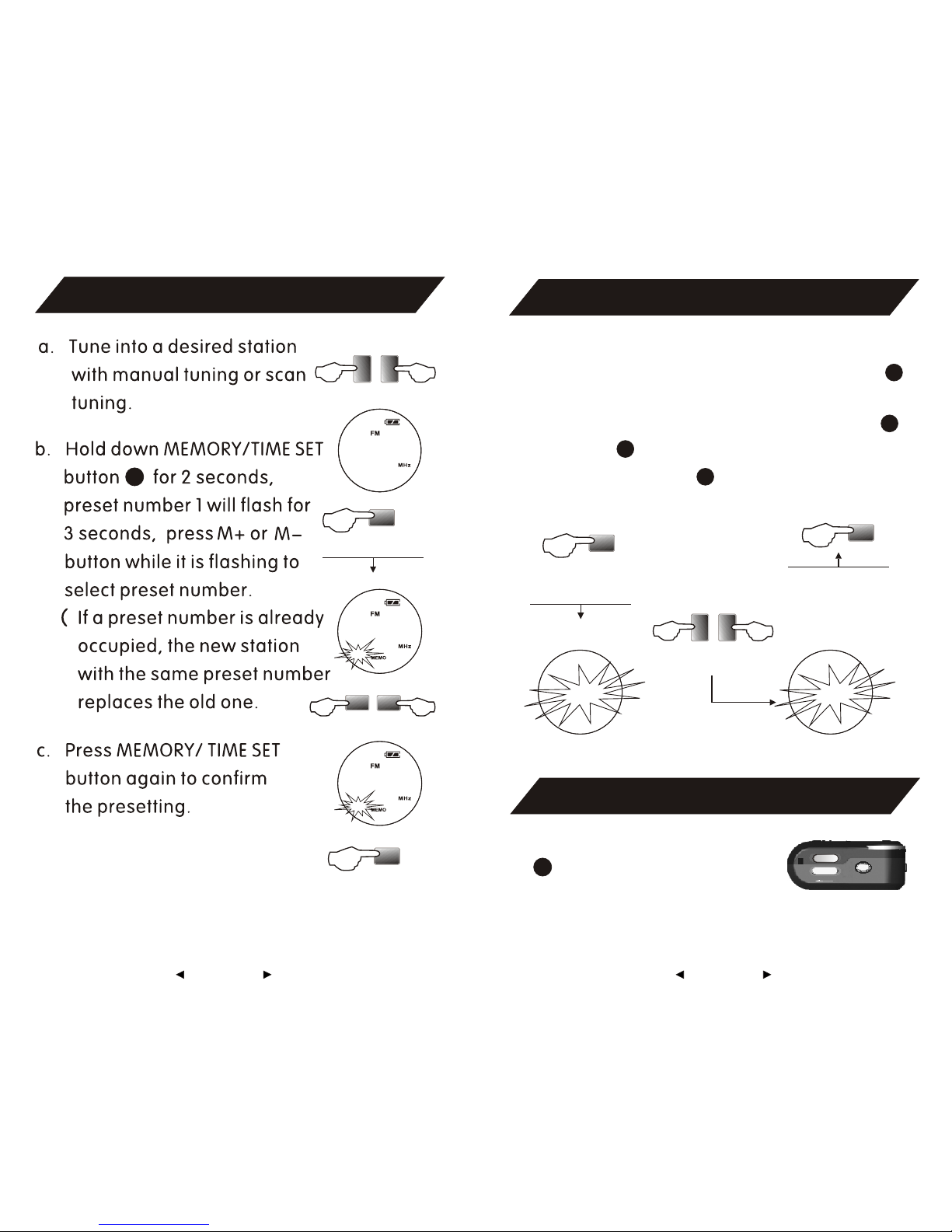
There are up to 30stations can be preset.
20 are assignedto FM band, 10 assigned
to AMband. Preset stations can be found
by below step.
3. Listening to Preset Stations
Select band
a. Select band
9
8
M+
M-
TUNING INTO ASTATION
1. Manual Tuning
2. Scan Tuning
11
11
11
15
15
15
11
15
105.70
97.10
20
GB-05GB-04
97.10
SETTING CURRENT TIME
Current time displayswhen the unit is off.
Hold down MEMORY/ TIME SET button
for 2 seconds,current time flashed for 5
seconds, while itis flashing , adjust Hr+
and Min.- buttonto adjust hour and
minute, then press button to confirm.
12
+-
Set Hr. Min.
Time Setting
11
15
PRESETTING STATIONS
12
Preset Stations
+-
M+
M-
Preset Stations
12
Time Setting
VOLUME CONTROL
Adjust volume byVOL
button, keep thevolume
at a moderatelevel.
7
20
97.10
1
97.10
3:00 5:25
POWER
LOCK
GB-07GB-06

When listening toa stereo reception, normally
switch STEREO/MONO tostereo. If the
stereo reception istoo weak or noisy, set the
selector to MONO.BASS can be selected by
press BASS button.
STEREO: strong signalbroadcast, music,
FM stereo broadcast.
MONO: weak signalbroadcast, voice
program, mono broadcast.
STEREO/MONO/BASS
16
USING EARPHONES
Before turn onthe unit, connect the earphone
to the earphonejack .
5
If the unitoperates erratically, press RESET
button to resumenormal operation.
Reset function willerase all of the memories
including clock setting.Time converts to
default setting O OO, preset stations needto
be re-stored.
14
RESET
NOTES ON EARPHONES
Avoid usingearphones at high volume, if you
experience a ringingin your ears,reduce volume
or discontinue use.
Shut down theradio before sleeping.
Do not useearphones while drivingor cycling, it
can also bepotentially dangerous toplay your
earphones at highvolume while walking,
especially at pedestriancrossing.
GB-09GB-08

SPECIFICATIONS
FM 87.5 - 108.0MHz
AM 522 - 1620KHz
2.Memory Stations (30)
FM(20); AM(10)
1.Frequency Range
7.Dimension: Approx. 78x36x14.8mm
8.Mass: Approx. 32g(excl. battery)
6.Earphone D3.5mm
5.Power DC 1.5V
Battery 1 AAAbattery
4.Single Signal Selection: 20dB
3.Noise Limit Sensitivity
FM 10 v
AM 2.0mv/m
CAUTIONS
Avoid exposure to temperature extremes, direct
sunlight, moisture, sand, dust or mechanical
shock.
Should anything go wrong with the radio, please
remove the battery and have the unit checked by
qualified personnel before operating it any further.
When the unit is not being used for a long period
of time, remove the battery to avoid damage from
battery leakage and corrosion.
GB-11GB-10

(1) Revision to the software and hardware or
manual is not subject to further
our company boasts the
to this manual.
(2) Don't press the screen or the buttons too
to avoid damages to the player.
user
notification, and
finial interpretation right
hard
Reminder: Thank you for selecting our product.
In order to ensure correct operation, please
read this manual carefully.
1. Instruction
You can help protect the environment!
Pleas remember to repect the local
regulations: hand in the non-working
electrical equipments to an appropriate
waste disposal center.
GB-12
MANUAL DE INSTRUCCIONES
AM / FM ESTEREO
SINTONIZACION MANUAL / AUTOMATICA / PRESINTONIZADA
30 MEMORIAS PRESINTONIZADAS (AM: 10, FM: 20)
SELECCION MONO / ESTEREO / BASS
FUNCION DE APAGADO AUTOMATICO (SLEEP)
SELECTOR DE BLOQUEO, INDICADOR DEL NIVEL DE CARGA DE LA PILA
DISE O MODERNO
NES: 78 x 36 x 14.8 mm
N
FRONTAL DE ALEACION METALICA
REQUIERE SOLO UNA PILA AAA
SE ADJUNTAN AURICULARES ESTEREO
DIMENSIO
ACCESORIOS
RADIO RECEPTOR PLLAM / FMEST REOE
RP-D20
Auriculares est reoe
Manual de instrucciones
Correa

SITUACI N DE LOS CONTROLESO
Toma de los
auriculares
Correa
Correa
Compartimento
de la pila
Banda
Bloqueo
Memoria / Ajuste
de la hora
Reset
(puesta a cero)
Bass (graves)
Alimentaci no
Sintonizacion autom. + /
Horas
Est eo / Monoer
Sintonizacion autom. -- /
Minutoso
4
LCD
3
RP-D20
AM/FM STEREO
RESET
6
5
14
Volumen
1
7
POWER
LOCK
10
16
6
11
8
2
13
M+
BAND
M+ MEMORY
TIME SET
BASS
9
12
15
M-
Sleep
KHz
MHz
INFORMACI N DE LAPANTALLALCDO
Bloqueo
Banda FM
Frecuencia /
Hora
Indicador de
memoria
Numero de
presintonia
Banda AM
Indicador del nivel de carga
Bass (graves)
Tabla de contenidos
Idiomas:
Otros manuales de Receptor de Sunstech


