Sturtevant Richmont Global 400mp Manual de usuario

!
Global 400mp User Manual
v4.0!
!
17#August#2016#
#
#
#

Global 400mp User Manual 2 of 72 v4.0
17 August 2016
Table of Contents
Quick Start ...................................................................................................................................... 4!
Chapter 1: Overview ....................................................................................................................... 9!
Warnings................................................................................................................................... 10!
Cautions .................................................................................................................................... 10!
Unit Overview........................................................................................................................... 11!
Compatible Tools...................................................................................................................... 11!
Chapter 2: Using the unit .............................................................................................................. 12!
Concepts.................................................................................................................................... 13!
Run Screen................................................................................................................................ 14!
History....................................................................................................................................... 16!
Unit Status................................................................................................................................. 17!
Rundown Graph........................................................................................................................ 17!
Network Status.......................................................................................................................... 18!
Tool Status ................................................................................................................................ 19!
I/O State .................................................................................................................................... 20!
Chapter 3: Configuring the unit .................................................................................................... 21!
Introduction............................................................................................................................... 22!
Saving Configuration Changes ................................................................................................. 22!
Entering letters.......................................................................................................................... 22!
Main Menu................................................................................................................................ 23!
Tools ......................................................................................................................................... 24!
Parameters................................................................................................................................. 28!
Jobs ........................................................................................................................................... 33!
Network Setup .......................................................................................................................... 35!
Unit Setup ................................................................................................................................. 36!
Events........................................................................................................................................ 42!
Network Log ............................................................................................................................. 43!
Chapter 4: Serial communications................................................................................................ 44!
Introduction............................................................................................................................... 45!
Barcode ..................................................................................................................................... 45!

Global 400mp User Manual 3 of 72 v4.0
17 August 2016
Serial Printer ............................................................................................................................. 48!
Chapter 5: Atlas Copco Open Protocol......................................................................................... 50!
Introduction............................................................................................................................... 51!
Configuration Options .............................................................................................................. 51!
Supported Commands............................................................................................................... 54!
Unsupported Commands........................................................................................................... 55!
Chapter 6: ToolsNet...................................................................................................................... 57!
Introduction............................................................................................................................... 58!
Configuration Options .............................................................................................................. 58!
Chapter 7: EtherNet/IPTM.............................................................................................................. 61!
Chapter 8: Data Management ....................................................................................................... 66!
Download data to USB ............................................................................................................. 67!
Upload USB file to device ........................................................................................................ 68!
Chapter 9: Firmware Updates ....................................................................................................... 69!
Chapter 10: Product Specifications............................................................................................... 71!
Dimensions ............................................................................................................................... 72!
Radio Information..................................................................................................................... 72!

Global 400mp User Manual 4 of 72 v4.0
Quick Start 17 August 2016
Quick Start

Global 400mp User Manual 5 of 72 v4.0
Quick Start 17 August 2016
This quick start will guide you through the process of configuring the unit for first time use.
Plug the provided power cable into the unit and 100-240
VAC power and turn on the power switch. The beeper
should sound a series of quick beeps and the display should
show the loading progress.
Once the loading is completed, the unit should go to the
Run screen. If the unit stays on the loading screen with an
error, please contact your local SR Distributor, or call
Sturtevant Richmont at +1-847-455-8677. Email is
To use a tool with the Global 400mp, you must first “learn”
(connect the radios) in the tool and the Global 400mp. To
do so, press the button below MENU.
Enter the password (0104 by default) using the numeric
keypad and pressing ENT when completed.
In the menu, press the right arrow to select TOOLS and
press ENT.

Global 400mp User Manual 6 of 72 v4.0
Quick Start 17 August 2016
In the tools menu, press ENT to go to the main tools page.
If the tool you are going to learn to the Global 400mp has
previously been used with another unit, make sure the tool
has been “forgotten” (radio disconnected) from that unit
before continuing. Press the button beneath LEARN to
begin the learn process.
Follow the directions on screen to learn the tool.
Once the tool has found the unit, you may need to perform
an additional step for the unit to know which type of tool
was just learned. Holding tools, air tools, and newer click
tools can be distinguished by the unit. The 1200 Series and
1250 Series Exacta digital tools and older click tools will
require some additional information. The digital tools will
automatically transmit their serial number in a few seconds.
However, if you are learning an older click tool, you will
need to perform a tightening (good or bad) with the wrench,
or push the appropriate button on screen.

Global 400mp User Manual 7 of 72 v4.0
Quick Start 17 August 2016
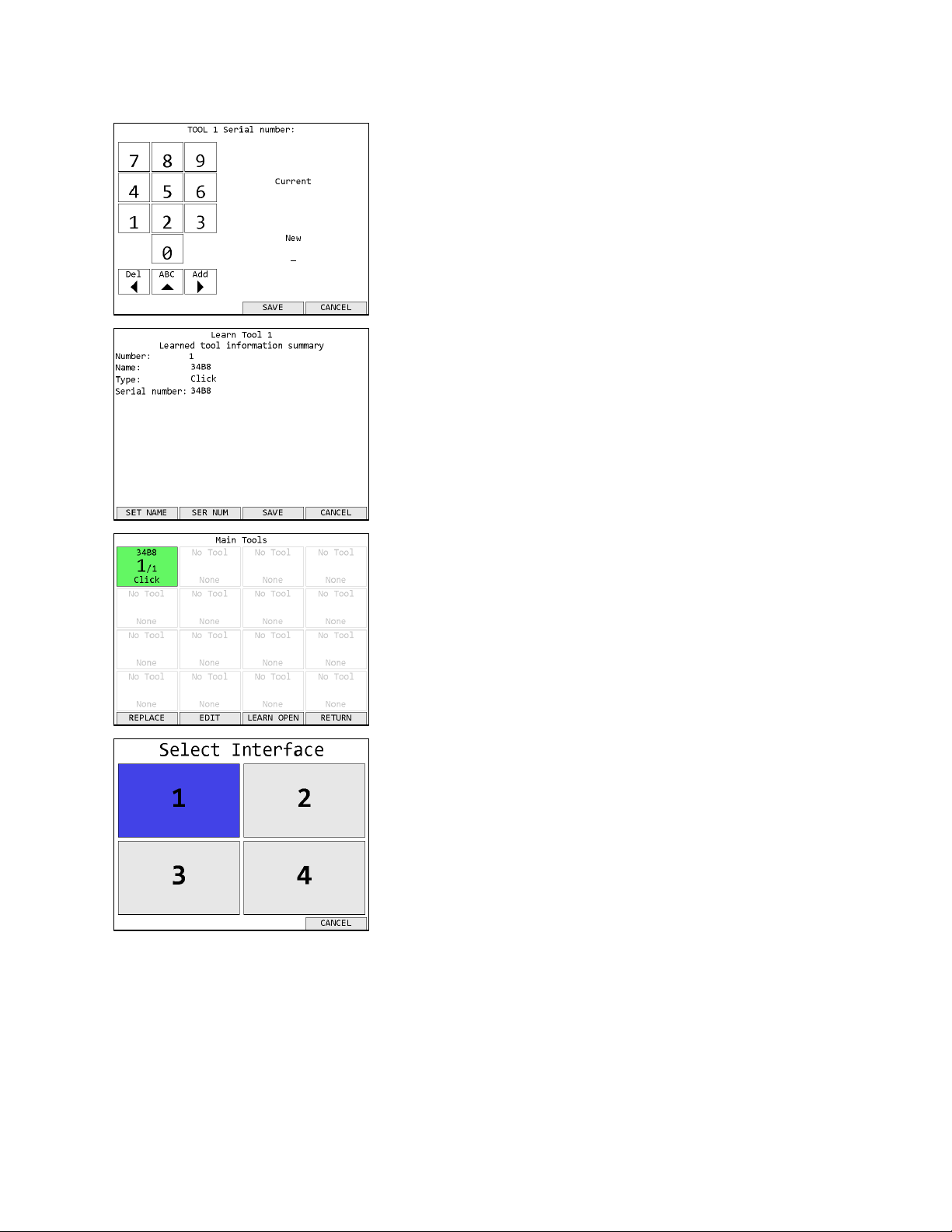
Once the tool type is identified, you must enter the tool’s
serial number. The PST 1200, SLTC FM, and HT Series
holding tools require manual entry of the serial number.
Digital tools report its serial number automatically and this
step will be skipped.
The serial number entered in this step will be used as the
default tool name.
Once the tool learn is completed, the unit will show a
summary of the new tool information. Press SAVE to store
the tool information and continue.
The unit will return to the Tools screen with the just learned
tool now shown.
Before you can run the tool, you must first assign it to a
parameter. Return to the menu by pressing ESC twice.
Then press ENT to go to the Select Interface screen. By
default, tools learn into interface 1. Press ENT to select
interface 1 and go to the Choose Parameter or Job screen.

Global 400mp User Manual 8 of 72 v4.0
Quick Start 17 August 2016
Press the button below EDIT to go to the Parameter Edit
screen. The parameter number will remain white until the
parameter has been successfully set up.
Press the down arrow to move the cursor to the Primary
Tool row, followed by 1 to assign the tool to the parameter.
Press ENT or the button below SAVE to save the changes
and return to the Choose Parameter screen.
Parameter 1 should now be shown in black instead of white
to indicate that it was set up successfully. Press the button
below SELECT to select Parameter 1.
You will be returned to the Run screen, now with Parameter
1 selected. You can now perform tightenings with Tool 1
that will be monitored, stored, and reported by the Global
400mp.

Global 400mp User Manual 9 of 72 v4.0
Chapter 1: Overview 17 August 2016
Chapter 1: Overview

Global 400mp User Manual 10 of 72 v4.0
Chapter 1: Overview 17 August 2016
Warnings
Do not disassemble the unit for repair or modifications. There is a high
electrical voltage inside the unit that could cause electric shock.
Do not allow any type of liquid to come into contact with any part of the
unit.
Insert all fittings fully into their mating receptacles. Failure to do so could
result in injury.
Do not fold, bend or apply excessive force to any cable or fitting.
Cautions
Please use caution when handling this or any other electrical appliance.
• This unit accepts an AC input voltage from 100-240 VAC. Trying to operate this unit with a
voltage outside that range may cause damage to the unit.
• Avoid placing or storing this unit in a location where it may become wet or dust covered.
• Do not place or mount this unit in an unstable area.
• Dropping this unit may result in personal injury or damage to the unit.
• Before performing any maintenance on the unit, make sure to turn it off and remove the
power plugs.
• There are no user serviceable parts inside the main enclosure of the unit.
Tabla de contenidos
Otros manuales de Controladores de Sturtevant Richmont