OPTIONAL LED KIT CONNECTIONS & OPERATING INSTRUCTIONS
Technical Parameters (remote control):
• Power supply AAA batteries (2)
• Cover material ABS
Technical Parameters (controller):
• Working voltage DC12V-24V
• Output control 3 circuits (R/G/B)
• Control current 6A/circuit
• Connection method Common anode
• Dimensions L85xW45xH22mm
• Receiving range 30 meters
9
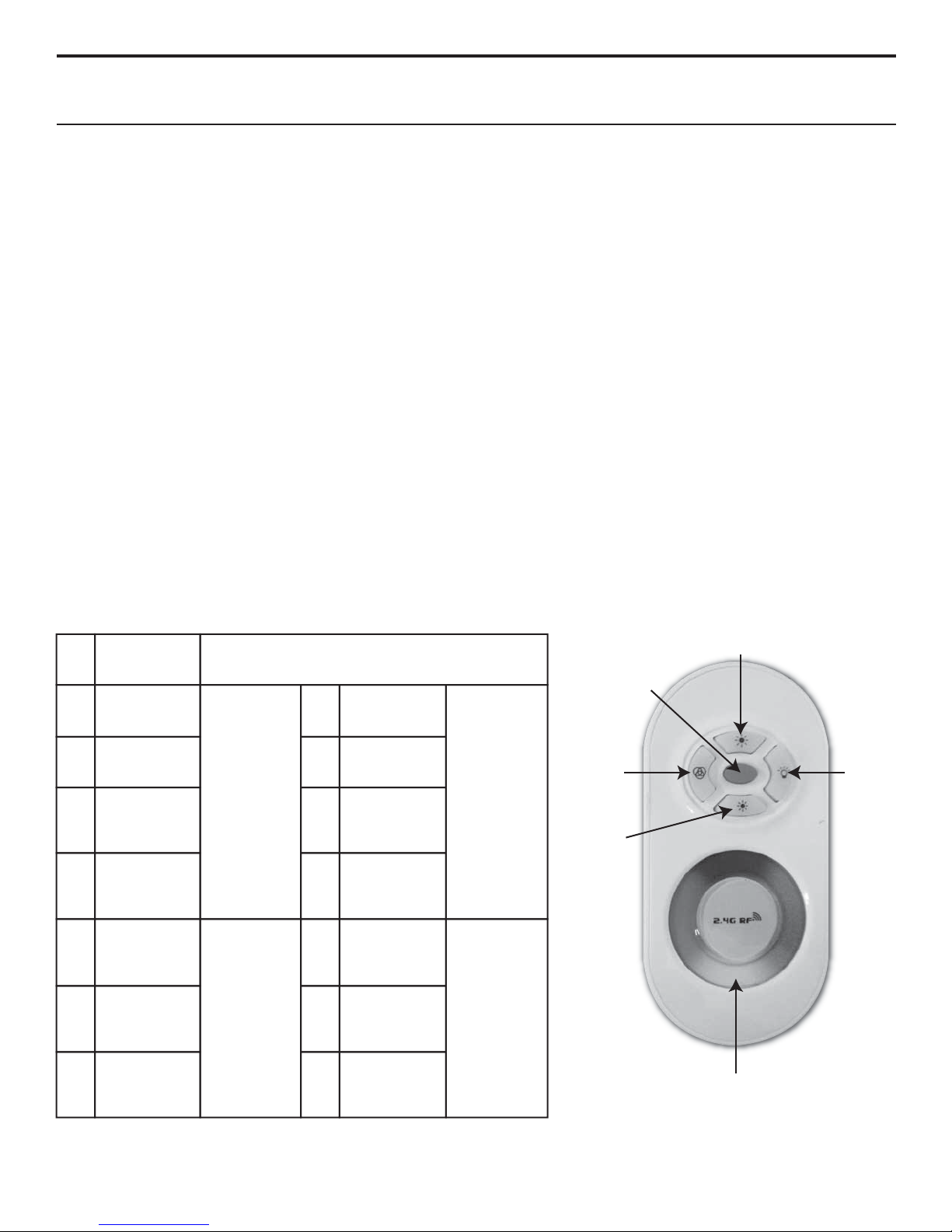
Key 4
Key 3
You can move your
nger to choose any
color you like along
this color ring.
Key 2
Key 1
Key 5
Functions of Keys:
• Key 1 on/o
• Key 2 light changing mode (15 modes)
• Key 3 color light/white light switching mode
• Key 4 turn up (brightness/speed)
• Key 5 turn down (brightness/speed)
Color Mode Chart:
How to Use:
• Plug in unit (Please note standard, provided power supply
is capable of handling 100-240V AC at 1.5A and 50/60Hz,
designed for a standard U.S. receptacle. Please contact a
Stewart representative for additional help.)
• Press Key 1 to turn on/o in any state
• Press Key 2 to activate light changing mode, keep
pressing for dierent programs. There are 15 programs
in total. (See Color Mode Chart below)
• Press Key 3 once to activate white light mode, you can
change brightness by pressing Key 4 or Key 5. Press Key
3 twice to activate color ring, changing brightness by
pressing Key 4/Key 5 or changing light color by touching
the color ring.
• To match the remote control to the receiver (you do not
need to do this when rst out of the box), press Key 4
once when rst switched on within three seconds. The
light will blink 3 times to indicate that the remote control
is matched.
Clearing Code:
Press Key 4 ve times when rst switched on, again, the light
will blink six times if clearing is successful.
CAUTION: Do not cover the color ring with your hand
while installing the batteries.
1Auto color
changing
8 grades of brightness to adjust by
pressing Key 4 or Key 5.
2Three colors
jump to change 9Green color
jumps to change
13 Red/blue light
twinkles
alternately
14 Green/blue light
twinkles
alternately
15 Red/green light
twinkles
alternately
Seven colors
jump to change
3
Three colors
jump to gradual
change
4
5Seven colors
jump to gradual
change
11 Cyan color
jumps to change
12 White color
jumps to change
10 Yellow color
jumps to change
8 grades of
speed to adjust
by pressing Key
4 or Key 5
8 grades of
brightness to
adjust by
pressing Key
4 or Key 5
8 grades of
brightness to
adjust by
pressing Key
4 or Key 5
8 grades of
speed to adjust
by pressing Key
4 or Key 5
6Red color jumps
to change
7Blue color
jumps to change
8Purple color
jumps to change