Stage right SRP64 Manual de usuario

SRP64 Grid Controller
P/N 625895
User's Manual

2
CONTENTS
SAFETY WARNINGS AND GUIDELINES.......................................................................................................................................3
FEATURES..............................................................................................................................................................................................................4
CUSTOMER SERVICE....................................................................................................................................................................................4
PACKAGE CONTENTS.................................................................................................................................................................................5
SYSTEM REQUIREMENTS.........................................................................................................................................................................5
Windows®.......................................................................................................................................................................................................5
Mac® OS X®....................................................................................................................................................................................................5
PRODUCT OVERVIEW.................................................................................................................................................................................6
Top Panel.........................................................................................................................................................................................................6
Rear Panel.......................................................................................................................................................................................................8
CONTROL SOFTWARE................................................................................................................................................................................9
Assign a Pad to Start/Stop MMC............................................................................................................................................10
Assign Pads to Send MIDI Notes ..............................................................................................................................................11
Assign a Pad to Toggle a MIDI CC# Between Two Values..............................................................................12
Save Settings to a Preset................................................................................................................................................................13
Setting Pad RGB Backlighting .................................................................................................................................................... 13
SETUP IN ABLETON® LIVE™.................................................................................................................................................................15
TECHNICAL SUPPORT............................................................................................................................................................................... 17
REGULATORY COMPLIANCE.............................................................................................................................................................. 17
Notice for FCC .......................................................................................................................................................................................... 17
Notice for Industry Canada...........................................................................................................................................................18

3
SAFETY WARNINGS AND GUIDELINES
Please read this entire manual before using this device, paying extra attention to these
safety warnings and guidelines. Please keep this manual in a safe place for future reference.
•This device is intended for indoor use only.
•Do not expose this device to water or moisture of any kind. Do not place drinks or
other containers with moisture on or near the device. If moisture does get in or on
the device, immediately unplug it from the power source and allow it to fully dry
before reapplying power.
•Do not touch the device, the power cord, or any other connected cables with wet
hands.
•Do not expose this device to excessive vibration.
•Do not subject the product to extreme force, shock, or fluctuations in temperature
or humidity.
•Do not expose this device to excessively high temperatures. Do not place it in, on,
or near a heat source, such as a fireplace, stove, radiator, etc. Do not leave it in
direct sunlight.
•Clean using a soft, dry cloth only. Do not use chemical cleaners, solvents, or
detergents. For stubborn deposits, moisten the cloth with warm water.
•This device has no user serviceable parts. Do not attempt to open, service, or
modify this device.

4
FEATURES
•64 velocity and pressure sensitive performance Pads with RGB customizable
backlighting
•Pads can be assigned to send Note, MIDI Control Change, and Program Change
messages
•6 built-in memory slots for storing button assignments and settings
•Powered by the USB connection to the computer
•Requires less than 100mA current
•MIDI IN and MIDI OUT connectors
•Dedicated Note, Octave, Aftertouch, Channel, Velocity, Mute, and Volume function
buttons
•Compatible with Windows® XP (SP2) or newer and Mac® OS X® 10.3.9 or newer
•Controlled using graphical PC and Mac software applications (download from
website)
•Compatible with Albeton® Live™ digital audio workstation (DAW) software
•Measures 10.1" x 10.1" x 1.4" (256 x 256 x 36 mm) and weighs 1.9 lbs. (840g)
CUSTOMER SERVICE
The Monoprice Customer Service department is dedicated to ensuring that your ordering,
purchasing, and delivery experience is second to none. If you have any problem with your
order, please give us an opportunity to make it right. You can contact a Monoprice
Customer Service representative through the Live Chat link on our website
www.monoprice.com or via email at support@monoprice.com. Check the website for
support times and links.

5
PACKAGE CONTENTS
Please take an inventory of the package contents to ensure you have all the items listed
below. If anything is missing or damaged, please contact Monoprice Customer Service for a
replacement.
1x SRP64 Grid Controller
1x USB Cable
1x USB Power Cable
1x MIDI to 3.5mm Audio Cable
SYSTEM REQUIREMENTS
If using this controller with a computer, ensure that the computer has the following
minimum capabilities. Note that USB hubs are not supported.
Windows®
•Pentium® 800 MHz or higher (CPU requirement may be higher for laptops)
•256MB RAM
•DirectX® 9.0b or later
•Windows® XP (SP2) or later
Mac® OS X®
•Mac G3 800 MHz or G4 733 MHz or higher (G3/G4 accelerator cards not supported)
•OS X 10.3.9 with 256MB RAM or OS X 10.4.2 or later with 512MB RAM

6
PRODUCT OVERVIEW
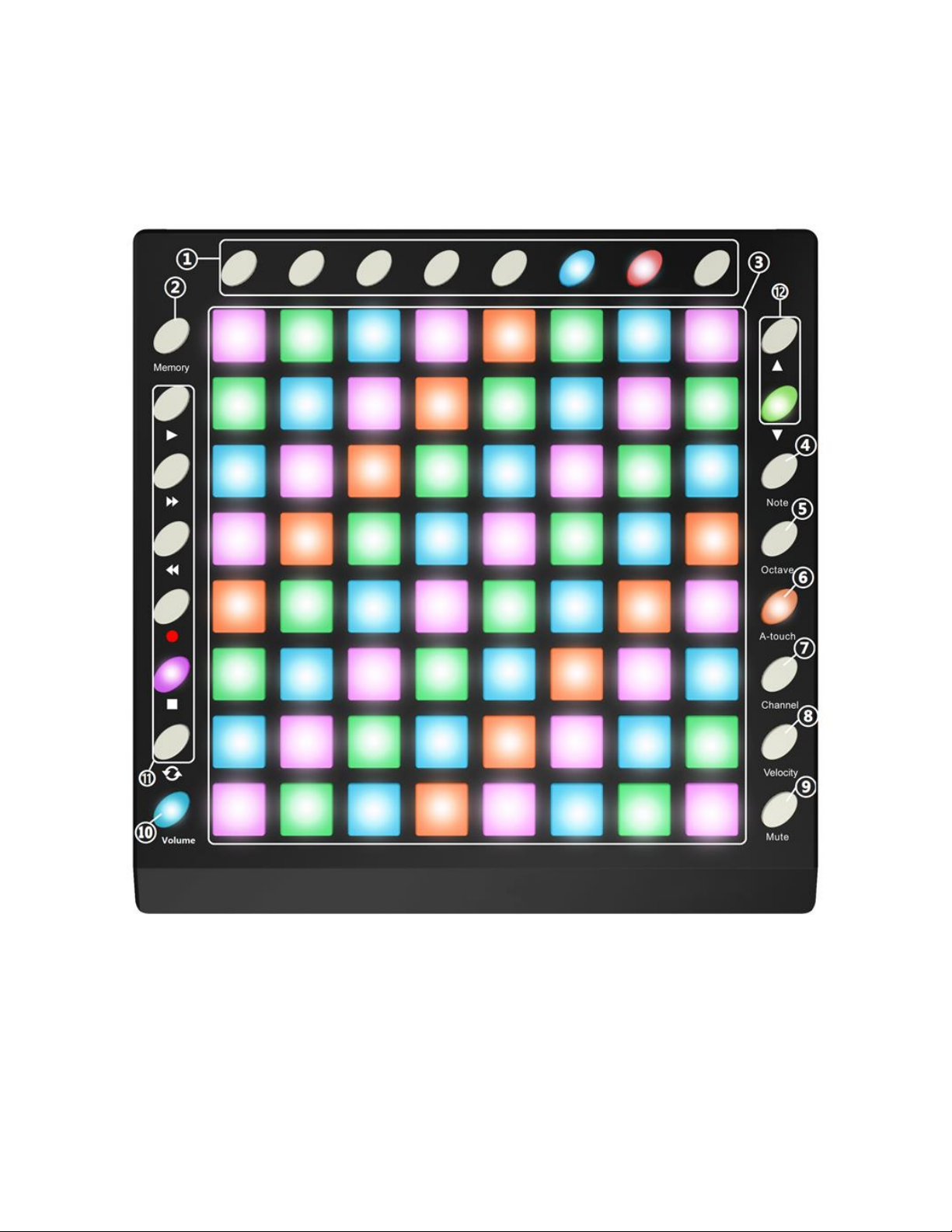
Top Panel
1. Parameter Control Buttons: These buttons can be assigned to send Control Change
messages and can be used to send continuous control data to a digital audio
workstation (DAW).
2. Memory Button: The SRP64 features 6 built-in memory slots for storing button
assignments and settings. Press and hold the Memory button and press one of the 6

7
Pads to the right of the Memory button to recall the settings assigned to that Pad.
Momentarily press the Memory button, then press one of the 6 Pads to the right of
the Memory button, to save the current button assignments and settings to the
memory slot assigned to that Pad.
3. Trigger Pads: The 8x8 grid of velocity and pressure sensitive Pads can be configured
to send Note or Control Change messages. They can be used to trigger drum hits to
your software or hardware module.
4. Note Button: Press the Note button to configure the Pads to send Note messages.
Use the ▲and ▼buttons to increase or decrease the current Note by a semitone.
5. Octave Button: Press the Octave button, then use the ▲and ▼buttons to increase
or decrease the Octave setting. The range of settings is 0-4 with 0 being the initial
setting. Press both the ▲and ▼buttons at the same time to reset the Octave
setting to 0.
6. A-touch Button: Press the A-touch button to control the Aftertouch function. Press
the button once to enter Channel Aftertouch Mode, press it a second time to enter
Keyboard Aftertouch Mode, and finally press it a third time to disable Aftertouch
Mode. The button illuminates red when in Channel Aftertouch Mode and the SRP64
will send Channel Aftertouch information when pressing the Pads. The button
illuminates blue when in Keyboard Aftertouch Mode and the SRP64 will send
Keyboard Aftertouch information when pressing the Pads.
7. Channel Button: Press the Channel button, then use the ▲and ▼buttons to
increase or decrease the Channel setting. The range of settings is 1-16 with 1 being
the initial setting.
8. Velocity Button: Press the Velocity button to cycle through the different velocity
settings. The button illuminates green when Normal velocity is selected, red when
Heavy velocity is selected, and blue when Constant velocity is selected.
9. Mute Button: Press the Mute button to toggle controller mute on or off. When
Mute is on, the SRP64 cannot send any MIDI messages.
10. Volume Button: Press the Volume button to send a General MIDI Master Volume
message (F0 7F 7F 04 01 00 xx F7).

8
11. MMC Buttons: These six buttons default to send MIDI Machine Control messages to
a sequencer. From top to bottom, the buttons perform Play, Fast Forward, Rewind,
Record, Stop, and Loop functions. Press the ◄◄ and ►buttons at the same time
to set the buttons to send Control Change messages instead of MMC messages.
12. ▲and ▼Buttons: These buttons are used to increase or decrease values and to
navigate menus and options.
Rear Panel
13. USB: USB Type-B connector for connecting your PC using the included USB cable.
14. MIDI Out: MIDI output connector.
15. MIDI In: MIDI input connector.
16. DC 5V: DC barrel connector for connecting the included USB Power Cable to a USB
power source.
17. Power: Press the Power button to turn the SRP64 on or off.

9
CONTROL SOFTWARE
This Grid Controller includes Control Software to change and manage the various settings.
Download the Windows® or Mac® software package from the 625895 page on the
monoprice.com website, connect the SRP64 to your computer, then run the software to
control the settings. While the software is intuitive and easy to use, a few setup examples
are listed in the following sections. The main window of the software is shown below.

10
Assign a Pad to Start/Stop MMC
It can be easier to trigger a Pad to start or stop a song than to use the keyboard or mouse.
The following example sets Pad 7 to send a Stop message and Pad 8 to send a Start
message.
1. Click Pad 7 in the software to select it, then use the Mode pull down list box to set
it to Switched.
2. Use the CC Number pull down list box to set the value to 1, which is the MMC Stop
command.
3. Click Pad 8 in the software to select it, then use the Mode pull down list box to set
it to Switched.
4. Use the CC Number pull down list box to set the value to 2, which is the MMC Start
command.
Tabla de contenidos
Otros manuales de Controladores de Stage right