
Ssl SD726MB Manual de usuario

SD726MB
BLUETOOTH® • DVD/MP3/CD AM/FM RECEIVER
FEATURING 7" (178 mm) MOTORIZED WIDESCREEN
TOUCHSCREEN DIGITAL TFT LCD MONITOR
SD726MB
BLUETOOTH® • DVD/MP3/CD AM/FM RECEIVER
SOUND STORM LABORATORIES
3451 Lunar Court, Oxnard CA 93030
TECHNICAL ASSISTANCE
www.soundstormlab.com/customer-support
888-387-8676 US Toll-free
805-751-4855 Customer Service
USER’S MANUAL
0817
iPod
®
and iPhone®are registered trademarks of Apple Inc. in the U.S. and other countries.
Sound Storm Laboratories is not aliated with Apple Inc.
The Bluetooth® word mark and logos are registered trademarks owned by Bluetooth SIG, Inc. and any use of such marks by
Sound Storm Laboratories is under license. Other trademarks and trade names are those of their respective owners.
AUDIO
OUTPUT
COMPATIBLE
MP3
USB
AUDIO
STREAMING
AUX
INPUT
DETACHABLE
FACE
WIRELESS
RC
RDS
SCREEN
TOUCH

Content
To ensure safety while driving and to comply with laws, drivers should
not watch video or operate the video device while driving.
01
A
ccessories………………………………………………………………………………………………………………………………………...02
Unit Installation………………………………………………………………………………………………………………………………..03
Wire Connection………………………………………………………………………………………………………………………………04
Parking Brake Connection ………………………………………………………………………………………………………05
Speaker connection……………………………………………………………………………………………………………………….06
Button Description………………………………………………………………………………………………………………………….07
Remote Control………………………………………………………………………………………………………………………………..09
Main Menu…………………………………………………………………………………………………………………………………………...12
Radio Operation……………………………………………………………………………………………………………………………….12
DVD Operation………………………………………………………………………………………………………………………………..13
USB /SD Operation………………………………………………………………………………………………………………………..14
Settings Operation………………………………………………………………………………………………………………………..15
Bluetooth Operation……………………………………………………………………………………………………………………..18
A
ux-In Operation ……………………………………………………………………………………………………………………………19
Notes of Disc……………………………………………………………………………………………………………………………………...20
T
roubleshooting……………………………………………………………………………………………………………………………..21
General Specification…………………………………………………………………………………………………………………..23

Power Cable User Manual
Accessories
Package contains the following accessories for installation and operation of the unit.
(1) Washer,
Spring
Washer,
M5 Nut
1
(5) Rubber
Cushion 1
(2) Screw
1
(6) Screw
4
(3) Bolt 1
(7)installation
bracket 2
(4) Mounting
Strap
1
02
Remote Control
(8)Half-
sleeve
1
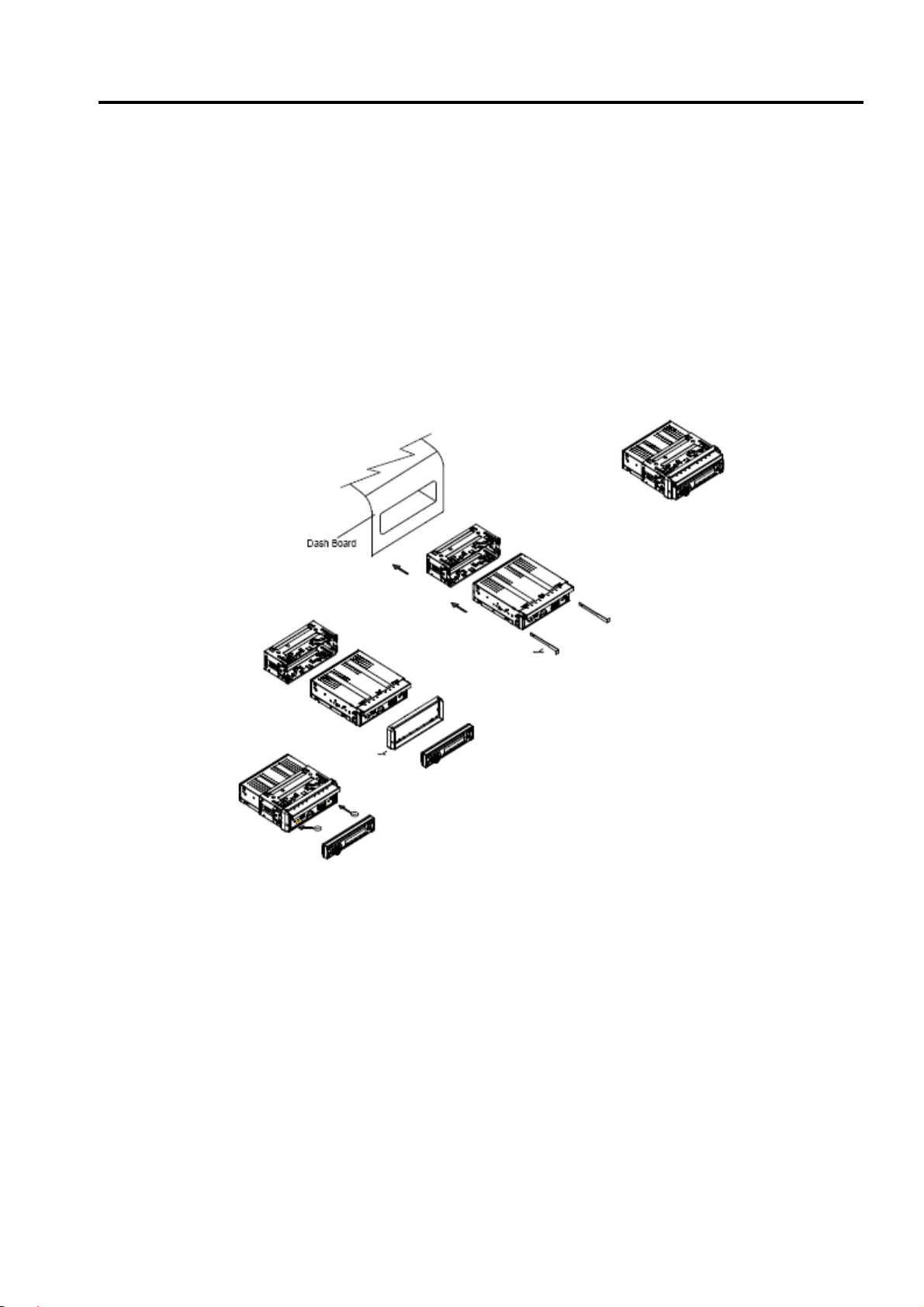
Unit Installation
Note
Before starting installation of the unit, make sure the wiring is connected properly.
Use only the parts provided with the unit to ensure proper installation.
The use of unauthorized parts may cause malfunction.
Install the unit where it does not get in the driver’s way and will not injure the passenger in case
there is a sudden stop, like an emergency stop.
INSTALLATION (Figure 1)
Insert the unit into dash-board hole.
If necessary, place the mount strap at the rear of the unit and fix it with provided washer as
figure 2.
Push the unit into the Half Sleeve until you hear a click sound
Place Trim Ring over the unit and installation is completed as figure 3. (Some vehicle may
not need Trim Ring)
03

Wire Connection
The Description of the Input/output Interface of the Rear Chassis
04

Parking Brake Connection
In order to view videos, the parking brake wire must be connected, and the vehicle stopped
Connecting the reversing line to taillight on the car
05

Speaker Connection
After connecting, when you start up the reverse gear, the unit will receive the picture from car rear
view camera.
Connect the speakers according the following diagram, incorrect connections will damage the unit or
your loudspeakers.
Correct connection
Left front - Right front | Left rear - Right rear
Incorrect connections
06

Button Description
1.Open button
Press the button to open/close the screen
Press the button for short moment to turn on power,and long press it to turn off power.
Press the button can adjustment the screen angle
2 /9 .Fast Forward /Hang up button
In radio mode, press the button to select station upward
In Bluetooth mode, press to reject a coming call
3/5 . dial /Fast Forward button
In radio mode,press the button to select station backward
In Bluetooth mode, press to hang up call
07

Button Description
4.MIC input
Bluetooth microphone input socket
6. Mode Button
When the unit is power on ,Repeat press this button can switch to different function mode as follow
picture.
7 .Rotate Button
Press the button to increase or decrease volume level
8. Mute Button
Press the button will briefly to mute
10. Number Button1
In radio mode,press this button to hear radio preset
In disc playback mode,press this button to turn on/off TFT LCD display.
11. Number Button2
In radio mode,press this button to hear radio preset
In disc playback mode,press this button to repeat the current track indefinitely.
12. Number Button3
In radio mode,press this button to hear radio preset
In disc playback mode,press this button to play frocks on the disc in random order.
13. Number Button4
In radio mode,press this button to hear radio preset
In disc playback mode,press this button for to stop playback.
14. Number Button5
In playback mode,press this button to adjust the angle of screen.
15. Number Button6
In playback mode,press this button to adjust the angle of screen.
16.RELEASE Button
Press this button to release the panel.
17. AUX
Put the Aux plug into the Aux-In jack which was marked on front panel
18. USB
insert a USB into this slot and the unit will automatically start reading and playback
19.Eject
When there is a disc in the unit,press the button to eject the disc.
08

Remote Control
1. MODE button
Press it to select the mode: radio, disc (if there is a disc in unit), USB (if there is a USB device in the
unit), SD (if there is a SD/MMC card in the unit), Bluetooth, Aux-In
2. POWER button
Power on or power off.
3. UP button
Press it to move the cursor up.
4. BAND/RDM/CLEAR button
In radio mode, press to change radio band in sequence of FM1 →FM2 →FM3 →AW1 →AW2; In DVD
mode, press to play randomly; In Bluetooth mode, short press it to clear the single phone number; long
press it to clear all the phone number.
5: ENTER
Press it to confirm your selection
6. LEFT button
Press it to move the cursor left
7. DOWN button
Press it to move the cursor d
8. EJECT button
Press it to eject the disc.
9. STEREO/MONO/* button
Press to switch the radio in stereo and mono sound. In Bluetooth mode, press it to make a symbol.
10. P.SCN/ RPT /# button
In DVD mode, press to repeat REP 1 => REP Title => REP ALL.
In SD /USB mode ,press to repeat REP 1 => REP Dir => REP ALL.
09
1: MODE
2: POWER
3: UP
4: BAND/RANDOM/CLEAR
5: ENTER
6: LEFT
7: DOWN
8: EJECT
9: STEREO/MONO/*
10:P.SCAN/REPEAT/#
11: SEEK-/BACKWARD
12: LOUD
13: STOP/PBC
14: OSD
15: PLAY/PAUSE
16: MUTE/BLUETOOTH
17: MENU/ROOT
18: SUBTITLE
19: RIGHT
20: SETUP
21: DIAL/ANGLE
22: HANG UP
23: VOLUME UP
24: ZOOM
25: SELECT
26: SEEK+/FORWARD
27: VOLUME DOWN
28: AUDIO
29: NUMERIC KEY
30: OPEN
/
TILT
Tabla de contenidos
Otros manuales de Receptor de Ssl


