SPS SD1 Manual de usuario

INSTRUCTION MANUAL
SD1
T h e D i s p l a y / I n d i c a t o r
SPS

2
Instruction Manual SD1
Contents
1. Technical Data .............................................................................................................................. : 3
2. Dimensions ................................................................................................................................... : 4
3. Connecting probes ....................................................................................................................... : 5
4. Display ........................................................................................................................................... : 6
5. Programming Menu...................................................................................................................... : 7
6. Measuring Mode ........................................................................................................................... : 13
7. Instructions for battery replacement .......................................................................................... : 14
8. PC connection .............................................................................................................................. : 15
9. Windows configuration software SD1_Win.exe ........................................................................ : 16
10. Safety Instructions ........................................................................................................................ : 17
11. Declaration of conformity ............................................................................................................ : 18
12. Guarantee ....................................................................................................................................... : 18

3
Instruction Manual SD1
1. Technical Data
Mechanical characteristics
Case
Aluminium, rubber shock protection
Front plane
Acryl glass ( scratch proof )
Dimensions / Weight
( W x H x D ) 60 x 59.5 x 21.7 mm / 95 g
Electrical characteristics
Power supply
Battery ( CR2032 )
Battery lifetime
approx. 8000 h ( SD1 with probe )
Measuring rate
adjustable, 2 … 20 values / sec
LCD display
Display type
Liquid crystal display, reflective
Numeric display
7 digits ( 10.5 mm )
Analogue display
53 segments
LEDs / Acoustical output
Tolerance display
3 LEDs : 1x red, 1x green, 1x yellow
Buzzer
Piezo
Connections
ISi interface
Bus connection for sensors, hand / foot switch,
tolerance adapter, …
Triple-I interface
Connection for IBR radio modules or cable with
USB / RS232 interface
Measuring systems
The measurands : measuring range, resolution, precision, … are defined by the
connected measuring probe or sensor.
Example : Measuring probe IMS-5S →Range 5mm, Resolution 0.01µm
Environmental conditions
Operation / Storage temp.
+41 … +113 °F / -4 … +158°F
Protection class
IP65 ( CEI / IEC 529 )
EMC according to EN50081-2 and EN50082-2

4
Instruction Manual SD1
2. Dimensions

5
Instruction Manual SD1
3. Connecting probes
Variant A
➔Usage as dial gauge
Variant B
➔Connection of up to 2 probes and an additional hand / foot switch

6
Instruction Manual SD1
4. Display
1
2
3
4
5
6
7
8
9
10
11
12
13
1. Calibration request
2. Tolerance LEDs
3. Column display
4. Data transmission
5. Dynamic measuring mode
6. Numeric display
7. Unit
8. Battery display
9. Factor defined
10. Function „Hold“
11. Programming menu
12. Passcode set
13. Measuring probe 1 / 2
A detailed description can be found in chapter 6 “Measuring Mode”.

7
Instruction Manual SD1
5. Programming menu
Open the programming menu by pressing the PRG button.
The following settings are available :
Note : The access to the settings via the programming menu can be restricted by using
the Windows configuration software SD1_Win.exe ( ➔see chapter 9 ).
Because of this, there may not be all of the following menu options available.
Overview :
•Unit Selection of unit
•rESoL. Selection of resolution
•dir. Selection of measuring direction
•PrESEt Zeroadjustment / Preset
•2-CAL. 2 Master calibration
•dt.-CAL. Temperature forced calibration ( in steps of 0.5 °C )
•tF.-CAL. Timer forced calibration ( in steps of 30 min )
•FActor / ProbES (*) Measuring input A and B
•SEt.OP. Selection of a Measuring mode
•GrAdinG Selection of a Grading mode
•SEt.Pnt. (*) Input of the nominal value with relative tolerances
•SEt.toL. (*) Input of absolute tolerances
•toL.LED Tolerance LEDs
•CoL.diS. Analogue display
•hoLd Freezing of the display on a static measurement
•but.PRG. Assign a second function to the PRG button
•but.dAtA. Assign a second function to the DATA button
•but.CAL. Assign a second function to the >O< button
•FootS. Assign a function to a hand / foot switch
•P.C.ProG. Passcode for the programming menu ( 4 digits )
•P.C.CAL. Passcode for the calibration ( 4 digits )
•Auto.oFF Setting the Auto Power Off time
•SA.rAtE Setting the measurement rate
•BEEP Button tone
•ProG.End Leave the programming menu
Note : The selection of the active menus ( marked with (*) ) is only possible with the
Windows configuration software SD1_Win.exe ( ➔see chapter 9 ), not with the
programming menu of the SD1.

8
Instruction Manual SD1
Basic function / Selection of the unit
Basic function / Selection of the resolution
Basic function / Selection of the measuring direction
Calibration / Zeroadjustment & Preset
Calibration / 2 Master calibration
Calibration / Temperature forced calibration
Calibration / Timer forced calibration
First display variant, if only one probe was selected in the basic settings:
Note :
All digits have to be set one by one with the buttons
and . The change to the next digit is done
by pressing the button . If the button is
pressed > 2 sec., the complete number is confirmed
regardless of which digit is active at the moment.

9
Instruction Manual SD1
Second display variant, if both probes were selected in the basic settings :
Submenu for the selection of a probe
Submenu for the activation / deactivation of the probe with input of a factor
Measuring modes
(Max+Min) / 2 (Max-Min)
Grading mode / Number of grades [Off...30]
Grading mode / Display of grade on numeric display on / off
Tolerance limits / Nominal value
Note :
All digits have to be set one by one with the buttons
and . The change to the next digit is done
by pressing the button . If the button is
pressed > 2 sec., the complete number is confirmed
regardless of which digit is active at the moment.

10
Instruction Manual SD1
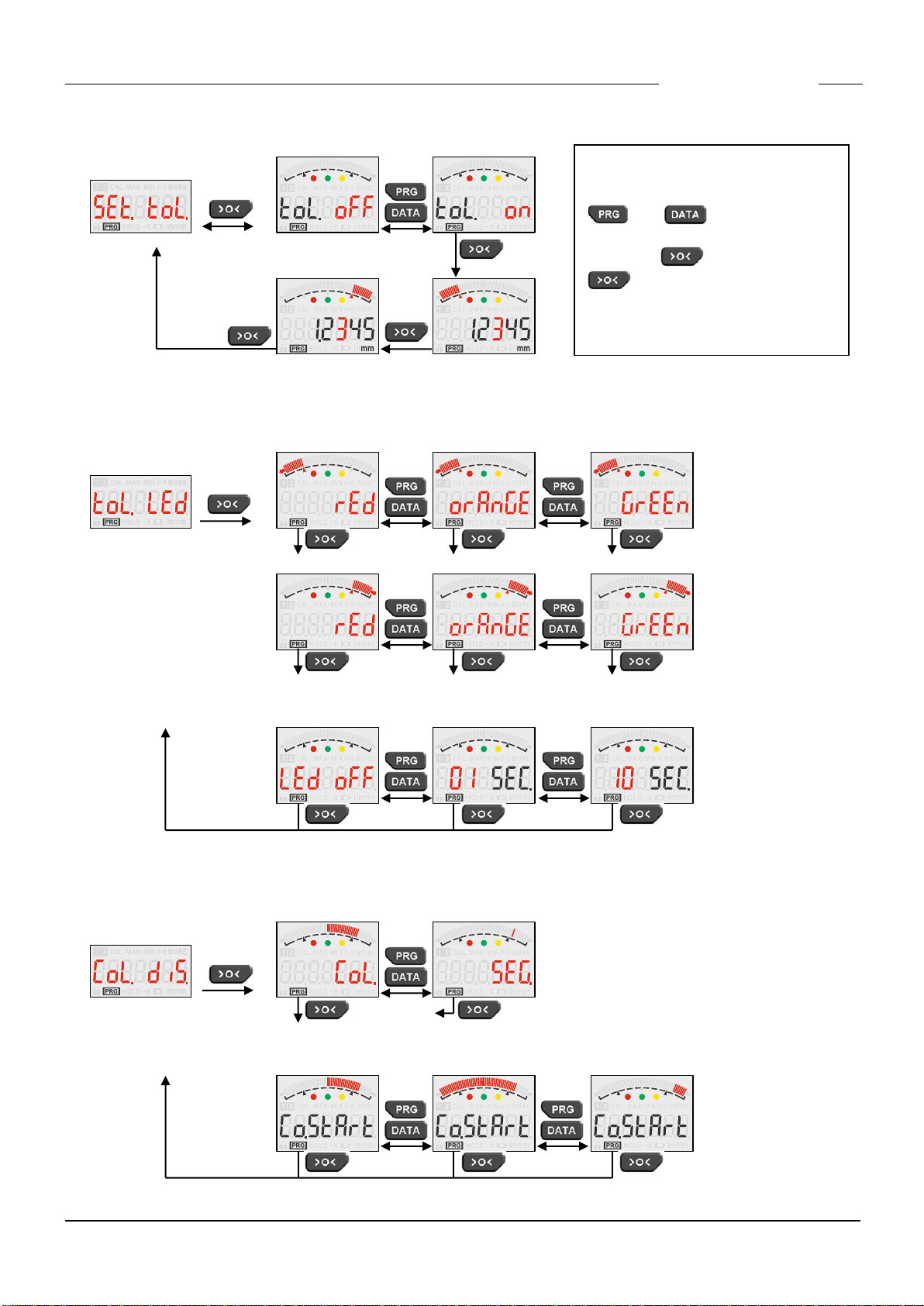
Tolerance limits / Tolerances
Tolerance LEDs / Exceeding upper tolerance limit and lower tolerance limit
Tolerance LEDs / Display time
Column display / Selection of the column display mode
Column display / Column starting point
Note :
All digits have to be set one by one
with the buttons
and . The change to
the next digit is done by pressing
the button . If the button
is pressed > 2 sec., the com-
plete number is confirmed
regardless of which digit is active at
the moment.
Tabla de contenidos
Otros manuales de Instrumento de medición de SPS
Manuales populares de Instrumento de medición de otras marcas

Endress+Hauser
Endress+Hauser Proline Promag 50 Especificaciones técnicas

Siemens
Siemens SITRANS F Coriolis FCT030 Manual de lista de piezas

KLINGER
KLINGER CMF V Series Manual de usuario

EXFO
EXFO FTB-2 Manual de operación y mantenimiento

Keysight
Keysight M8290A Manual de usuario

ADTEK
ADTEK MW-5 Manual de usuario