
Sprint AIRAVE 2.5 Manual de usuario

911702 Rev. 7.04 15November2013
AIRAVE 2.5 and 2.5+
User Guide
©2013 Sprint. Sprint and the logo are trademarks of Sprint. Other marks are trademarks of their
respective owners.

Important Messages
Important Messages
IMPORTANT: Sprint’s policies often do not apply to third-party applications. Third-party
applications may access your personal information or require Sprint to disclose your customer
information to the third-party application provider. To find out how a third-party application will
collect, access, use, or disclose your personal information, check the application provider’s
policies, which can usually be found on their website. If you aren’t comfortable with the third-
party application’s policies, don’t use the application.

i
Table of Contents
Introduction................................................................................................................................ 3
Getting Started........................................................................................................................... 4
Check What’s in the Box ........................................................................................................ 4
Set up at a glance .................................................................................................................. 4
Setting up Your AIRAVE™..................................................................................................... 5
External GPS Antenna Setup................................................................................................. 8
When is Your AIRAVE Ready for Use?.................................................................................. 9
Setting up Optional Components ..............................................................................................10
PC or LAN Router Setup.......................................................................................................10
Configuring AIRAVE™ Router...............................................................................................11
Adding Your ISP User Name and Password.............................................................................12
Using Your AIRAVE™...............................................................................................................15
How AIRAVE Works..............................................................................................................15
Your Broadband Connection Speed...................................................................................15
How Calls and Data Go Over the Internet..........................................................................16
Maintenance..........................................................................................................................16
Ventilation..........................................................................................................................16
Cleaning ............................................................................................................................16
Troubleshooting........................................................................................................................17
Troubleshooting Installation Problems...................................................................................17
Troubleshooting Slow Connection When Laptop is Connected to the AIRAVE™ ..................18
Troubleshooting Voice Quality Issues....................................................................................19
Resetting the AIRAVE...........................................................................................................20
LED Quick Reference............................................................................................................21
Using LEDs ...........................................................................................................................22
FAQs.....................................................................................................................................25
Why does the AIRAVE™ need a GPS antenna?................................................................25
Why does the AIRAVE™ need an external GPS antenna?................................................25
What happens to the AIRAVE™ if there is a power outage or if you lose Internet access?25
Can you move the AIRAVE™ to another location? ............................................................25

ii
How do I know if my phone is connecting through the AIRAVE™? ....................................25
I have a DSL modem and cannot connect to the Internet...................................................25
Getting Help ..........................................................................................................................26
Safety Information.....................................................................................................................27
General Precautions..............................................................................................................27
FCC Information....................................................................................................................28
! FCC Radiation Exposure Statement ................................................................................28
FCC Part 15.......................................................................................................................28

3
Introduction
This User Guide introduces you to the SPRINT®AIRAVE™ service and all its features. It’s
divided into four sections:
●Getting Started page 4
●Setting up Optional Components page 10
●Using Your AIRAVE™ page 15
●Troubleshooting page 17
●Safety Information page 27
Throughout this guide, you’ll find tips and techniques that help you make the most of your new
device and service. The Table of Contents and Index also help you quickly locate specific
information. It is important that you read each section and note any special requirements.
However, if you’d like to get right to a specific feature, simply locate that section in the Table of
Contents and go directly to that page. Follow the instructions in that section, and you’ll be ready
to use your AIRAVE in no time.
WARNING: Please read the safety information on page 27 to learn about how to safely use
your device. Failure to read and follow the safety information in this user guide
may result in serious bodily injury, death, or property damage.
4
Getting Started
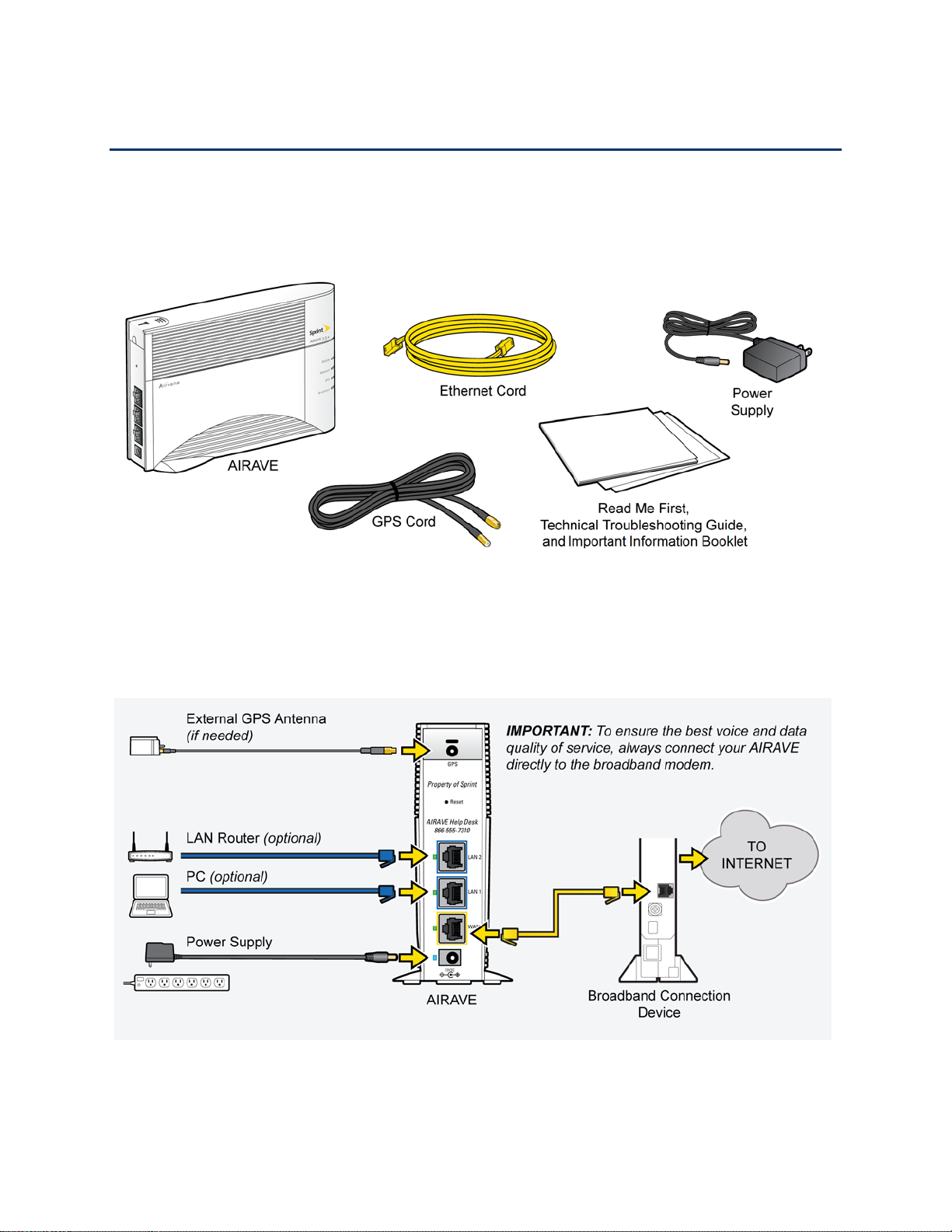
Check What’s in the Box
Ensure that the following items are in the box:
Tip: See the Read Me First for detailed illustrations on setting up your AIRAVE.
Set up at a glance

5
Setting up Your AIRAVE™
1. Disconnect the power from all devices on your network.
Note: This includes your cable or DSL modem and router.
2. Place your AIRAVE close to a window and in a central location. For best results, place the
AIRAVE in an elevated location, such as the top of a bookshelf or tall cabinet.
Note: In large homes, the external GPS antenna can be used to allow the AIRAVE to be
placed in a more central location. This allows the AIRAVE to provide even coverage
throughout the home.
3. Connect one end of the yellow Ethernet cable to an available LAN port on your broadband
modem.

6
4. Connect the other end of the Ethernet cable to your AIRAVE’s yellow WAN port.
5. Turn on your cable or DSL modem.
Important Wait a couple of minutes for the cable or DSL modem to fully initialize before
continuing.
6. Plug the power supply connector into the black power port on your AIRAVE.

7
7. Plug the other end into an available electrical outlet. Sprint recommends a surge protector
power strip.

8
External GPS Antenna Setup
Use the external GPS antenna if your AIRAVE’s internal antenna does not gain a signal for GPS
lock (indicated by a solid red GPS LED for more than 40 minutes, solid green indicates GPS
lock). Connect the external GPS antenna to your device’s GPS connection port.
Note: After initial installation GPS may take 30-40 minutes to get a GPS fix.
1. Remove the GPS antenna module from the back of the AIRAVE. Connect the GPS cord to
the antenna module and the AIRAVE. (See inset in drawing.)
2. Remove the red paper backing from the tape on the GPS antenna.
3. Place the external GPS antenna horizontally on a clean, flat surface, preferably on a window
sill or as close to a window as possible and above the window sill. The antenna works best
in an open area where it can easily pick up signals.
Note: Be sure to place the GPS antenna module tape-side down on a window sill.
Otros manuales para AIRAVE 2.5
1
Este manual sirve para los siguientes modelos
1
Tabla de contenidos
Otros manuales de Extensor de Sprint


