Spracht Aura Mobile BT Manual de usuario
Spracht Logo
AURA MOBILE BT
Mobile Conference Phone
[illustration of aura mobile drawing with spracht logo, example below]
USER MANUAL

TABLE OF CONTENTS – ENGLISH
Introduction....................................................................................................
Package Contents...........................................................................................
Aura Mobile BT Design ................................................................................
Safety Precautions..........................................................................................
Determining your phone’s compatibility.......................................................
Charging your Aura Mobile BT.....................................................................
Powering ON/OFF.........................................................................................
What is “pairing” ...........................................................................................
Pairing the Aura Mobile BT with your mobile phone ...................................
Making a call .................................................................................................
Receiving a call..............................................................................................
Adjusting the volume manually.....................................................................
Muting a call ..................................................................................................
Ending a call ..................................................................................................
Call waiting....................................................................................................
LED indicators...............................................................................................
Using the visor clip ........................................................................................
Specifications.................................................................................................
Warranty ........................................................................................................
FCC statements ..............................................................................................

INTRODUCTION
Thank you for purchasing the Aura Mobile BT Conference Phone with Bluetooth technology, the
most advanced Bluetooth conference phone available.
With wireless connection to your Bluetooth mobile phone, you can take your Aura Mobile BT to
the office, car, airport, beach, or anywhere your day takes you!
This is the ultimate option for hands-free communication on your mobile phone, so convenient
you don’t need to wear a headset to make or answer a call. The Aura Mobile BT is compatible
with a Bluetooth mobile phone, any non-Bluetooth mobile, a cordless phone with a headset jack,
or even your PC or Mac for VoIP (Voice over Internet Protocol) functionality.
FEATURES:
- Echo cancellation and active noise reduction using Digital Signal Processing
(DSP) technology
- Full duplex providing simultaneous two way communications
- Dual speakers and a 3 watt amplifier with sound strong enough to fill a 30
foot conference room
- A whopping 91db of sound, making it the most powerful mobile product on
the market
For complete specifications, see page xx of this manual
PACKAGE CONTENTS
1. Aura Mobile BT Conference Phone
2. 110V Power adapter
3. Car charger
4. 6’ 2.5mm male to male cable (for use with traditional non-Bluetooth mobiles,
cordless phones, and PC and Macs for VoIP connectivity
5. User manual
6. Accessories coupon
7. Warranty/registration card
[Illustrations and descriptions of phone, power adapter, car charger, and 2.5mm cable]
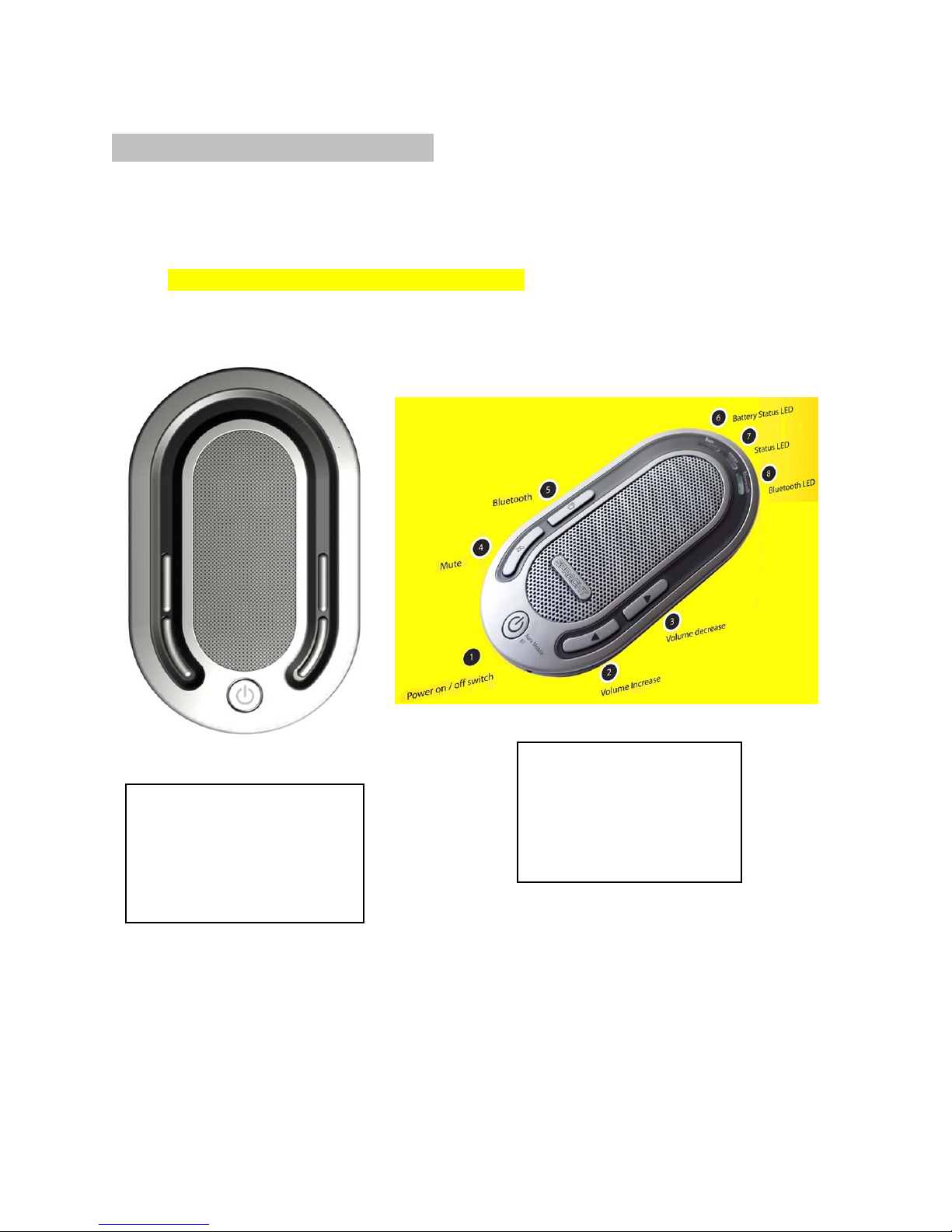
AURA MOBILE BT DESIGN
[Illustration of Aura defining buttons and ports]
BUTTONS
1. Power on / off switch
2. Volume up switch
3. Volume down switch
4. Bluetooth Mode switch
5. Mute switch.
LEDS
1. Charge LED- Amber
2. Status LED – Green
3. Bluetooth LED – Blue
SAFETY PRECAUTIONS
The safest way to make or receive a call is to pull off to the side of the road before
communicating. Please obey all cell phone and driving laws in your area.
DETERMINING YOUR PHONE’S COMPATIBILITY
The Aura Mobile BT is compatible with both Bluetooth and non-Bluetooth phones. To
determine if your mobile phone has Bluetooth capability, please visit your phone manufacturer’s
web site.
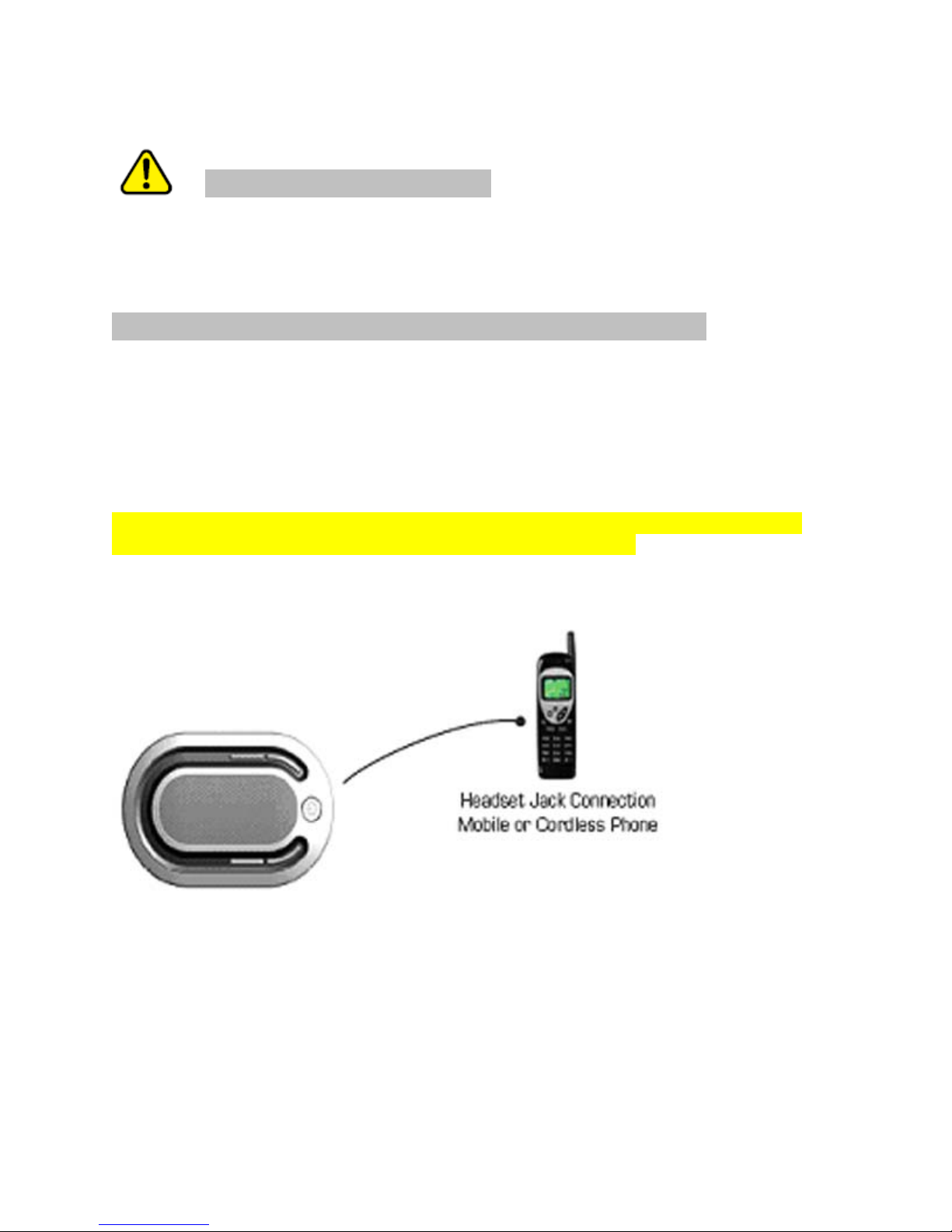
NOTE: If your phone is a non-Bluetooth model, you must connect to the Aura Mobile BT using
the included 2.5mm data cable. See diagram below:
[Illustration of Aura BT connecting to mobile phone using the 2.5mm data cable, this can be
similar to the illustration on pg. 14. The data cable should be labeled]

1 CHARGING YOUR AURA MOBILE BT
Your Aura Mobile BT must be fully charged before using for the first time. First, plug the power
adapter into an available electrical outlet (do not exceed voltage rating of power adapter). Next,
plug the power adapter wire into the port on the Aura Mobile BT labeled “9V Charge”
Once the Aura Mobile BT is fully charged the “batt” indicator will turn off and you are ready for
setup.
[Illustration of power adapter plugged into Aura Mobile BT]
2 POWERING ON/OFF
1. Powering ON: Press and hold down the Power button. The “status” indicator will
display green followed by a flashing green signal every 2 seconds.
2. Powering OFF: Press and hold down the Power button. The “status” indicator will flash
twice and turn off.

3 WHAT IS “PAIRING”
Pairing is the process of two Bluetooth compatible devices linking or communicating with one
another. Pairing involves a mobile phone identifying a Bluetooth device and entering in a
password or PIN to establish the pairing. This process allows only a verified device to connect
to your mobile phone, ensuring enhanced security.
4 PAIRING THE AURA MOBILE BT TO A MOBILE PHONE
1. Make sure that your Aura Mobile BT is powered on. (see section 2)
2. Power on your Bluetooth mobile phone.
3. To switch to Bluetooth mode and connect to a Bluetooth mobile phone, press and
hold the Mode button for 5 seconds. An ON audio cue will sound followed by a
flashing amber and green light on the “bluetooth” indicator. At this point the Mode
button can be released.
4. Follow your mobile phone’s instruction guide to connect to a Bluetooth device.
Typically, you will click on a Bluetooth icon and click “Find device” or “Discover
device.”
5. Your mobile phone should find the Aura Mobile BT which is displayed as “BTHS”
6. Click on “BTHS” and click “Yes” or “OK” if your phone prompts you to confirm.
7. Your mobile phone will then prompt you to enter a PIN or password. Enter: 0000
(Note: this is the default pin and can be changed.
8. If the pairing is successful, the “bluetooth” indicator will flash an amber light. The
Aura Mobile BT is now in standby mode.
9. The pairing mode can be cancelled by pressing and holding down the Mode button
for 3 seconds. The “bluetooth” indicator will turn off and an OFF tone will sound.
The Aura Mobile BT is now in idle mode.
NOTE: The connection default time-out is 60 seconds. If no connection is established
with a Bluetooth mobile phone within this time span, the Aura Mobile BT will switch to
standby mode.
4 MAKING A CALL
1. Dial the number on your mobile phone’s keypad.
2. Press the “Call” or “Talk” button on mobile phone.
3. On the Aura Mobile BT, the “status” indicator will flash green twice, then it will flash
quickly every second. Once the connection is established the “status” indicator will
flash green 4 times in 3 second intervals.
4. The Aura Mobile BT will automatically adjust volume depending on background
noise.
5 RECEIVING A CALL
1. When the mobile phone is ringing, you can pick up the call by pressing the “Call” or
“Talk” button on the mobile phone. At this moment the ringing tone will sound
through the Aura Mobile BT speaker.
6 ADJUSTING THE VOLUME MANUALLY
1. The Volume features a 16 step range with both Volume UP and Volume DOWN
buttons.
2. Volume UP: Press and hold down the Volume UP button to increase the volume.
The volume will increase at 2 level increments.
3. The “status” indicator will flash 3 times when the maximum level has been reached.
4. Volume DOWN: Press and hold down the Volume DOWN button lower the volume.
The volume will decrease at 2 level increments.
5. The “status” indicator will flash 3 times when the minimum level has been reached.
7 MUTING A CALL
1. To turn off the speaker and mic, press the Mute button. The “status” indicator will
blink twice when the Mute is active.
2. To resume talking, press the Mute button again for half second.

8 CALL WAITING
1. Press the “Call” or “Talk” button on your mobile phone.
9 ENDING A CALL
1. Press and hold down the Power button until green status light flashes and turns off.
OR
2. Press “End” on your mobile phone.
10 LED INDICATORS
1. Battery
• OFF - no battery or no input power (power adapter not plugged in)
• BLINKING rapidly – initial power up or battery not connected
• ON – battery is below 2V
• BLINKING every .5 seconds – battery voltage may exceed 4.35V
• OFF – fully charged
2. Status LED
• STEADY LIGHT FOLLOWED BY BLINKING EVERY 2 SECONDS –
Initial power up
• BLINKING two times - mute function is active
• BLINKING three times – volume button has reached the maximum or
minimum level
3. Bluetooth
• Amber and Green (see instructions in section x, Bluetooth mode switch)
11 USING VISOR CLIP
1. To attach to car visor, pull down the visor clip under the conference phone and slide onto
visor with the speaker facing down, towards you.

[illustration of visor clip open]
BLUETOOTH MODE SWITCH
Press Mode button and hold for 1 second
1. Switches from standby mode to master mode.
2. Switches from master mode to idle mode.
3. Switches from talk mode to standby mode.
Press Mode button and hold down for 3 seconds
1. Switches from idle mode to standby mode, (wake up from deep sleep mode).
2. Switches off the Bluetooth module if it is in idle mode.
Press Mode button and hold for 5 seconds
1. Switches from idle mode to pairing mode.
2. If it is not at idle mode, this will not take any effect.
Otros manuales para Aura Mobile BT
2
Tabla de contenidos
Otros manuales de Teléfono de conferencia de Spracht

Spracht
Spracht Aura Professional UC Manual de usuario

Spracht
Spracht Aura Professional CP-3010 Manual de usuario

Spracht
Spracht Voice Center CP-2012 Manual de usuario

Spracht
Spracht AURA SOHO CP-2016-007 Manual de usuario

Spracht
Spracht Voice Center cp-2010 Manual de usuario

Spracht
Spracht CP-2016-004 Manual de usuario

Spracht
Spracht Aura Professional Manual de usuario

Spracht
Spracht Aura Soho Manual de usuario

Spracht
Spracht Aura Soho Manual de usuario