
Sparklan WRTR-168G Manual de usuario

User’s Manual 1
WRTR-168G
SpeedPlus Wireless-G AP/Router
User’s Manual
Version 1.0

User’s Manual 2
Copyright Statement
No part of this publication may be reproduced, stored in a retrieval system, or
transmitted in any form or by any means, whether electronic, mechanical,
photocopying, recording, or otherwise without the prior writing of the publisher.
JULY 2008

User’s Manual 3
Contents
1. Introduction ................................................................................................4
2. Safety Notification......................................................................................5
3. Hardware Installation.................................................................................6
4. How to Configuring the AP/ Router ........................................................10
4.1 Quick Setup ............................................................................................12
4.2 General Setup.........................................................................................20
4.3 Setup Internet Connection (WAN Setup)..............................................24
4.4 Wired LAN Configuration.......................................................................34
4.5 Wireless LAN Configuration..................................................................38
4.6 Quality of Service (QoS) ........................................................................56
4.7 Network Address Translation (NAT) .....................................................60
4.8 Firewall....................................................................................................68
4.9 System Status.........................................................................................80
4.10 Tools Settings.......................................................................................84
5. Troubleshooting – Q & A .........................................................................87

User’s Manual 4
1. Introduction
Thank you for purchasing your SpeedPlus Wireless-G AP/Router.
This user guide will assist you with the installation procedure.
Package Contents
Please make sure you have the following in the box:
♦SpeedPlus Wireless-G AP/Router
♦Quick Installation Guide
♦User Manual CD-ROM
♦Universal AC/DC Power Adapter
♦RJ-45 Network Cable
Note: if anything is missing, please contact your vendor

User’s Manual 5
2. Safety Notification
Your Wireless Router should be placed in a safe and secure location. To ensure proper
operation, please keep the unit away from water and other damaging elements. Please read
the user manual thoroughly before you install the device.
The device should only be repaired by authorized and qualified engineer.
※ Please do not try to open or repair the device yourself.
※ Do not place the device in a damp or humid location, i.e. a bathroom.
※ The device should be placed in a sheltered and non-slip location within a temperature
range of +5 to +40 Celsius degree.
※ Please do not expose the device to direct sunlight or other heat sources. The housing
and electronic components may be damaged by direct sunlight or heat sources.

User’s Manual 6
3. Hardware Installation
Front Panel
The front panel provides LED’s for device status. Refer to the following table for the
meaning of each feature.
LED Name Light Status Description
PWR On Router is switched on and correctly powered.
On Wireless WPS function is enabled.
Off Wireless network is switched off.
WLAN Flashing Wireless LAN activity (transferring or receiving
data).
On WAN port (Internet) is running at 100Mbps.
Off WAN port (Internet) is running at 10Mbps.
WAN
10/100M Flashing WAN activity (transferring or receiving data).
On WAN port is connected.
Off WAN port is not connected.
WAN
LNK/ACT Flashing WAN activity (transferring or receiving data).
On LAN port is running at 100Mbps.LAN
10/100M Off LAN port is running at 10Mbps.
On LAN port is connected.
Off LAN port is not connected.
LAN
LNK/ACT Flashing LAN activity (transferring or receiving data).

User’s Manual 7
Rear Panel
The rear panel features 4 LAN ports, 1 WAN port and Reset/WPS button. Refer to the
following table for the meaning of each feature.
Power The POWER port is where you will connect the power adapter.
WAN The WAN port is where you will connect your broadband Internet connection.
LAN
1,2,3,4
These ports (1, 2, 3, 4) connect the Router to your networked PCs and other
Ethernet network devices.
RESET/WPS
Reset the router to factory default settings (clear all settings) or start WPS
function. Press this button and hold for 10 seconds to restore all settings to
factory defaults, and press this button for less than 5 seconds to start WPS
function.

User’s Manual 8
AP Router Default Settings
User admin
Password 1234
IP Address 192.168.2.1
Subnet Mask 255.255.255.0
RF ESSID default
Channel 11
Radio Band Wide (Full speed to 300Mbps)
Mode BGN Mixed
Encryption Disabled
WPS Function Enabled
DHCP Server Enabled

User’s Manual 9
Hardware Installation for Connection to Your Broadband Modem
1. Power off your network devices.
2. Locate an optimum location for the Router. The best place for the Router is usually at
the center of your wireless network, with line of sight to all of your wireless devices.
3. Adjust the antennas. Normally, higher location of your Router will get better
performance.
4. Using a standard Ethernet network cable, connect the Router’s Internet port to your
broadband modem.
5. Connect your network PCs or Ethernet devices to the Router’s LAN ports using
standard Ethernet network cable.
6. Connect the AC power adapter to the Router's Power port. Then connect the other end
to an electrical outlet. Only use the power adapter supplied with the Router. Use of a
different adapter may cause product damage.
7. The Hardware installation is complete; please refer to the following content for Router
configuration.
User’s Manual 10
4. How to Configuring the AP/ Router
START UP & LOGIN
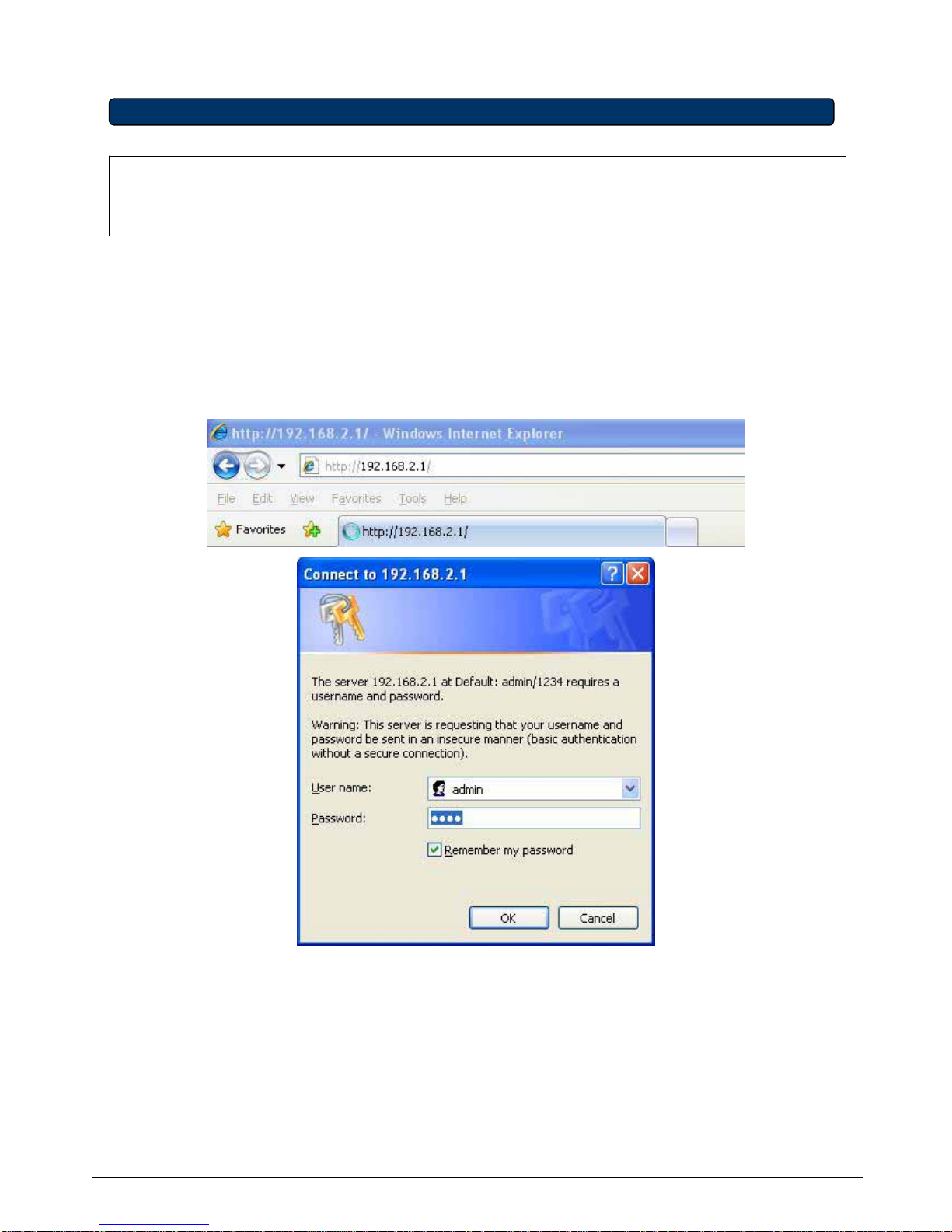
In order to configure the SpeedPlus Wireless-G AP/Router, you must use web browser and
manually input http://192.168.2.1 into the Address box and press Enter. The Main Page will
appear.
In order to configure the SpeedPlus Wireless-G AP/Router, you must input the password
into the Password box and leave blank on the User Name box. The default User name is
“admin” and password is “1234”.
TURN ON POWER SUPPLY
Quick power cycle would cause system corruption. When power on, be careful not to shut
down in about 5 seconds, because data is writing to the flash.
Tabla de contenidos
Otros manuales de Enrutador inalámbrico de Sparklan


