EN
A detailed manual can be found on the website:
NL
Een handleiding bevindt zich op de website:
www.wiredcontrols.somfy.com
DB
to Friday and at 8:30 am at the weekend, and to close at
8:00 pm. Chronis Smoove UnoS also enables applications
to be controlled automatically in accordance with the
brightness using an optional sunlight sensor. The product
parameters can be modified from the backlit screen.
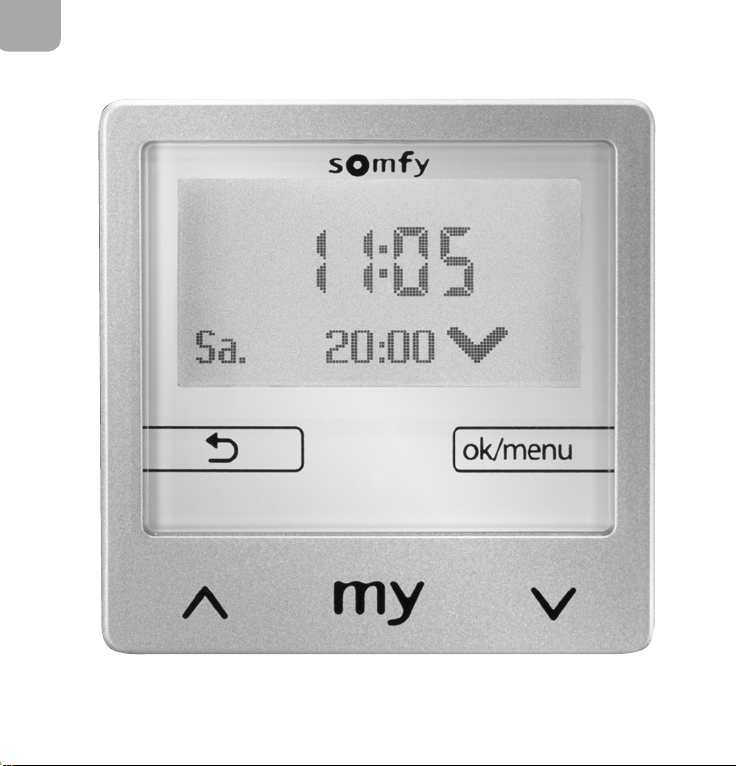
3. Description of the control buttons
(FigureA)
Arrow :
-Manual raising and lowering control in normal
operation.
-Navigation or changing the value in the settings menu.
Brief press (less than 2 seconds):
-When moving: stop function
-When stationary: switch to position
Brief press (less than 2 seconds):
-Return to the upper part of the menu or to the main
screen.
-On the main screen, the functions used are displayed.
-Brief press (less than 2 seconds) from the main screen:
access to the quick menu.
-Press and hold down (longer than 2 seconds) from the
main screen: direct access to the settings menu.
-Activation in the settings menu: confirms an entry.
EN
NL
Aer 3 minutes, the appliance will enter standby mode
and the display will switch off. Stand-by mode ends once
a key is activated.
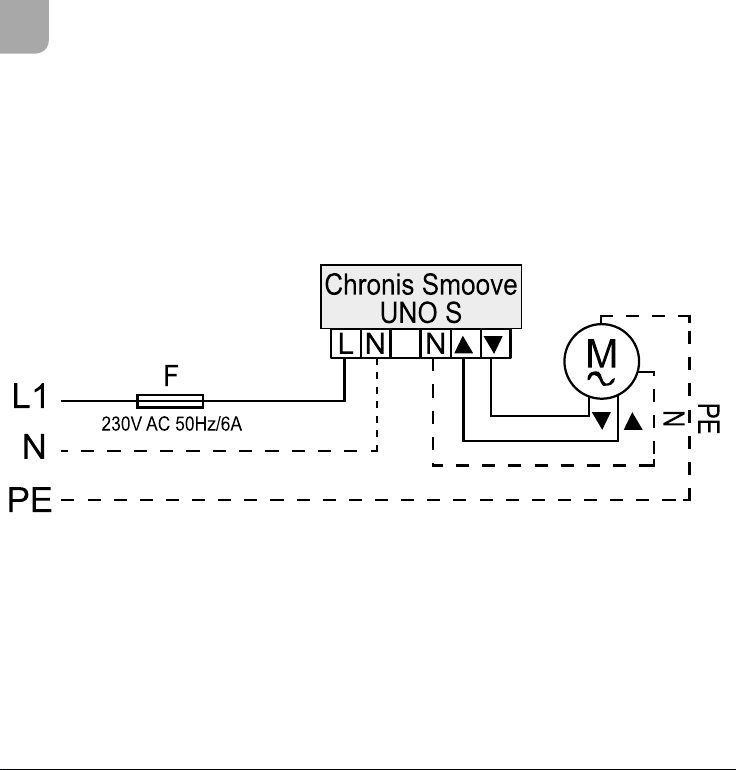
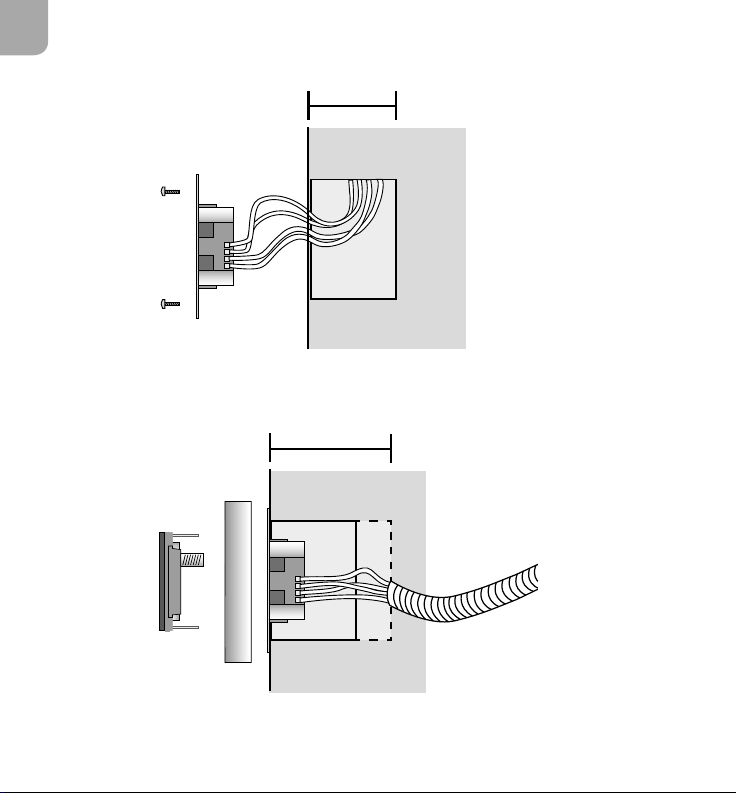
4. Connection
(FigureB)
The installation, testing and commissioning of the
appliance must be carried out by qualified personnel.
Switch off all the connecting cables. Ensure that they
cannot be accidentally switched on.
Observe the wiring of Neutral and Live.
Keep the “up” wiring and “down” wiring in the right
directions.
Never connect more than one motor to the Chronis
Smoove UNO S.
Connection Line Max. distance
Motor 0.75 - 1.5 mm² 150 m
230 V AC 1.5 mm² -
5. Installation
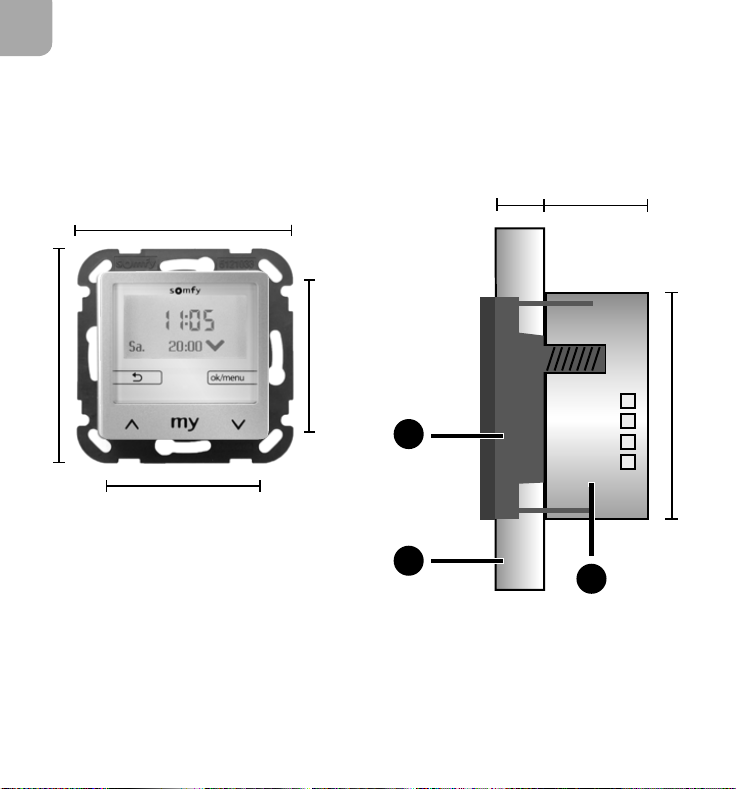
5. 1. Dimensions and parts
(Figure C)
Dimensions: see figure
a
Electronic module
b
Cover frame
c
Power supply module
5. 2. Installation
(Figure D)
1) Connect up the connection cables and secure the
power supply module in the flush mounted box.
2) Position the electronic module with its cover frame in
the power supply module. Switch on the power supply.
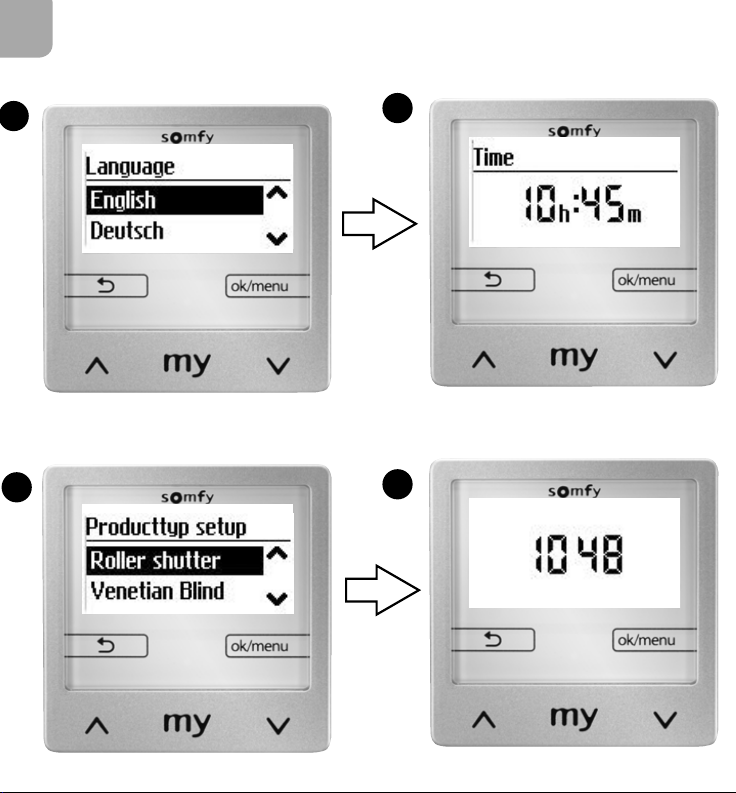
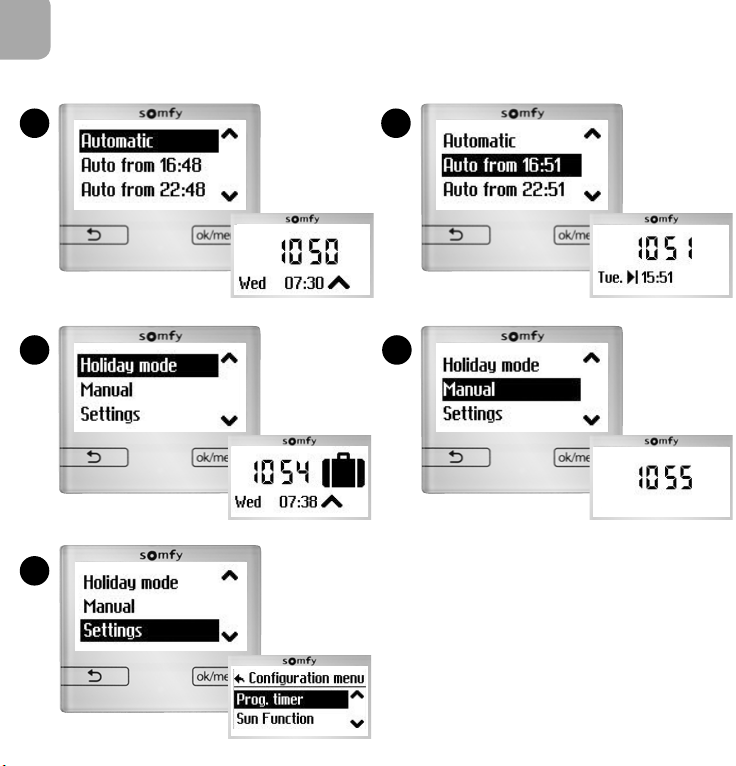
6. Initial commissioning
(FigureE)
If the appliance has already been commissioned, the main
screen displays (image
d
).
If the appliance is in its original configuration, carry out the
settings
a
,
b
and
c
step by step.
Each setting must be confirmed with the “ok” button
in order to access the next step: language, time,
date(dd/mm/yy), type of equipment and linear travel (*1)
and use of the sunlight sensor.
When setting is complete, the appliance operates and
the main screen is displayed (image
d
).
(*1) The linear travel time is the time required for a
roller shutter, an external venetian blind or an awning
to move from the open position to the fully closed
position.
Setting the travel in automatic mode:
To raise the product, select “Start”. To stop it, select
“Stop” as soon as the product is at the end of the
upper end limit. Press the button .
To lower the product, select “Start”. To stop it, select
“Stop” as soon as the product reaches the lower end
limit. Press the button .
The travel time is set.
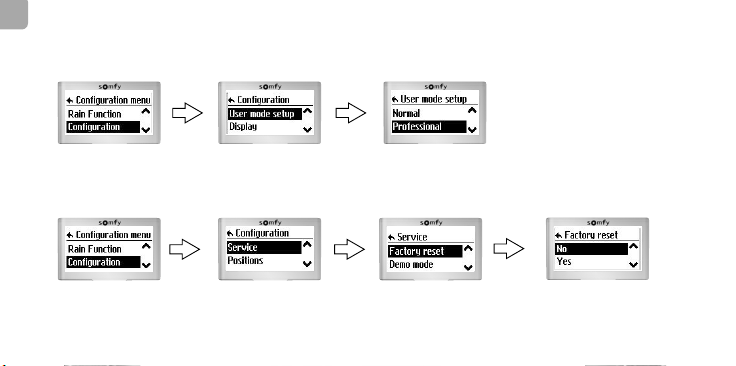
All information on the basic settings are in the online
manual.
The motor end limits must be set in advance.
Advice for operating the external venetian blind:
if the product does not move or barely moves
aer jogging, adjust the maximum tilting time of
the slats or the start-up delay time (see the
online manual).
min. 50 mm
min. 40 mm
1)
2)
C
SOMFY ACTIVITES SA
50 avenue du Nouveau Monde
F - 74300 Cluses
www.somfy.com
EN
Somfy hereby declares that the radio
equipment covered by these instructions is in
compliance with the requirements of Radio
Directive 2014/53/EU and the other essential
requirements of the applicable European
Directives.
The full text of the EU declaration of conformity
is available at www.somfy.com/ce.
NL
Hierbij verklaart Somfy dat de
radioapparatuur die behandeld wordt in dit
document in overeenstemming is met de Richtlijn
Radioapparatuur 2014/53/EU en de andere
relevante bepalingen van de Europese richtlijnen
voor toepassing binnen de Europese Unie.
De volledige EU-conformiteitsverklaring staat ter
beschikking op de website www.somfy.com/ce.
71 mm
50 mm
71 mm
50 mm
51 mm
31 mm
11 mm
a
bc
1. Safety and liability
1. 1. Liability
Before installing and using this product, please read
these instructions carefully. This Somfy product must be
installed by a home drive and automation professional.
Moreover, the installer must comply with standards
and legislation in the country in which the product
is being installed, and inform his customers of the
operating and maintenance conditions for the product.
He must give them these instructions. Any use outside
the sphere of application defined by Somfy is prohibited.
This invalidates the warranty and discharges Somfy
of all liability, as does any failure to comply with the
instructions given herein. Never begin installing without
first checking the compatibility of this product with the
associated equipment and accessories.
1. 2. Safety instructions
Keep out of reach of children.
Never drop, knock, drill or submerge.
Do not use abrasive products or solvents to clean it.
2. Product description
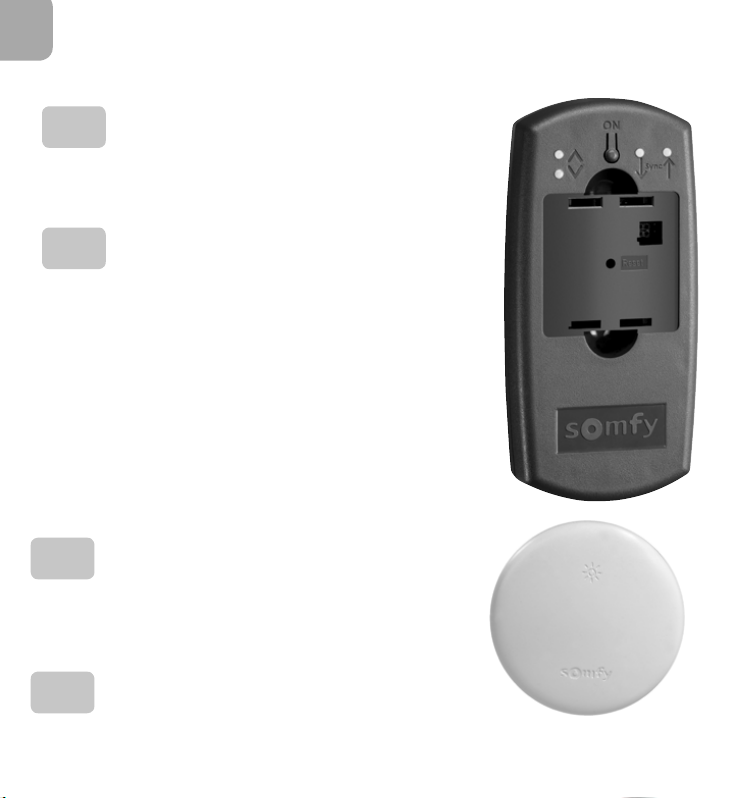
Chronis Smoove Uno S is a timer enabling a roller
shutter, awning or external venetian blind type motor
to be controlled automatically and manually. Chronis
Smoove Uno S is pre-set to open at 7:30 am from Monday
AE
ab
cd
The images are not contractually binding. / Afbeeldingen zijn niet contractueel bindend. Copyright © 2017 All rights reserved. SOMFY ACTIVITES SA, Société Anonyme, Capital 35.000.000 €, RCS Annecy 303.970.230 - 09/2017 1/2
van maandag tot en met vrijdag en om 8:30 uur in het
weekend en om te sluiten om 20:00 uur. Met behulp van
een optionele zonsensor kunnen met de Chronis Smoove
UnoS de toepassingen ook op basis van de lichtintensiteit
worden bestuurd. De parameters van het product kunnen
op het scherm worden veranderd.
3. Beschrijving van de bedieningstoetsen
(figuurA)
Pijl :
-Handmatig omhoog en omlaag zetten met normale
werking.
-Navigeren of een waarde veranderen in het instelmenu.
Korte druk (minder dan 2 seconden):
-Tijdens een beweging: stop-functie
-Gestopt: verplaatsing naar de positie
Korte druk (minder dan 2 seconden):
-Terug naar een hoger niveau van het menu of naar het
hoofdscherm.
-Op het hoofdscherm, visualisatie van de gebruikte
functies (zie de handleiding).
-Korte druk (minder dan 2 seconden) vanuit het
hoofdscherm: het snelmenu openen.
-Lang drukken (meer dan 2 seconden) vanuit het
hoofdscherm: direct het instelmenu openen.
-Inschakelen in het instelmenu: bevestigen van een
invoer.
Na 3 minuten gaat het apparaat in de stand-bymodus
en wordt het scherm donker. Zodra een toets wordt
aangeraakt wordt de stand-bymodus weer verlaten.
4. Aansluiting
(figuurB)
Het installeren, testen en in bedrijf stellen van het
systeem moeten gebeuren door een gekwalificeerde
vakman.
Zorg ervoor dat alle aansluitkabels spanningsloos
zijn. Zorg ervoor dat er niet onverwacht spanning op
kan worden gezet.
Houd u aan de aansluiting van de nul- en de
fasedraad.
Respecteer de aansluiting van de richtingen “Op’ en
“Neer”.
Sluit nooit meerdere motoren aan op een Chronis
Smoove UNO S.
Aansluiting Bedrading Max. afstand
Motor 0,75 - 1,5 mm² 150 m
230V AC 1,5 mm² -
5. Montage
5. 1. Afmetingen en onderdelen
(figuur C)
Afmetingen: zie figuur
a
Elektronische module
b
Frame
c
Voedingsmodule
5. 2. Installatie
(figuur D)
1) Sluit de verbindingskabels aan en zet de
voedingsmodule vast in de inbouwdoos.
2) Plaats de elektronische module met zijn frame in de
voedingsmodule. Schakel de spanning in.
6. Eerste inbedrijfstelling
(figuurE)
Als het apparaat reeds in bedrijf is gesteld, verschijnt het
hoofdscherm (afbeelding
d
).
Als het apparaat in de oorspronkelijke configuratie is, voer
dan stap voor stap de instellingen
a
,
b
en
c
uit.
Elke instelling moet worden bevestigd met de “ok“ toets
om naar de volgende stap te kunnen gaan: taal, tijd,
datum(dd/mm/jj), type systeem, looptijd (*1) en gebruik
van de zonsensor.
Als het instellen klaar is, werkt het apparaat en
verschijnt het hoofdscherm (afbeelding
d
).
(*1) De looptijd is de tijd die nodig is om een rolluik,
een zonnescherm of een jaloezie vanuit de open
positie geheel te sluiten.
Instellen van de looptijd in de automatische
modus:
Om het product omhoog te zetten, selecteert u “Start”
(Start). Selecteer “Stop” (Stop) om te stoppen zodra
het product zich in het bovenste eindpunt bevindt.
Druk op de toets.
Om het product omlaag te zetten, selecteert u “Start”
(Start). Selecteer “Stop” (Stop) om te stoppen zodra
het product zich in het onderste eindpunt bevindt.
Druk op de toets.
De looptijd is ingesteld.
Alle bijzonderheden over de basisinstelling staan in de
online handleiding.
Voorafgaand moeten de eindpunten van de
motor reeds ingesteld zijn.
Tip voor de werking van de jaloezie: als het
product niet of weinig beweegt na korte
impulsen, stel dan de maximale draaitijd van de
lamellen of de startvertragingstijd af (zie de
online handleiding).
1. Veiligheid en aansprakelijkheid
1. 1. Aansprakelijkheid
Voordat dit product geïnstalleerd en gebruikt wordt, moet
deze handleiding zorgvuldig gelezen worden. Dit Somfy
product moet geïnstalleerd worden door een erkende
installateur van automatiseringssystemen in woningen.
De installateur moet zich altijd aan de in het land van
installatie geldende normen en wettelijke voorschrien
houden en zijn klanten informeren over de gebruiks-
en onderhoudsomstandigheden van het product.
Hij moet hun de handleiding overhandigen. Elk gebruik
buiten het door Somfy bepaalde toepassingsgebied is
verboden.Hierdoor en door het negerenvan de instructies
in deze handleiding, vervallen iedere aansprakelijkheid en
garantie van Somfy. Vóór de installatie aangevat wordt,
moet gecontroleerd worden of dit product compatibel is
met de aanwezige apparatuur en accessoires.
1. 2. Veiligheidsvoorschrien
Buiten het bereik van kinderen houden.
Laat het product niet vallen, sla er niet tegen, boor
er niet in en dompel het niet in een vloeistof.
Geen schuur- of oplosmiddelen gebruiken om het
schoon te maken.
2. Productbeschrijving
Chronis Smoove UnoS is een klok voor het automatisch
of met de hand bedienen van een motor voor een
rolluik, zonnescherm of jaloezie. De Chronis Smoove
Uno S is vooringesteld om open te gaan om 7:30 uur
www.somfy.com
Ref. 5128403A
CHRONIS SMOOVEUNO S
w
w
w
.
s
o
m
f
y
.
i
n
f
o
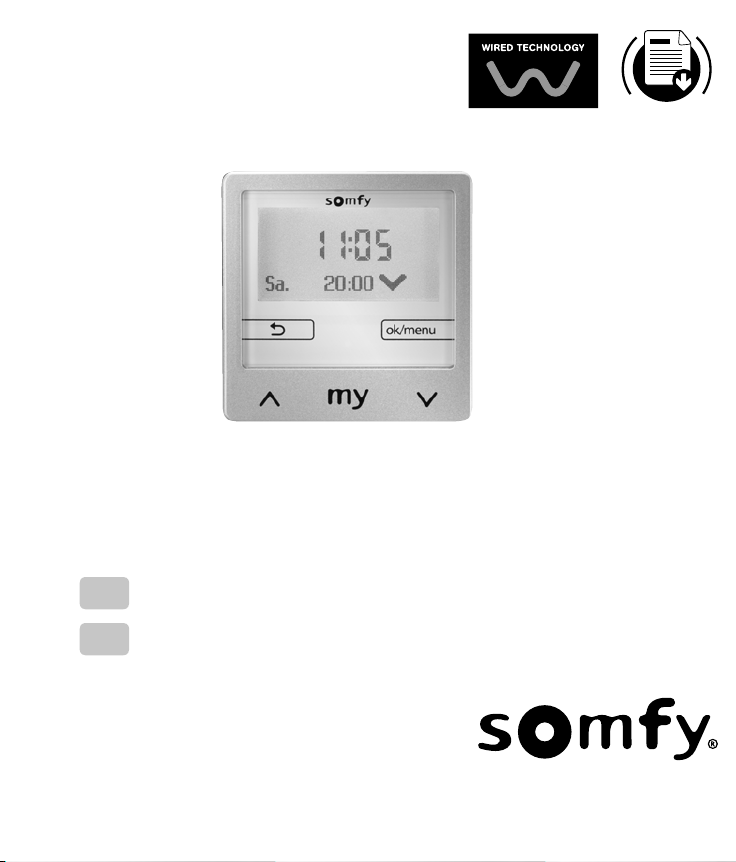
EN INSTALLATION GUIDE
NL INSTALLATIEGIDS
5128403_Chronis Smoove UNO S_ENNL.indd 1 13/10/2017 11:37:05