SMART SHSAP3000 Manual de usuario

SHSAP3000
SMART Wireless Scale + App
Instruction Manual

ENGLISH
2
THE SMART CHOICE
Visit www.smartworldwidefun.com for more fun products.
CONTENTS
IMPORTANT PRECAUTIONS . . . . . . . . . . . . . . . . . . . . . . . . . . . . . 3
PRODUCT SPECIFICATONS . . . . . . . . . . . . . . . . . . . . . . . . . . . . . 3
PARTS . . . . . . . . . . . . . . . . . . . . . . . . . . . . . . . . . . . . . . . . . . 4
HOW TO INSTALL THE BOWL . . . . . . . . . . . . . . . . . . . . . . . . . . . . 4
HOW TO REMOVE THE BOWL . . . . . . . . . . . . . . . . . . . . . . . . . . . . 4
HOW TO INSTALL THE BATTERIES . . . . . . . . . . . . . . . . . . . . . . . . . 5
OPERATION INSTRUCTIONS . . . . . . . . . . . . . . . . . . . . . . . . . . . . 5
RETURNS & WARRANTY . . . . . . . . . . . . . . . . . . . . . . . . . . . . . . . 11
SAFETY
Your safety and the safety of others is very important.
We have provided many important safety messages in this manual and
on your appliance. Always read and obey all safety messages.
This is the safety alert symbol.
This symbol alerts you to potential hazards that
can kill or hurt you and others.
All safety messages will follow the safety alert symbol.
All safety messages will tell you what the potential hazard is, tell you how to reduce the
chance of injury, and tell you what can happen if the instructions are not followed.

ENGLISH
3
IMPORTANT PRECAUTIONS
1. Dierent types of batteries or new and used batteries are not to be mixed.
2. Batteries (not included) are to be inserted with the correct polarity.
3. Exhausted batteries are to be removed from the product.
4. Batteries should be disposed of in a safe way. Only dispose of batteries in specic collection
containers (contact your retailer for more information) in order to protect the environment.
5. This appliance is NOT A TOY.
6. Batteries should not be exposed to excessive heat such as sunshine or naked ames.
7. This product is for domestic and indoor use only.
8. The European directive 2012/19/EC on Waste Electrical and Electronic Equipment
(WEEE), requires that old household electrical appliances must not be disposed in
the normal unsorted municipal waste stream. Old appliances must be collected
separately in order to optimize the recovery and recycling of the materials they
contain and reduce the impact on human health and the environment.
9. The crossed out“wheeled bin” symbol on the product reminds you of your obligation,
that when you dispose of the appliance it must be separately collected.
10. Consumers should contact their local authority or retailer for information
concerning the correct disposal of their old appliance.
PRODUCT SPECIFICATIONS
1. Automatically connect with iPhone/Android smartphone via sound
wave without paring process (microphone needs to be on).
2. “Food Nutrition Scale” free-downloadable app is provided.
3. Accurately measure the weight /capacity of food in
dierent forms (liquid/powder/granules, etc.).
4. Multi-measurement units available (oz., grams, lb., ml, oz, cups).
5. Over 1800 kinds of food and 9 kinds of nutrients selectable in the app.
6. Maximum measuring weight: 5.01 kg (11lbs).
7. Transmission distance is up to 8-10 meters for iPhone,
other mobile devices or tables may dier.

ENGLISH
4
PARTS
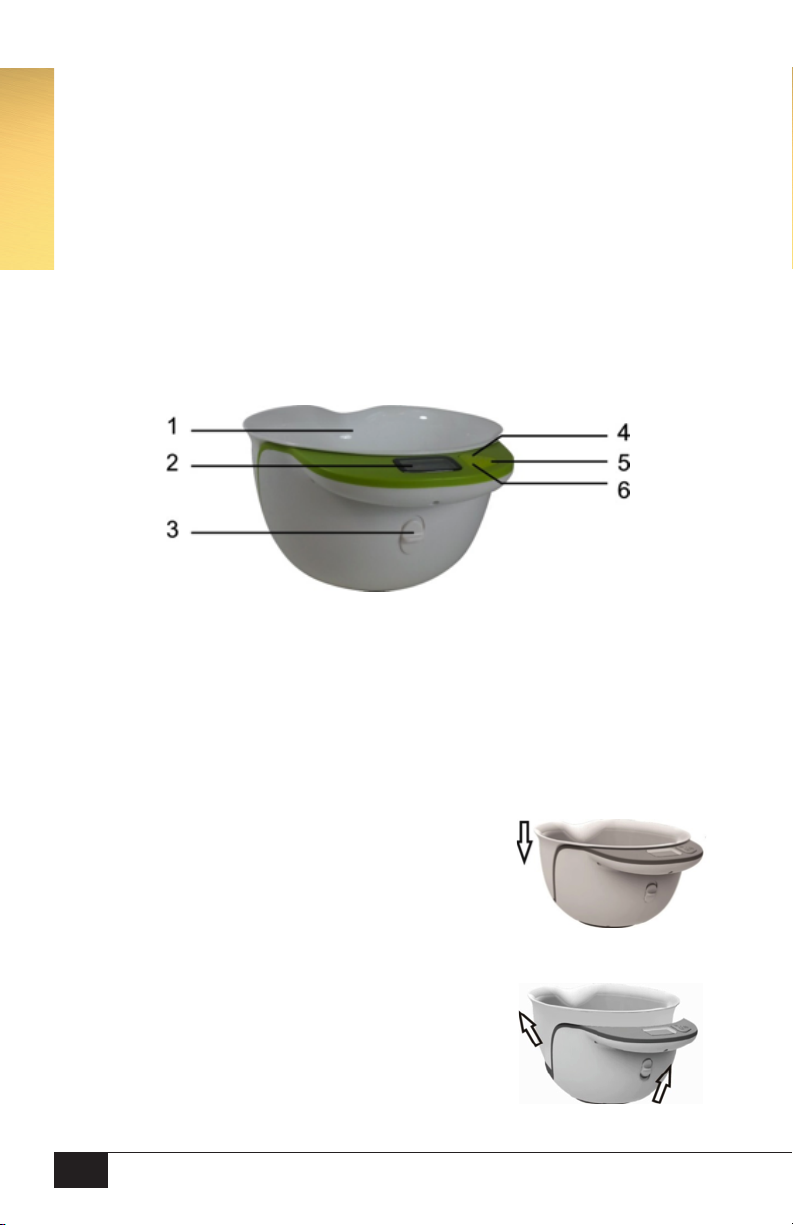
1. Mix & Measure Bowl.
2. LCD Digital Display.
3. Lock/Unlock switch.
4. Mode key (water, milk, oil, sugar, our, scale).
5. ON/OFF/Tare function key.
6. Measuring units key (oz., grams, lb., ml, oz, cups).
HOW TO INSTALL THE BOWL
1. Align the slot of the bowl to the scale body, and press down the
bowl. If hearing locked sound, the installation is nished.
HOW TO REMOVE THE BOWL
1. Pull the Lock/Unlock switch to the upside position, and at the
same time pull out the bowl from the scale body.

ENGLISH
5
HOW TO INSTALL THE BATTERIES
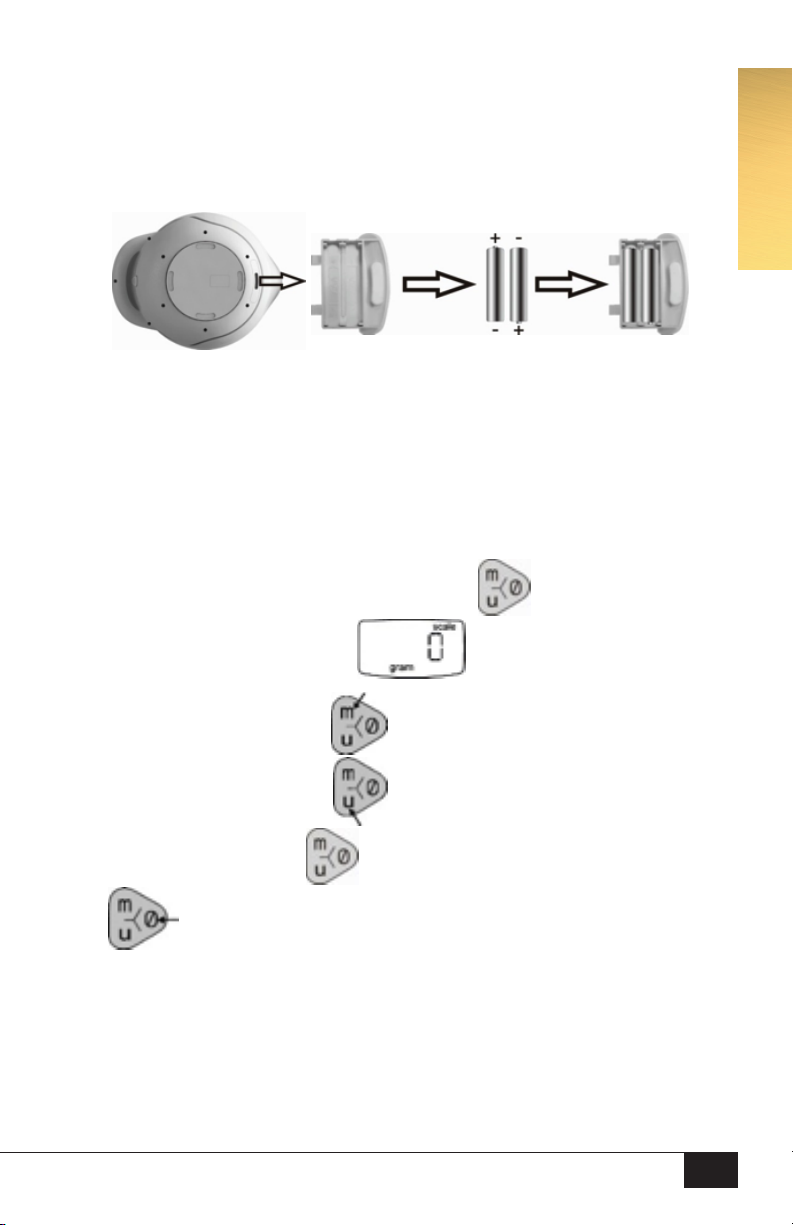
1. Pull out the battery box, and install 2 AAA batteries (not included),
and replace the battery box to the scale body.
OPERATION INSTRUCTION
Measuring Weight
1. Keep the bowl placed on a level surface. Press Ø button the LCD will power on,
and after 3 seconds when LCD shows , put the ingredients in the bowl.
2. When the scale is on, press M key to change the mode (water, milk,
oil, sugar, our, scale), press U key to change the unit (oz, grams, lb,
ml, oz, cups). Press Ø button to turn o the scale. Press Ø button
it will display “TARE”, and 2 seconds later will display zero.
3. If there is no operation within 3 minutes, the scale will automatically power o.

ENGLISH
6
Tips
• TARE function allows you to weigh many ingredients at the same time.
• Max weight is 5010 grams, LCD will show if the weight is over 5010g.
• “lb.” unit is only available when the ingredients’weight exceeds 454g or 16 oz.
• When the battery is low power, LCD will show please change the batteries.
• Remove the bowl from the scale before cleaning.
• DO NOT use water to clean the scale. This will void the product’s guarantee.
• If the product doesn’t work properly, please remove the batteries and reinstall.
Download and Install the App
1. Open “App Store”from your iPhone, or“Play Store” from your Android mobile.
2. Search ”Food Nutrition Scale”app.
For iPhone For Android
ENGLISH

ENGLISH
7
3. Download and install the app.
4. Run the app of “Nutrition Scale”. Please set this app access to
Microphone otherwise it can’t pair to the scale automatically.
5. After connection from phone to scale is completed, it will now show the
measured weight on your phone, please note there will be an orange dot in
the top left indicating the communication between phone and scale.
For iPhone For Android

ENGLISH
8
6. Press Nutrition button to go to food category, and select the correct food
category, it will show the nutrition facts. The current plate will show the food you
searched; select one or several items of them and press Nutrition Facts to see
nutrition details. You can also select Add to Diary, then select the options of
breakfast, lunch, dinner, snacks, and press done, this will add to your food diary.
ENGLISH

ENGLISH
9
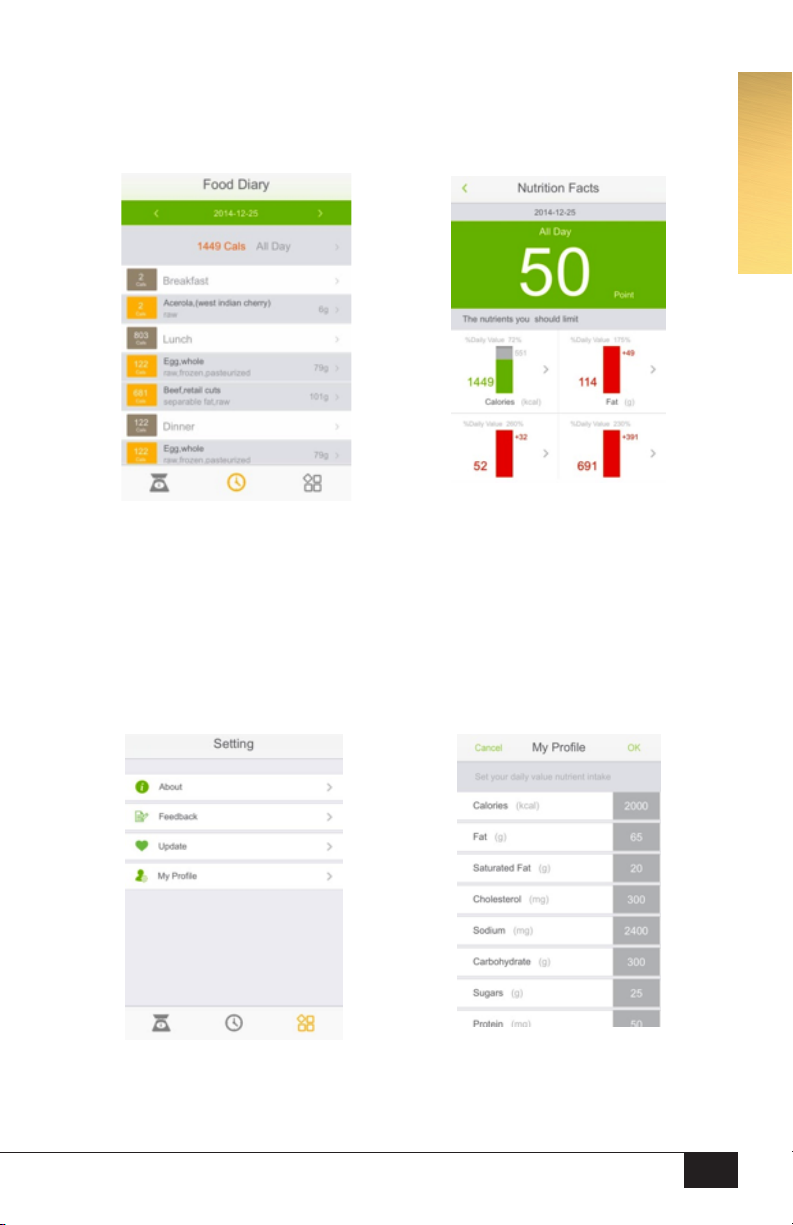
7. Food Diary: Press the food diary button to enter food diary interface.
Select All day, it will show the nutrition facts of the whole day.
8. Preset your daily value nutrient intake: Press the setting button and enter to
setting menu, and select the My Prole to change those values if necessary.

ENGLISH
10
Important Note
The communication between the scale and the mobile phone is made through
acoustic sound waves. So that this process can work, the App must be authorized
to use the mobile’s microphone (see pages 6 and 7 for more information).
Remarks
If the the app can’t be downloaded from the App Store or Play Store, please
download from below address and install to your mobile phone:
For iPhone: https://itunes.apple.com/us/app/food-nutrition-scale/id797356047?mt=8
Android: https://play.google.com/store/apps/details?id=com.carrybean.nutritionscale
Technical Values
Important Note
Withdraw the bowl from the scale to clean it. Never put the scale
into water. This would void the product’s guarantee.
SMART CONVERSION TABLE
1 cup our = 125g our
1 cup butter = 225g butter
1 cup brown sugar = 170g brown sugar
1 cup granulated sugar = 170g granulated sugar
1 cup icing sugar = 100g icing sugar
1 cup uncooked rice = 170g rice
1 cup chopped nuts = 100g chopped nuts
1 cup fresh breadcrumbs = 150g fresh breadcrumbs
1 cup sultanas = 140g sultanas
1 shot = 11/2 ounces (45 ml)
1 cup = 5.33 shots (239 ml)
10 ounces = 0.625 pounds
ENGLISH
Tabla de contenidos
Otros manuales de Escala de SMART