
SK Pang Electronics PiCAN-M Manual de usuario

!!!!!!!!!!!!!!!!!!!!!!!!!!!!!!!!!!!!!!!!!!!!!!!!!!!!!!!!!!!!!!!!!!!!!!!!!!!PiCAN-M Rev B 1.0
!
SK Pang Electronics Ltd Ó 2020
www.skpang.co.uk
1
!
Product name PiCAN-M with NMEA 0183 and NMEA 2000 Connection
Model number RSP-PICAN-M
Manufacturer SK Pang Electronics Ltd
PiCAN-M
USER GUIDE V1.0
July 2020

!!!!!!!!!!!!!!!!!!!!!!!!!!!!!!!!!!!!!!!!!!!!!!!!!!!!!!!!!!!!!!!!!!!!!!!!!!!PiCAN-M Rev B 1.0
!
SK Pang Electronics Ltd Ó 2020
www.skpang.co.uk
2
!
Contents
Table of Contents
1.!Introduction ........................................................................................................... 3!
1.1.!Features*.............................................................................................................................................................*3!
2.!Hardware Installation ............................................................................................. 4!
1.2.!NMEA*2000*CAN-BUS*Connection*.........................................................................................................*4!
1.3.!NMEA*0183*(RS422)*Connection*...........................................................................................................*5!
1.4.!120W*Terminator*..........................................................................................................................................*5!
1.5.!LED*.......................................................................................................................................................................*5!
1.6.!Switch*Mode*Power*Supply*(optional)*................................................................................................*5!
3.!Software Installation .............................................................................................. 5!
1.7.!Installing*CAN*Utils*.......................................................................................................................................*6!
1.8.!Bring*Up*the*Interface*.................................................................................................................................*6!
4.!NMEA 0183 (RS422) Installation ............................................................................. 7!
5.!Qwiic (I2C) Connector J4 ......................................................................................... 9!
6.!Third Party Applications ......................................................................................... 9!
1.9.!Connecting*a*BME280*Sensor*................................................................................................................*10!
!
!

!!!!!!!!!!!!!!!!!!!!!!!!!!!!!!!!!!!!!!!!!!!!!!!!!!!!!!!!!!!!!!!!!!!!!!!!!!!PiCAN-M Rev B 1.0
!
SK Pang Electronics Ltd Ó 2020
www.skpang.co.uk
3
!
1. Introduction
This!is!a!PiCAN-M!with!NMEA!0183!and!NMEA!2000!Connection.!The!NMEA!0183!
(RS422)!is!via!a!5!way!screw!terminal.!The!NMEA!2000!is!via!Micro-C!connector.!
Extra!sensors!can!be!connected!via!the!Qwiic!(I2C)!connector.!
Optional!3A!SMPS.!The!12v!from!the!NMEA!2000!network!can!be!use!to!power!the!
PiCAN-M!and!the!Raspberry!Pi.!
Easy!to!install!SocketCAN!driver.!Programming!can!be!done!in!C!or!Python.!
1.1. Features
• CAN!connection!via!Micro-C!connector!
• 120Ω!terminator!ready!
• SocketCAN!driver!
o appears!as!can0!to!application!
• NMEA!0183!(RS422)!via!5-way!screw!terminal!
o appears!as!ttyS0!to!application!
• LED!indicator!(GPIO22)!
• Qwiic!(I2C)!connector!for!extra!sensors!
• Optional!3A!SMPS.!!
• Compatible!with!OpenCPN!and!Signal!K!!
!
!

!!!!!!!!!!!!!!!!!!!!!!!!!!!!!!!!!!!!!!!!!!!!!!!!!!!!!!!!!!!!!!!!!!!!!!!!!!!PiCAN-M Rev B 1.0
!
SK Pang Electronics Ltd Ó 2020
www.skpang.co.uk
4
!
2. Hardware Installation
Before!installing!the!board!make!sure!the!Raspberry!is!switched!off.!Carefully!align!
the!40way!connector!on!top!of!the!Pi.!Use!spacer!and!screw!(optional!items)!to!secure!
the!board.!
!
!
1.2. NMEA 2000 CAN-BUS Connection
The!CAN-bus!connections!are!made!via!J1!a!5!pin!Micro-C!connector.!
!
!
!
!
J1#
Function#
1!
Shield!
2!
+12v!
3!
GND!
4!
CAN_H!
5!
CAN_L!

!!!!!!!!!!!!!!!!!!!!!!!!!!!!!!!!!!!!!!!!!!!!!!!!!!!!!!!!!!!!!!!!!!!!!!!!!!!PiCAN-M Rev B 1.0
!
SK Pang Electronics Ltd Ó 2020
www.skpang.co.uk
5
!
!
!
1.3. NMEA 0183 (RS422) Connection
The!NNEA!0183!(RS422)!connection!are!made!via!J3!a!5way!screw!terminal.!
!
!
!
1.4. 120
W
Terminator
There!is!a!120W!resistor!fitted!to!the!board.!To!use!the!terminator!solder!a!2way!
header!pin!to!JP1!then!insert!a!jumper.!
1.5. LED
There!is!a!red!LED!fitted!to!the!board.!This!is!connected!to!GPIO!22.!
1.6. Switch Mode Power Supply (optional)
This!is!an!optional!5v!3A!module!that!can!power!the!Pi.!It!has!an!input!voltage!range!
of!7v!to!24v.!
!
3. Software Installation
It!is!best!to!start!with!a!brand!new!Raspbian!image.!Download!the!latest!from:!
https://www.raspberrypi.org/downloads/raspbian/!
After!first!time!boot!up,!do!an!update!and!upgrade!first.!
sudo apt-get update
sudo apt-get upgrade
sudo reboot
Add!the!overlays!by:!
J3#
Function#
1!
GND!
2!
IN!+!
3!
IN!-!
4!
OUT!-!
5!
OUT!+!

!!!!!!!!!!!!!!!!!!!!!!!!!!!!!!!!!!!!!!!!!!!!!!!!!!!!!!!!!!!!!!!!!!!!!!!!!!!PiCAN-M Rev B 1.0
!
SK Pang Electronics Ltd Ó 2020
www.skpang.co.uk
6
!
sudo nano /boot/config.txt
Add!these!lines!to!the!end!of!file:!
dtparam=i2c_arm=on
dtparam=spi=on
dtoverlay=mcp2515-can0,oscillator=16000000,interrupt=25
dtoverlay=spi-bcm2835-overlay
Reboot!Pi:!
sudo reboot
1.7. Installing CAN Utils
Install!the!CAN!utils!by:!
sudo apt-get install can-utils
1.8. Bring Up the Interface
You!can!now!bring!the!CAN!interface!up!with!CAN!2.0B!at!250kbps:!
sudo /sbin/ip link set can0 up type can bitrate 250000
Connect!a!NMEA!2000!device!to!the!network!and!start!candump.!
!
candump can0
You!should!see!something!like!this:!

!!!!!!!!!!!!!!!!!!!!!!!!!!!!!!!!!!!!!!!!!!!!!!!!!!!!!!!!!!!!!!!!!!!!!!!!!!!PiCAN-M Rev B 1.0
!
SK Pang Electronics Ltd Ó 2020
www.skpang.co.uk
7
!
This*capture*is*from*a*Yacht*Devices*Digital*Thermometer*NMEA*2000*YDTC-13N*
4. NMEA 0183 (RS422) Installation
The!NMEA!01832!(RS422)!is!connect!to!the!Pi!on!UART!port.!This!need!to!be!enable!
first.!!
On!the!Raspberry!Pi!type!in:!
sudo raspi-config
Select!5!Interfacing!Options,!P6!Serial!
“Would!you!like!a!login!shell!to!be!accessible!over!serial!?”!Select!No.!
!
“Would!you!like!the!serial!port!hardware!to!be!enabled!?”!Select!Yes.!

!!!!!!!!!!!!!!!!!!!!!!!!!!!!!!!!!!!!!!!!!!!!!!!!!!!!!!!!!!!!!!!!!!!!!!!!!!!PiCAN-M Rev B 1.0
!
SK Pang Electronics Ltd Ó 2020
www.skpang.co.uk
8
!
!
Select!finish!and!reboot!the!Pi.!
Connect!a!NMEA!0183!GPS!device!to!the!5!way!connect!like!shown!below:!
!
On!the!Pi!terminal!type!in:!
stty -F /dev/ttyS0 raw 4800 cs8 clocal
cat /dev/ttyS0
You!should!now!see!the!GPS!sentences:!

!!!!!!!!!!!!!!!!!!!!!!!!!!!!!!!!!!!!!!!!!!!!!!!!!!!!!!!!!!!!!!!!!!!!!!!!!!!PiCAN-M Rev B 1.0
!
SK Pang Electronics Ltd Ó 2020
www.skpang.co.uk
9
!
!
5. Qwiic (I2C) Connector J4
J4!is!a!Qwiic!(I2C)!connector.!The!I2C!bus!can!be!use!for!extra!sensors.!
!
6. Third Party Applications
There!are!many!third!party!applications!that!can!be!use!with!the!PiCAN-M!board:!
• OpenCPN!
• Signal!K!
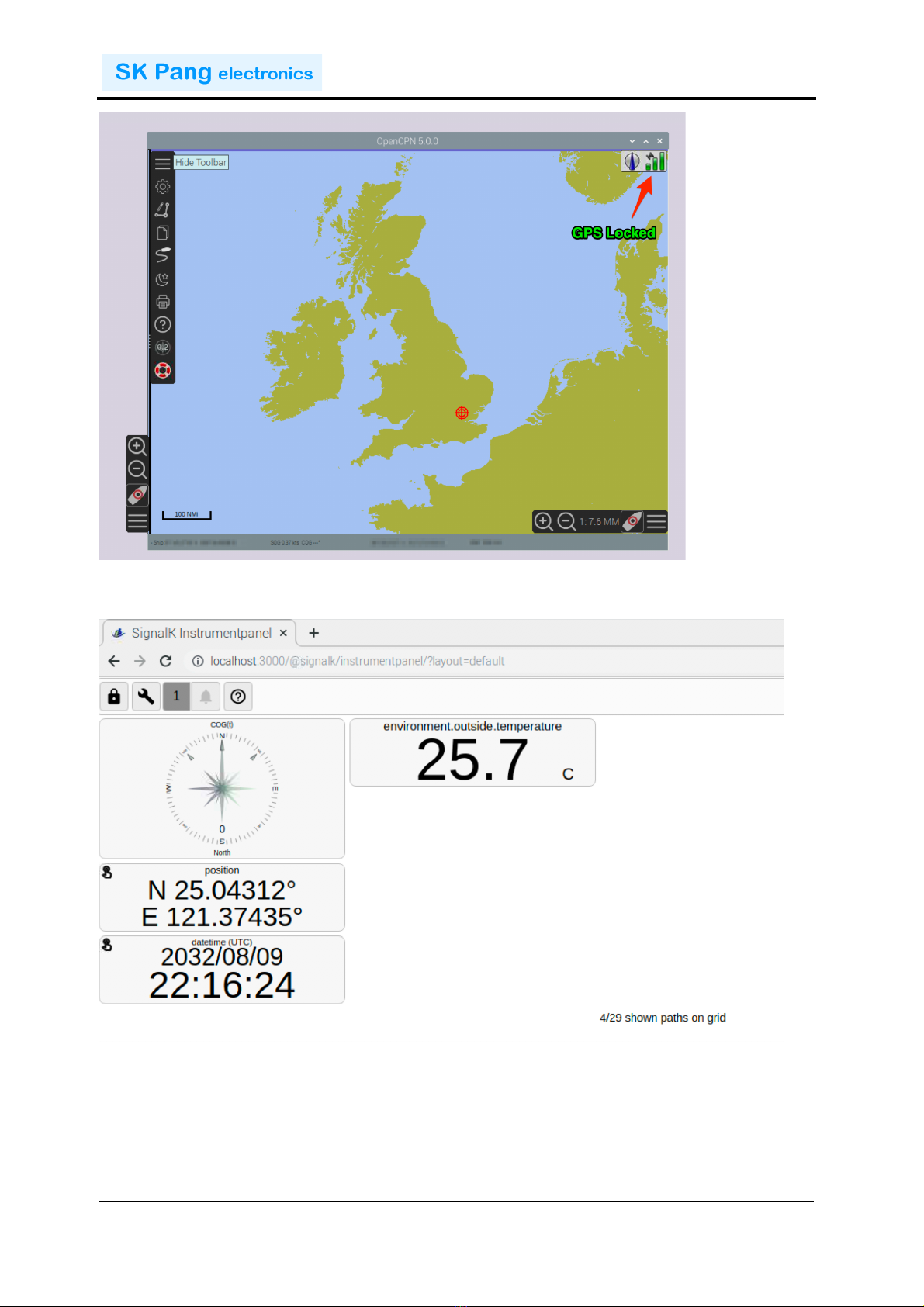
A!NMEA!0183!GPS!device!can!be!use!with!OpenCPN.!Once!there!is!a!GPS!lock!you!can!
view!your!location!on!the!map.!
!!!!!!!!!!!!!!!!!!!!!!!!!!!!!!!!!!!!!!!!!!!!!!!!!!!!!!!!!!!!!!!!!!!!!!!!!!!PiCAN-M Rev B 1.0
!
SK Pang Electronics Ltd Ó 2020
www.skpang.co.uk
10
!
!
Temperature!reading!from!a!Yacht!Devices!Digital!Thermometer!NMEA!2000!YDTC-
13N!on!Signal!K!instrument!panel.
!
1.9. Connecting a BME280 Sensor
The!Sparkfun!BME280!sensor!can!provide!barometric!pressure,!humidity,!and!
temperature!to!the!Raspberry!Pi.!
The!default!address!on!the!board!is!0x77!but!this!gives!a!problem!to!Signal!K!
application.!This!can!be!solved!by!changing!it!to!0x76.!To!do!this!cut!the!track!on!the!
Otros manuales para PiCAN-M
2
Este manual sirve para los siguientes modelos
1
Tabla de contenidos
Manuales populares de Unidad de control de otras marcas

Festo
Festo Compact Performance CP-FB6-E Manual de lista de piezas

Elo TouchSystems
Elo TouchSystems DMS-SA19P-EXTME Manual de usuario

JS Automation
JS Automation MPC3034A Manual de usuario

JAUDT
JAUDT SW GII 6406 Series Guía rápida

Spektrum
Spektrum Air Module System Manual de usuario

BOC Edwards
BOC Edwards Q Series Manual de usuario


