
Sinsion SI-350 Manual de usuario

Product Manual
Smar
t Sweeping Robot
SI-350

1 Important Safety Instructions....................................................................
1,2
2 Product Components...................................................................................3
2.1 The main machine and accessories
.................................................................3
2.2 The main machine
......................................................................................4
2.3 Charging station
.........................................................................................4
2.4 Dustbin
....................................................................................................5
2.5 Water tank
...............................................................................................5
2.6 Side brush
............................................................................................6,5
2.7 Remote control
..........................................................................................6
3 Product Operations......................................................................................7
3.1 Quick start guide
........................................................................................7
3.2 Start/Pause/Standby mode
...........................................................................8
3.3 Plan mode
............................................................................................ 8,9
3.4 Cleaning mode
..........................................................................................9
3.5 Water tank and mop operation
.................................................................10,11
4 Product Maintenances................................................................................12
4.1 Cleaning of side brush
...............................................................................12
........................................................................12
4.3 Cleaning of sensors and charging poles
.........................................................13
4.4 Cleaning of main brush
..............................................................................13
4.5 Water tank maintenance
.............................................................................14
4.6 Battery replacement
..................................................................................14
5 Troubles Shooting.......................................................................................15
6 Product Parameters....................................................................................16
Table of Contents

1
1 Important Safety Instructions
Warning!
Violation of safety instructions may cause
severe personal casualty and property loss.
Do not attempt to disassemble or
revise the main machine, otherwise
personal injury.
Do not touch the power cord with wet
hand, otherwise may cause electric
shock.
Do not touch wheels and brushes when
the product is working and keep your
clothes and hair away from the product
when it is working.
Always use the original charger with
this product, otherwise may cause
Do not put weight on the power cord or
bend the power cord, otherwise may
Keep the product away from heat or
Attention!
Violation of safety instructions may
cause personal injury and product damage.
Please switch the product off when you
will not use it for a long time.
Please take careful of children when
use the product to avoid scaring or
injury.
Do not use the product to vacuum
water or other liquids, otherwise may
cause product damage.
This product is intended to be an
indoor appliance. Never use it outdoor.
Make sure the charger plugged in the
socket tightly, otherwise may cause
electric shock, short-circuit, smoke or
Clear up all fragile, braided fabrics,
glasses or bottles before use it,
otherwise may cause damage.
Do not stand or sit on the product,
otherwise may cause product damage
or personal injury.
Do not use the product on an easy
falling place such as table or chair to
avoid product damage.
Do not use it in public commercial
places.
When people with disabilities (body perception and thinking ability defects) and children
using, need to be operated under the guardian to accompany with product use and get
the related instructions.
Please read the following safety instructions before using this product to
avoid damage.
Do not use the product to vacuum
stone, big waste paper, burning
cigarette ends or metals.
2
1 Important Safety Instructions
WARNING: For the purposes of recharging the battery, only use the detachable supply unit
provided with this appliance.
Hereby,SinsionTechnologyIndustrialCo.,Ltd.,declaresthatthisSmartSweepingRobotis
incompliancewiththeessentialrequirementsandotherrelevantprovisionsofREDirective
2014/53/EU.
The appliance is only to be used with the power supply unit provided with the appliance.
Main switch must be OFF before cleaning or maintaining the appliance.
1. Non-rechargeable batteries are not to be recharged in Remote control
2. different types of batteries or new and used batteries are not to be mixed in Remote control
3. batteries are to be inserted with the correct polarity into Remote control
4. Exhausted batteries are to be removed from the Remote control and safely disposed of.
5. if the Remote control is to be stored unused for a long period, the batteries should be removed
6.The battery of main machine is only replaceable by skilled persons.
For adaptorWarning
- The outlet should be close to the device and be slightly accessible.
- Use the device NOT with a damaged connecting cable or case.
- Follow the technical data given by the manufacturer if you use the device.
- Pull out the plug of the outlet if the device is not used.
- Max. Ambient temperature 40 °C.
-for indoor use only.
- The mains connection management of this device cannot be substituted. By damage of the
power cable the device has to be thrown away.
- The device may not be put out to splashing water, rain or humidity.
- Objects with liquids, e.g. vases, should not be put on the device.
- If there is any damage on the external flexible cord of the adapter, the adaptor should be scrapped.
detachable supply unit.
This appliance can be used by children aged from 8 years and above and persons with reduced
physical, sensory or mental capabilities or lack of experience and knowledge if they have been
given supervision or instruction concerning use of the appliance in a safe way and understand
the hazards involved. Children shall not play with the appliance. Cleaning and user maintenance
shall not be made by children without supervision.
3
2 Product Components
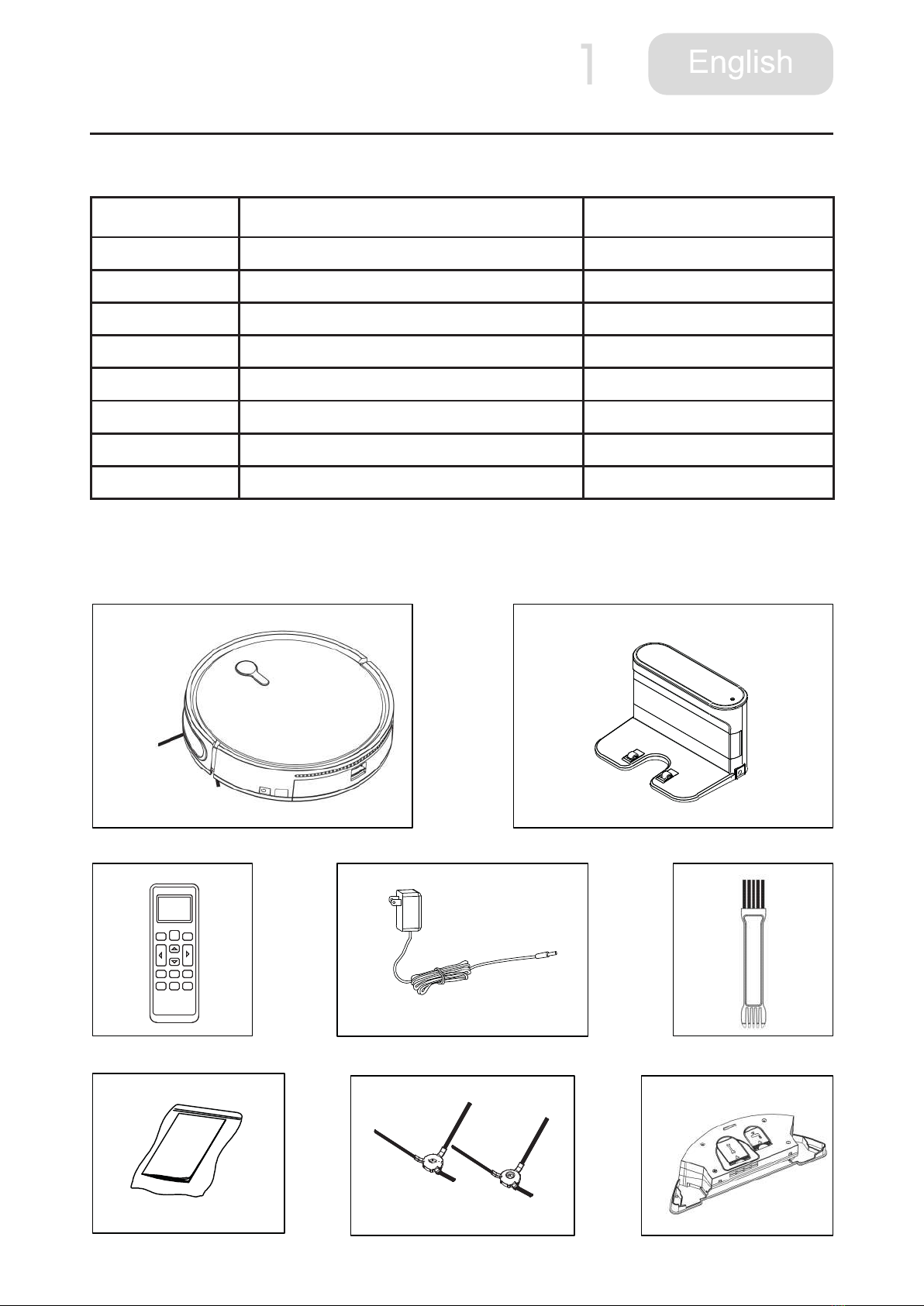
2.1 The main machine and accessories
No. Name Quantity
1Main machine 1pc
2Charging station 1pc
3Remote control 1pc
4Adapter 1pc
5 Cleaning brush 1pc
6Insturction manual 1pc
7Side brush 2pcs
8Water tank 1pc
Attention:
Please take actual product shall prevail on the basis of not less than the above accessories.
2
3 4
6 7
1
5
8

4
2 Product Components
2.2 Main machine
2.3 Charging station
1.Signal receiver
2.Signal projector
4.Charging poles
3.Indication light
5.Adapter socket
1. Touch clean button
3. Panel
4. Universal wheel
5. Charging poles
6. Battery cover
7. Stair detection
sensor
8. Main brush
9. Dustbin
10.Dustbin cover button
11.Charging socket
12. Drving wheel
13. Signal receiving
window
9
8
7
6
5
1
4
3
2
12
13
14
11
10
2. Bumper
14. Side brush
1
3
4
5
2
5
2 Product Components
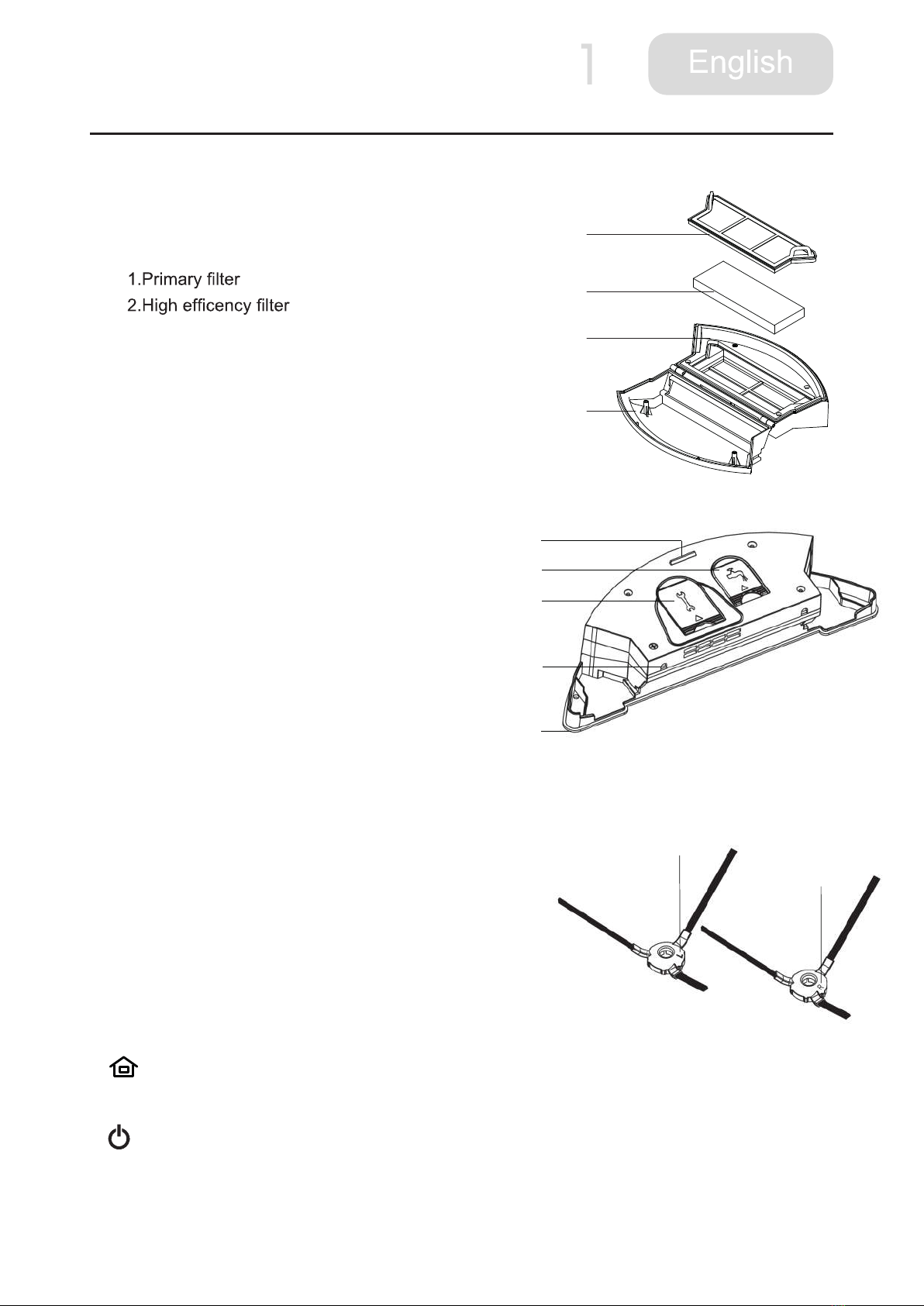
2.4 Dustbin
3.Dusbin upper cover
4. Dusbin botton cover
2.5 Water tank
1. Water tank button
2. Water inlet cap
3.Air valves
4. Water leakage hole
5. Mop
2.6 Side brush
Please install the side brush according to the
"L" and "R" marks on the side brush, corresponding to the
"L" and "R" of the side brush position on the bottom
of the machine.
2.7 Remote control
1
The robot is in standby or cleaning mode, press this button to start auto recharging.
2
1 Press this button to change standby mode from sleep mode (power switch is on).
2 In standby mode, press this button to start cleaning.
1
2
3
4
5
1
2
3
4
L
R

6
2 Product Components
3 In cleaning mode, press this button to stop
cleaning.
the schedule setting.
5 Press this button to start cleaning when
the robot is recharging on charging station.
3
Press this button to start random cleaning
mode. The process is zigzag cleaning mode,
edgewise.
4
Press direction button to adjust the robot
moving direction.
5
Press this button for 3 seconds to start time
6
In cleaning mode press this button to start strong suction power cleaning.
7
process of setting, press schedule button to unset. (Before reschedule cleaning, set current
8
In standby or cleaning mode, press this button to start edgewise cleaning mode.
9
In standby or cleaning mode, press this button to start advanced zigzag cleaning mode.
10
In standby or cleaning mode, press this button to start spot cleaning mode. The robot start
Attention:
1 Please install 2 AAA/R03(No.7) battery.
2 Please take out battery when you do not use for a long time.
3 Remote control will be in standby mode in a few seconds after use, please press any key to
wake up it.

7
3 Product operations
3.1 Quick start guide
1.Place charger
Place charger, connect the adapter and
power, and the power light on the charger
will stay lit. Position the charger against
the wall, and remove all obstacles about 1
or 2 meters ahead of the charger.
2. Power Switch
Open the power switch at the bottom of the machine, host keypad led is lit, the machine enters
standby mode..
3. Main machine sweep button
Turn on the power switch of the product, and press directly the sweep button on the panel, it will
begin with a zigzag path cleaning.
4.Product charging
There are two methods of charging.
1 Plug the power adapter directly to the
machine and the other end is plugged in
the power.
2 When the charge is lower than 20%, the
machine will automatically start looking for
recharge stand, or press the recharge
button on the remote control to return
the automatic charger. Automatic
recharge-sensing distance as in the
charging a RADIUS 4m, please ensure
that the charger is powered and obstacle
location as little as possible, otherwise it
Attention:
1 When charging, make sure the power switch is on.
2 using the charger stand will interrupt the charging and start the cleaning, so please do not
make this operation when using thedirect charge.
Power Robot
Adapter

8
3 Product operations
4 When charging, the cleaning button blinks, and when fully charged, the cleaning button stops
blinking, and lit permanently.
5 Please switch the main machine off when long time no use.
3.2 Pause/Standby mode
1. This model operation process: sleep mode>Standby mode>Cleaning
mode
1 Sleep mode: power switch is on, CLEAN button light is off, the robot does not work.
2 Standby mode: power switch is on, CLEAN button light is on, the robot does not work.
3 Cleaning mode: the robot is cleaning, CLEAN button light is off.
2.Start
1 Please turn on the switch at the bottom of the
machine.
2 Press sweep button on the machine or on
the remote control to automatically start the
machine to work.
Attention:
When the robot is in sleep mode, press CLEAN
button on the main machine to wake it up, press
again to start cleaning.
3.Standby mode
Standby mode refers to the machine switching from working status to static status. Press the
sweep button on the machine or switch button on the remote control to operate.
4.Sleep mode
In standby mode without any operation the machine will enter into standby mode after 2
minutes, and the machine is in static status and the button indicator light is off.
3.3 Plan mode
Under the plan mode, the machine can work at a preset time.
1.Set the remote controller clock time
according to “up, down, left and right” direction button.
2 Press the clock button once again to save the setting.
2.Set the pre-scheduled cleaning time
1 Point the remote controller at the machine (the machine is in standby status).
Tabla de contenidos
Otros manuales de Aspiradora de Sinsion


