
Seventh Circle Audio C84 Manual de usuario

Pag e 1 o f 18
Seventh Circle Audio C84 Microphone Preamp Rev 2.1
Based on the innovative “Double Balanced Microphone Amplifier” circuit published by Graham
John Cohen in 1984, the C84 microphone preamp offers exceptional performance in any
application where extremely low distortion and neutral sonic characteristics are desired.
Who Should Build This Kit?
The C84 is not difficult to build, but it is not intended for beginners. If you’ve never built an
electronic project before, this is definitely not the one to start with. To guarantee success, make
sure you have:
•The ability to make basic voltage and resistance measurements using a digital
multimeter (DMM).
•At least a rudimentary understanding of voltage, current, and resistance.
•Some experience soldering on printed circuit boards.
•The patience to follow instructions precisely and work carefully.
Essential Tools
Fine tipped, 20-30 watt soldering iron w/ cleaning sponge (Hakko 936 or similar)
Eutectic (63/37) rosin core or “no clean” solder (.025” diameter or smaller is best)
Good-quality DMM
Small needle nose pliers
Small diagonal cutters
Phillips screwdriver (#1)
Precision straight blade screwdriver (for adjusting potentiometers)
Highly Recommended Tools
Lead bender (Mouser 5166-801)
T-Handle wrench and 4-40 tap (Hanson 12001 and 8012)
MOLEX crimp tool (Waldom W-HT1919 or equivalent)
Magnifying glass
Optional Tools
Panavise w/ circuit board head
Oscilloscope
Signal generator

C84 Assembly Instructions
Page 2 of 18
Work Area
Find a clean, flat, stable, well-lit surface on which to work. An anti-static mat is recommended
for this project. If you’re in a dry, static-prone environment, it’s essential. The importance of
good lighting can’t be overstated. Component markings are tiny, and you’ll be deciphering a lot
of them.
Soldering Technique
Make sure your irons tip is tinned properly and keep it clean! The trick to making perfect solder
joints is to heat the joint quickly and thoroughly before applying the solder, and a properly
tinned and clean tip is essential for this. Apply enough solder to form a "fillet" between the lead
and the pad, a little mound of solder that smoothly transitions from the plane of the board up to
the lead, but don’t use too much. The finished joint should be smooth and shiny, not rough or
gritty looking.
If you've never soldered a board with plated-through holes, you might be surprised to discover
how difficult it can be to remove a component once you've soldered it in place. If you're using
solder wick to correct a mistake, be very careful not to overheat the pads, since they will
eventually delaminate and "lift". It's often better to sacrifice the component and remove its
leads individually and start over with a new part. If for some reason you need to unsolder a
multipin component (like a rotary switch or integrated circuit), remove as much solder as you
can with solder wick or a solder sucker, and then use a small heat gun to heat all the leads
simultaneously. With care, you can remove the component without damaging the board.
Instruction Conventions
Text in orange indicates a step where extra care needs to be taken. Doing it wrong isn’t a
disaster, but it’ll need to be corrected.
Text in red indicates a step that must be done correctly. Doing it wrong will guarantee
improper operation, and probably damage components and/or the circuit board.
C84 Assembly Instructions
Page 3 of 18
Assembly
1. Before you begin, carefully unpack the kit and examine the parts. Check the contents of
each small bag against the BOM to make sure all the parts have been included. If you
think something’s missing, please e-mail the details to [email protected] and
we’ll ship replacement parts ASAP.
2. Generally, the idea when "stuffing" or “populating” a circuit board by hand is to start with
the lowest profile parts, such as the resistors, and work your way up to the taller
components. In each step below, insert the components, flip the board onto your work
surface component-side down, and carefully solder and trim the leads. Use a piece of stiff
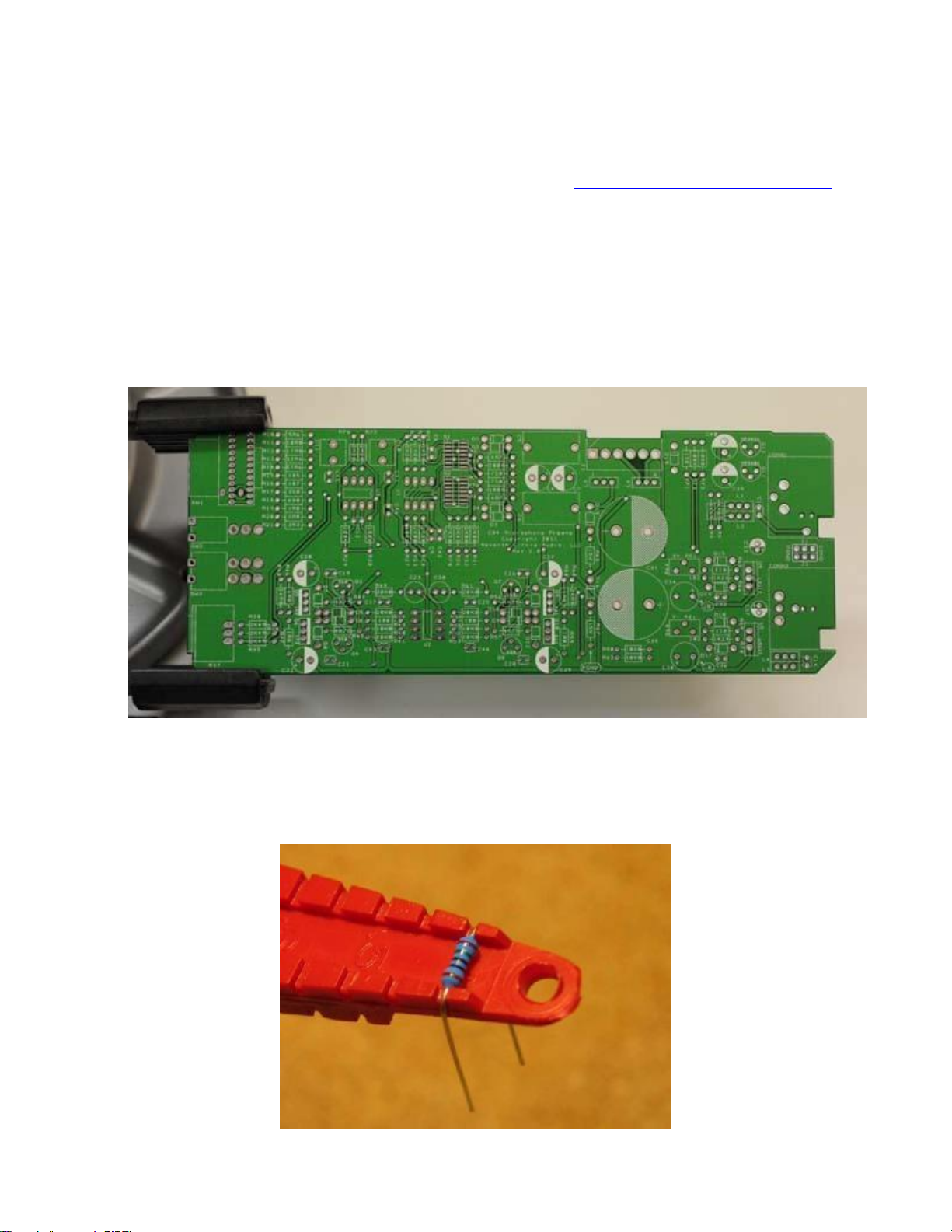
cardboard to hold the parts in place while you flip the board. First, orient the board as
shown.
3. Before installing the resistors, prepare the leads using small needle nose pliers or a lead-
forming tool as shown below. Whatever you do, don’t bend the leads at the resistor
body and force them into the board.This not only results in an ugly job, it can also
damage the parts.

C84 Assembly Instructions
Page 4 of 18
4. Insert the 1/4-watt resistors. Check the Bill of Materials (BOM) for help in reading the
resistor color bands. It's also a good idea to actually measure each resistor with your DMM
as you place it on the board, just in case you've decoded it incorrectly. Don't rely on the
photos for component placement. THE PCB PICTURES ARE NOT NECCESARILY THE
CURRENT REVISION! If the resistor value silk-screened on the board doesn't agree with
the value on the schematic or parts list, follow the schematic.
5. Next, add the protection diodes D1 through D19. Diodes are polarized and must be
installed the right way around! The colored band on the diode matches the white band
on the silkscreen.

C84 Assembly Instructions
Page 5 of 18
6. Add the small ceramic capacitors. These capacitors are not polarized and can be installed
in either direction, but pay close attention to the capacitor markings! These parts all
look alike, but they are not interchangeable. Putting one in the wrong spot will not prevent
the preamp from passing signal, but it can seriously impair its performance.
7. Install Q1 and Q2 now. Start by flowing a small amount of solder on two pads only as
shown.

C84 Assembly Instructions
Page 6 of 18
8. Carefully position the part over the pads and re-flow the solder to tack it in place. Pay
close attention to the IC markings. Align the dot on the IC with the dot on the
silkscreen outline!
9. Flow solder onto the rest of the pads. Use a flux pen or liquid flux for best results.

C84 Assembly Instructions
Page 7 of 18
10. Install U1, U2, and U3 now. Pay close attention to the IC markings. Align the notch
on the IC with the notch on the silkscreen outline! IC sockets are not included in the
kit and are not recommended. Socketing the ICs will interfere with the ability of the PC
board to conduct heat away from the parts.
11. Install the ferrite filters now. These parts are not polarized and can be installed in either
direction.

C84 Assembly Instructions
Page 8 of 18
12.
Unless you are installing this into a PC01 One Shot, jumper P1+ to M+ and P2- to M-
using pieces of trimmed leads. Solder into place. THE INPUT CIRCUIT IS NOT
COMPLETE WITHOUT FOLLOWING THIS STEP!!!
13. Install the 1uF film caps at C10 and C11. These parts are not polarized and can be
installed in either direction.

C84 Assembly Instructions
Page 9 of 18
14. Add small transistors Q3, Q4, Q7, and Q8. These parts are not the same and are not
interchangeable. Align the flat side of the transistors with the flat side of the
silkscreen outline.
15. Add Q11 and Q12. Again, these parts are not the same, and are not interchangeable.
Align the flat side of the transistors with the flat side of the silkscreen outline.

C84 Assembly Instructions
Page 10 of 18
16. Add the trim pots R64 and R68. R64 and R68 are used to adjust the on-board voltage
regulators as described later.
17. Add tantalum capacitors C34 and C38. Tantalum electrolytic capacitors are polarized
and must be installed the right way around! Be absolutely sure to observe the correct
polarity when installing these parts. The positive leads of the tantalum caps are marked
with a small "+" sign. The positive pads on the circuit board are marked with a small "+"
sign.
Otros manuales de Amplificador de Seventh Circle Audio

Seventh Circle Audio
Seventh Circle Audio H32 Manual de usuario

Seventh Circle Audio
Seventh Circle Audio N72 Manual de usuario

Seventh Circle Audio
Seventh Circle Audio A12 Manual de usuario

Seventh Circle Audio
Seventh Circle Audio J99-500 Manual de usuario

Seventh Circle Audio
Seventh Circle Audio S90 Manual de usuario

Seventh Circle Audio
Seventh Circle Audio A12B Manual de usuario


