
SecurView DVR4CHSOUH264 Manual de usuario

DVR4CHSOUH264
User Guide
Page 1

Table of Contents
1. Unpacking ................................................................................................................... 3
2. Installation................................................................................................................... 4
DVR Overview ......................................................................................................... 4
Rear Panel............................................................................................................... 5
Alarm Installation ..................................................................................................... 5
3. Getting Started ............................................................................................................ 7
Start Screen ............................................................................................................. 7
Full Screen............................................................................................................. 10
Quad Screen...........................................................................................................11
Main Menu ..............................................................................................................11
Event List ............................................................................................................... 13
Playback ................................................................................................................ 15
4. Main Menu ................................................................................................................ 20
Camera.................................................................................................................. 20
Setup ..................................................................................................................... 21
Record ................................................................................................................... 26
Alarm ..................................................................................................................... 29
USB Backup .......................................................................................................... 31
Network.................................................................................................................. 36
5. Network..................................................................................................................... 38
System Requirements............................................................................................ 38
Getting Start........................................................................................................... 38
6. NetView Operation.................................................................................................... 43
Overview................................................................................................................ 43
Live & Playback ..................................................................................................... 44
Backup................................................................................................................... 46
Setup ..................................................................................................................... 52
PPPoE ................................................................................................................... 53
DDNS .................................................................................................................... 53
7. Specifications ............................................................................................................ 58
8. FAQ........................................................................................................................... 60
Page 2

1. Unpacking
1 2 3
4 5 6
7
Item Name and description
1 DVR
2 User guide
3 Remote control
4 IR extension cord
5 Power Lead
6 Power adaptor (12V DC)
7 Mouse (optional)
Page 3

2. Installation
This chapter includes DVR Overview, Rear Panel, SATA HDD & Alarm Installation.
DVR Overview
Item Name Description
1 Front panel Indicators & USB port
2 Cover To protect HDD
3 IR receiver For IR remote control
4 USB port For USB backup
5 Power indicator
Indicator of power status
6 HDD indicator
Indicator of HDD status
Page 4

Rear Panel
Item Name Description
1 Power DC 12V
2 D-SUB 9-pin For alarm device: Relay, NO, NC
3 VGA Video output
4 Audio in RCAx2 (1Vp-p)
5 Audio out RCA (L, R) (1Vp-p)
6 BNC input BNC video input x 4
7 USB port For mouse control
8 LAN RJ-45
9 IR IR extension jack
10 GND GND hole
Alarm Installation
Pin Definition
Page 5

Pin No Pin definition
1 Alarm-in 1
2 Alarm-in 2
3 Alarm-in 3
4 Alarm-in 4
5 COM
6 NC
7 NO
8 Do not connect to any cable.
9 GND
larm figures
(normal open) or NC (normal close) alarm device:
A
Connect to NO
Page 6

3. Getting Started
In this chapter, it introduces the front panel of DVR, and the definition of icons shown on
event list and live/playback screen.
Start Screen
Page 7

DVR Status
1. System Status
Live
display
Main menu Event list Playback
Pause Fast forward Rewind
2. Recording Mode
No recording Continuing
recording
Single-way
recording
3. Password level
ID 0 (guest) ID 1 (normal user) ID 2 (administrator)
NOTE: The password level will be returned to ID: 0 after 17 seconds without any
operation or pressing twice directly in live screen.
4. Language of OSD
T. Chinese S. Chinese Japanese Czech Dutch English
Spanish French Italian German Polish Russian
Hebrew Thai Danish Swedish Finnish Vietnamese
Device Status
1. USB Flash Drive Status
USB Flash Drive is detected No USB Flash Drive is detected
2. HDD Status
Page 8

HDD is installed HDD is not installed
3. Network Status
Network is working Network is not working
4. Status Bar of HDD Space
This bar shows the HDD storage & consumption
percentage. The estimate of recording time will be more
accurate after at least one day recording.
DVR Tool Bar
DVR Tool Bar
Switch to full screen display by singly channel
Quad mode Main menu Rewind
Playback/pause Fast forward Event list
Delete Show/hide OSD ESC
Camera Status
1. Channel
Channel 1 Channel 2 Channel 3 Channel 4
2. Recording mode
DVR is recording Alarm is detected Alarm recording is
on
Page 9
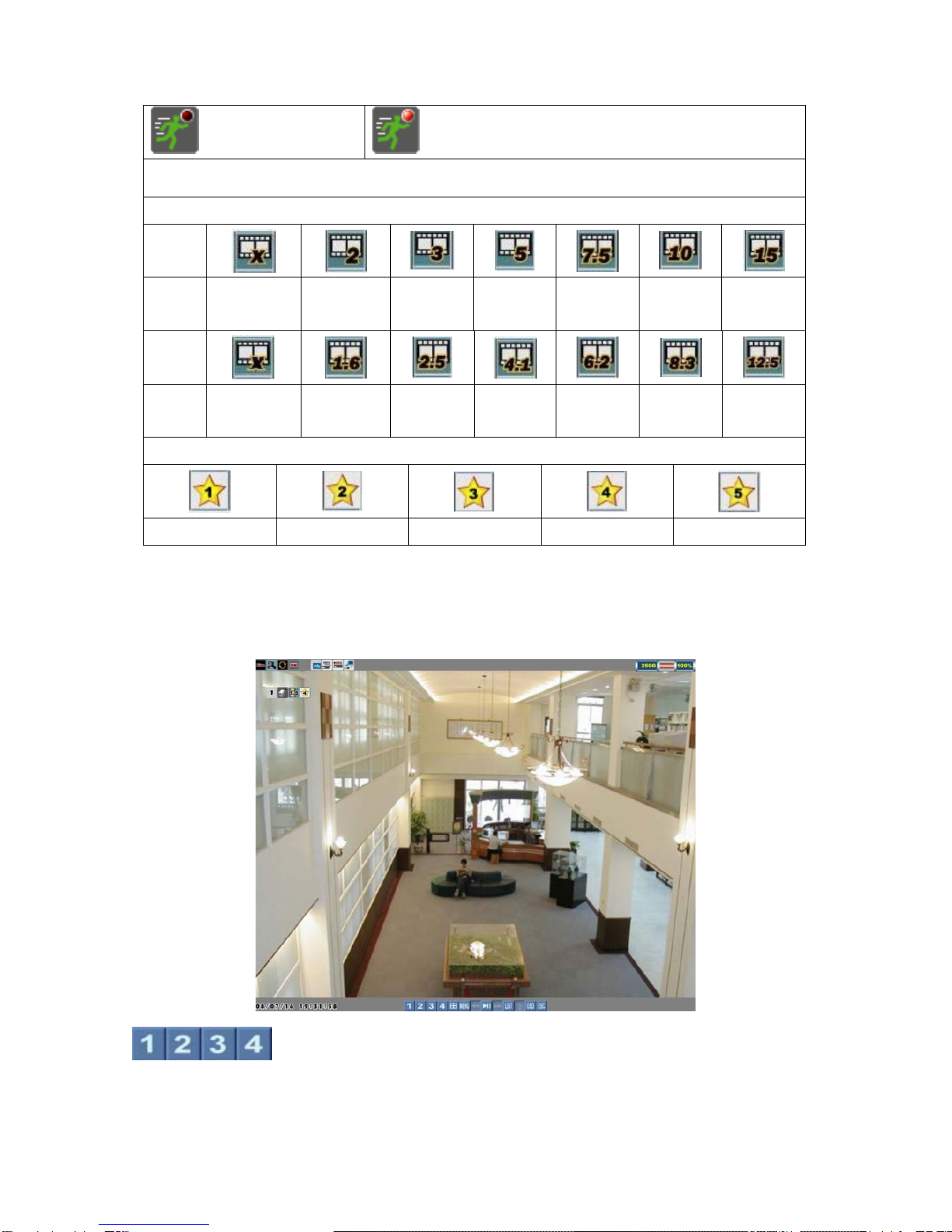
Motion is detected Motion recording is on.
NOTE: The red light will be flashed when recording.
3. Frame Rate
NTS
C
No
recording
2fps 3fps 5fps 7.5fps 10fps 15fps
PAL
No
recording
1.6fps 2.5fps 4.1fps 6.2fps 8.3fps 12.5fps
4. Image Quality
Basic Normal Fine Good Excellent
Full Screen
Left click the mouse on one of the buttons to switch full screen display
in live or playback mode.
Page 10
Tabla de contenidos
Otros manuales de DVR de SecurView


