
Scaled Instruments Davis 7747 Manual de usuario

© 2014 Scaled Instruments – Reproduction prohibited unless permission explicitly granted
www.scaledinstruments.com
1
www.scaledinstruments.com
507 NW 60th Street Suite D Gainesville, FL, 32607 USA
Phone: (352) 262-6119
Email: ryanwilhour@gmail.com
24-Hour Conversion Kit for the Davis Instruments 7747
Daytime Fan-Aspirated Radiation Shield
Table of Contents
Introduction .................................................................................................................................................. 1
Acknowledgements....................................................................................................................................... 2
Components.................................................................................................................................................. 2
Parts List........................................................................................................................................................ 2
Tools Needed: ............................................................................................................................................... 2
Performing the Conversion........................................................................................................................... 3
Installation Overview ................................................................................................................................ 3
Remove & Disassemble the existing DFARS ............................................................................................. 3
Move Spacers............................................................................................................................................ 9
Install Battery Terminals into appropriate slots ..................................................................................... 11
Place the PCBA into the DFARS and Solder battery connectors............................................................. 13
Reassemble the radiation shield............................................................................................................. 15
Reinstall the radiation shield to the ISS .................................................................................................. 19
Introduction
Thank you for your purchase of the 24-hour conversion kit used to convert a Davis 7747
Daytime Fan-Aspirated Radiation Shield (DFARS) into a 24-hour unit. This conversion kit is
designed to bring your DFARS as close as possible to the official 24-hour shield used on the
Davis Vantage Pro2 Models 6153 & 6163. The kit utilizes the same parts used in these models
to provide both solar and battery power to your DFARS. This guide assumes you have already
purchased and installed the Davis 7747 unit. Scaled Instruments is not responsible for any

© 2014 Scaled Instruments – Reproduction prohibited unless permission explicitly granted
www.scaledinstruments.com
2
change in warranty status of your equipment due to the installation of this conversion kit.
Additionally, Scaled Instruments is not responsible for any damage or injury you may cause by
installing this kit.
A portion of this installation requires the ability to solder leads to a printed circuit board
assembly (PCBA). If you are not confident in your ability to perform this step, it is strongly
suggested you contact a friend with the proper equipment and experience to create a good
solder joint.
Acknowledgements
Scaled instruments would like to thank a generous customer who wishes to remain anonymous
for this outstanding guide.
Components
Before starting, please ensure you have all the necessary components for the conversion. This
conversion relies on re-using parts that are already included with your DFARS, so be sure you
don’t throw anything out until the conversion is complete. You should have the following
components shown on the next page:
Parts List
Quantity Description
(2) 7011.010 24 Hr Spars ISS NiCad Rechargeable Batteries
(2) 7342.509 Pro2 Spars 24 Hr NiCad Battery Cover
(2) 7354.003 Pro2 Spars 24 Hr NiCad Battery Cover O-Ring
(3) 7350.787 PRO2 Standoff M/F #8-32 1.5” Hex 2.25”
(3) 7350.015 PRO2 Stainless Steel 24Hr Shield Spacer
(3) #8-32 x 1.25” Stainless Steel Machine Screws
(3) #8 Stainless Steel Lock Washers
(3) #8 Stainless Steel Flat Washers
(1) 7353.2034 Pro2 SPARS Red and Black Battery Lead Wire Set
(1) 7315.053A Pro2 24hr SPARS PCBA Circuit
(1) 7342.514 Pro2 PCBA Cover
(1) 7345.119 Pro2 24hr SPARS Solar Panel
(6) #4-3/8” Stainless Steel Self Tapping Screws
Tools Needed:

© 2014 Scaled Instruments – Reproduction prohibited unless permission explicitly granted
www.scaledinstruments.com
3
•A medium Phillips Head screwdriver
•A good soldering iron (Capable of reaching 800 deg F) and StayBrite or equivalent
SILVER solder (Do not use Lead-Tin solder due to exposure to elements) – Rosin core
preferred, or non-corrosive flux
•Wire stripper
Performing the Conversion
Installation Overview
1. For Consoles – Put the console into Setup Mode to prevent erroneous data while
working on the ISS. To put the Vantage Pro2 console into Setup Mode, press and hold
DONE and then press the down arrow (-). This prevents the reception of erroneous data
while you are removing the DFARS from the ISS.
2. Remove the existing DFARS from the ISS
3. Disassemble the existing DFARS to perform the conversion
4. Install the new components into your DFARS
5. Solder battery wires to the PCBA
6. Reassemble the converted DFARS
7. Test the functionality of the fan with both battery and solar operation
8. Reinstall the radiation shield
9. Take the console out of Setup Mode
Remove & Disassemble the existing DFARS
It is important that you work on the conversion in a safe location, such as a workbench. To
do so, please perform the following steps after ensuring your console is in Setup Mode:
1. Locate the Sensor Interface Module (SIM) housing cover on the side of the ISS and
open it. This should be the cover that was used with your DFARS and has two solar
panels on it.
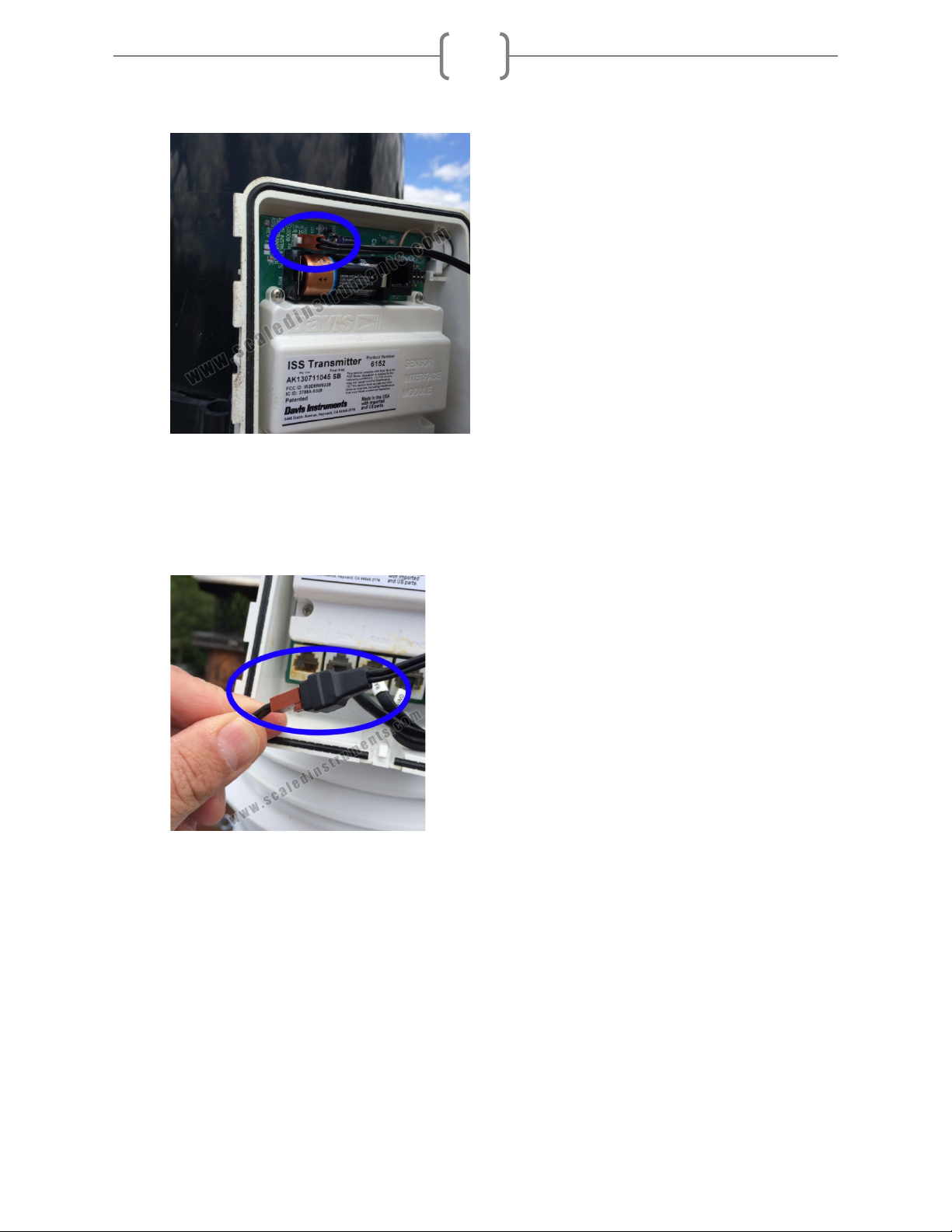
2. Disconnect the Solar Panel wire on the SIM cover from the SIM board by pulling the
Solar Panel connector. (Fig. 1)
© 2014 Scaled Instruments – Reproduction prohibited unless permission explicitly granted
www.scaledinstruments.com
4
Figure 1
3. Disconnect the 2nd Solar Panel wire on the SIM cover from the power lead connected to
the DFARS fan. Set the SIM cover aside in a safe place. (Fig. 2)
Figure 2

© 2014 Scaled Instruments – Reproduction prohibited unless permission explicitly granted
www.scaledinstruments.com
5
4. Remove the foam insert from the cable access port and set it aside. (Fig. 3)
Figure 3
5. Disconnect the existing cables from sensor connectors. These cables should all be
labeled – if your labels have fallen off, take note of which cables plug in where. (Fig. 4)
Figure 4

© 2014 Scaled Instruments – Reproduction prohibited unless permission explicitly granted
www.scaledinstruments.com
6
6. For wired models, disconnect the console cable from the SIM. (Fig. 5)
Figure 5
7. Feed the TEMP/HUM cable and the fan power cable through the back of the cable access port. (Fig. 6)
Figure 6

© 2014 Scaled Instruments – Reproduction prohibited unless permission explicitly granted
www.scaledinstruments.com
7
8. Remove the rain collector cone by rotating the cone counter-clockwise until the cone’s
latches line up with the openings in the base. Lift off the rain collector cone and set aside
in a safe place. (Fig. 7)
Figure 7
9. While supporting the bottom of the DFARS, remove the (3) #8-32 x 3-1/4” screws, lock
washers and flat washers from the ISS base. IMPORTANT: Be sure to support the
bottom of the shield while removing the hardware. Save this hardware – it will be
used later. (Fig. 8)
Figure 8

© 2014 Scaled Instruments – Reproduction prohibited unless permission explicitly granted
www.scaledinstruments.com
8
10. The DFARS should now be free of the ISS. Be careful – there is nothing holding the
closed cap plate and open cap plate at the top of the shield at this point. Take the
DFARS to your work area to perform the conversion.
11. Remove the closed cap plate and the open cap plate from the DFARS assembly. They
should just lift off. You should now be presented with the Fan Plate. (Fig. 9)
Figure 9

© 2014 Scaled Instruments – Reproduction prohibited unless permission explicitly granted
www.scaledinstruments.com
9
Move Spacers
1. Remove the screw that holds the strain relief for the fan power cable and
temperature/humidity sensor. Remove the fan power cable from the strain relief and
disconnect from the fan. This cable will no longer be needed. Additionally, remove the
(3) 4” screws from the fan plate as indicated below. Save the 4” screws, washers, and
lock washers from this step, as well as the strain relief and its washer/screw. (Fig. 10).
Figure 10
2. Remove the fan from the housing by simply lifting it..
3. Lift the fan plate off of the existing plate stack, and place the remaining shield to the
side, being sure to keep them in the proper order.
4. Remove the existing spacers in the DFARS fan plate by removing the screw, lock
washer and flat washer from the bottom of the fan plate. These screws are located
under the fan plate (Fig. 11) Keep the spacers in a safe place, they will be needed later
in Section E. Only remove the existing spacers -- the screws, lock washers and flat

© 2014 Scaled Instruments – Reproduction prohibited unless permission explicitly granted
www.scaledinstruments.com
10
washers will be used in the next step.
<- Keep these spacers for later.
Figure 11
Figure 12
Tabla de contenidos
Otros manuales de Inversor de Scaled Instruments


