
SBC PCD7.D23 Series Manual de usuario
Document 26/795; Edition EN10 │ 2013-10-14
Manual
Serie PCD7.D23x Graphic Terminals

Saia-Burgess Controls AG
Manual for PCD7.D23x │ Document 26/ 795 EN10 │ 2013-10-14
Content
0-1
0
0 Content
0 Content
0.1 Document History ........................................................................................... 0-3
0.2 About this manual ........................................................................................... 0-3
0.3 Brands and trademarks .................................................................................. 0-3
1 Quickstart
1.1 Introduction ..................................................................................................... 1-1
1.2
Use of the PCD7.D230, D231 and D232 terminals as remote displays for PCS1... 1-2
1.2.1 Congurationwithoneterminalasremotedisplay ......................................... 1-2
1.2.2 CongurationwithoneterminalasseconddisplayforPCS1 ......................... 1-4
1.2.3 CongurationwithtwoormorePCD7.D230,D231andD232
terminalsasremotedisplaysforPCS1(mixingnotpossible)......................... 1-5
1.3 Use of the PCD7.D230, D231 or D232
as remote displays for the Saia PCD®range .................................................. 1-7
1.3.1 Congurationforoneterminal......................................................................... 1-7
1.3.2 Congurationforseveralterminals(mixingisnotpossible)............................ 1-9
1.4 Specialcongurationwithseveralterminals
withRS-422FreeTerminalProtocol(MultiDrop)(mixingisnotpossible) ..... 1-11
1.5 Powersupply .................................................................................................. 1-12
1.6 Communication connector, D-Sub 9 pole ....................................................... 1-12
1.7 Dimensions ..................................................................................................... 1-12
2 Hardware-System Overview
2.1 Function .......................................................................................................... 2-1
2.2 TechnicalDataPCD7.D230,D231andD232................................................. 2-2
2.2.1 Blockdiagram ................................................................................................. 2-3
2.3 Standard interface connection cables............................................................. 2-4
2.3.1 PCD7.K412:forinterfaceRS-232(withouthandshakeRTS/CTS)................. 2-4
2.3.2 PCD7.K413:forinterfaceRS-232................................................................... 2-4
2.3.3 PCD7.K422:forinterfaceRS-232(withouthandshakeRTS/CTS)................. 2-5
2.3.4 PCD7.K423:forinterfaceRS-232(withhandshakeRTS/CTS)...................... 2-5
2.3.5 PCD7.K456:forinterfaceRS-485 .................................................................. 2-6
2.4 User created interface connection cables....................................................... 2-7
2.4.1 ConnectioninRS-422mode(singleterminal)................................................ 2-7
2.4.2 ConnectioninRS-485 .................................................................................... 2-7
2.4.3 ConnectioninRS-422MultiDrop(examplewithPCD7.F110module) .......... 2-8
2.4.4 ConnectioninRS-232(withHandshakeRTS/CTS)
foranautonomousversionwithout24VDCpowersupply ............................. 2-8
3 Communication mode setting
3.1 Serial mode – Baudrate and Controls............................................................. 3-1
3.1.1 Standardmodes(availablewithD23x,FW25)............................................... 3-1
3.1.2 Specialmodes(availablewithD23x,FW25) ................................................. 3-2
4 Software
4.1 Basic commands............................................................................................. 4-1
4.1.1 ThePCD7.D23xreturncodesindirectmode ................................................. 4-1
4.1.2 ThePCD7.D23xdisplayreturnset ................................................................. 4-3
4.1.3 Serial lock command to acces in the setup mode .......................................... 4-4
4.2 All commands ................................................................................................. 4-5

Saia-Burgess Controls AG
Manual for PCD7.D23x │ Document 26/ 795 EN10 │ 2013-10-14
Content
0-2
0
4.3 AdvancedCommands..................................................................................... 4-10
4.4 FreeTerminalProtocolMode.......................................................................... 4-13
4.5 ReturncodesinFTPmode............................................................................. 4-17
4.6 CompatibilitybetweenPCD7.D202,D160/170commands
and PCD7.D232, D231 commands................................................................. 4-19
4.6.1 PCD7.D202,D160/170(andD250)commands
nolongerusedwiththePCD7.D232/D231terminals .................................... 4-19
4.6.2 Auto-repetitionupgradecommands................................................................ 4-19
5 Handling
5.1 SetupMenu..................................................................................................... 5-1
5.2 Useofthefunction“Playas”ofPCD7.D230withtheHMI-Editor................... 5-5
5.3 CreationofuserdialoguewiththeHMI-Editor ................................................ 5-6
6 Maintenance
6.1 Care ................................................................................................................ 6-1
A Appendix
A.1 Icons ............................................................................................................... A-1
A.2 Code maps...................................................................................................... A-2
A.3 Contact ........................................................................................................... A-4

Saia-Burgess Controls AG
Manual for PCD7.D23x │ Document 26/ 795 EN10 │ 2013-10-14
Content
0-3
0
Document History | Brands and trademarks
0.1 Document History
Date Version Changes Remarks
2003-04-28 EN01 -PublishedEdition
2003-06-30 EN02 -Chap.4.1-4.3,new,add.,corr.
2003-10-15 EN03 - Chap. 2, colours free cable ends
2004-03-31 EN04 -Chap.1,page1-5,1-12,Add.ofD231and
D232
2004-05-01 EN05 - Chap. 3, Communication
2005-02-25 EN06 - Chap. 2 and chap. 4 corr.
2005-04-01 EN07 - Corrections in all chapters
2009-09-28
2009-12-02
EN08 -Errorin2.4.2Picture«Connectionin
RS-485»
4.1.3newGrammaticalcorrections
in Ch04, Ch05 and Ch0A
2010-04-08 EN09 - Chapter 2.3: PCD7.K413 -> D-Sub connector
2013-10-14 EN10 -Newlogoandnewcompanyname
0.2 About this manual
Seethesectionintheappendixinrelationtosomeoftheterms,abbreviationsand
the references used in this manual.
0.3 Brands and trademarks
Saia PCD®andSaiaPG5®
areregisteredtrademarksofSaia-BurgessControlsAG.
Technicalmodicationsarebasedonthecurrentstate-of-the-arttechnology.
Saia-BurgessControlsAG,2003.©Allrightsreserved.
PublishedinSwitzerland

Saia-Burgess Controls AG
Manual for PCD7.D23x │ Document 26/ 795 EN10 │ 2013-10-14
Quickstart
1-1
1
Introduction
1 Quickstart
1.1 Introduction
This manual covers the technical aspects of the PCD7.D23x graphic terminals.
The aim of the Quickstart chapter is to talk about the essentials regarding the use
and installation aspects of PCD7.D23x components. We are talking about:
● Howtousetheterminals
as remote displays for PCS1
as remotedisplaysforthewholeSaiaPCD®range
in a specialcongurationwithRS-485andRS-422 Free Terminal Protocol
● HowtoconguretheterminalswiththeHMI-Editor
● Powersupply
● The communication connector
● Dimensions
Details about the
● Hardware
● Communication
● Software
● Handling and
● Maintenance
can be found in separate chapters. The appendix covers more general topics like
information about the iconsweused,charactermapsandsoon.

Saia-Burgess Controls AG
Manual for PCD7.D23x │ Document 26/ 795 EN10 │ 2013-10-14
Quickstart
1-2
1
Use of the PCD7.D23x terminals for PCS1
1.2
Use of the PCD7.D230, D231 and D232 terminals as remote displays for PCS1
1.2.1 Congurationwithoneterminalasremotedisplay
Valid for: PCS1.C822, C823, C882, C883 (without integrated display)
A - Basic equipment with RS-232 interface
D230 (or D231 or D232)
● Usetheport2(withorwithoutHandshake)oftheterminalblockX3
or
● usetheport1(withorwithoutHandshake)oftheterminalblockX4
PCD7.D23x setup (recommended):
(see also chapter 3)
Baudrate: 9600 or 19200 bps
Serialmode: RS-232RTS/CTS
Use of HMI-Editor V 1.3 (recommended):
Terminaltype: D230with8×20(orD231orD232)
Terminal topology: single terminal
Serial line: 2 or respectively 1
Typeofserialline: RS-232
Baudrate: 9600 or 19200 bps
Handshake: RTS/CTS
Hardware connection:
Connectioncable(length:2.5m)betweenPCS1andPCD7.D23x:PCD7.K423

Saia-Burgess Controls AG
Manual for PCD7.D23x │ Document 26/ 795 EN10 │ 2013-10-14
Quickstart
1-3
1
Use of the PCD7.D23x terminals for PCS1
B - Extra PCD7.F110 interface for RS- 422
D230 (or D231 or D232)
● RS-422:usetheport1ofthe
terminalblockX4
PCD7.D23x setup (recommended):
(see also chapter 3)
Baudrate: 9600 or 19200 bps
Serialmode: RS-422XON/XOFF-[orXON/XOFF(R)]*
Use of HMI-Editor V 1.3 (recommended):
Terminaltype: D230with8×20(orD231orD232)
Terminal topology: single terminal
Serial line: 1
Typeofserialline: RS-422
Baudrate: 9600 or 19200 bps
Handshake: SoftwareXON/XOFF
Connection diagram: see chapter 2.4
* ThereducedXON/XOFFmodeisasave,nonlocking,XON/XOFFmodewiththe
PCD7.D23xalwaysresponding.IfusingXON/XOFF,itisrecommendedtousethisre-
ducedmode,especiallyifyounoticethataftersometimeofuseyouhavetoswitchthe
poweroffandonagaintogetthePCD7.D23xrespondingagain.Inthismode,thetrafc
from the Saia PCD®tothePCD7.D23xissupervisedbyowcontrol,intheotherdirection,
from the PCD7.D23x to the Saia PCD®,thereisnoowcontrol
Saia PCD®..... PCD7.D23x
owcontrol
noowcontrol

Saia-Burgess Controls AG
Manual for PCD7.D23x │ Document 26/ 795 EN10 │ 2013-10-14
Quickstart
1-4
1
Use of the PCD7.D23x terminals for PCS1
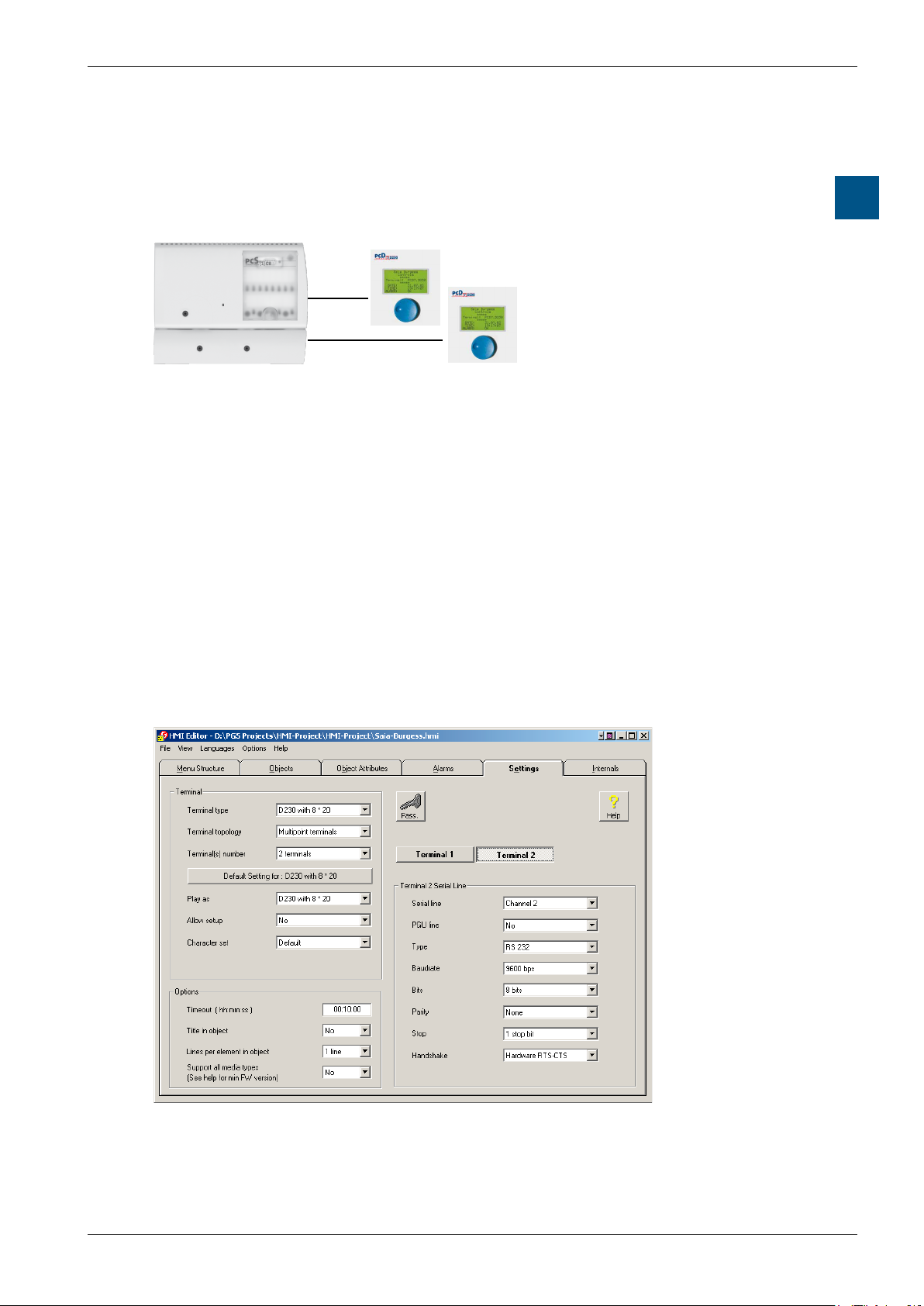
1.2.2 CongurationwithoneterminalasseconddisplayforPCS1
Valid for: PCS1.C820, C821, C880, C881 (with integrated display)
A - Extra PCD7.F120 interface for RS-232
D230 only
The integrated display is connected physically on the port 2.
● Usetheport1(withorwithoutHandshake)oftheterminalblockX4.
Don’tusetheport2oftheterminalX3(reservedforinternaldisplay)4.
PCD7.D230 setup (recommended):
(see also chapter 3)
Baudrate: 9600 bps
Serialmode: RS-232RTS/CTS
Use of HMI-Editor V 1.3 (recommended):
Terminaltype: D230with8×20(only)
Terminaltopology: Multipointterminals
Numberofchannels: 2
Serial line: 2 (internal display) and 1 (PCD7.D230)
Typeofserialline: RS-232
Baudrate: 9600 bps
Handshake: RTS/CTS
Hardware connection:
Connectioncable(length:2.5m)betweenPCS1andPCD7.D230:PCD7.K423
Saia-Burgess Controls AG
Manual for PCD7.D23x │ Document 26/ 795 EN10 │ 2013-10-14
Quickstart
1-5
1
Use of the PCD7.D23x terminals for PCS1
1.2.3 CongurationwithtwoormorePCD7.D230,D231andD232
terminalsasremotedisplaysforPCS1(mixingnotpossible)
Valid for: PCS1.C822, C823, C882, C883 (without integrated display)
A - Basic equipment with RS-232 interface + Extra PCD7.F120 interface for RS-232
Congurationwith2PCD7.D230terminals(or2D231or2D232)
● Usetheport2(withorwithoutHandshake)oftheterminalblockX3
● Usetheport1(withorwithoutHandshake)oftheterminalblockX4
PCD7.D23x setup (recommended):
(see also chapter 3)
Baudrate: 9600 bps
Serialmode: RS-232RTS/CTS
Use of HMI-Editor V 1.3 (recommended):
Terminaltype: D230with8×20(orD231orD232)
Terminaltopology: Multipointsterminal
Numberofchannels: 2
Serial line: 2 and 1 corresponding to the terminal 1 and 2
Typeofserialline: RS-232
Baudrate: 9600 bps
Handshake: RTS/CTS
Hardware connection:
Connectioncable(length:2.5m)betweenPCS1andPCD7.D23x:PCD7.K423
B - Extra PCD7.F110 interface for RS- 485

Saia-Burgess Controls AG
Manual for PCD7.D23x │ Document 26/ 795 EN10 │ 2013-10-14
Quickstart
1-6
1
Use of the PCD7.D23x terminals for PCS1
Congurationwith3PCD7.D230or3D231or3D232
● Usetheport1oftheterminalblockX4
PCD7.D23x setup (recommended):
(see also chapter 3)
Baudrate: 9600 or 19200 bps
Serialmode: RS-485FTP
Addresses: same number of different addresses
as number of terminals: from 01 to 31
Use of HMI-Editor V 1.3 (recommended):
Selecttheterminal: D230with8×20(orD231orD232)
Terminal topology: terminal bus
Terminal number: xx terminals
Terminallist: number1,2,3,…31correspondingtotheidentication
number (address) of each terminals.
Serial line: 1
Typeofserialline: RS-485
Baudrate: 9600 or 19200 bps
Handshake: None
Connection diagram: see chapter 2.4
Forfurtherdetailsseethemanual“HMI-Editor”26/768.
General restriction: Don’tusethePGUportofthePCS1asRS-232serialportbe-
causeitisreservedforModem!!!
Este manual sirve para los siguientes modelos
3
Tabla de contenidos


