
SAB Explorer Manual de usuario

USER’S MANUAL
USER’S MANUAL
SAB
EXPLORER
(FTA, CI, FTASC, CISC)
Please read this User’s Manual carefully.
The menu structure and specifications can be changed without notice.

Safety----------------------------------------------------------------------------------------------------3
General Introduction-------------------------------------------------------------------------------4
Glossary------------------------------------------------------------------------------------------------5
Remote Control Unit-------------------------------------------------------------------------------6
Front/Rear Panel------------------------------------------------------------------------------------8
Recei er Connection------------------------------------------------------------------------------9
View Mode--------------------------------------------------------------------------------------------10
1. Channel Info Banner---------------------------------------------------------------------------10
2. To change channel in View mode---------------------------------------------------------10
3. Channel list---------------------------------------------------------------------------------------11
4. Satellite List--------------------------------------------------------------------------------------12
5. Fa orite list---------------------------------------------------------------------------------------12
6. Volume Control----------------------------------------------------------------------------------12
7. Changing Mode---------------------------------------------------------------------------------12
8. Useful Function---------------------------------------------------------------------------------13
9. Program Guide Mode-------------------------------------------------------------------------13
Main Menu-------------------------------------------------------------------------------------------14
1. Installation---------------------------------------------------------------------------------------14
1.1 Ser ice Searching-------------------------------------------------------------------------14
1.1.1 Edit----------------------------------------------------------------------------------------14
1.1.2 Rename----------------------------------------------------------------------------------17
1.1.3 Scan---------------------------------------------------------------------------------------17
1.1.4 Transponder----------------------------------------------------------------------------18
Table of Contents
- 1 -

1.2 Data Base Upgrade-----------------------------------------------------------------------19
1.3 Initialize STB--------------------------------------------------------------------------------20
2. Channel Manager------------------------------------------------------------------------------20
2.1 Channel Edit--------------------------------------------------------------------------------20
2.2 Fa orite Group-----------------------------------------------------------------------------21
3. System setting----------------------------------------------------------------------------------22
3.1 Language Setting---------------------------------------------------------------------------22
3.2 Video Settings--------------------------------------------------------------------------------23
3.3 Modulator Settings-------------------------------------------------------------------------23
3.4 Clock Settings--------------------------------------------------------------------------------24
3.5 Lock Settings---------------------------------------------------------------------------------24
3.6 System Information-------------------------------------------------------------------------25
4. Utility-----------------------------------------------------------------------------------------------26
5. Common interface-----------------------------------------------------------------------------27
Trouble Shooting---------------------------------------------------------------------------------28
Specification---------------------------------------------------------------------------------------29
Table of Contents
- 2 -

This receiver has been manufactured to satisfy the international safety standards.
Please read the following safety precautions carefully.
MAIN SUPPLY
110-240V 50/60Hz 30W
OVERLOADING
Do not overload a wall outlet extension cord or adapter as this may result in
fire or electric shock.
LIQUIDS
: This receiver shall not be exposed to dripping or splashing and that no objects
filled with liquids such as vases shall be placed on the receiver.
CLEANING
: Disconnect the receiver from the main supply before cleaning. Do not use any
kind of solvents to clean the receiver only use a soft-dry cloth.
VENTILATION
: The slots on top of the receiver must be left uncovered to allow proper airflow
to the unit.
Do not stand the receiver on soft furnishings or carpets.
Do not expose the receiver to direct sunlight or do not place it near a heater.
Do not stack electronic equipments on top of the receiver.
ATTACHMENTS
: Do not use any unrecommended attachments as these may cause hazard or
damage the receiver.
CONNECTION TO THE SATTLITE DISH LNB
: Disconnect the receiver from the main supply before connecting or
disconnecting the cable from the satellite dish.
FAILURE TO DO SO CAN DAMAGE THE LNB.
CONNECTION TO THE TV.
Disconnect the receiver from the main supply before connecting or
disconnecting the cable from TV.
FAILURE TO DO SO CAN DAMAGE THE TV.
EARTHING
The LNB cable MUST BE EARTHED to the system earth for the satellite dish.
LOCATION
: Place the receiver indoor in order not to expose to lightening rain or sunlight.
Safety
Safety
- 3 -

This manual will help you learn basic functions such as formatting selecting
channels and many other functions of the recei er. All functions can be performed
from the remote control and some from the Front panel. You can easily install it by
selecting “Ser ice Searching” function and upgrade its software through
communication cable or satellite.
The remote control is designed for easy access to all the functions at once and for
comfortable grab for your hand. It is programmed to control all functions and to
easily watch telecommunication programs via the recei er.
This recei er is designed for your convenient use and you can upgrade software at
anytime.
General Introduction
- 4 -

Glossary
Antenna
A device that collects and radiates electromagnetic waves.
Includes a satellite dish and a broadband antenna.
Forward Error Correction (FEC)
A system of error control for data transmission.
Frequency
The number of cycles or events per one second which is expressed in the
unit of Hertz(Hz).
Intermediate Frequency (IF)
A frequency to which a carrier frequency is shifted as an intermediate step in
transmission or reception.
Low Noise Block (LNB) Downcon erter
A low noise microwave amplifier and converter which downconverts a range
of frequencies to IF range.
Packet Identifier (PID)
A set of numbers that identifies transport stream packets containing data from
a single data stream.
Polarization
Characteristic of an electromagnetic wave determined by the orientation of
the electric field vector.
Quaternary Phase Shift Keying (QPSK)
Phase-shift keying in which four different phase angles are used.
Transponder
Equipment in a satellite which receives a single uplink channel from a satellite
Earth station amplifies it converts the frequency and changes the
polarization then rebroadcasts it back to Earth.
Transport Stream
The bit stream formed prior to transmission of signals by combining the video
audio and data streams of one service. It consists of fixed length packets of
188 bytes of data.`
- 5 -
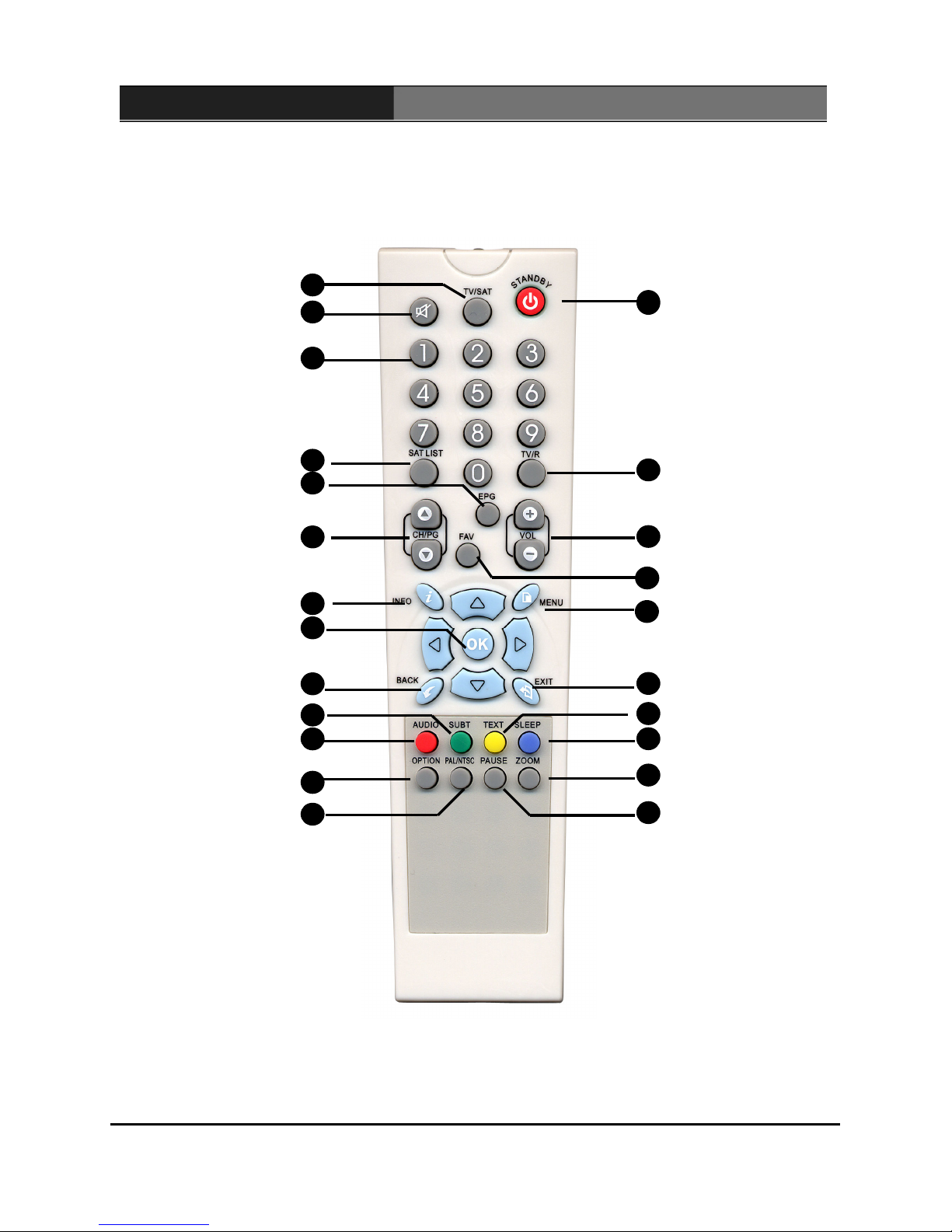
Remote Control Unit
4
13
5
1
19
21
14
16
2
20
10
8
9
6
7
18
3
15
17
11
12
22
23
TV/SAT
MUTE
Numeric Buttons
SAT LIST
EPG
CH/Page Up/Down
INFO
Channel Up/Down
BACK
SUBT
OPTION
AUDIO
STANDBY
TV/Radio
VOL Up/Down
FAV
MENU
EXIT
SLEEP
TEXT
PAUSE
ZOOM
PAL/NTSC
- 6 -

Remote Control Unit
.
.
2
STANDBY
TV/SAT
3
MUTE
Numeric Buttons
4
SAT LIST
5
Page Up/Down
6
INFO
7
Channel Up/Down
8
Volume Up/Down
9
BACK
10
SUBT
11
12
13
14
TV/RADIO
15
GUIDE
16
FAV
17
MENU
18
EXIT
19
TEXT
20
SLEEP
21
ZOOM
PAUSE
1
22
OPTION
23
PAL/NTSC
AUDIO
Switches between Operation
and Standby modes
Selects TV or Satellite mode.
Turns the sound ON or OFF
Change channels or select the
menu options
Selects fa orite channel list or
current channel list in the iew mode
Changes the page of the channel
list
Displays the program information
box on the screen
Changes channels or items on
the menu
Turns up/down olume or hanges
the menu
Mo es back to the pre ious step
without sa ing the changed
information, or back to the pre ious
channel
Selects the subtitle language for
the current ser ice
Changes audio mode to left+left,
right+right, or stereo
Switches between TV and Radio modes
Electronic Program Guide button; dis-
plays the TV/Radio program guide
Fa orite channel list
Mo es to main menu during TV iewing
Changes to channel mode without
sa ing the changed information
of the menu mode
Loads the teletext ser ice for the current
channel
Selects sleep and ON/OFF times
Selects the 2X or the 4X zoom function
Pauses or continues the current picture
Reser ed for future use
Changed Video system
- 7 -

Front Panel
1. : Turn on & off the power of the receiver.
2. MENU : Moves to main menu during TV viewing
3. OK : Displays the channel list and selects the item on the menu.
4. CH , CH : Changes channels or items from top to bottom on the menus.
5. VOL , VOL : Turns up/down volume.
Rear Panel
IF INPUT : Use to connect a LNB/Satellite Dish.
IF OUTPUT : Use it when connecting to another receiver.
ANT IN : Use to connect a terrestrial antenna or cable TV signal.
TV OUT : Use to connect a RF signal from this receiver to RF(ANT) input jack on TV.
DIGITAL AUDIO OUTPUT : S/PDIF output.
VIDEO/AUDIO OUTPUT : Video/Audio signal from your receiver to VCR TV or to
an external audio equipment
TV SCART : For the video/audio input of the TV.
VCR SCART : For the video/audio input/output of the VCR.
RS-232C : Use it when connecting to your PC.
Front/Rear Panel
- 8 -

.
Recei er Connection
Various equipment (TV/VCR) can be connected to this recei er.
This manual will explain common ways to connect to the equipment.
If you are using a RF cable, please synchronize the RF channels of the
TV set and of the VCR.
If you experience any problem, please contact your sales agency.
1. How to connect the recei er to a TV set
Connect one end of the SCART cable to the TV SCART socket on the back
of the receiver and the other end to the SCART input socket on your TV.
Connect the LNB[Dish] cable to the IF input connector of receiver.
If you want to use an RF cable connect one end of a RF cable to the TV
OUT connector on the receiver and the other end to the RF IN connector
on your TV.
Connect your TV Arial cable to the ANT IN connector on the receiver for
receiving terrestrial or cable channels
2. How to connect the TV and VCR
Connect one SCART cable between the TV and the TV SCART socket on
the receiver.
Connect the other SCART cable between the VCR and the VIDEO SCART
socket on the receiver.
Connect one end of an RF cable to the TV OUT connector on the receiver
and the other end to the RF IN connector on your VCR.
Connect one end of a RF lead to the RF OUT connector on your VCR and
the other end to the RF IN connector on your TV.
Connect your TV antenna to the ANT IN connector on the receiver for
receiving terrestrial or cable channels.
Connect IF input connector of the receiver and antenna.
3. How to connect the Audio system
Connect the AUDIO R L terminal
of the receiver and the LINE AUX
SPARE or EXTRA input socket
using the RCA/Cinch stereo cable.
- 9 -
Tabla de contenidos
Otros manuales de Receptor de SAB


