Roku BrightSign HD110 Manual de usuario

QUICK START GUIDE
HD110, HD210, HD410, HD810, and HD1010
Copyright © 2009 by BrightSign, a division of Roku, Inc. All rights reserved. Roku, the
Roku logo and the BrightSign logo are trademarks of Roku, Inc. Other brand and product
names are trademarks or registered trademarks of their respective holders.
BrightSign 12980 Saratoga Ave. Suite D, Saratoga, CA 95070
CMYK
www.brightsign.biz
DOC-005-02


Contents
What’s in the box? . . . . . . . . . . . . . . . . . . . . . . . . . . . . . . . . . . . . . . . . . . . . . . . . . . . . . . . . . . . 1
What is BrightSign? . . . . . . . . . . . . . . . . . . . . . . . . . . . . . . . . . . . . . . . . . . . . . . . . . . . . . . . . . . 2
Benefits . . . . . . . . . . . . . . . . . . . . . . . . . . . . . . . . . . . . . . . . . . . . . . . . . . . . . . . . . . . . . . . . . 2
Capabilities . . . . . . . . . . . . . . . . . . . . . . . . . . . . . . . . . . . . . . . . . . . . . . . . . . . . . . . . . . . . . . 3
Models . . . . . . . . . . . . . . . . . . . . . . . . . . . . . . . . . . . . . . . . . . . . . . . . . . . . . . . . . . . . . . . . . . 4
Connecting a display . . . . . . . . . . . . . . . . . . . . . . . . . . . . . . . . . . . . . . . . . . . . . . . . . . . . . . . . 5
Using a VGA cable . . . . . . . . . . . . . . . . . . . . . . . . . . . . . . . . . . . . . . . . . . . . . . . . . . . . . . . 5
Using an HDMI cable . . . . . . . . . . . . . . . . . . . . . . . . . . . . . . . . . . . . . . . . . . . . . . . . . . . . . 6
Connecting speakers . . . . . . . . . . . . . . . . . . . . . . . . . . . . . . . . . . . . . . . . . . . . . . . . . . . . . . . . 7
Playing the demo . . . . . . . . . . . . . . . . . . . . . . . . . . . . . . . . . . . . . . . . . . . . . . . . . . . . . . . . . . . 8
Playing your own presentations . . . . . . . . . . . . . . . . . . . . . . . . . . . . . . . . . . . . . . . . . . . . . . 9
Creating a sample playlist . . . . . . . . . . . . . . . . . . . . . . . . . . . . . . . . . . . . . . . . . . . . . . . . . . . . 9
Changing BrightSign settings . . . . . . . . . . . . . . . . . . . . . . . . . . . . . . . . . . . . . . . . . . . . 13
Adding videos to a playlist . . . . . . . . . . . . . . . . . . . . . . . . . . . . . . . . . . . . . . . . . . . . . . . 14

Playing your own presentations . . . . . . . . . . . . . . . . . . . . . . . . . . . . . . . . . . . . . . . . . . . . . . 15
Playing a series of files in alphabetic order . . . . . . . . . . . . . . . . . . . . . . . . . . . . . . . . 15
Playing files from a playlist . . . . . . . . . . . . . . . . . . . . . . . . . . . . . . . . . . . . . . . . . . . . . . . 16
Setting the video mode . . . . . . . . . . . . . . . . . . . . . . . . . . . . . . . . . . . . . . . . . . . . . . . . . . 18
Displaying items simultaneously using BrightSign Zones . . . . . . . . . . . . . . . . . . 19
Playing an interactive presentation . . . . . . . . . . . . . . . . . . . . . . . . . . . . . . . . . . . . . . . 20
Connecting an input device . . . . . . . . . . . . . . . . . . . . . . . . . . . . . . . . . . . . . . . . . . . . . . 21
Adding BrightSign to a network . . . . . . . . . . . . . . . . . . . . . . . . . . . . . . . . . . . . . . . . . . . . . . 22
Next steps . . . . . . . . . . . . . . . . . . . . . . . . . . . . . . . . . . . . . . . . . . . . . . . . . . . . . . . . . . . . . . . . . . . 23
BrightSign feature comparison . . . . . . . . . . . . . . . . . . . . . . . . . . . . . . . . . . . . . . . . . . . . . . . 24

1
•
•
•
What’s in the box?
TIP:
Use the cable mount and cable tie to keep the cables securely attached to your BrightSign.
* Not included with all models or bundles. Available for download at
www.brightsign.biz/support/quickstart.php
.
5v SerRS-232ControlErr UpdPwr Bsy SD / MMC
USB ResetGP/012
BrightSign
Rubber
feet
Power adapter
SD slot
cover
Cable
mount
Cable tie Demo SD cards* Quick Start Guide*
International
prongs

2
•
•
•
What is BrightSign?
Roku BrightSign is a standalone digital sign or kiosk controller. Because BrightSign is a non-PC
device with no moving parts, it is durable, reliable, and an ideal solution for information kiosks,
retail displays, museum exhibits, and other applications.
Benefits
•
Easy to use
•
Astonishing full HD quality
•
Reliable solid state platform
•
Custom interactivity and control
•
Powerful zones and synchronization
•
Versatile networking options

3
•
•
•
Capabilities
You can use BrightSign to do any combination of the following:
•
Play content from a Secure Digital card (SD or SDHC card) or USB Flash drive
•
Display content on a high-definition monitor or TV
•
Play looping video, images and music in HD
•
Use zones to divide the display into separate content windows to playback video and
images simultaneously
•
Play live video using the full screen or in a window using a USB video dongle accessory (sold
separately)
•
Schedule content to play at a specific time (hour, day, month, year)
•
Easily create looping displays using text based playlists
•
Display RSS feeds and other network information
•
Run interactive presentations that playback content based on inputs such as buttons,
touch screens, mice, and more
•
Synchronize video playback across multiple BrightSign units
•
Update software and content remotely with BrightSign networking

4
•
•
•
Models
NOTE:
For details on the features of each BrightSign model, see “BrightSign feature
comparison” on page 24.
Looping HD video playlists Interactivity and control Networking for remote content
delivery and reporting
BrightSign HD110
• Simple looping video playback
•FullHD
•Playlistsandzones
BrightSign HD410
• All HD110 features
• Basic interactivity via buttons,
GPIO controls, and serial devices
• Synchronization for video wall
implementations
BrightSign HD210
• All HD110 features
•Networkingsupportforremote
content update, reporting, live
data feeds, and more
BrightSign HD810
• All HD410 features
• Full interactivity including touch
screens and USB devices
• Schedule content by time/date
•Livevideofeed
• Support for A/V expansion module
accessories
BrightSign HD1010
• All HD810 features
•Networkingsupport

5
•
•
•
Connecting a display
Using a VGA cable
Audio VGA
VGA Y Pb Pr HDMI Ethernet
Power 5.2V 3A

6
•
•
•
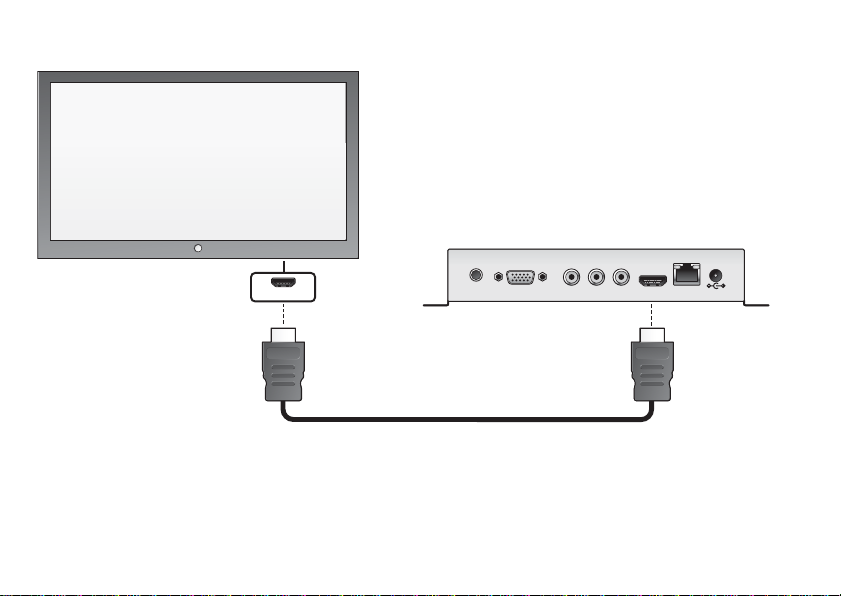
Using an HDMI cable
Audio VGA Y Pb Pr HDMI Ethernet
Power 5.2V 3A
HDMI
Otros manuales para BrightSign HD110
1
Este manual sirve para los siguientes modelos
4
Tabla de contenidos
Otros manuales de Controladores de Roku