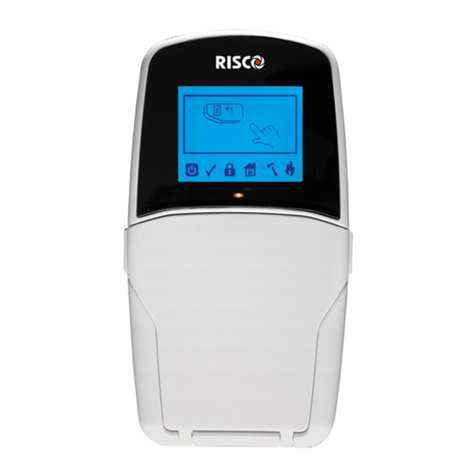
Risco RisControl Manual de usuario

RisControl
User Manual
Model: RP432KPTZ

2
Contents
INTRODUCTION...........................................................................................................6
INSTALLING THE RISCONTROL .....................................................................................7
Mounting the RisControl..............................................................................................7
RisControl Setup ........................................................................................................12
Step 1: Selecting the language for the RisControl.................................................12
Step 2: Setting the Bus Address (Virtual DIP Switch) ............................................12
Step 3: Setting the Wi-Fi Connection (optional) ...................................................13
Step 4a: Setup Slave/Master Smart Home Gateway.............................................15
Step 4b: Installer Login to RISCO Cloud.................................................................15
Step 5: Assigning a Site .........................................................................................16
Step 5a: Create a New Site....................................................................................17
Step 5b: Enter Owner Details................................................................................18
Step 5c: Select Existing Site...................................................................................19
Step 6: Site Details ................................................................................................20
Step 7 –Entering Panel’s Password ......................................................................21
Step 8a –Master Smart Home Gateway Installer Setup.......................................22
Step 8b –Adding Slaves to the Master Smart Home Gateway .............................23
Step 8c –Slave Smart Home Gateway Installer Setup ..........................................24
Step 9: Synchronizing the RisControl with the Security Setup..............................25
OPERATING THE RISCONTROL ...................................................................................26
Entering RisControl ....................................................................................................26
RisControl Session......................................................................................................26
RisControl Main Menu...............................................................................................26
RisControl Top Bar .....................................................................................................28
Troubles Management...............................................................................................29
Communication troubles ...........................................................................................29
Confirm Troubles .......................................................................................................31
Notifications Management ........................................................................................31
Software Update Notification ....................................................................................32
Confirm Alarms ..........................................................................................................32
SCREEN SAVER ..........................................................................................................34
Exit/Entry Screen Saver Mode ...................................................................................34
Screen Saver During Alarm ........................................................................................34
LOCK SCREEN ............................................................................................................35

3
About the Lock Screen............................................................................................... 35
Lock Screen with Quick Arm and/or Quick Stay ........................................................ 36
Lock Screen with Undefined Quick Buttons .............................................................. 37
The Lock Screen during Incoming Alarm ................................................................... 38
Blank Display Mode................................................................................................... 39
OVERVIEW SCREEN....................................................................................................40
Using the Overview Screen ....................................................................................... 40
Empty Overview Screen ............................................................................................ 41
Editing the Overview Screen ..................................................................................... 41
Adding Shortcut Buttons to the Overview Screen................................................ 42
Removing Shortcut Buttons from the Overview Screen ...................................... 45
Using the Shortcut Buttons from the Overview Screen ............................................ 45
Incoming Alarm on the Overview Screen.................................................................. 46
SECURITY...................................................................................................................47
Partitions ................................................................................................................... 47
Arming and Disarming .......................................................................................... 48
Exit/Entry Delay.................................................................................................... 49
Final Exit Zone ...................................................................................................... 49
One Click Activation of all Partitions .................................................................... 50
Arming/Disarming Selected or All Partitions........................................................ 51
Groups....................................................................................................................... 51
Detectors................................................................................................................... 53
Utility Outputs........................................................................................................... 54
CAMERAS ..................................................................................................................55
Cameras Screen......................................................................................................... 55
PIR CAM..................................................................................................................... 56
Video Cameras .......................................................................................................... 57
The Cameras Screen ............................................................................................. 58
Quick Buttons............................................................................................................ 59
Using Quick Buttons ............................................................................................. 59
Quick Buttons Tray ............................................................................................... 59
Editing the Quick Buttons Tray............................................................................. 59
Adding/Removing Quick Buttons from the Tray .................................................. 60
Adding/Removing Multiple Quick Buttons to/from the Quick Buttons Tray ....... 60
VIDEO RECORDER......................................................................................................62
Video Recorder Live Gallery ...................................................................................... 62

4
Camera Video Playback..............................................................................................64
Time Slider .................................................................................................................64
Playback Controls.......................................................................................................65
Date Selection............................................................................................................65
Switch back to Live.....................................................................................................66
SMART HOME ...........................................................................................................67
Using a Smart Home Device.......................................................................................67
Device Buttons Operations ...................................................................................68
HISTORY....................................................................................................................70
Searching Events ........................................................................................................70
Media Events .............................................................................................................71
SETTINGS...................................................................................................................72
General.......................................................................................................................73
Wi-Fi Connection........................................................................................................73
Screen Brightness.......................................................................................................73
Session Timeout.........................................................................................................74
Screen Saver...............................................................................................................74
Language....................................................................................................................75
System Information ...................................................................................................75
Manual (Software) Update ...................................................................................75
RisControl Software Version .................................................................................77
RisControl IP Address & MAC................................................................................77
Security System SW Version..................................................................................77
Security System IP Address ...................................................................................77
RisControl Bus ID...................................................................................................77
Users and Permission Settings...................................................................................77
Add a User.............................................................................................................78
Edit or Delete a User .............................................................................................79
Edit a User’s Own Details ......................................................................................79
Login to the RISCO Cloud ......................................................................................80
Date & Time ...............................................................................................................81
Date & Time Settings.............................................................................................82
Maintenance..............................................................................................................82
The Maintenance Menu........................................................................................82
Walk Test...............................................................................................................83
Siren Test...............................................................................................................84
Service Mode ........................................................................................................84

5
Restart Keypad ..................................................................................................... 84
Upload Logs File.................................................................................................... 84
Anti-Code.............................................................................................................. 85
Monitoring Station ............................................................................................... 86
Sounds....................................................................................................................... 86
Follow Me.................................................................................................................. 87
Adding a Follow Me Recipient.............................................................................. 87
Test or Edit a Follow Me....................................................................................... 88
Service Info................................................................................................................ 88
RULES ........................................................................................................................89
Adding a New Rule .................................................................................................... 89
Manual Rule.......................................................................................................... 90
Schedule Rule ....................................................................................................... 91
Event Rule............................................................................................................. 97
Performing Actions............................................................................................. 100
View Rules Summary .......................................................................................... 103
Set Night Mode................................................................................................... 105
Set Vacation........................................................................................................ 108
EMERGENCY............................................................................................................110
Emergency Button Position in Lock Screen/Main Menu......................................... 110
Emergency Type Selection ...................................................................................... 110
SPECIFICATIONS ......................................................................................................111
RED Compliance Statement: ................................................................................... 112
FCC ID:JE4RP432KPTZ.............................................................................................. 112
FCC Note.................................................................................................................. 112

6
INTRODUCTION
RisControl is a high-resolution Smart Touchscreen Keypad with an intuitive,
easy to navigate user interface. RisControl combines standard keypad functionality
with the ability to operate RISCO’s cloud-based solutions and products, such as
alarm, video and Smart Home devices, from one customizable screen.
Figure 1: RisControl

7
INSTALLING THE RISCONTROL
Note: This chapter is intended for the installer.
Mounting the RisControl
1. Remove the RS 485 connector.
2. Insert the wires into the RS
485 connector and secure
with screws.
Wall Installation

8
3 Gang Flush Mounting Box Installation
3. Remove screw to separate
the bracket from the
RisControl.

9
4. Push down and then
outward to remove the
bracket.
5. Position the bracket on the
wall / Flush Mounting Box
and secure with 5 screws
including tamper (Wall
installation) / 3 screws
including tamper
(Flush Mounting Box
installation).
Wall Installation

10
3 Gang Flush Mounting Box Installation
6. Insert the RS 485 connector
into its location in the rear
side of the RisControl.
7. Position the 4 grooves of the
RisControl over the bracket’s
4 pins and slide downward to
secure.
Otros manuales para RisControl
3
Tabla de contenidos
Otros manuales de Panel de control de Risco

Risco
Risco GT 601 Manual de instrucciones

Risco
Risco ProSYS 128 Manual de usuario

Risco
Risco GardTec 350+ Manual de usuario

Risco
Risco RisControl Manual de usuario

Risco
Risco GT Plus Manual de instrucciones

Risco
Risco GT 600 Manual de usuario

Risco
Risco gt490x Manual de usuario

Risco
Risco RisControl Manual de usuario

Risco
Risco GardTec 350+ Manual de usuario

Risco
Risco Gardtec GT480 Manual de usuario